
1. Wprowadzenie
Thank you for choosing the DUDUPET Automatic Pet Feeder and Water Dispenser. This device is designed to provide your pet with consistent access to food and water, ensuring their well-being even when you are away. Please read this manual thoroughly before use to ensure proper operation and maintenance.
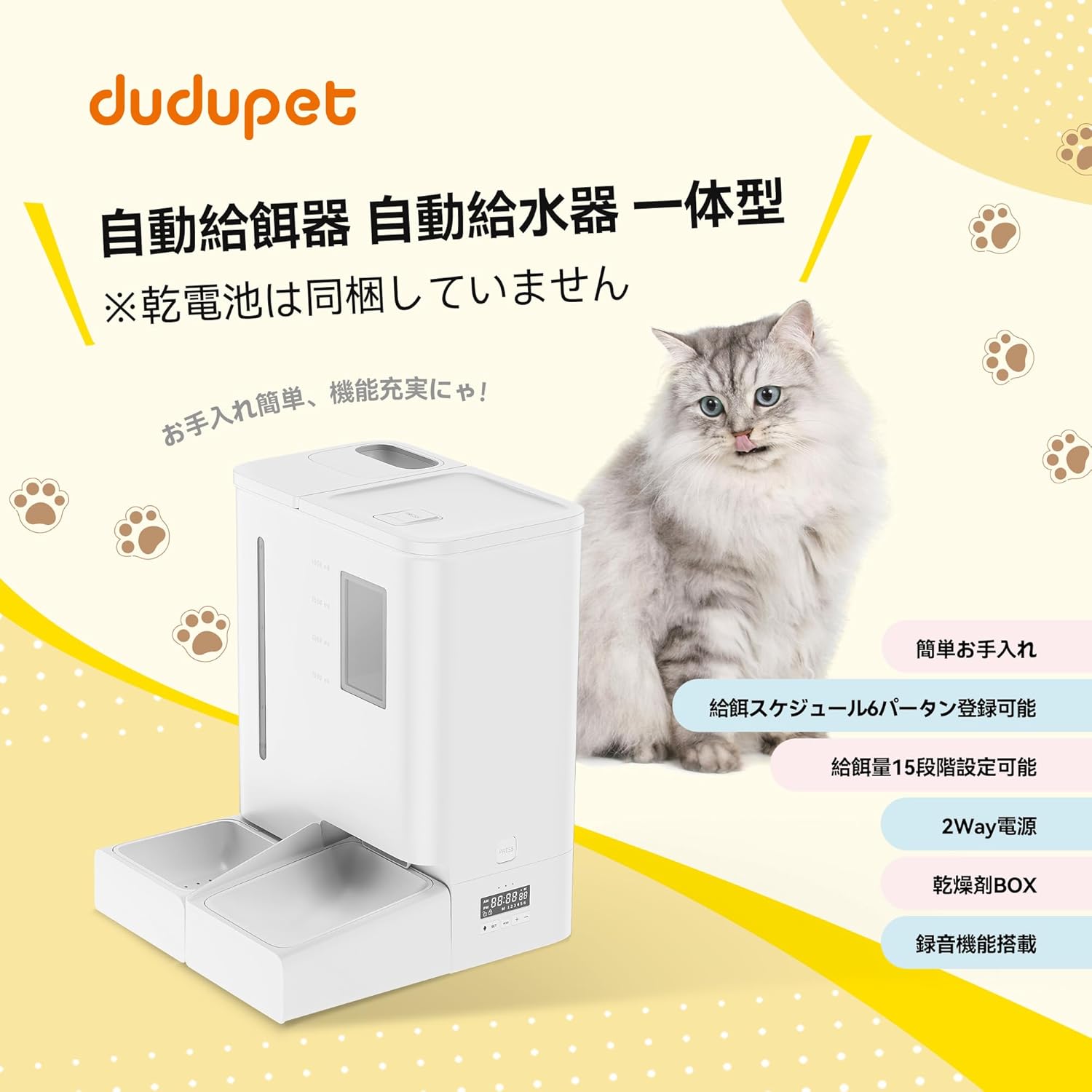
Image 1.1: DUDUPET Automatic Pet Feeder and Water Dispenser. This image displays the complete unit alongside a cat, highlighting its integrated design for both food and water.
2. Ważne informacje dotyczące bezpieczeństwa
Aby zapobiec obrażeniom ciała lub uszkodzeniu urządzenia, należy przestrzegać następujących środków ostrożności:
- Nie zanurzaj jednostki głównej w wodzie.
- Use only dry pet food with a diameter between 5-15mm.
- Keep the device out of reach of children and pets to prevent tamping.
- Ensure the power adapter is securely connected and the cable is not damaged.
- Nie używaj ściernych środków czyszczących ani rozpuszczalników na urządzeniu.
- Zawsze odłączaj urządzenie od zasilania przed czyszczeniem lub konserwacją.
3. Zawartość opakowania
Sprawdź, czy wszystkie komponenty są obecne i w dobrym stanie:
- Główna jednostka zasilająca
- Zbiornik na wodę
- Miska na jedzenie
- Miska na wodę
- USB Type-C Power Cable (approx. 1.5m)
- Zasilacz sieciowy
- Desiccant Box (desiccant not included)
- Instrukcja obsługi
4. Identyfikacja części
Familiarize yourself with the different parts of your DUDUPET Automatic Pet Feeder and Water Dispenser:

Obraz 4.1: Wybuch view diagram of the feeder components. This image labels the Food Tank Lid, Lid Buckle, Water Tank, Water Level Indicator, Food Remaining Indicator, Main Unit, Water Outlet, Food Outlet, Water Receiving Tray, Water Bowl, Food Bowl, and Food Tray.
- Pokrywa zbiornika na żywność: Covers the food storage tank.
- Lid Buckle: Secures the food tank lid.
- Zbiornik na wodę: Holds water for the dispenser.
- Wskaźnik poziomu wody: Shows the current water level.
- Food Remaining Indicator: Shows the approximate food level.
- Jednostka główna: Houses the control panel and dispensing mechanism.
- Wylot wody: Dispenses water into the water bowl.
- Punkt gastronomiczny: Dispenses food into the food bowl.
- Water Receiving Tray: Collects water from the outlet.
- Miska na wodę: Pet drinking bowl.
- Miska na jedzenie: Pet eating bowl.
- Taca na żywność: Supports the food bowl.
5. Konfiguracja
5.1 Montaż
Assemble the components as shown in the parts identification diagram. Ensure the food bowl, water bowl, and water tank are correctly seated in their respective positions.

Image 5.1: Disassembled components for easy cleaning. This image shows the food tank, water tank, and bowls separated from the main unit, illustrating the ease of disassembly for maintenance.
5.2 Zasilanie
Podajnik obsługuje dwie opcje zasilania:
- Zasilacz: Connect the provided USB Type-C cable to the feeder and the AC adapter, then plug it into a wall outlet.
- Zapas baterii: Dla mocytages, insert three (3) D-cell alkaline batteries (not included) into the battery compartment at the bottom of the unit. The device will automatically switch to battery power if AC power is lost.

Image 5.2: Two-way power options. This image illustrates the battery compartment for D-cell batteries and the USB Type-C power input, emphasizing reliable operation during power interruptions.
5.3 Filling Food and Water
- Żywność: Open the food tank lid and pour dry pet food into the tank. The maximum capacity is 5 liters. Close the lid securely.
- Woda: Fill the water tank with clean water. The maximum capacity is 4 liters. Place the filled water tank onto the main unit.

Image 5.3: Large capacity for food and water. This image highlights the 5L food storage and 4L water bottle capacity, ensuring extended feeding and hydration without frequent refills.
5.4 Desiccant Installation
To maintain food freshness, install a desiccant packet (not included) into the desiccant box located on the underside of the food tank lid. Replace the desiccant approximately every 30 days.

Image 5.4: Desiccant box for freshness. This image shows the desiccant box integrated into the food tank lid, designed to keep pet food fresh and dry.
6. Działanie
6.1 Panel sterowania
The control panel typically includes buttons for setting time, programming meals, manual feeding, and voice recording. Refer to the specific button labels on your device for exact functions.
6.2 Ustawianie harmonogramu karmienia
You can program up to 6 meals per day. For each meal, you can set the feeding time and the portion size. Portion sizes can be adjusted in 15 levels, from approximately 5g to 75g per portion (based on 13.4mm dry food measurements).
- Naciśnij przycisk „SET”, aby wejść w tryb programowania.
- Use the 'UP'/'DOWN' buttons to adjust the meal time and portion size.
- Naciśnij ponownie przycisk „SET”, aby potwierdzić każde ustawienie i przejść do następnego.
- Save your settings before exiting programming mode.

Obraz 6.1: Example of feeding schedule settings. This image illustrates how to program up to 6 meals per day with adjustable portion sizes (15 levels, 5g-75g), promoting healthy eating habits for pets.
6.3 Funkcja nagrywania głosu
Record a short message (e.g., your voice calling your pet for food) that will play during each scheduled meal. This can help comfort your pet and encourage them to eat.
- Press and hold the 'REC' button to start recording.
- Release the 'REC' button to stop recording.
- Naciśnij przycisk 'PLAY', aby odsłuchać nagraną wiadomość.

Image 6.2: Voice recording function. This image shows a cat eating from the feeder, with a speech bubble indicating a recorded message, highlighting the feature that allows owners to call their pets for meals.
6.4 Karmienie ręczne
To dispense food manually, press the 'MANUAL' button. One portion of food will be dispensed each time the button is pressed.
7. Konserwacja
7.1 Czyszczenie
Regular cleaning is essential for your pet's health and the device's longevity.
- Unplug the feeder from the power source.
- Disassemble the food tank, water tank, food bowl, and water bowl.
- Wash these removable parts with mild soap and water. Rinse thoroughly and dry completely before reassembling.
- Wyczyść jednostkę główną za pomocą reklamyamp płótno. Nie zanurzaj jednostki głównej w wodzie.
7.2 Wymiana środka pochłaniającego wilgoć
Replace the desiccant packet in the desiccant box every 30 days to ensure optimal food freshness.
8. Rozwiązywanie Problemów
Jeśli masz problemy z podajnikiem, zapoznaj się z poniższymi typowymi problemami i ich rozwiązaniami:
| Problem | Możliwa przyczyna | Rozwiązanie |
|---|---|---|
| Podajnik nie włącza się | No power, loose connection, dead batteries | Check AC adapter connection. Ensure batteries are correctly inserted and not depleted. |
| Żywność nie jest wydawana | Food jam, empty tank, incorrect settings | Check food level. Clear any food blockages in the outlet. Verify feeding schedule settings. |
| Woda nie jest dozowana | Empty water tank, blockage | Refill water tank. Check for any obstructions in the water outlet. |
| Nagranie głosowe nie jest odtwarzane | No recording, low volume | Ensure a message has been recorded. Check volume settings if available. |
9. Specyfikacje
| Funkcja | Szczegół |
|---|---|
| Marka | DUUPET |
| Model | DUF03K-JP |
| Kolor | Biały |
| Wymiary produktu (dł. x szer. x wys.) | Wymiary 20 x 26 x 42 cm |
| Pojemność żywności | 5 litrów |
| Pojemność wodna | 4 litrów |
| Harmonogram karmienia | Do 6 posiłków dziennie |
| Rozmiary porcji | 15 poziomów (ok. 5 g do 75 g na porcję) |
| Zasilacz | AC Adapter (USB Type-C) / 3 x D-cell Alkaline Batteries (not included) |
| Cechy specjalne | Voice Recording, Desiccant Box, Stainless Steel Bowls |
10. Gwarancja i wsparcie
10.1 Informacje o gwarancji
This product is covered by a product exchange warranty. Please retain your proof of purchase for any warranty claims. For specific terms and conditions, refer to the warranty card included with your product or contact DUDUPET customer service.
10.2 Obsługa klienta
If you have any questions, require technical assistance, or need to make a warranty claim, please contact DUDUPET customer support through the retailer where you purchased the product or visit the official DUDUPET store page: DUDUPET Store.