
1. Wprowadzenie
The Anker SOLIX C300 DC Portable Power Station is a versatile and reliable power solution designed for outdoor activities, travel, and emergency backup. Featuring a durable LiFePO4 battery with a 288Wh (90,000mAh) capacity and 300W total output, it provides power for multiple devices through various ports. This manual provides essential instructions for safe and efficient operation, setup, maintenance, and troubleshooting of your power station.
2. Zawartość opakowania
Sprawdź, czy w przesyłce znajdują się wszystkie elementy:
- Anker SOLIX C300 DC przenośna elektrownia
- 60cm 140W USB-C to C charging cable
- Instrukcja bezpieczeństwa
- Informacje o gwarancji
3. Koniec produktuview
The Anker SOLIX C300 is designed for portability and ease of use, featuring a compact form factor and multiple output ports. The front panel includes a digital display for monitoring battery status and output, along with various charging ports.

Rysunek 3.1: Przód view of the Anker SOLIX C300 DC Portable Power Station, showing the display and various ports.
The device offers a total output of 300W and a capacity of 90,000mAh (288Wh), suitable for powering a range of electronics from smartphones to laptops and small appliances.

Rysunek 3.2: The Anker SOLIX C300 providing power to a speaker, camera, and laptop, demonstrating its 90,000mAh capacity.
It features 7 device charging ports:
- 1 × Car Socket (120W)
- 2 × USB-C (140W, two-way fast charging)
- 1 × USB-C (100W)
- 1 × USB-C (15W)
- 2 × USB-A (12W)

Rysunek 3.3: Diagram illustrating the various charging ports on the Anker SOLIX C300 and examples of devices connected. Note that when 15W USB-C and 12W USB ports are used simultaneously, total output is limited to 20W.
The compact design makes it highly portable, allowing for easy transport by hand, with an optional strap (sold separately), or tucked into a bag.

Rysunek 3.4: Examples of carrying the Anker SOLIX C300: with a shoulder strap, by its handle, and stored in a backpack. The strap is not included and must be purchased separately.
4. Konfiguracja i aktywacja początkowa
Before first use, the Anker SOLIX C300 DC Portable Power Station requires activation by recharging.
4.1 Aktywacja początkowa
To activate your C300 for the first time, connect it to an 18W or higher USB-C wall charger. An Anker USB-C charger or a laptop charger can be used. Ensure you use only the USB-C2 and USB-C3 ports for this initial activation and subsequent recharging.
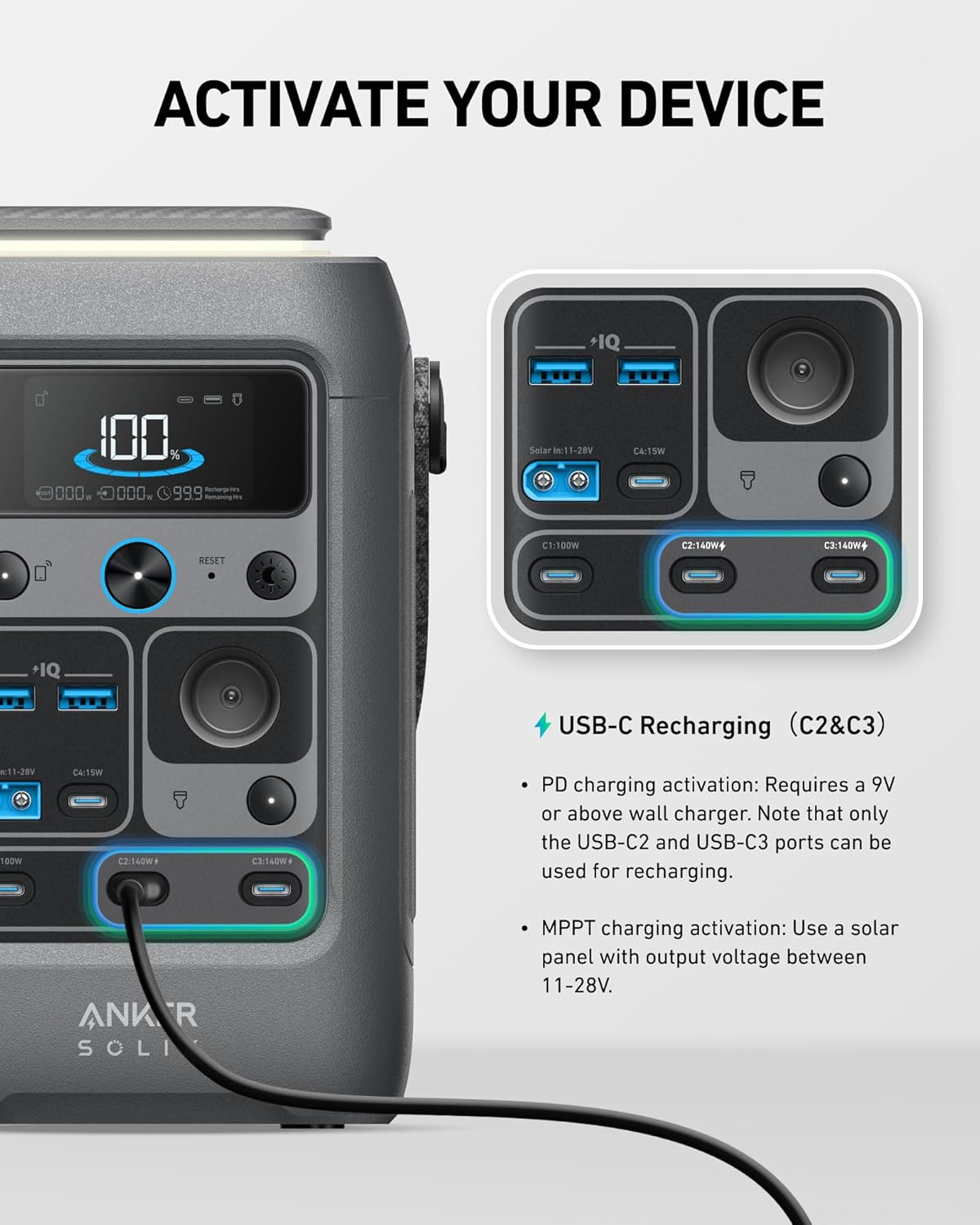
Rysunek 4.1: Illustration of activating the Anker SOLIX C300 by connecting a USB-C charger to the C2 or C3 port. PD charging activation requires a 9V or above wall charger.
4.2 MPPT Charging Activation
For solar charging, MPPT (Maximum Power Point Tracking) activation requires a solar panel with an output voltage pomiędzy 11-28V.
5. Instrukcja obsługi
5.1 Zasilanie urządzeń
Connect your electronic devices to the appropriate output ports on the Anker SOLIX C300. The power station will automatically detect and deliver power. Refer to Section 3 for a list of available ports and their specifications.
5.2 Solar Charging Devices
The Anker SOLIX C300 supports solar charging, providing a sustainable power source for extended outdoor use. Connect a compatible solar panel (100W or 60W Anker Solar Panel recommended) to the designated solar input port. Ensure the solar input voltage is between 11-28V. The C300 DC is not compatible with Anker SOLIX PS30 or other 5V~3A USB-C panels, PS200, or PS400.

Rysunek 5.1: The Anker SOLIX C300 being charged by a solar panel during the day and providing power inside a tent at night. A 60W panel is shown, but panels up to 100W can be connected.
5.3 Inteligentna kontrola aplikacji
For comprehensive power management, download the Anker SOLIX app. The app allows you to manage the power station remotely, check real-time statistics, control lights, and connect via Bluetooth or Wi-Fi.
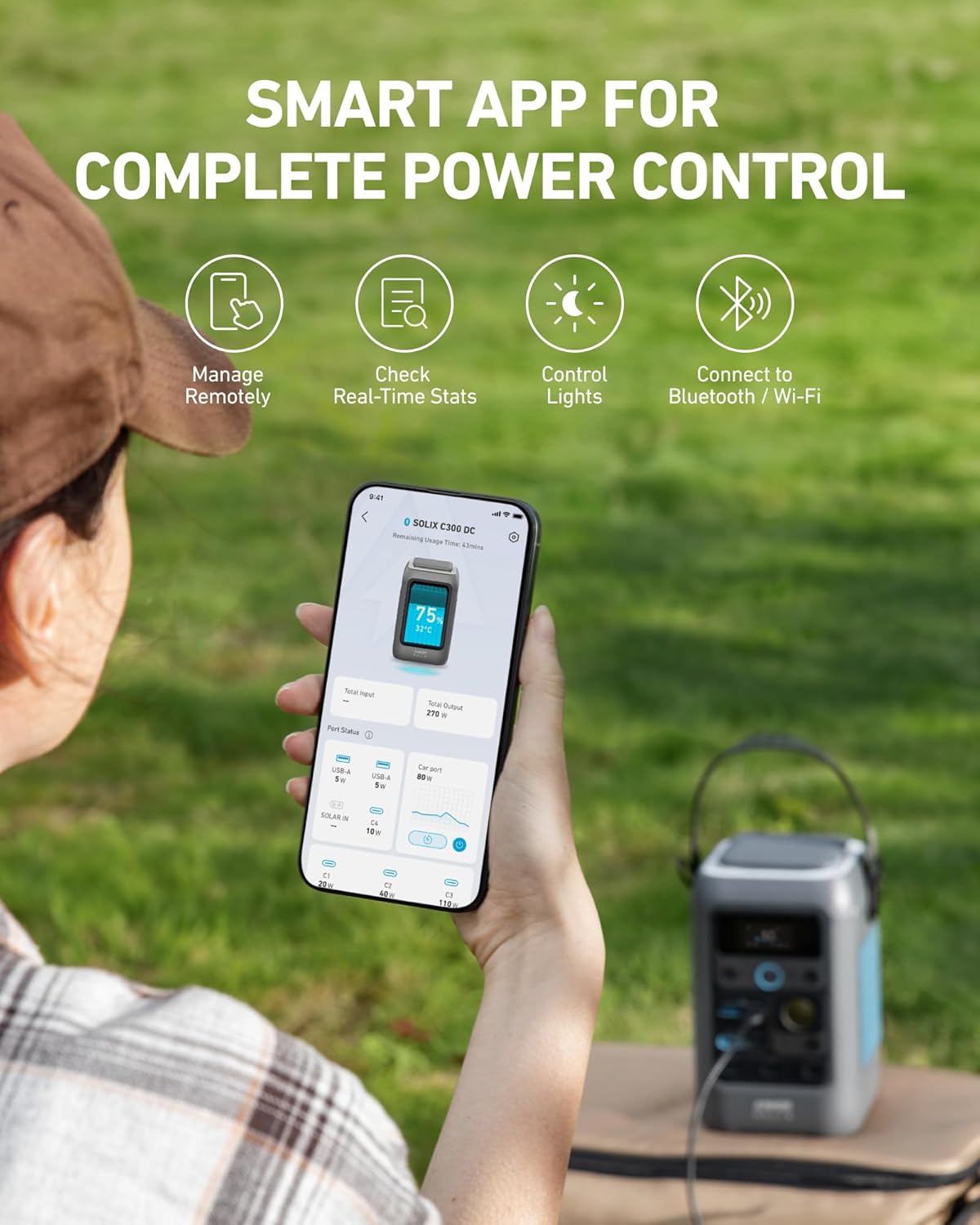
Rysunek 5.2: A smartphone displaying the Anker SOLIX app interface, showing options for remote management, real-time stats, light control, and connectivity.
6. Ładowanie elektrowni
The Anker SOLIX C300 offers multiple recharging options to ensure it's ready when you need it.
6.1 Fast Recharging via USB-C
Utilize the dual PD 3.1 USB-C ports for rapid recharging. The power station can reach 80% charge in approximately one hour when using two 140W USB-C chargers. The included 60cm 140W USB-C to C charging cable can be used for this purpose.
6.2 Ładowanie słoneczne
Connect a compatible solar panel (e.g., 100W Anker Solar Panel) to recharge the power station. A 100W solar panel can recharge the C300 to 80% in approximately 2.5 hours under optimal sunlight conditions.
6.3 Ładowanie samochodu
The power station can also be recharged using a car charger. This method typically recharges the C300 to 80% in approximately 2.5 hours.

Rysunek 6.1: Visual representation of recharging the Anker SOLIX C300 via wall outlets (dual 140W USB-C), solar panels, and a car socket. Note that chargers and cables for solar and car charging are not included.
7. Konserwacja
Właściwa konserwacja gwarantuje długowieczność i optymalną wydajność urządzenia Anker SOLIX C300.
- Pielęgnacja baterii: The power station features a LiFePO4 battery, known for its durability and long cycle life. To maximize battery lifespan, avoid fully discharging the unit frequently. Recharge it regularly, even if not in use, to maintain a charge level between 50% and 80%.
- Składowanie: Store the power station in a cool, dry place away from direct sunlight and extreme temperatures. If storing for extended periods, ensure it is charged to approximately 50% and recharge it every 3-6 months.
- Czyszczenie: Use a soft, dry cloth to clean the exterior of the power station. Avoid using harsh chemicals or abrasive materials.
- Kontrola temperatury: The smart temperature control system helps protect the battery. Operate and store the unit within the recommended temperature ranges specified in the safety manual.
8. Rozwiązywanie Problemów
If you encounter issues with your Anker SOLIX C300, refer to the following common problems and solutions:
| Problem | Możliwa przyczyna | Rozwiązanie |
|---|---|---|
| Jednostka się nie włącza | Low battery charge; Power button issue; Unit not activated | Recharge the unit using a wall charger (USB-C2 or USB-C3 port). Ensure the power button is fully pressed and not stuck. Perform initial activation if it's the first use. |
| Unit not charging or charging slowly | Incompatible charger/cable; Faulty port; Solar panel issues; Charging source insufficient | Ensure charger meets 18W+ USB-C PD requirements. Use the provided USB-C cable. Check solar panel connection and ensure adequate sunlight and correct voltage (11-28V). Try a different charging port or power source. |
| USB-C outlets not charging low-power items | Minimum power threshold not met; Device incompatibility | Some low-power devices may not draw enough current to activate the USB-C output. Try a different port or ensure the device is compatible with the power station's output specifications. |
| Display shows incorrect charge level | Calibration issue; Software glitch | Fully discharge the unit and then fully recharge it to recalibrate the battery management system. If the issue persists, contact customer support. |
Jeśli po wypróbowaniu tych rozwiązań problem nadal występuje, skontaktuj się z obsługą klienta firmy Anker w celu uzyskania dalszej pomocy.
9. Specyfikacje
| Funkcja | Specyfikacja |
|---|---|
| Model | SOLIX C300 |
| Typ baterii | LiFePO4 |
| Pojemność | 288 Wh (90,000 mAh) |
| Całkowita wydajność | 300 W |
| Wyjście USB-C (x2) | 140W (two-way) |
| Wyjście USB-C (x1) | 100 W |
| Wyjście USB-C (x1) | 15 W |
| Wyjście USB-A (x2) | 12 W |
| Car Socket Output (x1) | 120 W |
| Wejście słoneczne Objętośćtage | 11-28 V |
| Wymiary produktu | 4.89 x 7.87 x 4.72 cala |
| Waga przedmiotu | 7.65 funta |
| Cechy specjalne | Szybkie ładowanie, inteligentne sterowanie aplikacją |
10. Gwarancja i wsparcie
The Anker SOLIX C300 DC Portable Power Station comes with a 3-year guarantee for its LiFePO4 battery, ensuring reliable performance. For detailed warranty terms and conditions, please refer to the Warranty Information included in your package.
For technical support, troubleshooting assistance, or warranty claims, please contact Anker customer support through their official website or the contact information provided in your product documentation. When contacting support, please have your product model and purchase details ready.