
1. Wprowadzenie
Thank you for choosing the MZZYG FJ3362G Touchscreen Weather Station. This device provides comprehensive environmental monitoring, including indoor and outdoor temperature and humidity, weather forecasting, time, date, alarm functions, and more. Please read this manual carefully to ensure proper setup and operation.
2. Zawartość opakowania
Po rozpakowaniu sprawdź, czy wszystkie wymienione poniżej przedmioty znajdują się na miejscu i są w dobrym stanie:
- 1 x MZZYG FJ3362G Weather Station (Main Unit)
- 1 x bezprzewodowy czujnik zewnętrzny
- 1 x Instrukcja obsługi (ten dokument)
- Power Adapter (DC5V/1.2A) - (Note: 2 x LR6 AA batteries for main unit and 2 x LR6 AA batteries for outdoor sensor are not included)

Image 1: MZZYG FJ3362G Weather Station main unit and wireless outdoor sensor.
3. Funkcje produktu
The MZZYG FJ3362G Weather Station offers a range of functionalities designed for comprehensive environmental monitoring and convenience:
- Large Touchscreen Display: Backlit display for clear visibility of time, date, calendar, temperature, humidity, air pressure, moon phases, tides, sunrise/sunset times, and more.
- Funkcjonalność zegara: 12/24-hour time format, two daily alarms, and an automatic snooze function (adjustable from 5 to 60 minutes or OFF). Perpetual calendar up to the year 2099.
- Thermo-Hygrometer Function: Wyświetla temperaturę i wilgotność wewnątrz i na zewnątrz.
- Indoor Humidity Range: 20% ~ 95% RH
- Outdoor Humidity Range: 20% ~ 95% RH
- Indoor Temperature Range: -9.9°C ~ 50°C (15°F ~ 122°F)
- Outdoor Temperature Range: -40°C ~ 70°C (-40°F ~ 158°F)
- Minimum/Maximum humidity and air temperature display.
- Temperature/humidity trend indication.
- Weather Station Function: Weather forecast, sunrise and sunset times (city selectable), moon phases and tides, outdoor temperature upper and lower limit alarms, frost warning, indoor comfort display, and mold risk indication.
- Bezprzewodowy czujnik zewnętrzny: Wall-mountable or table-standing sensor with 433.92 MHz RF transmission frequency. Transmission range up to 60 meters in open areas. Supports connection of up to 3 wireless outdoor sensors (one included).
- Barometric Pressure Function: Measurement range of 600 ~ 1100 hPa/mb (17.72 ~ 32.50 inHg). Histogram displays 24-hour historical barometric pressure trends.
- Rejestrowanie danych: Records data for trend analysis.
- Niskie zużycie energii: Designed for energy efficiency, high stability, and accuracy.

Obraz 2: Koniecview of the main functions displayed on the weather station screen.
4. Konfiguracja
4.1 Włączanie jednostki głównej
- Insert 2 x LR6 AA batteries into the battery compartment on the back of the main unit, observing correct polarity (+/-).
- Alternatively, connect the DC5V/1.2A power adapter to the main unit and plug it into a power outlet.
- The display will light up, and the unit will begin initialization.
4.2 Zasilanie bezprzewodowego czujnika zewnętrznego
- Otwórz komorę baterii bezprzewodowego czujnika zewnętrznego.
- Insert 2 x LR6 AA batteries, ensuring correct polarity.
- Dokładnie zamknij komorę baterii.
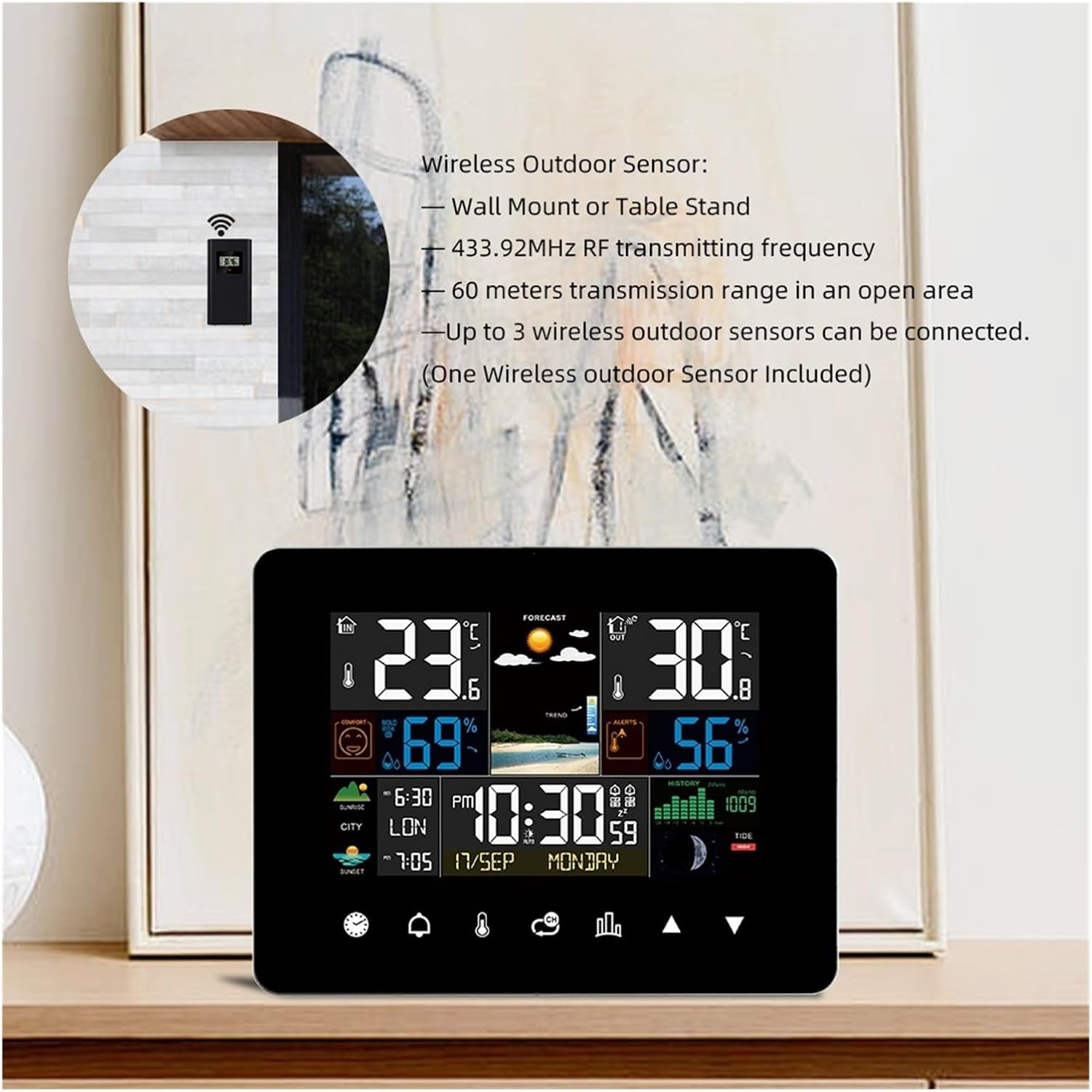
Image 3: Wireless outdoor sensor, showing wall mount and table stand options. It operates on 433.92MHz RF frequency with a 60-meter range.
4.3 Pairing the Outdoor Sensor with the Main Unit
The main unit will automatically attempt to connect with the outdoor sensor upon initial power-up.
- Place the outdoor sensor within 3 meters of the main unit during the initial pairing process.
- Po podłączeniu na wyświetlaczu jednostki głównej pojawią się dane dotyczące temperatury i wilgotności zewnętrznej.
- If the connection is not established, press and hold the "Sensor" button on the main unit to initiate a manual search.
4.4 Umiejscowienie czujnika zewnętrznego
- Choose a shaded location to avoid direct sunlight, which can affect temperature readings.
- Ensure the sensor is protected from direct rain or snow.
- Mount the sensor vertically to allow for proper drainage.
- Keep the sensor within the 60-meter transmission range of the main unit, minimizing obstructions like thick walls or metal structures.
5. Instrukcja obsługi
The MZZYG FJ3362G features a touchscreen interface for easy navigation and setting adjustments.

Image 4: Touchscreen diagram illustrating various touch-sensitive areas for interaction.
5.1 Basic Settings (Time, Date, Unit)
- Ustawienia dostępu: Tap the "SET" icon (often represented by a gear or similar symbol) on the touchscreen.
- Format czasu: Select 12-hour or 24-hour format.
- Regulacja czasu: Use the UP/DOWN arrows to set the hour and minute. Tap "SET" to confirm and move to the next setting.
- Korekta daty: Set the year, month, and day using the UP/DOWN arrows.
- Jednostka temperatury: Wybierz pomiędzy stopniami Celsjusza (°C) i Fahrenheita (°F).
- Jednostka ciśnienia: Select between hPa/mb and inHg.
5.2 Funkcja budzika
- Nastaw budzik: Tap the "ALARM" icon. Use UP/DOWN arrows to set Alarm 1 and Alarm 2 times.
- Aktywuj alarm: Tap the alarm icon again to toggle the alarm ON/OFF. An alarm symbol will appear on the display when active.
- Funkcja drzemki: When the alarm sounds, tap any button (except "ALARM OFF") to activate snooze. The snooze duration can be set in the settings (5-60 minutes).
- Wyłącz alarm: Tap the "ALARM OFF" area on the screen when the alarm sounds to stop it for the day.
5.3 Prognoza pogody
The weather station predicts weather conditions for the next 12-24 hours based on barometric pressure changes. The forecast icons (sunny, partly cloudy, cloudy, rainy, snowy) are displayed prominently.
5.4 Godziny wschodu i zachodu słońca
This feature displays sunrise and sunset times for 251 pre-programmed cities.
- Select City: In the settings menu, navigate to the city selection option.
- Enter City Code: Use the UP/DOWN arrows to select the appropriate city code from the provided list in the full manual (if available).
- The display will update with the sunrise and sunset times for the selected city.

Image 5: Display showing sunrise and sunset times for a selected city.
5.5 Alerty dotyczące temperatury i wilgotności
You can set upper and lower temperature limits for the outdoor sensor. If the temperature goes outside these limits, an alarm will sound.
- Ustaw alerty: Tap the "ALERT" icon.
- Dostosuj limity: Use UP/DOWN arrows to set the desired upper and lower temperature thresholds for outdoor readings.
- Activate Alert: Toggle the alert ON/OFF.
6. Konserwacja
- Czyszczenie: Przetrzyj wyświetlacz i powierzchnię urządzenia miękką szmatką.amp ściereczka. Nie należy używać środków czyszczących o właściwościach ściernych ani rozpuszczalników.
- Wymiana baterii: Wymień baterie w jednostce głównej i czujniku zewnętrznym, gdy na wyświetlaczu pojawi się wskaźnik niskiego poziomu naładowania baterii. Upewnij się, że biegunowość jest prawidłowa.
- Składowanie: Jeśli urządzenie będzie przechowywane przez dłuższy czas, należy wyjąć wszystkie baterie, aby zapobiec wyciekowi.
- Ochrona środowiska: Keep the main unit away from direct sunlight, extreme temperatures, and moisture. Ensure the outdoor sensor is protected from direct weather elements.
7. Rozwiązywanie Problemów
| Problem | Możliwa przyczyna | Rozwiązanie |
|---|---|---|
| Brak wyświetlacza na jednostce głównej | Baterie są rozładowane lub nieprawidłowo włożone; zasilacz nie jest podłączony lub jest uszkodzony. | Check battery polarity and replace if necessary. Ensure power adapter is securely connected and functional. |
| Temperatura/wilgotność zewnętrzna nie jest wyświetlana | Baterie czujnika zewnętrznego są rozładowane; czujnik jest poza zasięgiem; występują zakłócenia; czujnik nie jest sparowany. | Replace sensor batteries. Move sensor closer to the main unit. Reduce interference sources. Manually re-pair the sensor (refer to Section 4.3). |
| Niedokładne odczyty | Sensor exposed to direct sunlight or moisture; unit placed near heat sources. | Relocate the sensor to a shaded, protected area. Move the main unit away from direct heat or cold sources. |
| Prognoza pogody wydaje się nieprawidłowa | Weather forecasts are predictions based on barometric pressure and may not always be 100% accurate. | This is normal. The forecast is an estimation for the next 12-24 hours. |
8. Specyfikacje
| Funkcja | Szczegół |
|---|---|
| Model | FJ3362G |
| Marka | MZZYG |
| Zakres wilgotności w pomieszczeniu | 20% ~ 95% wilgotności względnej |
| Zakres wilgotności na zewnątrz | 20% ~ 95% wilgotności względnej |
| Zakres temperatury wewnętrznej | -9.9 ° C ~ 50 ° C (15 ° F ~ 122 ° F) |
| Zakres temperatury zewnętrznej | -40°C ~ 70°C (-40°F ~ 158°F) |
| Dokładność temperatury | ±1°C |
| Zakres ciśnienia barometrycznego | 600 ~ 1100 hPa/mb (17.72 ~ 32.50 inHg) |
| Częstotliwość transmisji bezprzewodowej | 433.92MHz |
| Zasięg transmisji bezprzewodowej | Do 60 metrów (otwarta przestrzeń) |
| Zasilacz (jednostka główna) | 2 x LR6 AA batteries or DC5V/1.2A power adapter |
| Zasilacz (czujnik zewnętrzny) | 2 baterie LR6 AA |
| Wymiary jednostki głównej | 167 × 128 × 30 mm (6.57 × 5.04 × 1.18 cala) |
| Wymiary czujnika | 97 × 50 × 30 mm (3.82 × 1.97 × 1.18 cala) |
| Waga produktu | Main Unit: 260 g / Sensor: 10 g |
9. Gwarancja i wsparcie
For warranty information and technical support, please refer to the retailer's policy or contact MZZYG customer service through their official channels. Keep your purchase receipt as proof of purchase.