
1. Wprowadzenie
This manual provides comprehensive instructions for the installation, operation, and maintenance of your ASLONG 10.36-inch Wireless CarPlay Screen and 4K 4-Channel Dash Cam system. This system integrates a portable touchscreen display with advanced features such as Wireless CarPlay, Android Auto, 4K dash camera recording, and a 4-channel camera system for enhanced vehicle monitoring and navigation. Please read this manual thoroughly before use to ensure proper functionality and safety.
2. Zawartość opakowania
Sprawdź, czy w przesyłce znajdują się wszystkie wymienione poniżej elementy:
- 10.36-calowy monitor x1
- Camera x4 (Includes 4K front/side cameras and 1080P rear camera)
- Camera extension cable x4 (Three 5M cables for side/front cameras, one 20M cable for the back camera)
- Przewód zasilający x1
- Wspornik x1
- Karta TF o pojemności 128 GB x1

Image: Package contents including the 10.36-inch monitor, four cameras, various cables, mounting bracket, and a 128GB TF card.
3. Koniec produktuview
The ASLONG Wireless CarPlay Screen and Dash Cam system offers a comprehensive solution for in-vehicle entertainment, navigation, and safety. Key features include:
- 10.36" HD Touchscreen Monitor: Provides a clear interface for all functions, supporting quad view display for up to four camera inputs simultaneously.
- 4K 4-Channel Dash Cam: Records video from four cameras (front, rear, two side views) for a 360° monitoring perspective. Features include loop recording and local playback.
- Bezprzewodowy CarPlay i Android Auto: Seamlessly integrates with your smartphone for navigation, music, calls, and voice control (Siri/Google Assistant).
- Funkcja łącza lustrzanego: Supports mirroring of iOS and Android smartphone screens to the monitor, including 1080P video playback.
- Nawigacja GPS w czasie rzeczywistym: Projects smartphone navigation apps (e.g., Google Maps, Waze) onto the screen.
- Wiele trybów wyjścia audio: Built-in speaker, Bluetooth connection, and FM transmission to car audio system.
- Super widzenie nocne i szerokie View Kąt: High-definition cameras with 170° wide viewing angle and enhanced low-light performance.
- Flexible Vehicle Compatibility: Designed for a wide range of vehicles including cars, trucks, buses, RVs, and trailers (9-36V DC power).
- Monitorowanie parkowania: Additional safety feature for monitoring when parked.

Obraz: Ponadview of the ASLONG 10.36-inch monitor and its accompanying four cameras, illustrating the complete system.
4. Konfiguracja i instalacja
Proper installation is crucial for the optimal performance of your ASLONG system. It is recommended to have this system installed by an experienced professional, especially for complex wiring.
4.1 Połączenie zasilania
- The system is powered directly by your vehicle's electrical system (9-36V DC).
- Ważny: The installation fuse box must be rated for 20A lub więcej.
- The system is designed for automatic power-on with vehicle ignition, initiating recording without delay.
4.2 Camera Installation and Wiring
The system uses a wired camera setup to ensure stable signal transmission. Each camera connects to the monitor via an extension cable.
- Connect the front, rear, and two side cameras to the corresponding inputs on the monitor's wiring harness.
- The rear camera uses a 20M extension cable, while the front and side cameras use 5M cables.
- Przewody spustowe: Connect the trigger wires for automatic camera switching:
- Green Wire (CH2TRIG): Connect to the vehicle's reversing lights for automatic rear view wyświetlacz podczas cofania.
- Blue Wire (CH3TRIG): Connect to the left turn signal light for automatic left camera display.
- Grey Wire (CH4TRIG): Connect to the right turn signal light for automatic right camera display.

Image: Detailed wiring diagram illustrating how to connect the four cameras and the main monitor to the vehicle's power supply and trigger lines.

Image: Diagram explaining the trigger line connections for automatic camera view switching based on vehicle actions.
5. Działanie
5.1 Bezprzewodowy CarPlay i Android Auto
Once powered on, the system can wirelessly synchronize with your smartphone. This allows access to navigation, music, communication, and other apps directly on the 10.36-inch screen.
- Sprawdź, czy Bluetooth i Wi-Fi w Twoim telefonie są włączone.
- Select the CarPlay or Android Auto option on the monitor and follow the on-screen prompts to connect your device.
- Use Siri or Google Assistant for voice control of functions like calls, music, and navigation.

Image: The monitor showing wireless CarPlay and Android Auto connectivity, along with the Mirror Link feature.

Image: Voice control functionality demonstrated with a phone call interface on the monitor, activated by voice commands.
5.2 Łącze lustrzane
The Mirror Link feature allows you to project your smartphone screen directly onto the ASLONG monitor. This is useful for viewing content not natively supported by CarPlay/Android Auto, such as 1080P videos.
- Connect your smartphone using AirPlay (iOS) or Android Cast.
- Ensure a stable wireless connection for optimal performance.
5.3 Nawigacja GPS
Utilize your smartphone's GPS navigation applications (e.g., Google Maps, Waze) directly on the large 10.36-inch display via CarPlay or Android Auto. This provides real-time navigation and traffic updates.
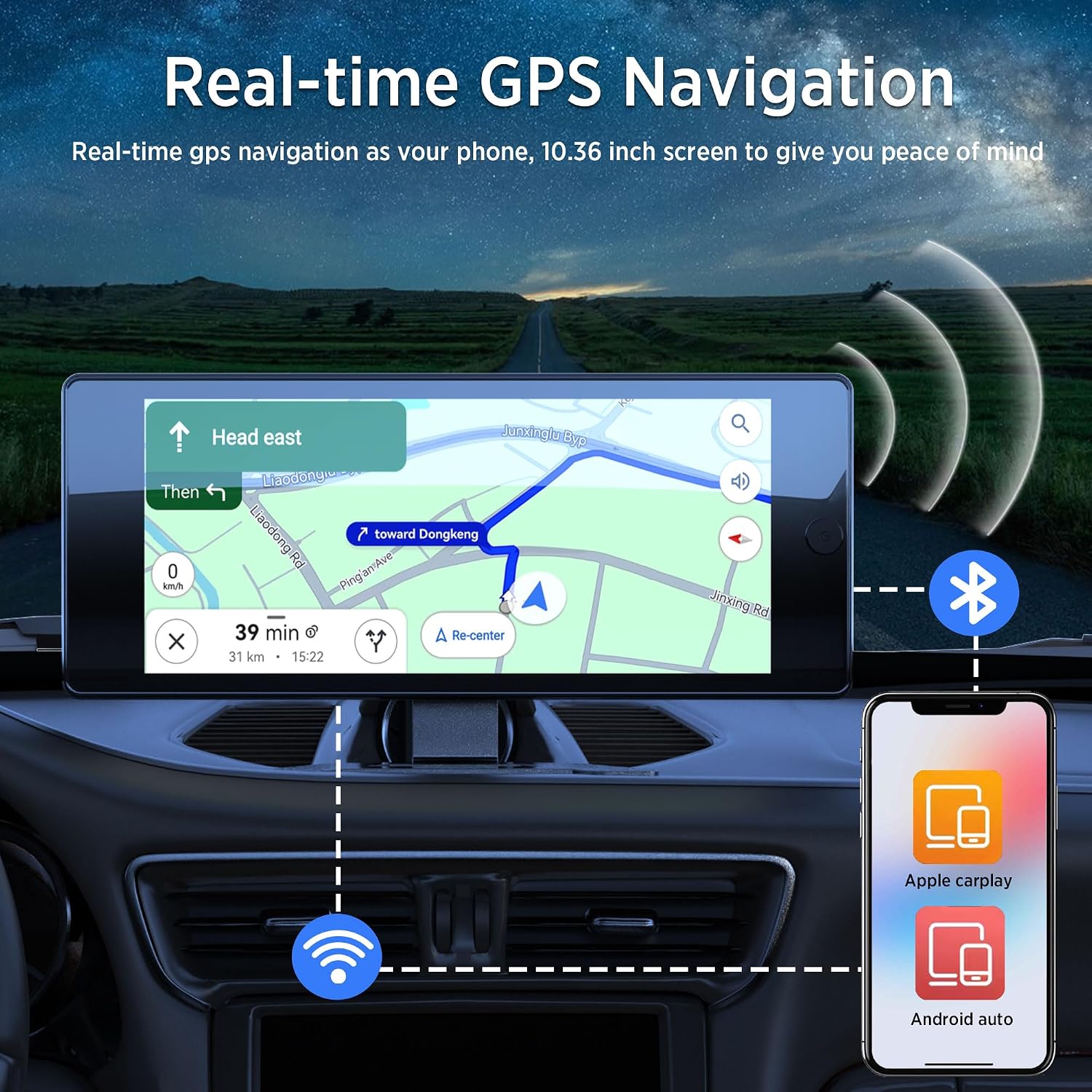
Image: Real-time GPS navigation displayed on the ASLONG monitor, mirroring a smartphone's map application.
5.4 Tryby wyjścia audio
The system offers three ways to output audio:
- Wbudowany głośnik: Do bezpośredniego odtwarzania dźwięku z monitora.
- Połączenie Bluetooth: Connect to external Bluetooth speakers or your vehicle's Bluetooth audio system.
- Transmisja FM: Transmit audio to your car's FM radio. Tune your car radio to the frequency displayed on the ASLONG monitor.

Image: Visual representation of the three available audio output modes: built-in speaker, FM transmission, and Bluetooth connectivity.
5.5 DVR Recording and Display
The integrated DVR function records footage from all four cameras to the included 128GB TF card. It supports seamless loop recording, ensuring continuous coverage without filling the disk.
- Kwadrat View Wyświetlacz: The monitor can display video from all four cameras simultaneously, providing a 360° view wokół pojazdu.
- Odtwarzanie lokalne: Recorded videos can be reviewbezpośrednio na monitorze.
- Trigger Display: The system automatically switches to the corresponding camera view when a turn signal is activated or when reversing.
- Reversing Image Function: Features an adjustable reversing line for precise parking and maneuvering.

Image: The monitor displaying a four-camera split screen, demonstrating 360-degree monitoring and rearview capabilities with parking lines.
6. Konserwacja
- Czyszczenie: Do czyszczenia ekranu monitora i obiektywów aparatu używaj miękkiej, suchej ściereczki. Unikaj środków czyszczących o właściwościach ściernych i rozpuszczalników.
- Połączenia kablowe: Okresowo sprawdzaj wszystkie połączenia kablowe, aby mieć pewność, że są solidne i nieuszkodzone.
- Karta TF: Format the 128GB TF card regularly (e.g., monthly) to maintain optimal recording performance and prevent data corruption.
- Temperatura pracy: The system is designed to operate in temperatures from -20℃ to 60℃. Avoid prolonged exposure to extreme temperatures outside this range.
7. Rozwiązywanie Problemów
- System się nie włącza: Ensure the fuse box for installation is rated at 20A or higher. Check all power connections for proper seating.
- Poor FM Audio Quality: FM transmission quality can be affected by local signal interference. Try adjusting the FM frequency on the monitor and your car radio. Consider using Bluetooth audio output as an alternative.
- Monitor Unresponsive or Abnormal Sounds: Disconnect power, wait a few minutes, and reconnect. If the issue persists, verify all connections and contact customer support.
- TF Card Not Recognized/Recording Issues: Ensure the 128GB TF card is properly inserted. Try formatting the card through the monitor's settings. If issues continue, try a different compatible TF card.
- Camera Feed Issues (No Signal/Distorted Image): Check the extension cables for secure connections and any visible damage. Ensure cameras are properly installed and aligned.
- Problemy z połączeniem CarPlay/Android Auto: Ensure your smartphone's Bluetooth and Wi-Fi are active. Restart your phone and the ASLONG system. Verify that your phone's operating system is up to date.
8. Specyfikacje
| Funkcja | Specyfikacja |
|---|---|
| Marka | JAK DŁUGO |
| Model | AS-YY-DashCam-4CH-X400CARPLAY-SEP |
| Rozmiar ekranu | 10.36 cali |
| Technologia łączności | Wi-Fi (for Wireless CarPlay/Android Auto) |
| Rozdzielczość przechwytywania wideo | 4K (Dash Cam), 1080p (Rear Camera) |
| Liczba kamer | 4 (Front, Rear, Left Side, Right Side) |
| Pole View | 170 stopni |
| Typ serwisu pojazdu | Car, Truck, Bus, Van, Motorhome |
| Temperatura pracy | -20℃ do 60℃ |
| Moc Objętośćtage Zakres | 9-36V DC |
| W zestawie miejsce do przechowywania | 128GB TF Card (Max support 128GB) |
| Wymiary produktu | 16.54 x 11.02 x 4.13 cala |
| Waga przedmiotu | 7.43 funta |
9. Gwarancja i wsparcie
ASLONG provides a Roczny serwis gwarancyjny for this product. If you encounter any issues or require assistance, please contact ASLONG customer support. Refer to your purchase documentation for specific contact details.