
Wstęp
Thank you for choosing the TOZO NC3 Hybrid Active Noise Cancelling Wireless Earbuds. These earbuds are designed to provide a superior audio experience with advanced noise cancellation, crystal-clear calls, and extended playtime. This manual will guide you through the setup, operation, and maintenance of your new earbuds to ensure optimal performance.
Co jest w pudełku
- Bezprzewodowe słuchawki douszne TOZO NC3 z aktywną redukcją szumów
- Etui ładujące
- 6 Pairs of Earcaps (XS/S/M/L/XL/XXL)
- Kabel ładujący USB A do USB C
- Krótki przewodnik i instrukcja obsługi

Image: TOZO NC3 Earbuds and Charging Case.
Produkt ponadview
Komponenty
The TOZO NC3 earbuds consist of two main components: the earbuds themselves and the charging case. The charging case features a smart digital display to show battery status.

Image: Smart Digital Display on Charging Case.
Sterowanie i funkcje
The earbuds feature touch controls for various functions and can be managed via the TOZO App. Key features include:
- Hybrydowa aktywna redukcja szumów (ANC): Zmniejsza hałas otoczenia nawet o 45 dB.
- 6 Microphones with ENC: Ensures clear calls by reducing environmental noise.
- Tryb przezroczystości: Umożliwia słyszenie otoczenia bez konieczności zdejmowania słuchawek.
- Wydłużony czas gry: Up to 13 hours on a single charge, 55 hours with the charging case (ANC off).
- TOZO App Integration: Access 32 preset EQs and personalized sound profiles.
- IPX8 Wodoodporny: Resistant to water and sweat.
- Bluetooth 5.3: Provides stable and low-latency connectivity.
- Powerful Dynamic Drivers: 12mm drivers for deep bass and clear highs.

Image: Advanced Noise Cancellation Technology.

Image: Powerful Dynamic Drivers.
Organizować coś
1. Ładowanie słuchawek i etui
Before first use, fully charge the earbuds and the charging case. Connect the USB A to USB C charging cable to the charging case and a power source. The LED display on the case will indicate the charging status.
- Charging time for earbuds: Approximately 1.5 hours.
- A 10-minute charge provides 1 hour of playtime.

Image: Charging the TOZO NC3 Earbuds and Case.
2. Wybór odpowiednich końcówek dousznych
For optimal sound quality and noise cancellation, choose the eartips that provide the best seal and comfort. The TOZO NC3 comes with 6 pairs of earcaps (XS/S/M/L/XL/XXL).
- Try different sizes to find the most secure and comfortable fit.
- A good seal is crucial for effective noise cancellation and bass response.
3. Parowanie z urządzeniem
- Otwórz etui ładujące. Słuchawki automatycznie przejdą w tryb parowania.
- Na swoim urządzeniu (smartfonie, tablecie, laptopie) przejdź do ustawień Bluetooth.
- Select "TOZO NC3" from the list of available devices.
- Po nawiązaniu połączenia usłyszysz dźwięk potwierdzenia.
The earbuds support Bluetooth 5.3 technology for a stable and fast connection.
Instrukcja obsługi
Sterowanie dotykowe
The TOZO NC3 earbuds feature intuitive touch controls. Specific functions can be customized via the TOZO App.
| Działanie | Funkcjonować |
|---|---|
| Pojedyncze dotknięcie (L/P) | Odtwórz/Pauza, Odbierz/Zakończ połączenie |
| Podwójne dotknięcie (L) | Poprzedni utwór |
| Podwójne dotknięcie (R) | Następny utwór |
| Potrójne dotknięcie (L/P) | Aktywuj Asystenta Głosowego |
| Długie naciśnięcie (L/R) | Przełącz tryb ANC/przezroczystości |
| Długie naciśnięcie (L/R) podczas połączenia | Odrzuć połączenie |
Tryby kontroli hałasu
The TOZO NC3 offers Hybrid Active Noise Cancellation and Transparency Mode:
- Aktywna redukcja szumów (ANC): Blokuje hałas zewnętrzny, zapewniając wciągające wrażenia słuchowe.
- Tryb przezroczystości: Przepuszcza dźwięki otoczenia, pozwalając Ci być świadomym tego, co dzieje się wokół Ciebie.
Switch between modes by long-pressing the touch area on either earbud.

Image: Enhanced Noise Cancellation in use.
Funkcje aplikacji TOZO
Download the TOZO App from your device's app store to unlock full customization options:
- 32 predefiniowanych trybów korektora: Wybierz spośród różnych profesjonalistów dźwiękufiles to match your music style.
- Personalized EQs: Create and share your own custom equalizer settings.
- Noise Control Adjustment: Fine-tune ANC and Transparency levels.
- Aktualizacje oprogramowania układowego: Aktualizuj swoje słuchawki, dodając najnowsze funkcje i udoskonalenia.
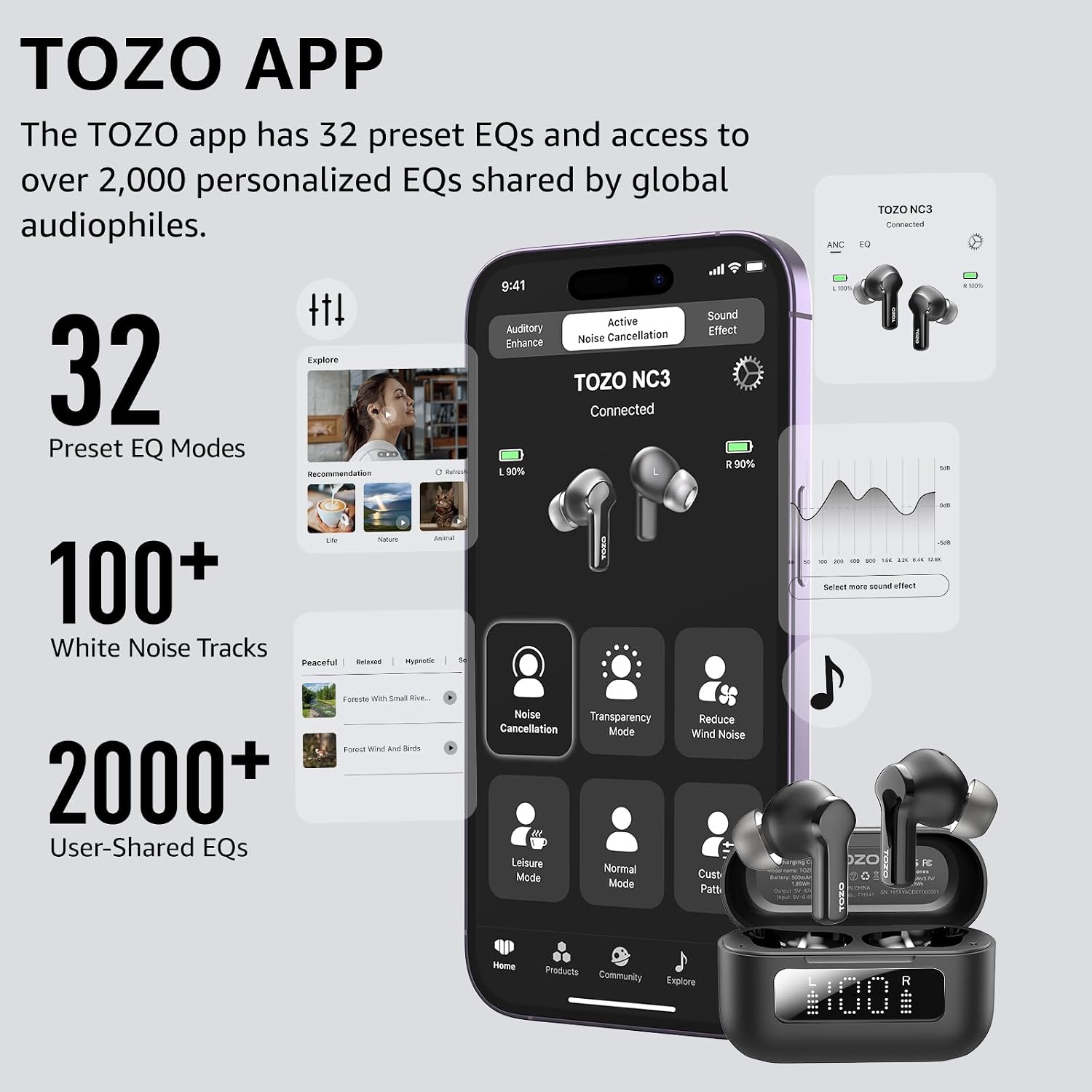
Image: TOZO App Interface.
Tryb małych opóźnień
The earbuds support a low-latency mode, ensuring audio and visuals are perfectly synchronized, ideal for gaming and watching videos.

Image: Low-Latency Mode for synchronized audio and visuals.
Konserwacja
Czyszczenie
- Regularnie czyść słuchawki douszne i etui ładujące miękką, suchą i niepozostawiającą włókien ściereczką.
- Zdejmij nakładki douszne i wyczyść końcówkę słuchawek z woskowiny lub zanieczyszczeń za pomocą małej szczoteczki lub patyczka kosmetycznego.
- Sprawdź, czy styki ładowania w słuchawkach i etui są czyste i suche.
Wodoodporność (IPX8)
The TOZO NC3 earbuds are IPX8 waterproof, meaning they are protected against immersion in water up to 1 meter for up to 30 minutes. While they are resistant to sweat and splashes, avoid prolonged exposure to water or using them during swimming.
- Always dry the earbuds completely before placing them back in the charging case to prevent damage.
Rozwiązywanie problemów
Typowe problemy i rozwiązania
| Problem | Możliwe rozwiązanie |
|---|---|
| Słuchawki douszne nie parują się | Ensure earbuds are charged. Place them back in the case, close, then reopen to re-enter pairing mode. Forget "TOZO NC3" on your device's Bluetooth list and try pairing again. |
| Tylko jedna słuchawka odtwarza dźwięk | Place both earbuds back in the charging case, close the lid for 5 seconds, then open again. This often re-syncs them. Check battery levels for both earbuds. |
| Słaba jakość dźwięku / Słaby bas | Ensure you have selected the correct size eartips for a proper seal. Clean earbud nozzles. Adjust EQ settings in the TOZO App. |
| Redukcja szumów nie jest skuteczna | Ensure earbuds are properly seated in your ears with a good seal. Adjust ANC levels via the TOZO App. |
| Problemy z ładowaniem | Check the USB-C cable and power adapter. Ensure charging contacts on earbuds and case are clean and free of debris. |
For further assistance, refer to the TOZO App or the official TOZO support channels.
Specyfikacje
| Funkcja | Szczegół |
|---|---|
| Nazwa modelu | NC3 |
| Numer modelu przedmiotu | T11141 |
| Kontrola hałasu | Hybrydowa aktywna redukcja szumów (do 45 dB) |
| Technologia łączności | Bezprzewodowa (Bluetooth 5.3) |
| Zasięg Bluetooth | 20 metrów |
| Mikrofony | 6 Mics with ENC Ambient Noise Reduction |
| Czas odtwarzania (ANC wyłączone) | 13 godzin (słuchawki douszne), 55 godzin (z etui ładującym) |
| Czas odtwarzania (ANC wł.) | 9.5 godzin (słuchawki douszne), 40 godzin (z etui ładującym) |
| Czas ładowania | 1.5 godziny (słuchawki douszne) |
| Odporność na wodę | Wodoodporność IPX8 |
| Typ sterownika audio | Dynamiczny sterownik |
| Rozmiar sterownika audio | 12 milimetrów |
| Odpowiedź częstotliwościowa | 20 Hz - 20 000 Hz |
| Wrażliwość | 100dB |
| Impedancja | 32 omy |
| Typ sterowania | Sterowanie dotykowe, aplikacja, głos |
| Tworzywo | Tworzywo sztuczne, akrylonitryl-butadien-styren (ABS) |
| Waga przedmiotu | 40.6 gramy (łącznie) / 1.43 uncji |
| Pojemność akumulatora etui ładującego | 500 mlnamp Godziny |
| Wymiary produktu | 1.08 x 0.95 x 1.28 cala (słuchawka douszna) |
| UPC | 810102981424 |
Gwarancja i wsparcie
TOZO products typically come with a manufacturer's warranty. Please refer to the warranty card included in your product packaging or visit the official TOZO webSzczegółowe informacje na temat gwarancji i jej warunków można znaleźć na stronie.
For technical support, troubleshooting not covered in this manual, or warranty claims, please contact TOZO customer service through their official webstronę internetową lub dane kontaktowe znajdujące się na opakowaniu produktu.
Official TOZO Webstrona: www.tozostore.com