
Wstęp
Thank you for choosing the ION Digital Watch. This smartwatch is designed to enhance your daily life with its advanced features, including a vibrant 2-inch HD color screen, extended battery life, IP68 waterproof rating, and comprehensive health and fitness tracking. This manual provides detailed instructions for setup, operation, and maintenance to ensure optimal performance and user experience.
Co jest w pudełku
- Smartwatch
- Magnetyczny kabel ładujący
- Instrukcja obsługi
Produkt ponadview
The ION Digital Watch combines sleek design with powerful functionality. Familiarize yourself with its components and key features.
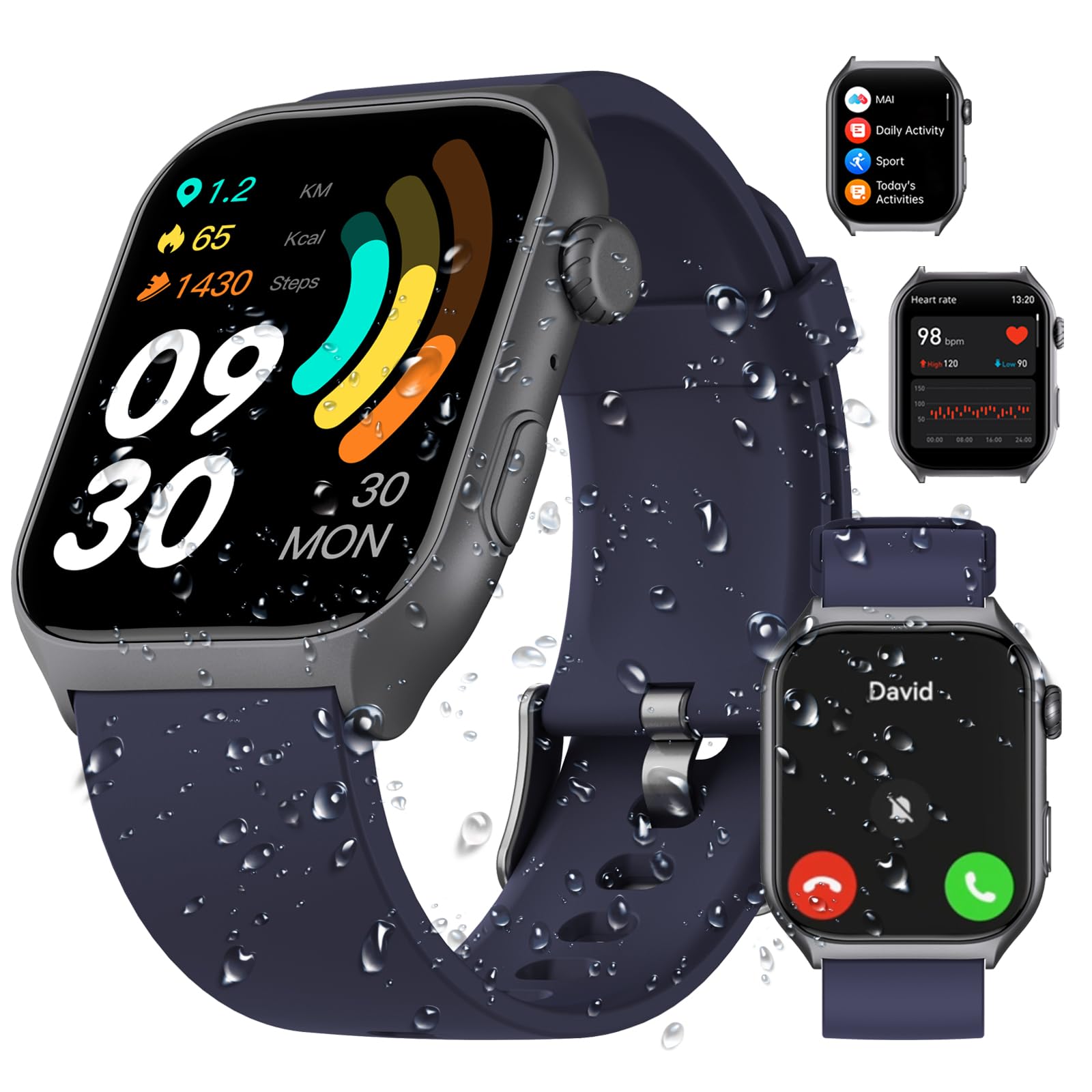
Przód view of the ION Digital Watch, showcasindzięki dużemu wyświetlaczowi i eleganckiemu wzornictwu.
Official product video demonstrating the key features and design of the ION Digital Watch.
Organizować coś
1. Ładowanie zegarka
Before first use, fully charge your ION Digital Watch. Connect the magnetic charging cable to the charging points on the back of the watch and plug the USB end into a power adapter (not included) or a computer's USB port. A full charge typically takes approximately 2 hours.

Illustration of the watch charging process and its impressive battery duration.
2. Instalacja i parowanie aplikacji
Aby w pełni wykorzystać potencjał swojego smartwatcha, pobierz i zainstaluj Aplikacja Runmefit na Twoim smartfonie.
- Scan the QR code provided in the quick start guide or search for "Runmefit" in your phone's app store (Google Play Store for Android, Apple App Store for iOS).
- Zainstaluj aplikację i załóż konto lub zaloguj się.
- Upewnij się, że Bluetooth jest włączony w Twoim smartfonie.
- Open the Runmefit APP, navigate to the device section, and select "Add Device".
- Select your ION Digital Watch from the list of available devices to pair. Follow the on-screen prompts to complete the pairing process.

Visual representation of the AI Voice Assistant and Bluetooth 5.3 call functionality.
Instrukcja obsługi
1. Podstawowa nawigacja
The watch features a 2-inch HD touch screen display with a resolution of 320x386 pixels. Navigate through menus and functions by swiping across the screen and tapping icons. The side button typically serves as a power button, back button, or to access the main menu.

The 2-inch HD color screen provides clear and vibrant visuals for all watch functions.
2. Funkcje wywoławcze
With upgraded Bluetooth 5.3, the watch allows for stable connections up to 10 meters. You can answer and make calls directly from your wrist, receive call notifications, and manage quick replies.

Various ION Digital Watches showcasing the answer/make call feature via Bluetooth 5.3.
3. Asystent głosowy AI
The integrated AI voice assistant allows for hands-free control. Speak commands to play music, check weather updates, set alarms, and more. This feature is particularly useful when your hands are occupied.
4. Tryby sportowe
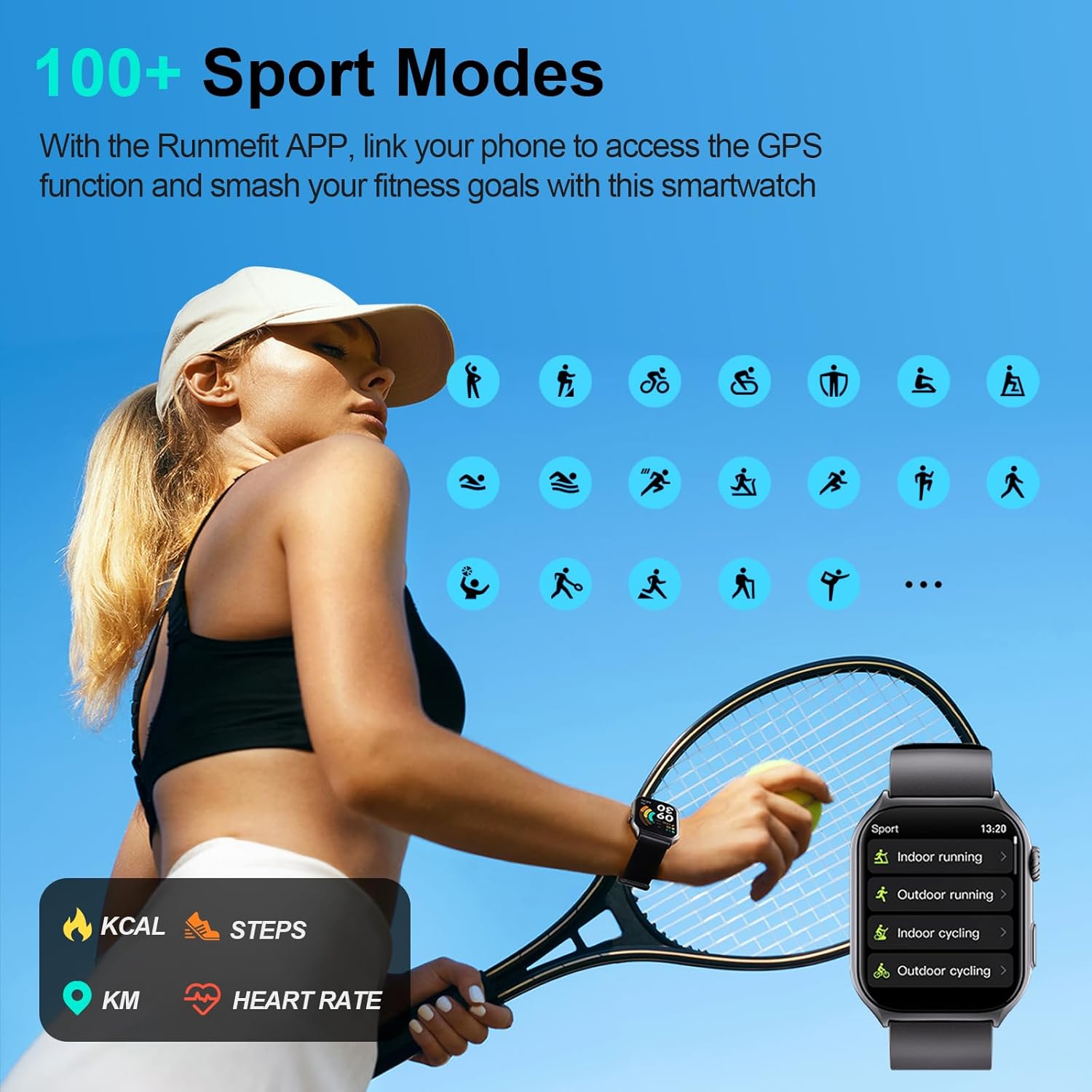
The watch offers over 100 sport modes, including running, cycling, and swimming. Link the Runmefit APP to your phone for accurate GPS tracking during outdoor activities. The watch monitors steps, calories burned, and distance, providing detailed insights into your workouts.

Visual of the watch interface displaying various sport modes available for tracking.

The watch and companion app tracking fitness activities for an active lifestyle.

The watch tracking real-time data like calories, distance, and steps during a run.
5. Monitorowanie stanu zdrowia
The ION Digital Watch provides comprehensive health monitoring features:
- MAI Health Vitality Index: Offers unique insights into your overall health.
- Monitorowanie na żywo: Includes 24-hour heart rate monitoring and SpO2 (blood oxygen) tracking.
- Monitorowanie snu: Accurately tracks sleep patterns and provides detailed analysis of deep sleep, light sleep, and awake times.
- Zdrowie kobiet: Features dedicated functions for tracking women's health cycles.
- Funkcja SOS: Long press the side button for 3 seconds to activate the one-tap SOS feature.

The watch displaying 24/7 health monitoring data including heart rate, sleep, and notifications.

The watch providing detailed sleep monitoring and analysis for improved rest.

The watch displaying SpO2, heart rate, and menstrual cycle tracking features.
6. Personalizacja
Personalize your watch with over 200 downloadable watch faces. You can also upload your favorite photos to create unique watch face designs that match your style.

A selection of customizable watch faces available for the ION Digital Watch.
7. Inteligentne powiadomienia
Stay informed with instant notifications from your smartphone directly on your watch. The always-on display ensures you don't miss important alerts, messages, or reminders from various applications.
The watch displaying smart notifications synchronized with a smartphone.
Informacje o wodoodporności
The ION Digital Watch has an IP68 waterproof rating, meaning it is resistant to dust and can withstand immersion in water up to 1.5 meters for 30 minutes. This makes it suitable for daily activities such as washing hands, wearing in the rain, and during workouts. It is not recommended for hot showers, saunas, or diving.

Visual representation of the IP68 waterproof capability during various activities.
Żywotność baterii
Equipped with an upgraded 300 mAh battery, the watch offers impressive battery performance:
- Czas ładowania: Pełne ładowanie trwa około 2 godzin.
- Average Daily Use: 7-10 dni.
- Czas czuwania: Do 45 dni.
Specyfikacje
| Funkcja | Szczegół |
|---|---|
| Marka | ION |
| Numer modelu | 4895211618610 |
| Rozmiar ekranu | 2 cali |
| Rozdzielczość ekranu | 320*386 (R.G.B) |
| System operacyjny | Android 4.4+, iOS 9.0+ |
| Technologia łączności | Bluetooth 5.3 |
| Pojemność baterii | 300 mAh litowo-polimerowy |
| Stopień wodoodporności | IP68 |
| Waga przedmiotu | 106 gramów (3.74 uncji) |
| Cechy specjalne | Phone Call, AI Voice Assistant, 100+ Sport Modes, Health Monitoring (Heart Rate, SpO2, Sleep, Women's Health), SOS Function, Customizable Watch Faces |
Rozwiązywanie problemów
- Zegarek się nie włącza: Upewnij się, że zegarek jest w pełni naładowany. Podłącz go do magnetycznego kabla ładującego i źródła zasilania na co najmniej 10 minut.
- Nie można sparować z telefonem:
- Sprawdź, czy Bluetooth jest włączony w telefonie i zegarku.
- Upewnij się, że zegarek znajduje się w zasięgu Bluetooth (około 10 metrów).
- Uruchom ponownie telefon i zegarek.
- Check if the Runmefit APP is updated to the latest version.
- Jeśli urządzenia zostały wcześniej sparowane, spróbuj rozparować je w ustawieniach Bluetooth telefonu, a następnie sparować je ponownie za pomocą aplikacji.
- Niedokładne dane dotyczące zdrowia: Ensure the watch is worn snugly on your wrist, not too tight or too loose. Clean the sensors regularly. Environmental factors and individual physiology can affect accuracy.
- Powiadomienia się nie wyświetlają: Check notification permissions for the Runmefit APP in your phone's settings. Ensure the app is running in the background and not being restricted by power-saving modes.
Konserwacja
- Czyszczenie: Regularnie przecieraj ekran i pasek zegarka miękką, suchą ściereczką. W przypadku uporczywych zabrudzeń użyj lekko wilgotnej ściereczki.amp szmatką i łagodnym mydłem, a następnie dokładnie osusz.
- Czujniki: Keep the optical sensors on the back of the watch clean and free from debris to ensure accurate health monitoring.
- Składowanie: Przechowuj zegarek w chłodnym i suchym miejscu, gdy go nie używasz. Unikaj ekstremalnych temperatur.
- Narażenie na działanie wody: While IP68 rated, prolonged exposure to water or use in hot water environments should be avoided to maintain the integrity of the seals.
Gwarancja i wsparcie
For warranty information or technical support, please refer to the contact details provided with your purchase or visit the official ION product support webZachowaj dowód zakupu na wypadek roszczeń gwarancyjnych.