
SINGCALL APE500
SINGCALL Wireless Construction Site Elevator Calling System APE500 User Manual
Model: APE500 Call Button & SC-R10GX Receiver
1. Koniec produktuview
The SINGCALL Wireless Construction Site Elevator Calling System provides efficient and reliable communication between construction site personnel and elevator operators. This system consists of a durable, waterproof call button (APE500) and a versatile receiver (SC-R10GX) designed for demanding environments.
Główne cechy:
- SC-R10GX Receiver: Specifically designed for construction site elevator calling. Features a storage battery for 5-6 hours of standby time without external power, with an option for power adapter use. Displays up to 3 groups of double-digit numbers simultaneously. Offers multiple prompt modes: Dingdong, Alarming sound, and voice report. Supports up to 199 pagers.
- APE500 Call Button: 360-degree waterproof design ensures sturdy construction and stable performance, offering sun-protection, dust proofing, and anti-knock durability. Provides long transmitting distance: up to 150 feet indoors and 3000 feet in open air. Numbers can be easily changed for strong reusability, and the button allows for marking numbers and floors.
Zawartość pudełka:
- 1 x SINGCALL APE500 Wireless Call Button
- 1 x SINGCALL SC-R10GX Wireless Receiver
- 1 x zasilacz do odbiornika
- Mounting Hardware for Call Button
- Instrukcja obsługi (ten dokument)
2. Konfiguracja systemu
2.1 Call Button (APE500) Installation
The APE500 call button is designed for easy installation on various surfaces. Ensure the mounting location is easily accessible to users and within the transmission range of the SC-R10GX receiver.

Rycina 2.1: Przód view of the SINGCALL APE500 Call Button. It features a large 'Call' button, indicator light, and designated areas for writing 'No.' and 'Floor'.

Rysunek 2.2: Tył view of the SINGCALL APE500 Call Button, showing mounting holes for secure attachment.
- Wybierz lokalizację: Choose a flat, stable surface near the elevator access point.
- Zaznacz otwory: Use the call button as a template to mark the positions for drilling mounting holes.
- Wiercenie otworów: Drill appropriate holes for the provided mounting hardware.
- Secure Button: Attach the call button securely to the surface using screws.
- Etykieta: Use a permanent marker to write the corresponding elevator number and floor number in the designated 'No.' and 'Floor' areas on the button's face.
2.2 Receiver (SC-R10GX) Setup
The SC-R10GX receiver should be placed in a central location where the elevator operator can easily see and hear incoming calls.

Figure 2.3: The SC-R10GX receiver displaying call numbers.
- Umieszczenie: Position the receiver on a flat surface or mount it on a wall within clear view and hearing range of the operator.
- Podłączenie zasilania: Connect the provided power adapter to the receiver and plug it into a standard electrical outlet. The receiver also has an internal storage battery for backup power, providing 5-6 hours of standby time.
- Antena: Extend the antenna for optimal signal reception.
2.3 Pairing/Registration
The call buttons must be registered with the receiver to function correctly. The system prevents re-registration of an already registered number to avoid conflicts.
- Wejdź w tryb parowania: Refer to the receiver's specific instructions (usually a button combination or menu option) to enter pairing mode.
- Press Call Button: While the receiver is in pairing mode, press the 'Call' button on the APE500.
- Potwierdzenie: The receiver will typically display a confirmation message or sound to indicate successful pairing.
- Assign Number: Follow the receiver's instructions to assign a unique number to the paired call button. This number will be displayed on the receiver when the button is pressed.
- Powtarzać: Repeat this process for all additional APE500 call buttons. The SC-R10GX can work with up to 199 pagers.
3. Instrukcja obsługi
3.1 Nawiązywanie połączenia
To request elevator service, simply press the 'Call' button on the APE500 unit.
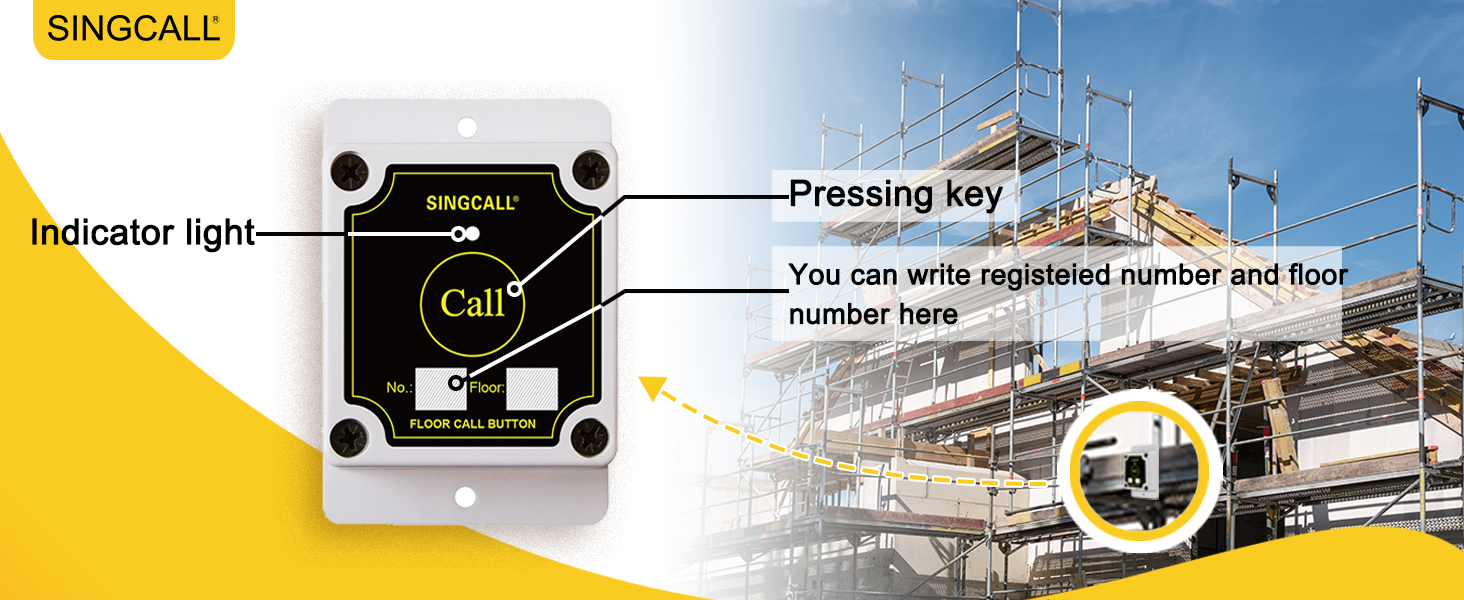
Figure 3.1: The call button with an indicator light and areas for writing the registered number and floor number.
- Naciśnij przycisk: Firmly press the large 'Call' button on the APE500 unit.
- Kontrolka: A red indicator light on the button will illuminate briefly, confirming that the signal has been sent.
3.2 Odbieranie połączenia
When a call button is pressed, the SC-R10GX receiver will alert the operator.
Video 3.1: Demonstration of the SINGCALL system in use on a construction site. A worker presses the call button, and the receiver in the elevator cabin displays the call number and sounds an alert. (Note: Actual video URL would be provided here if available.)
- Alert wizualny: The receiver's display will show the number of the calling button (e.g., '09 06' for elevator 9, floor 6). The display can show up to 3 groups of double-digit numbers simultaneously.
- Alarm dźwiękowy: The receiver will emit an audible alert based on the selected prompt mode: Dingdong, Alarming sound, or a voice report (e.g., "09 06 calling").
- Acknowledge Call: The elevator operator should acknowledge the call and proceed to the designated floor.
4. Pielęgnacja i konserwacja
Proper care ensures the longevity and reliable performance of your SINGCALL system.
- Czyszczenie: Wipe the call button and receiver with a soft, damp płótno. Nie używaj ostrych środków chemicznych ani ściernych środków czyszczących.
- Pielęgnacja baterii (odbiornik): The SC-R10GX receiver has a built-in storage battery. For optimal battery life, avoid fully discharging the battery frequently. Charge it regularly, especially during extended periods of non-use.
- Ochrona środowiska: While the APE500 call button is waterproof and durable, avoid exposing it to extreme temperatures or direct impact if possible.
- Zakłócenia sygnału: Ensure the receiver is not placed near large metal objects or other devices that may cause wireless interference.
5. Rozwiązywanie Problemów
If you encounter issues with your SINGCALL system, refer to the table below for common problems and solutions.
| Problem | Możliwa przyczyna | Rozwiązanie |
|---|---|---|
| Receiver does not display call. | Call button not paired; Out of range; Receiver off/low battery. | Ensure button is paired (Section 2.3). Move receiver closer to button. Check receiver power and battery. |
| Brak dźwięku z odbiornika. | Volume too low; Mute activated; Speaker malfunction. | Adjust receiver volume. Check receiver settings for mute. Contact support if speaker is faulty. |
| Call button indicator light does not illuminate. | Button malfunction; Internal battery depleted (if applicable). | Test with another button if available. Contact support for replacement. |
| Krótki zasięg transmisji. | Obstructions; Interference; Antenna not extended. | Ensure clear line of sight. Extend receiver antenna fully. Relocate receiver away from interference sources. |
6. Specyfikacje techniczne
| Funkcja | Specyfikacja |
|---|---|
| Call Button Model | APE500 |
| Model odbiornika | SC-R10GX |
| Call Button Durability | 360-degree waterproof, sun-protection, dust proof, anti-knock |
| Odległość transmisji | 150 ft (in building), 3000 ft (open air) |
| Wyświetlacz odbiornika | Displays 3 groups of double-digit numbers simultaneously |
| Receiver Prompt Modes | Dingdong, Alarming sound, Voice report |
| Receiver Pager Capacity | Up to 199 pagers |
| Żywotność baterii odbiornika | 5-6 hours standby (storage battery) |
| Product Dimensions (Call Button) | 3.54 x 2.36 x 1.18 cala |
| Producent | EASTWAY INTERNATIONAL (HK) LIMITED |
7. Gwarancja i wsparcie
For warranty information, technical support, or service inquiries, please contact SINGCALL customer service through your purchase platform or the official SINGCALL website. Please have your product model number (APE500) and purchase details ready.
Ask a question about this manual
Ask about setup, troubleshooting, compatibility, parts, safety, or missing instructions. Manuals+ will review the question and use this page’s manual context to help answer it.