
1. Wprowadzenie
The Abestorm DecDust 1080IG is an advanced air filtration system designed to improve air quality in various environments such as workshops, garages, and during home renovations. It features a 270-degree air intake, a powerful vortex fan, and a built-in ionizer to efficiently capture dust and fine particles. This manual provides essential information for the safe and effective use of your air filtration system.
2. Informacje dotyczące bezpieczeństwa
Przed użyciem urządzenia należy uważnie przeczytać wszystkie instrukcje bezpieczeństwa.
- Upewnij się, że zasilanie jest zgodne z wymaganiami urządzenia.
- Nie używaj urządzenia z uszkodzonym przewodem zasilającym lub wtyczką.
- Trzymaj ręce i luźną odzież z dala od ruchomych części.
- Nie używać na mokro lub damp warunki.
- Unplug the unit before performing any maintenance or cleaning.
- This product is not suitable for use in California due to specific regulatory requirements.
3. Zawartość opakowania
Sprawdź, czy w opakowaniu znajdują się wszystkie elementy:
- Abestorm DecDust 1080IG Air Filtration System
- MERV-11 Filters (3 included)
- Pilot zdalnego sterowania (wymaga 2 baterii AA, brak w zestawie)
- Mounting Hardware (chains, hooks, screws, anchors)
- Instrukcja obsługi

Image: Contents of the Abestorm DecDust 1080IG package, showing the main unit, three MERV-11 filters, a remote control, and various mounting accessories like chains, hooks, and screws.
4. Konfiguracja i instalacja
The DecDust 1080IG offers multiple installation options to suit your workspace:
- Suspended by Chain: Ideal for overhead placement to maximize air circulation. Use the provided chains and hooks to hang the unit securely from a ceiling or sturdy support structure.
- Flatwise Placement: Place the unit directly on a flat surface such as a workbench or table. Ensure stable positioning.
- Mounted with Screws: Secure the unit to a wall using the provided screws and anchors. Ensure the wall can support the unit's weight.
- Umiejscowienie pionowe: Position the unit upright on the floor or a stable surface.
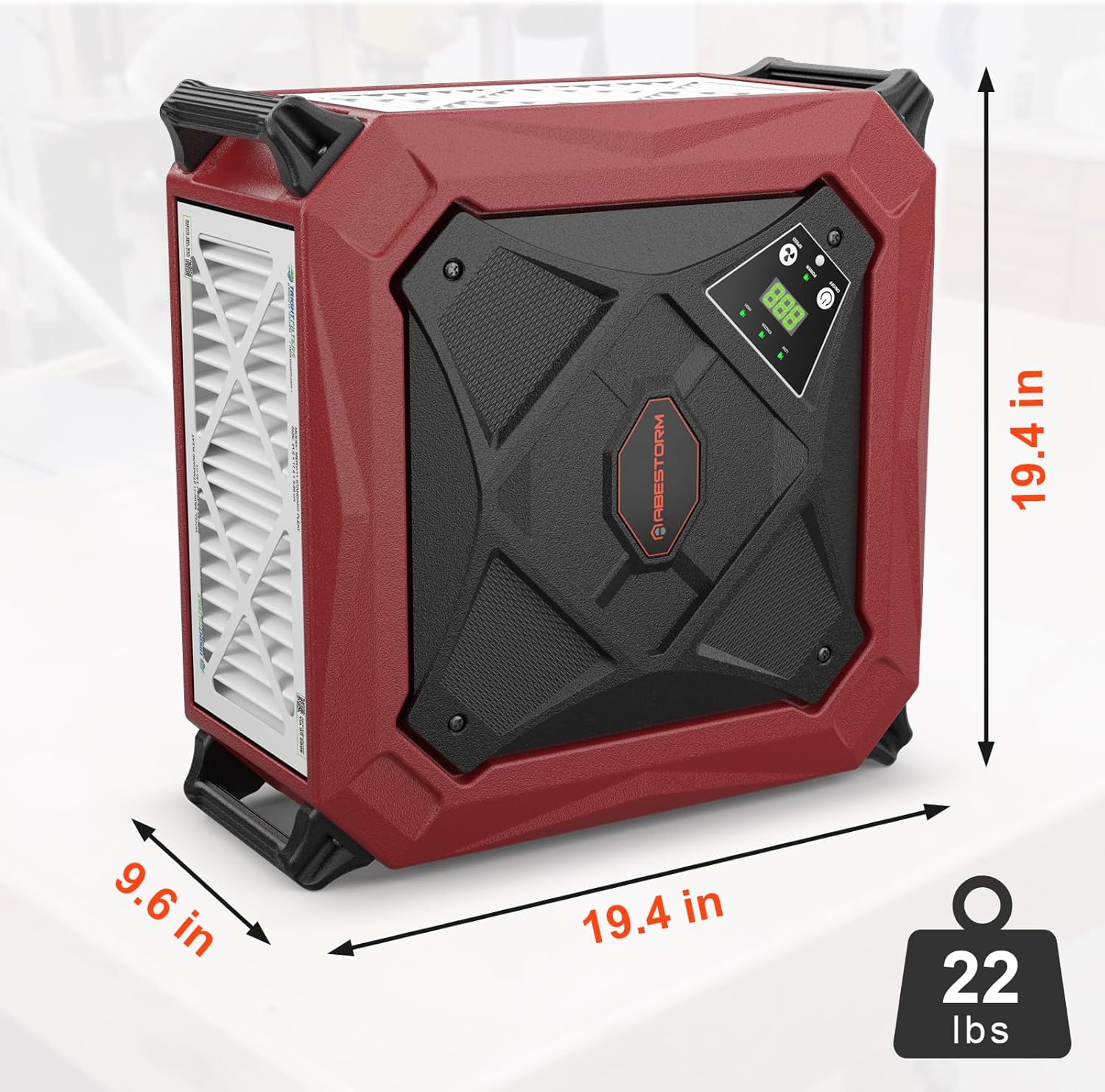
Image: Visual representation of the four different ways to install the air filtration system: hanging from chains, resting flat on a surface, mounted on a wall, and standing vertically.
After installation, plug the unit into a standard electrical outlet. The unit is designed for portability with sturdy handles on all four corners, making it easy to move between locations.
5. Instrukcja obsługi
The DecDust 1080IG can be operated via its intuitive control panel or the included remote control.
5.1 Panel sterowania i pilot
The control panel features buttons for power, speed adjustment, and ionizer activation. The remote control allows for convenient operation from up to 26 feet away.

Image: The unit's control panel with an LED display and buttons for On/Off, Power, and Speed. An infrared remote control is also shown, indicating a range of up to 26 feet.
- Przycisk zasilania: Naciśnij, aby włączyć lub wyłączyć urządzenie.
- Przycisk prędkości: Toggle between two fan speeds: Low (780 CFM) and High (1080 CFM).
- Przycisk jonizatora: Activate or deactivate the built-in ionizer.
- Regulator czasowy: Set the operating time from 1 to 9 hours using the remote control.
5.2 Ionization Technology
The built-in ionizer charges dust particles, improving their capture efficiency by the filters. This process helps to minimize filter clogging and extends filter lifespan. It also contributes to energy savings and reduced noise levels.

Image: A visual explanation of the built-in ionizer, depicting how it charges fine dust particles for enhanced capture and improved air quality.
5.3 Airflow and Filtration
The unit features a 270-degree air intake and a powerful vortex fan, providing a large airflow of up to 1080 CFM. It is equipped with three MERV-11 filters that effectively capture fine particles, wood dust, and other airborne contaminants.

Image: The air filtration system operating in a workshop, demonstrating its 270-degree air intake and the movement of air through the filters.
Video: An official product video demonstrating the features and operation of the Abestorm DecDust 1080IG Shop Dust Collector with its built-in ionizer.
The unit also offers an outlet ducting option for directed emission control, helping to prevent secondary pollution. This is suitable for ducts under 10 inches. Please measure your outlet size before purchasing ducts.

Image: The air filtration system with an attached outlet duct, illustrating how filtered air can be directed to prevent secondary contamination in the workspace.
6. Konserwacja
Regular maintenance ensures optimal performance and extends the lifespan of your air filtration system.
- Wymiana filtra: The unit is designed for easy filter removal and replacement. Check filters regularly and replace them when they appear dirty or when airflow is noticeably reduced. The MERV-11 filters are crucial for effective particle capture.
- Czyszczenie: Wipe the exterior of the unit with a dry cloth. Do not use abrasive cleaners or allow water to enter the internal components.
- Worek przeciwkurzowy: If using dust bags (not explicitly mentioned as included but implied by "dust bags that can be quickly removed and replaced"), ensure they are emptied or replaced regularly.
7. Rozwiązywanie Problemów
If you encounter issues with your Abestorm DecDust 1080IG, refer to the following common problems and solutions:
| Problem | Możliwa przyczyna | Rozwiązanie |
|---|---|---|
| Jednostka się nie włącza. | No power, loose connection, remote batteries dead. | Check power cord connection. Ensure outlet is functional. Replace remote control batteries. |
| Zmniejszony przepływ powietrza. | Zatkane filtry. | Inspect and replace MERV-11 filters. |
| Nietypowy dźwięk podczas pracy. | Obstruction in fan, loose components. | Turn off and unplug the unit. Carefully check for any obstructions. If noise persists, contact customer support. |
| Ionizer not working. | Ionizer feature deactivated, malfunction. | Ensure the ionizer is activated via the control panel or remote. If still not working, contact customer support. |
8. Specyfikacje
| Funkcja | Szczegół |
|---|---|
| Numer modelu | DecDust 1080IG |
| Wymiary produktu | 19.4 x 9.6 x 19.4 cala |
| Waga przedmiotu | 30.25 Pounds (Unit weight: 22 lbs) |
| Przepływ powietrza (CFM) | Do 1080 CFM |
| Typ filtra | MERV-11 |
| Rozmiar retencji cząstek | 0.3 mikronów |
| Metoda kontroli | Pilot zdalnego sterowania, panel na urządzeniu |
| Źródło zasilania | AC |
| Cotage | 62 watów |
| Cechy specjalne | 270-degree air filtration system, Built-in ionizer |
| Pokrycie powierzchni podłogi | Do 1100 stóp kwadratowych |
| Baterie do pilota | 2 baterie AA (brak w zestawie) |
| Orzecznictwo | Certyfikat UL |

Image: The physical dimensions of the unit, showing its height, width, depth, and weight.
9. Gwarancja i wsparcie
For warranty information or technical support, please contact Abestorm customer service. Refer to the contact details provided on the product packaging or the official Abestorm webstrona.
Notatka: This product is not intended for use in California due to state-specific regulatory requirements. Orders from California cannot be shipped.