
Wstęp
This manual provides essential information for the proper setup, operation, and maintenance of your shenruifa Handheld Game Console (Model: shenruifagn3owcx0bz-69). Please read this manual thoroughly before using the device to ensure optimal performance and longevity.
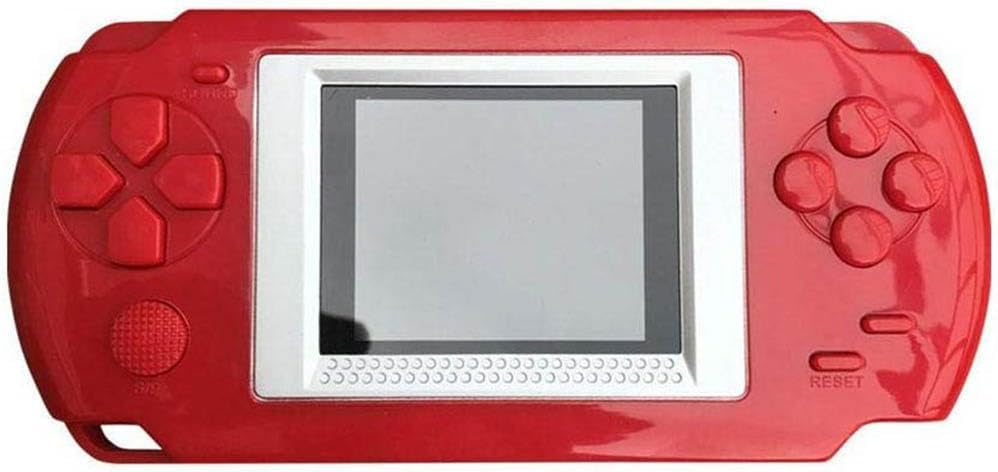
Obraz: Przód view of the shenruifa Handheld Game Console, showcasing jego czerwony casing and central screen.
Zawartość opakowania
Sprawdź, czy w opakowaniu znajdują się wszystkie elementy:
- shenruifa Handheld Game Console (Model: shenruifagn3owcx0bz-69)
Notatka: Do działania urządzenia wymagane są 3 baterie AAA, które nie są dołączone do zestawu.
Urządzenie ponadview
Familiarize yourself with the console's buttons and features:

Obraz: przód i tył view of the console with labels for Volume button, Switch, Arrow keys, Function keys, Power button, Start/pause key, Reset key, 2.0 inch eye protection screen, Horn, and Battery compartment.
- Przycisk głośności: Dostosowuje wyjście audio.
- Przełącznik: Włącznik/wyłącznik zasilania.
- Klawisze strzałek: Directional controls for gameplay and menu navigation.
- Klawisze funkcyjne: Przyciski akcji dla poleceń w grze.
- Przycisk zasilania: Secondary power control or menu function.
- Start/pause key: Initiates games or pauses gameplay.
- Klawisz resetowania: Restarts the console or current game.
- 2.0 inch eye protection: The main display screen.
- Klakson: Głośnik do wyjścia audio.
- Komora baterii: Znajduje się z tyłu i służy do instalacji baterii AAA.
Organizować coś
- Zainstaluj baterie:
- Znajdź komorę baterii z tyłu konsoli.
- Otwórz pokrywę komory baterii.
- Włóż 3 nowe baterie AAA, zwracając uwagę na prawidłową biegunowość (+/-).
- Dokładnie zamknij pokrywę komory baterii.
- Włączanie:
- Slide the 'Switch' to the ON position.
- Press the 'Power button' if the screen does not immediately illuminate.
Instrukcja obsługi
- Wybór gry:
- Upon powering on, the console will display a game menu.
- Use the 'Arrow keys' to navigate through the list of 268 built-in games.
- Press the 'Start/pause key' or a designated 'Function key' to select and begin a game.
- Rozgrywka:
- Use the 'Arrow keys' for movement and 'Function keys' for actions within the game.
- Press the 'Start/pause key' during gameplay to pause or resume.
- Regulacja głośności:
- Use the 'Volume button' to increase or decrease the sound level.
- Resetting the Console/Game:
- To restart the current game or return to the main menu, press the 'Reset key'.
- Wyłączone:
- Slide the 'Switch' to the OFF position to power down the console.
- Wybór języka:
- The console supports Chinese and English languages. Refer to the on-screen menu for language selection options, typically found in the settings or initial boot screen.
Konserwacja
- Czyszczenie: Wipe the console with a soft, dry cloth. Avoid using liquid cleaners or abrasive materials, as they may damage the flame-retardant ABS material or screen.
- Pielęgnacja baterii: If the console will not be used for an extended period, remove the AAA batteries to prevent leakage and potential damage to the device.
- Składowanie: Przechowuj konsolę w chłodnym, suchym miejscu, z dala od bezpośredniego światła słonecznego i ekstremalnych temperatur.
- Ochrona ekranu: The 2.0 inch screen is designed for eye protection. Avoid pressing on the screen or exposing it to sharp objects.
Rozwiązywanie problemów
- Konsola się nie włącza:
- Upewnij się, że baterie są prawidłowo zainstalowane, z zachowaniem właściwej polaryzacji.
- Wymień stare baterie na nowe baterie AAA.
- Confirm the 'Switch' is in the ON position.
- Ekran jest pusty lub migocze:
- Sprawdź poziom naładowania baterii i wymień ją, jeśli jest bliska rozładowania.
- Try pressing the 'Reset key'.
- Brak dźwięku:
- Adjust the 'Volume button'.
- Ensure the game itself has sound enabled (if applicable).
- Przyciski nie reagują:
- Try pressing the 'Reset key' to restart the game or console.
- Ensure the console has sufficient battery power.
Specyfikacje
| Numer modelu | shenruifagn3owcx0bz-69 |
| Marka | shenruifa |
| Tworzywo | ABS ognioodporny |
| Ekran | 2.0 inch TFT HD LCD Color Screen |
| Wbudowane gry | 268 Classic Retro Games |
| Źródło zasilania | Baterie 3 x AAA (brak w zestawie) |
| Console Dimensions (approx.) | 21 cm x 9.8 cm x 4.7 cm (8.27 cala x 3.86 cala x 1.85 cala) |
| Screen Dimensions (approx.) | 3.7 cm x 3.4 cm (1.46 cala x 1.34 cale) |
| Waga przedmiotu | 3.77 uncji (około 107 gramów) |
Informacje o gwarancji
No specific warranty information is provided with this product. Please refer to your point of purchase or retailer for details regarding their return or warranty policies.
Wsparcie
For further assistance or inquiries, please contact the retailer from whom you purchased this product. No direct manufacturer support contact information is provided in the product details.