
1. Wprowadzenie
Welcome to the WONNIE DC105P Digital Camera user manual. This guide provides essential information for setting up, operating, and maintaining your new camera. Designed for ease of use, this camera captures vivid 56MP photos and Full HD 1080P videos, making it perfect for young photographers to explore their creativity.
2. Informacje dotyczące bezpieczeństwa
- Nie wystawiaj aparatu na działanie wody i ekstremalnych temperatur.
- Trzymaj aparat z dala od silnych pól magnetycznych.
- Należy używać wyłącznie wskazanych baterii i kabla ładującego.
- Unikaj upuszczania aparatu i narażania go na silne uderzenia.
- Obiektyw należy czyścić miękką, suchą szmatką.
3. Co znajduje się w pudełku
Upon unboxing your WONNIE DC105P Digital Camera, please ensure all the following items are present:
- WONNIE DC105P Digital Camera
- Karta 32GB TF
- Akumulatory (x2)
- Kabel USB typu C
- Falrep
- Torba do przechowywania
- Instrukcja obsługi (ten dokument)
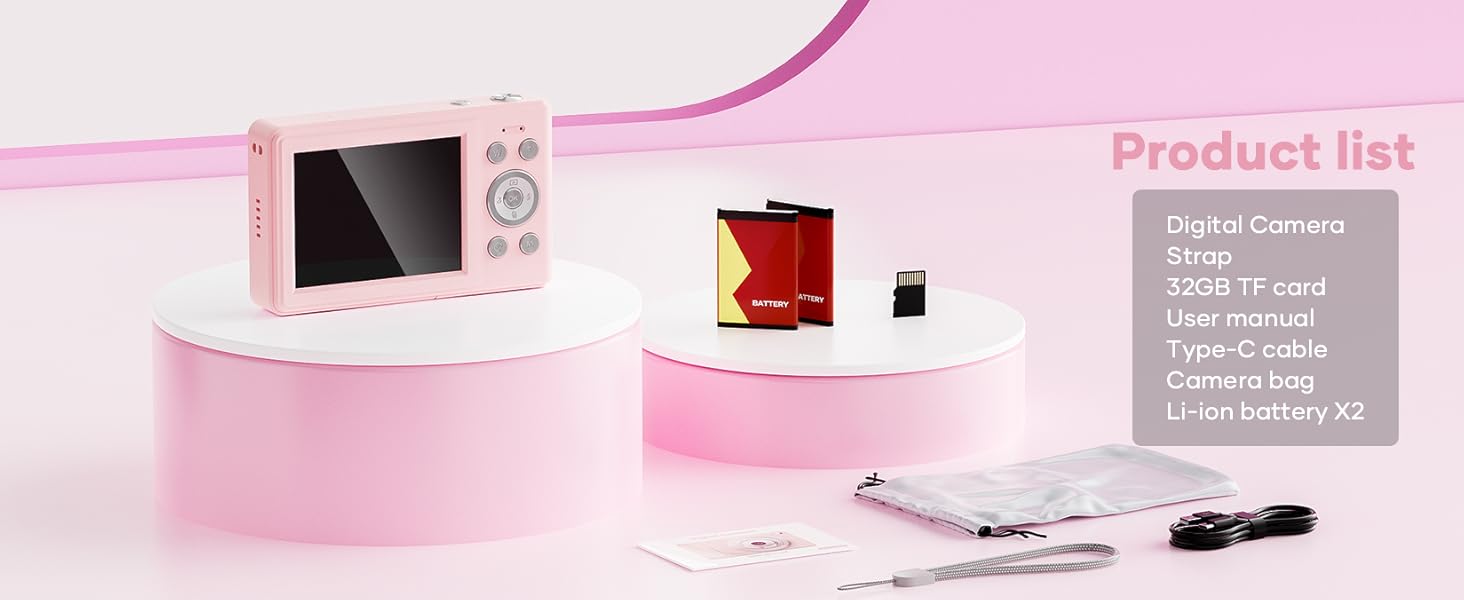
This image displays the WONNIE DC105P Digital Camera alongside its accessories: two rechargeable batteries, a 32GB TF card, a Type-C USB cable, a lanyard, and a soft storage bag, all neatly arranged.
4. Koniec produktuview
Zapoznaj się z podzespołami i elementami sterowania aparatu.
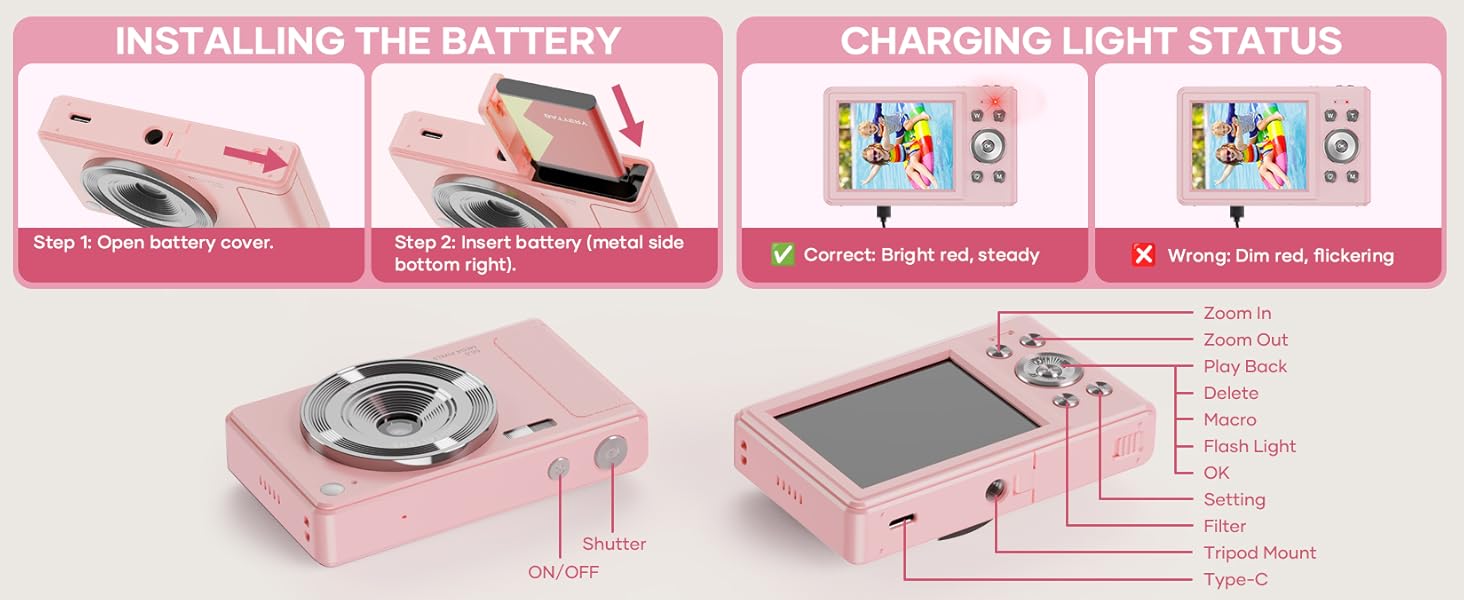
This diagram highlights the various buttons and ports on the WONNIE DC105P Digital Camera, including the power button, shutter button, zoom controls, playback button, menu button, OK button, flash light, tripod mount, and Type-C port.
Kluczowe komponenty:
- Obiektyw: Przechwytuje obrazy i filmy.
- Błysk: Zapewnia oświetlenie w warunkach słabego oświetlenia.
- Spust migawki: Naciśnij, aby zrobić zdjęcie lub rozpocząć/zatrzymać nagrywanie wideo.
- Przycisk zasilania: Włącza lub wyłącza kamerę.
- Ekran LCD: Wyświetla na żywo view, menu i odtwarzanie.
- Przyciski nawigacyjne (góra/dół/lewo/prawo/OK): Służy do nawigacji po menu i wybierania opcji.
- Przyciski zoomu (szer./wys.): Dostosowuje zoom cyfrowy.
- Przycisk odtwarzania: Wchodzi w tryb odtwarzania view przechwycone media.
- Przycisk menu: Dostęp do ustawień aparatu.
- Port typu C: Do ładowania i przesyłania danych.
- Mocowanie do statywu: Do mocowania kamery na statywie.
5. Konfiguracja
5.1 Instalacja baterii
- Otwórz pokrywę komory baterii znajdującą się z boku aparatu.
- Insert the rechargeable battery with the metal contacts facing down and to the right, ensuring it clicks into place.
- Dokładnie zamknij pokrywę komory baterii.
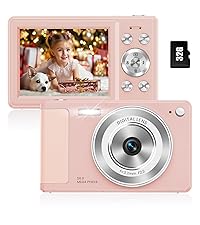
This image illustrates the two steps for battery installation: first, opening the battery cover, and second, inserting the battery with the metal side facing down and to the right.
5.2 Instalacja karty SD
The camera supports a 32GB TF (Micro SD) card. Insert the TF card into the designated slot in the battery compartment until it clicks.
5.3 Ładowanie akumulatora
- Podłącz kamerę do źródła zasilania za pomocą dołączonego kabla USB typu C.
- The charging indicator light will show the charging status. A bright red, steady light indicates correct charging. A dim, flickering light indicates an issue.
This image displays the camera's charging light status: a bright red, steady light for correct charging, and a dim, flickering light indicating an incorrect status.
5.4 Mocowanie smyczy
Thread the lanyard through the designated loop on the camera body to prevent accidental drops.
6. Obsługa aparatu
6.1 Włączanie/wyłączanie zasilania
Press and hold the Power button (labeled ON/OFF) on the top of the camera to turn it on or off.
6.2 Robienie zdjęć
In photo mode, frame your shot using the LCD screen and press the Shutter button to capture an image. The camera features 56MP resolution for clear photos.

This image shows a child holding the pink WONNIE DC105P Digital Camera, with the screen displaying a photo of children. Other children are in the foreground, emphasizing the camera's ease of use for capturing vibrant 56MP photos and smooth FHD 1080P videos.
Special Photo Features:
- 16-krotny zoom cyfrowy: Use the 'W' and 'T' buttons to zoom in or out.
- 20 Fun Filters: Apply various creative filters to your photos via the menu.
- Samowyzwalacz: Set a delay (2s, 5s, 10s) before taking a photo, ideal for group shots.
- Continuous Shooting (Burst Mode): Capture a rapid sequence of 3 photos.
- Przeciwwstrząsowy: Cyfrowa stabilizacja obrazu pomaga ograniczyć rozmycie obrazu spowodowane ruchem aparatu.
- Wypełnij światło: Activate the built-in fill light for brighter photos in dim environments. (Note: Fill light won't activate in macro mode or when battery is too low.)
- Smile Recognition: Automatycznie robi zdjęcie po wykryciu uśmiechu.

This image showcases three key features: Self Timer for perfect selfies, Continuous Shooting to capture every moment, and Anti Shake for steady shots.

This image illustrates the camera's 16x digital zoom capability with examples at 4x, 8x, and 16x, alongside a selection of 20 fun filters like Normal, Cold Filter, Warm Filter, and more, for endless creativity.
6.3 Nagrywanie filmów
Switch to video mode (usually indicated by a camcorder icon in the menu) and press the Shutter button to start recording. Press again to stop. Videos are recorded in FHD 1080P with a built-in microphone.
6.4 Playback/Vieww mediach
Press the Playback button to enter playback mode. Use the navigation buttons to scroll through your photos and videos. Press the OK button to play videos.
6.5 Przenoszenie Files
You have several options to transfer your media:
- USB do komputera: Connect the camera to your computer using the Type-C cable. The camera will appear as a removable disk.
- OTG to Phone: Use a compatible OTG cable adapter (sold separately) to connect the camera to your smartphone (e.g., iPhone 15, Samsung).
- Czytnik kart: Remove the TF card and insert it into a card reader to transfer files to a computer or phone.

This image illustrates three convenient ways to view and transfer media: directly connecting the camera via USB to a PC, using an OTG adapter to connect to a smartphone, or using a card reader with a smartphone.
6.6 WebFunkcjonalność kamery
Connect the camera to a computer via the Type-C USB cable. Select 'Webcam' mode on the camera (if prompted) to use it for video calls or live streaming.

This image demonstrates the WONNIE DC105P Digital Camera's capability to function as a webcam, showing it mounted on a laptop for a video call and for live streaming.
7. Demonstracja wideo
Ten film przedstawia ogólny przeglądview of the WONNIE Digital Camera, highlighting its features and suitability for kids and teens.
This video offers an introduction to the digital camera, demonstrating its basic functions and design.
8. Konserwacja
- Czyszczenie: Use a soft, lint-free cloth to clean the camera body and screen. For the lens, use a specialized lens cleaning cloth and solution.
- Składowanie: Store the camera in its provided storage bag in a cool, dry place away from direct sunlight and humidity. Remove the battery if the camera will not be used for an extended period.
- Pielęgnacja baterii: Fully charge batteries before first use. Avoid completely draining the battery frequently to prolong its lifespan.
9. Rozwiązywanie Problemów
| Problem | Możliwe rozwiązanie |
|---|---|
| Kamera się nie włącza. | Upewnij się, że bateria jest prawidłowo włożona i całkowicie naładowana. |
| Nie można robić zdjęć/nagrywać filmów. | Check if the SD card is inserted correctly and has sufficient free space. Ensure the battery is not critically low. |
| Obrazy są niewyraźne. | Ensure the lens is clean. Use the anti-shake feature. Hold the camera steady while shooting. |
| Nie można przenieść filedo komputera/telefonu. | Verify the USB cable connection. Ensure the camera is in the correct mode for data transfer (if prompted). Try a different USB port or cable. For phones, ensure OTG compatibility and adapter. |
| Charging indicator is flickering. | Refer to Figure 5.2 for correct charging status. Re-insert the cable or try a different power source. |
10. Specyfikacje
| Funkcja | Szczegół |
|---|---|
| Rozdzielczość czujnika fotograficznego | 56 MP |
| Rozdzielczość wideo | 1080p FHD |
| Zoom optyczny | 16-krotny zoom cyfrowy |
| Rozmiar ekranu | 2.8-calowy wyświetlacz LCD |
| Stabilizacja obrazu | Cyfrowy |
| Nośniki pamięci | 32GB TF Card (included), Max 32GB supported |
| Łączność | OTG, USB Type-C |
| Cechy specjalne | Czas Stamp, Anti-shake, Time-lapse, Continuous Shoot, Face Detection, Self-timer, Webcam, Filter Effect, Fill light, Selfie mirror, Auto Shut-off, Built-in Microphone |
| Waga przedmiotu | 0.22 kilograma (ok. 0.48 funty) |
| Wymiary | Około 3.8 x 0.78 x 2.4 cala (na podstawie obrazu) |
| Typ baterii | Lithium Ion (1000mAh, 3.8V) |
11. Gwarancja i wsparcie
Your WONNIE DC105P Digital Camera comes with a 1-letnia gwarancja. We are committed to providing excellent customer service and offer a hassle-free replacement policy. For any inquiries, missing accessories, or support needs, please contact our customer service team. We aim to respond within 24 hours.
For further assistance, please visit the official WONNIE Store on Amazon: WONNIE Store