
1. Wprowadzenie
Thank you for choosing the Pomya Mechanical Gaming Keyboard. This 68-key wired keyboard is designed for a comfortable and responsive typing experience, suitable for both gaming and office use. It features an ergonomic design, ice blue backlighting with multiple modes, a detachable cable, and hot-swappable switches for customization.
This manual provides essential information for the proper installation, operation, and maintenance of your keyboard. Please read it thoroughly before use.

Image: The Pomya Mechanical Gaming Keyboard, featuring its compact 68-key layout, ice blue backlighting, and a close-up of a blue mechanical switch.
2. Zawartość opakowania
Sprawdź zawartość paczki, aby upewnić się, że wszystkie przedmioty znajdują się w opakowaniu i są w dobrym stanie:
- 1 x 68-Key Mechanical Keyboard
- 1 x narzędzie do zdejmowania nasadek klawiszy
- 1 x Data Cable (USB-A to USB-C, 5.7ft)
- 1 x Instrukcja obsługi (ten dokument)
- 3 x Blue Switches (spare)

Image: All items included in the product package: the keyboard, detachable USB cable, keycap puller, and three spare blue switches.
3. Konfiguracja
- Rozpakuj klawiaturę: Ostrożnie wyjmij klawiaturę i wszystkie akcesoria z opakowania.
- Connect the Data Cable:
- Znajdź port USB-C z tyłu lub z boku klawiatury.
- Insert the USB-C end of the provided data cable into the keyboard's port.
- Insert the USB-A end of the data cable into an available USB port on your computer (desktop PC, laptop, etc.).
- Rozpoznawanie systemu: Komputer powinien automatycznie wykryć i zainstalować niezbędne sterowniki klawiatury. Zazwyczaj nie jest wymagana instalacja dodatkowego oprogramowania.
- Umieszczenie: Position the keyboard on a stable, flat surface. Adjust the kickstands on the bottom of the keyboard for your preferred typing angle, if available.

Image: Detail of the USB-C port on the keyboard, illustrating where the detachable cable connects.
4. Instrukcja obsługi
4.1 Podstawowe funkcje klawiatury
The keyboard functions as a standard 68-key layout. All keys are anti-ghosting, ensuring accurate input even during rapid key presses.
4.2 Backlight Control (Ice Blue)
The keyboard features an ice blue backlight with over 19 different lighting modes. Use the following key combinations to control the backlight:
- Fn + \ |: Cycle through the 19+ different backlight modes.
- Fn + ↑: Zwiększ jasność podświetlenia.
- Fn + ↓: Zmniejsz jasność podświetlenia.
- Fn + ←: Decrease backlight speed (for dynamic modes).
- Fn + →: Increase backlight speed (for dynamic modes).

Obraz: z góry view of the keyboard, showing the key layout and compact design.
4.3 Klawisze multimedialne i funkcyjne
Many keys have secondary functions accessible via the Fn key. Refer to the keycaps for specific icons indicating these functions (e.g., F1-F12, media controls).
| Połączenie | Funkcjonować |
|---|---|
| Fn+F1-F12 | Standard F-key functions (e.g., F1 for Help, F5 for Refresh). |
| Fn + Q/W/E/R/T/Y | Specific multimedia controls (check keycap legends). |
| Fn + Win | Klawisz blokowania/odblokowywania systemu Windows. |
4.4 Przełączniki z możliwością wymiany na gorąco
This keyboard features hot-swappable switches, allowing you to change the mechanical switches without soldering. This enables customization of typing feel and sound.
- Usuń nakładkę klawisza: Za pomocą dołączonego ściągacza nakładek klawiszy ostrożnie zdejmij wybraną nakładkę klawisza.
- Usuń przełącznik: Use a switch puller (not included, but often comes with spare switches or can be purchased separately) to carefully pull the switch straight up from the PCB.
- Włóż nowy przełącznik: Align the pins of the new switch with the holes on the PCB. Press the switch firmly until it clicks into place. Ensure pins are not bent.
- Wymień nasadkę klawisza: Załóż nakładkę klawisza z powrotem na nowy przełącznik.
Notatka: The keyboard comes with blue switches installed and three spare blue switches. Ensure replacement switches are compatible with the keyboard's PCB (typically 3-pin or 5-pin MX-style switches).
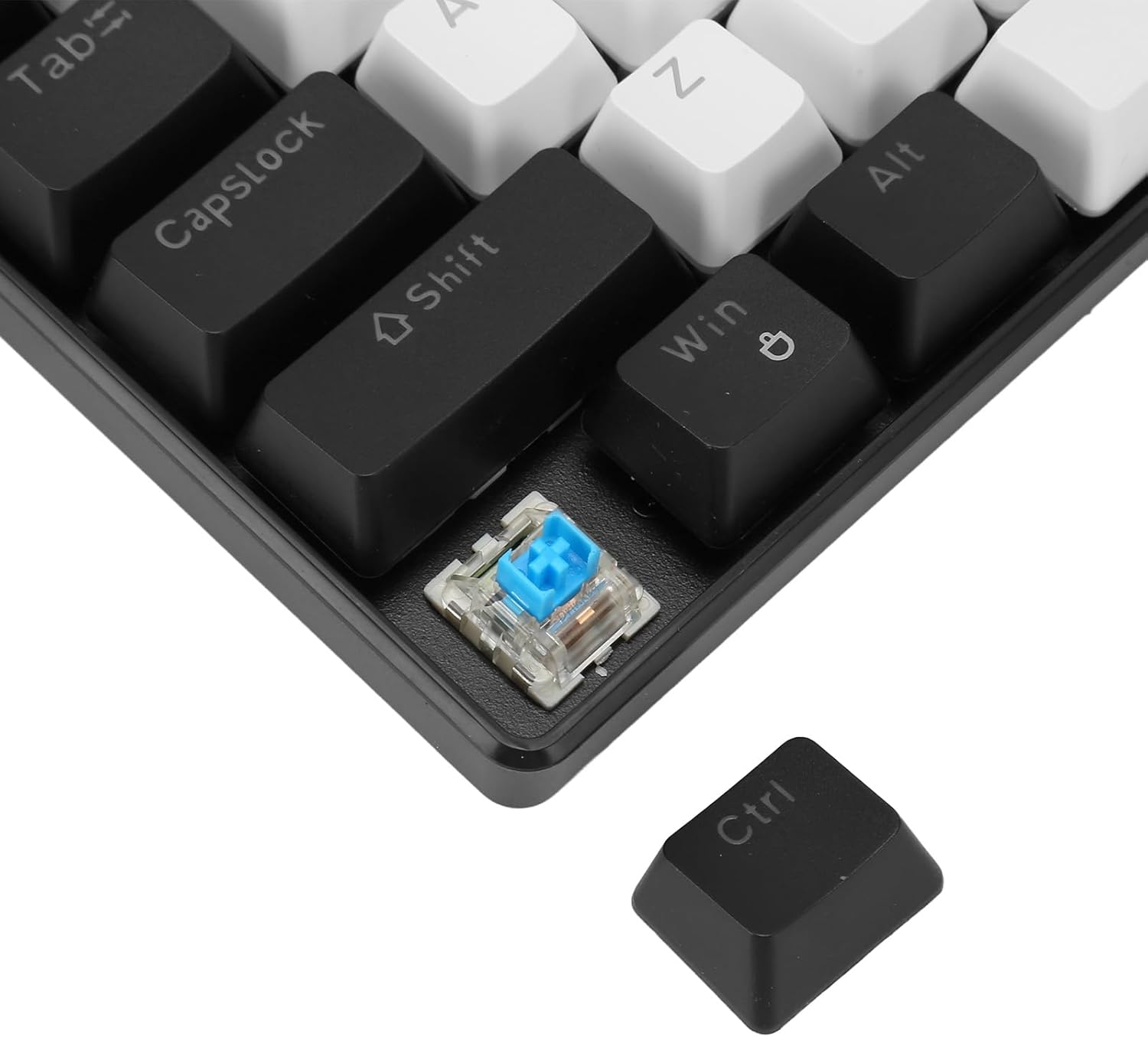
Obraz: szczegółowy view showing a mechanical switch detached from the keyboard, alongside a keycap, illustrating the hot-swappable design.
5. Konserwacja
- Czyszczenie:
- Przed czyszczeniem odłącz klawiaturę od komputera.
- Do czyszczenia powierzchni klawiatury należy używać miękkiej, suchej ściereczki.
- For deeper cleaning, use a keycap puller to remove keycaps and compressed air to clear dust and debris from between the switches.
- Keycaps can be cleaned with mild soap and water, then thoroughly dried before reattaching.
- Pielęgnacja kabli: The detachable cable should be handled with care. Avoid sharp bends or excessive pulling to prevent damage.
- Składowanie: Przechowuj klawiaturę w czystym, suchym miejscu, z dala od ekstremalnych temperatur i bezpośredniego światła słonecznego, jeśli nie używasz jej przez dłuższy czas.
6. Rozwiązywanie Problemów
| Problem | Rozwiązanie |
|---|---|
| Klawiatura nie odpowiada. |
|
| Podświetlenie nie działa lub jest zablokowane. |
|
| Certain keys not registering input. |
|
7. Specyfikacje
| Funkcja | Szczegół |
|---|---|
| Numer modelu | Pomya0f5gohme46-11 |
| Marka | Pomya |
| Typ połączenia | Wired (USB-C detachable cable) |
| Liczba kluczy | 68 Keys (Full Anti-Ghosting) |
| Typ przełącznika | Blue Mechanical Switches (Hot-swappable) |
| Życie naciśnięcia klawisza | 50 Million keystrokes |
| Podświetlenie | Ice Blue (19+ modes) |
| Proces nasadki klawiszy | Double Color Injection Molding |
| Długość kabla | 5.7 stóp (ok. 1.74 m) |
| Tworzywo | ABS (akrylonitryl-butadien-styren) |
| Zgodność | Windows, OS X, Linux |
| Wymiary (pakiet) | 13.39 x 5.12 x 1.97 cala |
| Waga przedmiotu | 1.52 funta |

Obraz: góra i dół views of the keyboard, detailing its design and the information label on the base.
8. Gwarancja i wsparcie
For warranty information and technical support, please refer to the documentation provided with your purchase or contact Pomya customer service through the retailer where the product was purchased. Keep your proof of purchase for warranty claims.
Wsparcie online: Visit the official Pomya store page on Amazon for additional product information and support resources: Pomya Amazon Store