
DWVO MADWV9pJNh
DWVO Height Adjustable Drawing Desk
Model: MADWV9pJNh
Marka: DWVO
1. Wprowadzenie
Thank you for choosing the DWVO Height Adjustable Drawing Desk. This manual provides essential information for the safe assembly, operation, and maintenance of your new desk. Please read it thoroughly before use and retain it for future reference.
This versatile desk is designed to adapt to various needs, featuring a tilting tabletop, adjustable height for sitting or standing, an integrated charging station, and mobile wheels for easy relocation.
2. Wytyczne bezpieczeństwa
Aby zapewnić bezpieczną eksploatację i zapobiec uszkodzeniom, należy przestrzegać następujących zasad:
- Always follow the assembly instructions provided. Ensure the desk is fully assembled and stable before use.
- When adjusting the height, use the provided controls carefully and avoid placing heavy objects on the desk while adjusting.
- Keep the desk away from heat sources and do not place it on uneven surfaces to prevent tipping.
- Zawsze nadzoruj dzieci, gdy znajdują się w pobliżu biurka.
- Do not overload the desk or shelves beyond their intended capacity.
3. Instrukcja montażu
This product requires assembly. Please refer to the separate assembly guide included in your package for detailed, step-by-step instructions. It is recommended that one person performs the assembly. Ensure all parts are present before beginning and use the appropriate tools as specified in the assembly guide.

Figure 3.1: Detailed product dimensions of the DWVO Height Adjustable Drawing Desk, including height range, tabletop size, and storage bag dimensions.
4. Instrukcja obsługi
4.1 Regulacja wysokości
The desk features a flexible height range of 25.6 inches to 41.34 inches, allowing seamless transitions between sitting and standing positions. To adjust the height, locate the adjustment knobs on the desk legs. Loosen the knobs, carefully raise or lower the tabletop to your desired height, and then securely tighten the knobs to lock the desk in place.

Figure 4.1: Illustration demonstrating the height adjustment feature, allowing transition from sitting to standing.
4.2 Tilting Desktop
The tabletop can be adjusted to 5 different angles, from 0 to 45 degrees, providing an ergonomic surface for drawing, reading, or working. To tilt the tabletop, lift the front edge of the designated section. The integrated stopper will prevent items from sliding off when the top is tilted.
4.3 Zintegrowana stacja ładowania
The desk includes a built-in charging station with two USB ports and two standard power outlets. Connect the desk's 6.56ft power cord to a wall outlet. You can then charge your devices directly from the desk, ensuring continuous productivity.

Rysunek 4.2: Zbliżenie view of the integrated charging station with USB ports and AC outlets.
4.4 Mobility and Storage
The desk is equipped with 360-degree swivel wheels for easy movement. To move the desk, unlock the wheels. Once in the desired location, lock the wheels to ensure stability. A side storage bag and a headphone hook are provided for organizing essentials and keeping your workspace tidy.
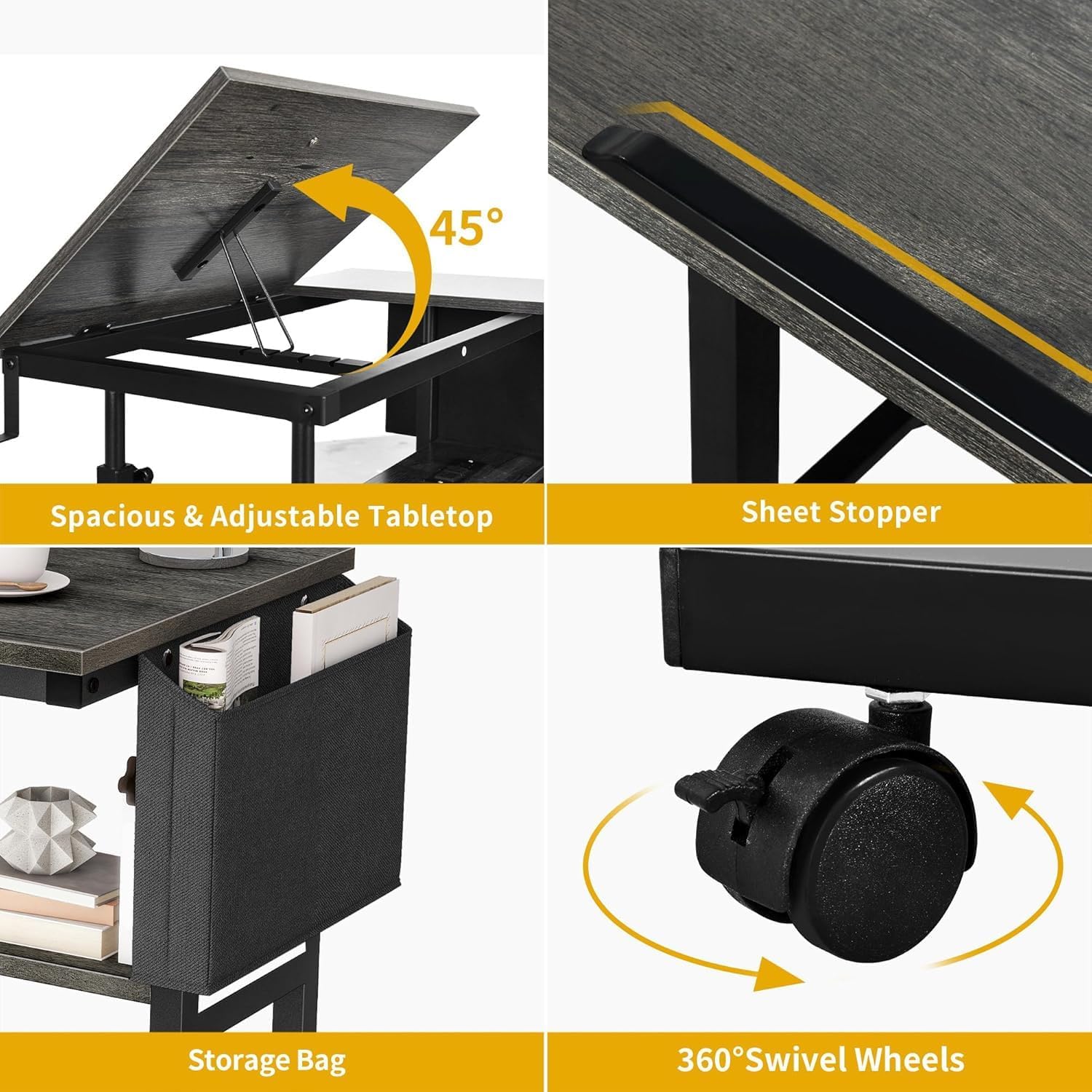
Figure 4.3: Key features including tilting tabletop, sheet stopper, storage bag, and swivel wheels.
Video 4.1: Demonstration of the DWVO Height Adjustable Drawing Desk's versatile features, including height adjustment, tilting tabletop, and portability.
5. Pielęgnacja i konserwacja
To maintain the appearance and functionality of your DWVO desk, follow these guidelines:
- Przetrzyj powierzchnie miękką, damp szmatką. Unikaj silnych środków chemicznych i ściernych środków czyszczących.
- Okresowo sprawdzaj wszystkie śruby i elementy mocujące, aby upewnić się, że są dobrze dokręcone. W razie potrzeby dokręć.
- Keep the desk away from direct sunlight and extreme temperature changes to prevent material damage.
- Sprawdź, czy przewód zasilający nie jest przyciśnięty lub uszkodzony.
6. Rozwiązywanie Problemów
If you encounter any issues with your DWVO Height Adjustable Drawing Desk, please refer to the following common solutions:
- Desk is unstable: Ensure all assembly screws are securely tightened. Check that the desk is placed on a flat, even surface. Lock the swivel wheels if they are unlocked.
- Regulacja wysokości jest trudna: Loosen the adjustment knobs sufficiently before attempting to change the height. Ensure no heavy objects are obstructing the mechanism.
- Stacja ładowania nie działa: Verify that the desk's main power cord is securely plugged into a functional wall outlet. Check for any visible damage to the cord or outlets.
- Tilting top not holding position: Ensure the tilting mechanism is properly engaged and the stopper is in place to support your items.
If problems persist, please contact DWVO customer support for assistance.
7. Specyfikacje produktu
| Funkcja | Szczegół |
|---|---|
| Marka | DWVO |
| Numer modelu | MADWV9pJNh |
| Wymiary produktu | 15.74" gł. x 31.49" szer. x 25.6" wys. |
| Waga przedmiotu | 23.6 funtów |
| Kolor | Szary |
| Styl | Regulowana wysokość |
| Materiał bazowy | Metal |
| Najlepszy rodzaj materiału | Drewno inżynieryjne |
| Minimalna wysokość | 25.6 cali |
| Maksymalna wysokość | 41.34 cali |
| Maksymalny kąt pochylenia | 45 stopni |
| Liczba półek | 1 |
| Funkcja specjalna | Portable, Charging Station, Tilting Top |
| Zawarte komponenty | Haczyk na słuchawki, torba do przechowywania |
| Wymagany montaż | Tak |
| Zalecana liczba osób do montażu | 1 |
| Gniazdka elektryczne | 2 gniazda prądu zmiennego, 2 porty USB |
8. Gwarancja i wsparcie
This DWVO product comes with a limited warranty. For specific details regarding warranty coverage, terms, and conditions, please refer to the warranty information provided with your purchase or contact DWVO customer support.
For technical support, replacement parts, or any inquiries not covered in this manual, please contact DWVO customer service through their official webstronę internetową lub dane kontaktowe znajdujące się na opakowaniu produktu.
Powiązane dokumenty - MADWV9pJNh
 |
Yaheetech 611055 Regulowany stół kreślarski ze stołkiem – instrukcja montażu Kompleksowa instrukcja montażu regulowanego stołu kreślarskiego i stołka Yaheetech 611055. Zawiera listę części, instrukcję krok po kroku oraz ważne informacje dotyczące bezpieczeństwa. |
 |
Height Adjustable C Shape Laptop Table Installation Guide Comprehensive installation guide for the Height Adjustable C Shape Laptop Table with 2 Shelves. This document provides a detailed parts list, necessary tools, and step-by-step assembly instructions for easy setup. |
 |
Instrukcja montażu i obsługi biurka stojącego FEZIBO Kompleksowa instrukcja montażu i instrukcja obsługi biurek stojących FEZIBO z elektryczną regulacją wysokości, obejmująca instalację, obsługę, rozwiązywanie problemów oraz specyfikację techniczną. Zawiera zestawienie materiałów, instrukcję montażu krok po kroku, funkcje panelu sterowania oraz informacje gwarancyjne. |
 |
Instrukcja montażu stołu kreślarskiego Yaheetech Kompleksowa instrukcja montażu stołu kreślarskiego Yaheetech (model nr 611097), zawierająca listę części, ostrzeżenia dotyczące bezpieczeństwa oraz wskazówki krok po kroku dotyczące składania biurka i stołka. |
 |
Instrukcja montażu stołu Craft o regulowanej wysokości Niniejsza instrukcja instalacji zawiera szczegółowe instrukcje montażu i obsługi stołu warsztatowego z regulacją wysokości i schowkiem. Zawiera ostrzeżenia dotyczące bezpieczeństwa, listy części, wymagania dotyczące narzędzi oraz wskazówki dotyczące obsługi funkcji regulacji wysokości biurka. |
 |
COSTWAY Elektrycznie regulowane biurko stojące – instrukcja montażu i obsługi Ten kompleksowy przewodnik zawiera instrukcje krok po kroku dotyczące montażu i obsługi biurka stojącego COSTWAY z elektryczną regulacją wysokości. Dowiedz się więcej o częściach, funkcjach kontrolera, ustawieniach i rozwiązywaniu problemów z kodami błędów. |
Ask a question about this manual
Ask about setup, troubleshooting, compatibility, parts, safety, or missing instructions. Manuals+ will review the question and use this page’s manual context to help answer it.