
1. Wprowadzenie
Thank you for choosing the himaly IF1010AR Digital Bluetooth Body Weight Scale. This scale is designed to provide accurate measurements of your body weight and various body composition metrics, including BMI, body fat, muscle mass, and more, through its integrated mobile application. Please read this manual carefully before use to ensure proper operation and to maximize the benefits of your new scale.
Ważne informacje dotyczące bezpieczeństwa
- Przed rozpoczęciem jakiejkolwiek diety lub programu ćwiczeń skonsultuj się z lekarzem.
- Do not use if you are pregnant, have a pacemaker, or other internal medical devices.
- Aby uzyskać dokładne pomiary, ustaw wagę na twardej, płaskiej powierzchni. Unikaj dywanów i nierównych podłóg.
- Powierzchnia wagi może być śliska, gdy jest mokra. Upewnij się, że powierzchnia jest sucha przed wejściem na nią.
- Nie wchodź na wagę.
- Przechowywać w miejscu niedostępnym dla dzieci.
- This scale is for household use only and not for medical diagnosis or treatment.
2. Zawartość opakowania
Sprawdź, czy w przesyłce znajdują się wszystkie elementy:
- himaly IF1010AR Digital Bluetooth Body Weight Scale
- Kabel ładujący USB
- Instrukcja obsługi (ten dokument)
3. Koniec produktuview
The himaly IF1010AR scale features a sleek design with a tempered glass surface and four high-precision sensors for accurate measurements. It includes a digital display and Bluetooth connectivity for app integration.

Rycina 3.1: Przód view of the himaly IF1010AR Digital Bluetooth Body Weight Scale, showing the display and electrode pads, alongside a smartphone displaying the companion app interface.

Rysunek 3.2: Spód view of the himaly IF1010AR scale, highlighting the four non-slip mats, the 'UNIT' button for changing measurement units, and the USB charging port.
Składniki:
- Platforma ze szkła hartowanego: The main weighing surface.
- Podkładki elektrodowe: Four metallic pads for body composition analysis.
- Cyfrowy wyświetlacz LCD: Shows weight and other basic readings.
- Przycisk JEDNOSTKA: Located on the underside, used to switch between weight units (kg/lb/st).
- Port ładowania USB: Do ładowania wewnętrznego akumulatora.
- Non-Slip Mats: Four rubber feet on the bottom for stability.
4. Konfiguracja
4.1 Ładowanie wagi
The himaly IF1010AR scale is equipped with a built-in rechargeable battery. Before first use, ensure the scale is fully charged.
- Locate the USB charging port on the underside of the scale (refer to Figure 3.2).
- Connect the provided USB charging cable to the scale and to a standard USB power adapter (not included) or a computer's USB port.
- Wyświetlacz pokaże stan ładowania. Ładuj, aż wskaźnik baterii pokaże pełny poziom.

Rysunek 4.1: Zbliżenie view illustrating the USB charging port on the side of the scale and the included USB cable for power.
4.2 Pobieranie i parowanie aplikacji
To access full body composition analysis and track your progress, download the companion app and pair it with your scale.
- Pobierz aplikację: Szukaj "Moving Life" in the Apple App Store (for iOS devices) or Google Play Store (for Android devices) and install it.
- Włącz Bluetooth: Upewnij się, że Bluetooth jest włączony w Twoim smartfonie.
- Otwórz aplikację: Launch the "Moving Life" app and follow the on-screen instructions to create your user profile.
- Połącz wagę: Step onto the scale barefoot to activate it. The app should automatically detect and connect to the scale via Bluetooth. If not, follow the app's instructions for manual pairing.

Figure 4.2: Image showing the scale's Bluetooth connectivity and icons for downloading the "Moving Life" app from Google Play and the App Store.
4.3 Wstępna kalibracja
For the most accurate first measurement, it is recommended to calibrate the scale:
- Ustaw wagę na twardej, płaskiej powierzchni.
- Lightly step on the scale until the display lights up, then step off immediately.
- The display will show "0.0" or "CAL" indicating successful calibration.
5. Instrukcja obsługi
5.1 Wykonywanie pomiaru
Follow these steps for an accurate body composition measurement:
- Upewnij się, że Twoje stopy są czyste i suche.
- Open the "Moving Life" app on your smartphone and ensure Bluetooth is active.
- Step onto the scale barefoot, placing your feet on the electrode pads. Stand still until the measurement is complete.
- Your weight will be displayed on the scale's LCD. Detailed body composition data will be sent to the app.
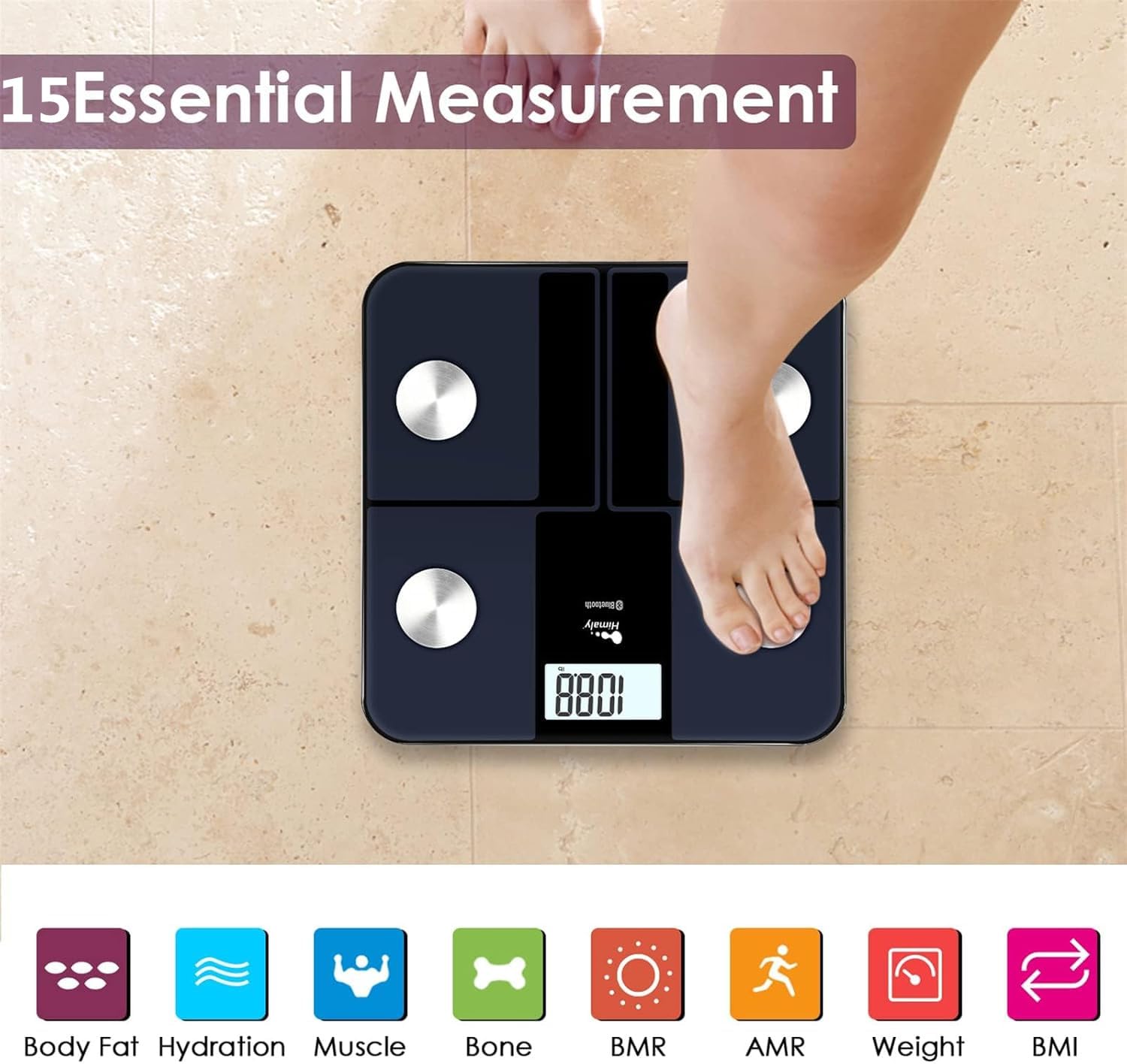
Figure 5.1: A person standing barefoot on the himaly scale, demonstrating the correct posture for obtaining 15 essential body composition measurements.
5.2 Zrozumienie wyświetlacza
The scale's LCD displays your weight. The app provides a more comprehensive breakdown of your body composition.

Figure 5.2: The scale's LCD display illustrating how different weight ranges (Thin, Slim, Normal, Heavy, Overweight) are visually represented, providing a quick reference for body type.
5.3 Multiple User Profiles
The "Moving Life" app supports multiple user profiles, allowing each family member to track their individual health data.
- W aplikacji przejdź do sekcji zarządzania użytkownikami.
- Aby dodać nowych użytkowników, wprowadź ich dane (wiek, wzrost, płeć).
- Upewnij się, że użytkownik jest właściwyfile is selected in the app before taking a measurement to ensure data is assigned correctly.
6. Zrozumienie pomiarów
The "Moving Life" app provides detailed insights into various body composition metrics. Here's a brief explanation of some key indicators:
- Masa ciała: Całkowita masa Twojego ciała.
- BMI (wskaźnik masy ciała): Miara tkanki tłuszczowej oparta na wzroście i wadze.
- Procent tkanki tłuszczowejtage: Stosunek tkanki tłuszczowej do całkowitej masy ciała.
- Masa mięśniowa: Całkowita masa mięśni w Twoim ciele.
- Hydration (Water Percentagmi): Ilość wody w organizmie.
- Masa kostna: Całkowita waga kości w Twoim ciele.
- BMR (podstawowa przemiana materii): Liczba kalorii spalanych przez organizm w stanie spoczynku.
- AMR (aktywna przemiana materii): The total calories your body burns in a day, including activity.

Figure 6.1: An illustrative graph from the app demonstrating how weight and body fat trends can be tracked over time, providing visual progress monitoring.
7. Konserwacja
7.1 Czyszczenie
- Przetrzyj powierzchnię wagi za pomocąamp szmatką i łagodnym detergentem.
- Nie należy używać środków czyszczących o właściwościach ściernych ani zanurzać wagi w wodzie.
- Przed przechowywaniem lub kolejnym użyciem należy upewnić się, że waga jest całkowicie sucha.
7.2 Przechowywanie
- Przechowuj wagę w chłodnym i suchym miejscu.
- Unikaj bezpośredniego światła słonecznego i ekstremalnych temperatur.
8. Rozwiązywanie Problemów
| Problem | Możliwa przyczyna | Rozwiązanie |
|---|---|---|
| Wyświetlany jest komunikat „Lo” | Niski poziom naładowania baterii. | Recharge the scale using the provided USB cable. |
| Wyświetla się komunikat „Err” | Przeciążenie lub błąd pomiaru. | Step off the scale. Ensure weight is within the 400 lbs (181 kg) limit. Recalibrate if necessary. |
| Niedokładne odczyty | Waga stoi na nierównej powierzchni, nie jest skalibrowana lub jej nóżki są nieprawidłowo ustawione. | Place scale on a hard, flat surface. Perform initial calibration. Ensure bare feet are centered on electrode pads. |
| Brak połączenia Bluetooth | Bluetooth off, app not open, or scale not activated. | Ensure Bluetooth is enabled on your phone. Open the "Moving Life" app. Step on the scale to activate it. Try restarting both the app and your phone. |
| Body composition data not showing in app | Not standing barefoot, or feet not making proper contact with electrodes. | Ensure you are standing barefoot with clean, dry feet making full contact with all four electrode pads. |
9. Specyfikacje
| Funkcja | Szczegół |
|---|---|
| Numer modelu | IF1010AR |
| Marka | Himalaje |
| Nośność | 400 funta (181 kg) |
| Jednostki miary | kg / funty / szt |
| Typ wyświetlacza | Cyfrowy LCD |
| Łączność | Bluetooth 4.0 |
| Źródło zasilania | Built-in Rechargeable Battery (USB charged) |
| Tworzywo | Szkło hartowane, plastik |
| Wymiary | Około. 33.7 x 32.8 x 4.3 cm |
| Waga przedmiotu | Około 1.77 kg |
| Zgodność aplikacji | iOS and Android (Moving Life App) |
10. Gwarancja i wsparcie
10.1 Informacje o gwarancji
The himaly IF1010AR Digital Bluetooth Body Weight Scale comes with a standard manufacturer's warranty. Please refer to the warranty card included in your package or contact himaly customer support for specific warranty terms and conditions. This warranty typically covers defects in materials and workmanship under normal use.
10.2 Obsługa klienta
If you encounter any issues or have questions regarding your himaly scale, please contact our customer support team. For the most up-to-date contact information, please visit the official himaly webodwiedź witrynę lub zapoznaj się z opakowaniem produktu.
Note: Specific contact details are not provided in this manual. Please check the product packaging or manufacturer's webwitryna zawierająca informacje kontaktowe pomocy technicznej.