
1. Koniec produktuview
The IAMJOY UFO5 Bluetooth Headset is designed for clear communication and comfortable all-day wear. Featuring advanced Dual-Mic ENC (Environmental Noise Canceling) technology, it effectively reduces up to 96% of background noise, ensuring crystal-clear calls even in noisy environments. Equipped with Bluetooth V5.4, it offers swift, stable, and seamless wireless connectivity with a wide range of devices.
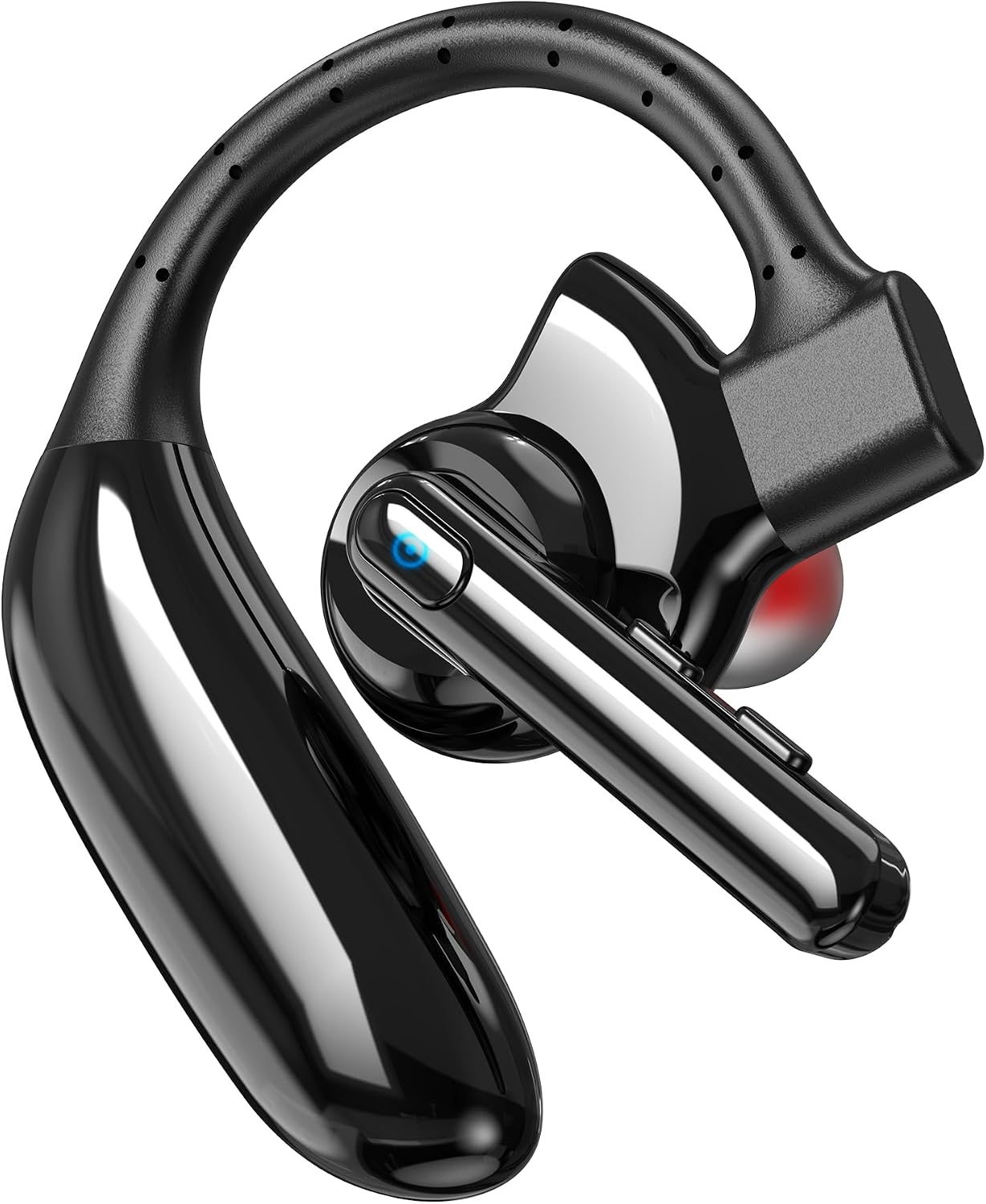
Image: The IAMJOY UFO5 Bluetooth Headset, showcasing its sleek black design and ergonomic ear hook.
2. Co jest zawarte
Your IAMJOY UFO5 Bluetooth Headset package contains the following items:
- IAMJOY UFO5 Bluetooth Headset
- Instrukcja obsługi
- Kabel ładujący (typ C)
- 2 x Replaceable Lithium Polymer Batteries (140mAH each)

Image: Contents of the IAMJOY UFO5 package, including the headset, charging cable, and user manual.
3. Konfiguracja
3.1 Ładowanie zestawu słuchawkowego
Before first use, fully charge your headset. The headset features a detachable design for charging. Simply pull off the earpiece part to reveal the Type-C charging port. Connect the provided Type-C cable to a power source.
- Czas ładowania: Pełne ładowanie trwa około 1.5 godzin.
- Kontrolka: The indicator light will be BLUE when charging and will turn OFF when fully charged.
- Czas pracy baterii: Enjoy up to 14 hours of talk time and 28 hours of music playback on a single charge. The headset offers an impressive 140 hours of standby time.

Image: Visual representation of the headset's battery life and charging details, highlighting 14 hours talk time, 28 hours music time, 1.5 hours full charge, and 140 hours standby.
3.2 Parowanie z urządzeniem
The IAMJOY UFO5 headset offers one-step auto pairing for quick and easy connection.
- Upewnij się, że zestaw słuchawkowy jest naładowany.
- Turn on the headset by holding the MFB button for 3-5 seconds.
- Aktywuj Bluetooth na swoim smartfonie, tablecie lub komputerze.
- Szukaj "UFO5" in the list of available Bluetooth devices and select it to connect.
- Once connected, the headset will automatically pair with your device in the future when in range.
With Bluetooth V5.4 technology, you can enjoy high-speed transmission, no latency, and a stable connection up to 33 feet (10 meters).

Image: Diagram illustrating the one-step auto pairing process for the IAMJOY UFO5 headset, showing quick connection to a smartphone.
4. Noszenie zestawu słuchawkowego
The IAMJOY UFO5 is designed for maximum comfort and versatility, allowing wear on either the left or right ear. Its ultralight design (only 0.42 oz) ensures comfort for extended periods.
- Ergonomiczna konstrukcja: The flexible ear hook and soft earbud provide a secure and comfortable fit without causing discomfort or strain.
- Regulacja mikrofonu: The microphone arm is 120° rotatable, allowing you to position it optimally for clear voice pickup, regardless of which ear you wear the headset on.

Image: Instructions on how to wear the headset on both left and right ears, and how to adjust the 120° rotatable microphone for optimal positioning.

Image: Demonstrates the ultralight (0.42 oz) and comfortable design of the headset, emphasizing its suitability for all-day wear.
5. Instrukcja obsługi
5.1 Funkcje przycisków
The headset features flexible and sensitive buttons for easy control of music and calls:
- Włączanie/wyłączanie: Hold MFB button for 3-5 seconds.
- Odtwórz/wstrzymaj muzykę: Single press MFB button.
- Odbierz/rozłącz połączenie: Single press MFB button.
- Odrzuć połączenie: Double press MFB button.
- Zwiększenie głośności: Single press Volume Up button.
- Ściszanie: Single press Volume Down button.
- Następna piosenka: Double press Next Song button.
- Poprzednia piosenka: Double press Previous Song button.
- Aktywuj asystenta głosowego: Double press Voice Assistant button.

Image: Detailed diagram of the headset's buttons and their corresponding functions for music playback, call management, and volume control.
5.2 Asystent głosowy
Easily access your device's voice assistant (Siri/Google Assistant) by pressing the dedicated Voice Assistant button twice. This allows for hands-free commands and improved efficiency.

Image: Illustration showing how to activate the voice assistant feature on the headset for hands-free commands.
5.3 Redukcja szumów
The IAMJOY UFO5 features a Dual-Mic ENC noise-canceling microphone, which effectively eliminates up to 96% of environmental noise. This ensures that your voice is picked up clearly and distinctly, providing a more focused and efficient communication experience in various settings.

Image: Visual demonstrating the effectiveness of the ENC noise cancellation, showing a significant reduction in background noise for clearer calls.
6. Zgodność
The IAMJOY UFO5 Bluetooth Headset is widely compatible with most Bluetooth-enabled devices, including:
- iPhone series
- Samsung, HTC, LG, SONY, and other Android cell phones
- PC, Laptops, and Tablets
Connect your mobile device or tablet through Bluetooth and move freely with up to a 33 ft (10 m) range.

Image: Depicts the wide compatibility of the headset with various devices such as smartphones, tablets, and laptops, along with its 10-meter Bluetooth range.
7. Konserwacja
To ensure the longevity and optimal performance of your IAMJOY UFO5 Bluetooth Headset, please follow these maintenance guidelines:
- Czyszczenie: Do czyszczenia zestawu słuchawkowego używaj miękkiej, suchej ściereczki. Unikaj stosowania silnych środków chemicznych i materiałów ściernych.
- Składowanie: Przechowuj zestaw słuchawkowy w chłodnym, suchym miejscu, z dala od ekstremalnych temperatur i bezpośredniego światła słonecznego.
- Wodoodporność: Please note that this headset is Nie jest wodoodporny. Aby zapobiec uszkodzeniom, należy unikać narażenia na działanie wody, deszczu i nadmiernej wilgoci.
- Pielęgnacja baterii: For optimal battery health, avoid fully discharging the battery frequently. Charge the headset regularly, even if not in constant use.
8. Specyfikacje
| Funkcja | Opis |
|---|---|
| Nazwa modelu | UFO5 |
| Marka | Jestem Radością |
| Technologia łączności | Bezprzewodowy (Bluetooth) |
| Wersja Bluetooth | 5.4 |
| Zasięg Bluetooth | 10 m (33 stóp) |
| Czas pracy baterii (czas rozmów) | 14 godzin |
| Czas pracy baterii (czas słuchania muzyki) | 28 godzin |
| Czas czuwania | 140 godzin |
| Czas ładowania | 1.5 godzin |
| Kontrola hałasu | Adaptive Noise Cancellation (Dual-Mic ENC) |
| Kształt słuchawki | In-ear, Ear-hook |
| Waga przedmiotu | 3.52 uncji |
| Poziom wodoodporności | Nie jest wodoodporny |
| Kompatybilne urządzenia | Cellphones, iPhone series, PC, iPad, Android, Laptop |
9. Rozwiązywanie Problemów
If you encounter any issues with your IAMJOY UFO5 headset, please refer to the following common problems and solutions:
- Zestaw słuchawkowy się nie włącza:
Ensure the headset is fully charged. Connect it to the charging cable and check the indicator light. - Nie można sparować z urządzeniem:
Make sure Bluetooth is enabled on your device and the headset is in pairing mode (usually indicated by a flashing light). Ensure the headset is within the 10-meter range. Try turning both the headset and your device's Bluetooth off and on again. - No sound or low volume during calls/music:
Check the volume levels on both the headset and your connected device. Ensure the headset is selected as the audio output device on your phone or computer. When making a call, please pay attention to whether you are connecting to a Bluetooth headset or a speaker to play the sound to prevent the call volume from being too low. - Poor call quality or excessive background noise:
Ensure the microphone is positioned correctly and not obstructed. The Dual-Mic ENC technology is designed to reduce noise, but extreme noise environments may still affect clarity. Try moving to a quieter location. - Przerywane połączenie:
This could be due to interference. Move away from other wireless devices or strong electromagnetic fields. Ensure the headset is within the effective Bluetooth range of your device.
10. Gwarancja i pomoc techniczna
IAMJOY is committed to providing high-quality products and excellent customer service.
- Serwis gwarancyjny: Your IAMJOY UFO5 Bluetooth Headset comes with a 365-day warranty service from the date of purchase. Please retain your proof of purchase for warranty claims.
- Obsługa klienta: For any questions, technical assistance, or warranty inquiries, please contact our 24/7 online customer support. Refer to the contact information provided on the product packaging or our official webstrona.

Image: IAMJOY's commitment to customer satisfaction, highlighting 24/7 online customer support and 365 days warranty service.