
1. Koniec produktuview
The GUOANVISION S100 is an advanced outdoor PTZ (Pan-Tilt-Zoom) security camera featuring a unique dual-lens system. It combines a fixed wide-angle lens with a rotatable tracking lens to provide comprehensive surveillance without blind spots. Equipped with 6MP resolution, AI human detection, automatic tracking, two-way audio, and IP66 waterproofing, this camera is designed for robust outdoor monitoring.

Figure 1: GUOANVISION S100 Dual Lens Outdoor PTZ Security Camera
2. Zawartość opakowania
Przed przystąpieniem do instalacji sprawdź, czy w opakowaniu znajdują się wszystkie elementy:
- GUOANVISION S100 Outdoor PTZ Camera
- Uchwyt montażowy
- Zasilacz (przewodowy)
- Śruby montażowe i kołki ścienne
- Waterproof Caps for Connectors
- Instrukcja obsługi
Video 1: Unboxing and Package Contents of the GUOANVISION S100 Camera.
3. Przewodnik konfiguracji
3.1 Fizyczna instalacja
The GUOANVISION S100 camera supports both wall and ceiling mounting. Choose a location that provides optimal coverage and a stable Wi-Fi signal.
- Zamontuj wspornik montażowy: Secure the mounting bracket to the camera using the provided screws.
- Zaznacz punkty wiercenia: Hold the camera with the attached bracket against the desired installation surface. Mark the drilling points.
- Wiercenie otworów: Wywierć otwory w zaznaczonych miejscach i włóż w nie kołki rozporowe.
- Zamontuj kamerę: Align the bracket with the drilled holes and secure the camera using the mounting screws.
- Podłącz zasilanie: Connect the power adapter to the camera and plug it into a power outlet. Ensure the connection is secure and protected from weather using the waterproof caps.

Figure 2: Illustration of wall and ceiling mounting options.
3.2 Instalacja i parowanie aplikacji
To control and monitor your camera, download the iCSee app from your smartphone's app store (available for Android and iOS).
- Pobierz aplikację: Scan the QR code in the included user manual or search for 'iCSee' in your app store.
- Zarejestruj Konto: Otwórz aplikację iCSee i postępuj zgodnie z instrukcjami wyświetlanymi na ekranie, aby zarejestrować nowe konto lub zalogować się, jeśli już je posiadasz.
- Włącz Bluetooth i Wi-Fi: Ensure your smartphone's Bluetooth and 2.4GHz Wi-Fi are enabled.
- Dodaj urządzenie: In the app, tap the '+' icon to add a new device. The app should automatically detect the camera via Bluetooth. Confirm the device.
- Połącz się z Wi-Fi: Select your 2.4GHz Wi-Fi network and enter the password. The camera will connect to your network.
- Włóż kartę MicroSD (opcjonalnie): For local recording, insert a MicroSD card (up to 128GB) into the designated slot on the camera.

Figure 3: Visual guide for iCSee app installation and device pairing.
Video 2: Detailed steps for connecting the camera to the iCSee app.
4. Instrukcja obsługi
4.1 Na żywo View i monitorowanie podwójnego ekranu
Access the live feed from your camera through the iCSee app. The S100 features a dual-screen display, allowing you to view both the fixed wide-angle lens and the rotatable PTZ lens simultaneously.

Figure 4: Simultaneous display of both camera lenses in the iCSee app.
4.2 Sterowanie PTZ
The lower lens of the camera can be controlled remotely via the app, offering a horizontal pan of 350° and a vertical tilt of 90°.
- Panoramowanie/pochylanie: Use the directional controls in the app to adjust the camera's viewkąt.
- Zaprogramowane pozycje: Save frequently monitored areas as preset positions for quick navigation.

Figure 5: Diagram illustrating the 350° pan and 90° tilt functionality.
4.3 Wykrywanie i automatyczne śledzenie ludzi za pomocą sztucznej inteligencji
The camera utilizes AI to accurately detect human movement and automatically track the subject within its field of view. This minimizes false alarms from animals or environmental factors.
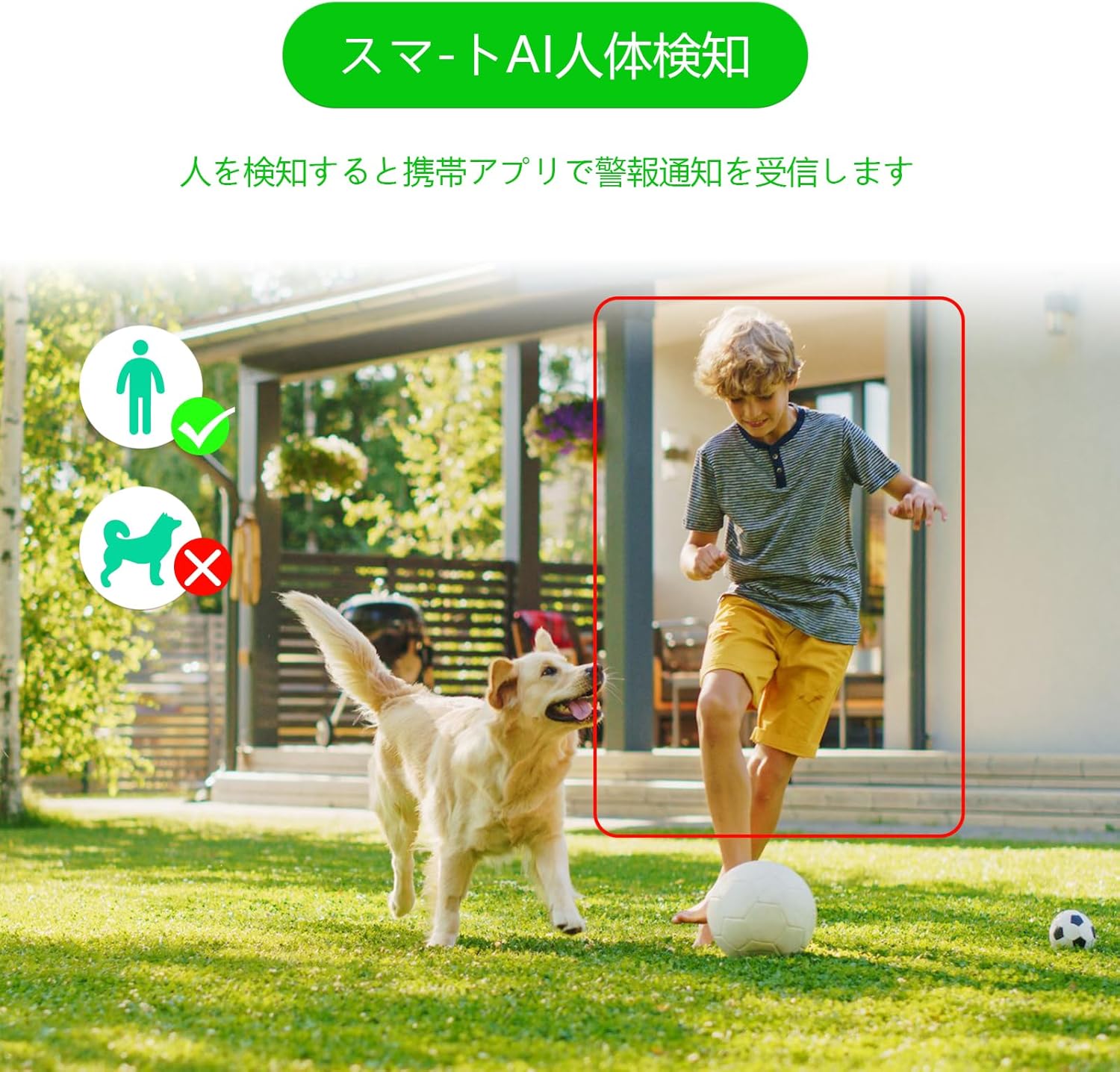
Figure 6: AI human detection feature, focusing on human figures.
Video 3: Demonstration of the camera's automatic motion tracking feature.
4.4 Tryby widzenia nocnego
The S100 offers multiple night vision modes to suit different lighting conditions:
- Tryb podczerwieni: Standardowa czarno-biała wizja nocna.
- Tryb pełnokolorowy: Utilizes built-in lights to provide color images even in low light.
- Tryb inteligentny: Automatycznie przełącza się między widzeniem nocnym w podczerwieni a kolorowym widzeniem nocnym na podstawie wykrycia ruchu.

Figure 7: Comparison of infrared, smart, and full-color night vision modes.
Video 4: Demonstration of the camera's night vision capabilities in various settings.
4.5 Two-Way Audio & Alarm Functions
Communicate with visitors or deter intruders using the built-in microphone and speaker. The camera also features a light and sound alarm that can be triggered upon detection of suspicious activity.
- Rozmowa dwukierunkowa: Use the app to speak through the camera's speaker and listen through its microphone.
- Light & Sound Alarm: Configure the camera to activate flashing blue/red lights and an audible siren when human motion is detected at night.

Figure 8: Illustrates the two-way audio feature for remote communication.
5. Konserwacja
Regular maintenance ensures optimal performance and longevity of your GUOANVISION S100 camera.
- Czyszczenie: Okresowo przecieraj obiektyw i korpus aparatu miękką, miękką szmatką.amp Do usuwania kurzu i brudu należy używać ściereczki. Unikać środków czyszczących o działaniu ściernym.
- Aktualizacje oprogramowania układowego: Check the iCSee app regularly for available firmware updates. Keeping the firmware updated ensures you have the latest features and security enhancements.
- Kontrola połączenia: Periodically verify the power and network connections to ensure they are secure and free from damage.
- Zarządzanie kartami SD: If using a MicroSD card, ensure it is functioning correctly and has sufficient storage space. Format the card through the app if necessary.
6. Rozwiązywanie Problemów
Jeśli masz problemy z aparatem, zapoznaj się z poniższymi typowymi problemami i ich rozwiązaniami:
- Kamera offline:
- Check power supply: Ensure the camera is properly connected to power.
- Check Wi-Fi connection: Verify your Wi-Fi network is active and the camera is within range. Re-pair the camera if necessary.
- Router settings: Ensure your router is broadcasting a 2.4GHz Wi-Fi signal.
- No Recording/SD Card Not Detected:
- Ensure MicroSD card is correctly inserted.
- Check if the MicroSD card is damaged or full. Format it via the app or replace it.
- Sprawdź ustawienia nagrywania w aplikacji iCSee.
- Słaba jakość obrazu:
- Wyczyść obiektyw aparatu.
- Ensure adequate lighting, especially for color night vision.
- Check network stability; a weak Wi-Fi signal can affect streaming quality.
- Fałszywe alarmy:
- Adjust AI human detection sensitivity in the app.
- Ensure the camera is positioned to minimize detection of non-human movement (e.g., swaying branches).
7. Specyfikacje
| Funkcja | Szczegół |
|---|---|
| Marka | GUOANVISION |
| Nazwa modelu | S100 |
| Zalecane zastosowanie | Baby Monitor, Pet Monitor, Indoor Security, Outdoor Security |
| Łączność | Przewodowy, Wi-Fi (2.4 GHz) |
| Cechy | HD Resolution, Dual Lens, PTZ, AI Human Detection, Auto-Tracking, Two-Way Audio, Light/Sound Alarm |
| Do użytku wewnątrz/na zewnątrz | Wewnątrz, Na zewnątrz |
| Kompatybilne urządzenia | Smartfon (iOS, Android) |
| Źródło zasilania | Elektryczny przewodowy |
| Protokół połączenia | ONVIF |
| Typ montażu | Wall Mount, Ceiling Mount (Screw-in) |
| Product Exterior Material | Plastikowy |
| Stopień wodoodporności | IP66 |
| Typ alarmu | Audio & Motion (Light & Sound) |
| Efektywna rozdzielczość obrazu nieruchomego | 6 MP (2 obiektywy 3 MP) |
| Metoda zarządzania | App (iCSee) |
| Wymagane baterie | NIE |
| Format kodowania wideo | MPEG-4 |
| Format przechwytywania wideo | MP4 |
| Zakres noktowizora | 15 metrów |
| Wizja nocna | Color Night Vision, Infrared, Smart Mode |
| Diody podświetlające | 8 |
| Rozmiar produktu | Wymiary 22.9 x 12.7 x 22.9 cm |
| Max Flash Memory Support | 128 GB (MicroSD) |
8. Gwarancja i pomoc techniczna
GUOANVISION is committed to providing high-quality products and excellent customer service. If you have any questions, concerns, or encounter product defects during the warranty period, please do not hesitate to contact us.
Informacje kontaktowe 8.1
- Wsparcie e-mailowe: support@guoanvision.net (odpowiedź 24-godzinna)
- Obsługa klienta Amazona: Navigate to 'Customer Service' > 'Your Orders' > 'Sold by' > 'Ask a question' for assistance with your purchase.
We will respond promptly to provide warranty service and support.