
Wstęp
This manual provides essential instructions for the setup, operation, and maintenance of your BLOW Portable Internet Radio RI 1. Please read this manual thoroughly before using the device to ensure proper functionality and to prevent damage.
Ważne informacje dotyczące bezpieczeństwa
- Nie wystawiaj urządzenia na deszcz lub wilgoć.
- Nie rozmontowuj urządzenia. Wszelkie czynności serwisowe zleć wykwalifikowanemu personelowi.
- Używaj wyłącznie dołączonego zasilacza.
- Unikaj ekstremalnych temperatur i bezpośredniego światła słonecznego.
- Trzymaj urządzenie z dala od silnych pól magnetycznych.
Zawartość opakowania
Sprawdź, czy w przesyłce znajdują się wszystkie elementy:
- BLOW Internet Radio RI 1
- Zasilacz
- User Manual (in Polish and English)

Image: The BLOW Internet Radio RI 1 packaging, showing the radio unit, power adapter, and user manual.
Produkt ponadview
The BLOW Portable Internet Radio RI 1 offers a wide range of features for an enhanced audio experience. It includes internet radio access, FM tuner, Bluetooth connectivity, and a clear LCD display.

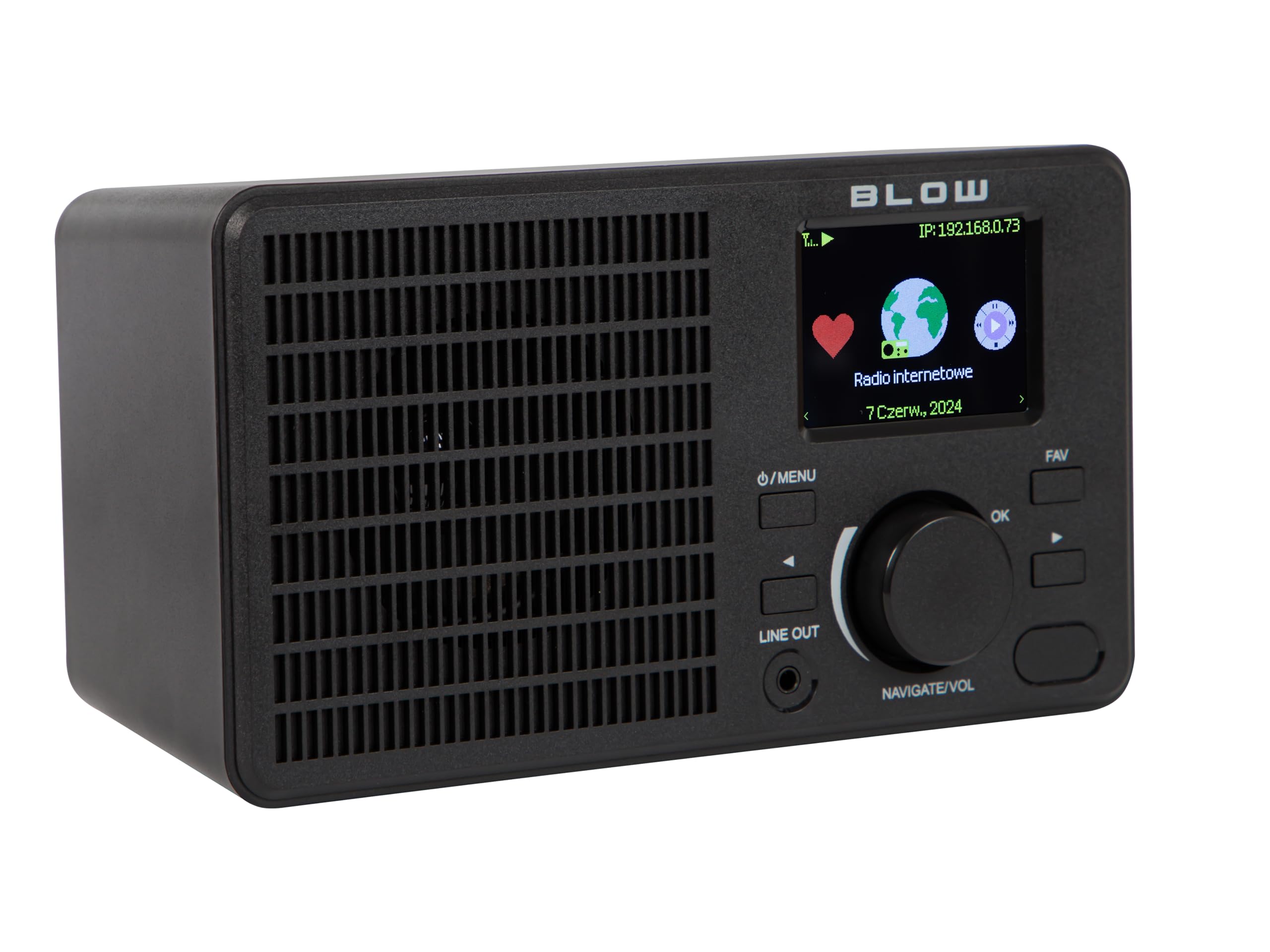
Obraz: Przód view of the BLOW Internet Radio RI 1, showcasing the display, speaker grille, and control buttons.
Główne cechy:
- Radio internetowe: Access thousands of stations worldwide via Wi-Fi.
- Łączność Wi-Fi: Wireless access to internet radio and network features.
- Bluetooth: Stream music from mobile devices.
- 2.4-calowy kolorowy wyświetlacz TFT: Shows station information and track details.
- Dual Alarm with Snooze: Wake up to music or news.
- Zakreślać: Połącz się z amplifier or external audio system.
- Kompaktowa konstrukcja: Elegant black design suitable for various interiors.
- Tuner FM: For local radio broadcasts.
Obraz: Tył view of the BLOW Internet Radio RI 1, showing the DC 5V power input and product information label.
Organizować coś
1. Podłączenie zasilania
- Connect the provided power adapter to the DC 5V input port on the back of the radio.
- Podłącz zasilacz do standardowego gniazdka elektrycznego.
- Radio włączy się automatycznie lub przejdzie w tryb czuwania.

Image: The power adapter included with the BLOW Internet Radio RI 1, showing the plug and DC connector.
2. Initial Wi-Fi Setup
- Po pierwszym włączeniu radio poprowadzi Cię przez proces początkowej konfiguracji.
- Use the navigation dial and OK button to select your preferred language.
- Radio rozpocznie skanowanie w poszukiwaniu dostępnych sieci Wi-Fi. Wybierz sieć z listy.
- Enter your Wi-Fi password using the navigation controls. Confirm with the OK button.
- Po nawiązaniu połączenia radio wyświetli komunikat potwierdzający.

Image: The BLOW Internet Radio RI 1 display showing the internet radio interface with network status.
Instrukcja obsługi
Podstawowe sterowanie
- Przycisk zasilania/menu: Press to turn on/off or access the main menu.
- Navigate/Volume Dial: Rotate to navigate menus or adjust volume. Press to confirm selection.
- Przycisk OK: Potwierdza wybór.
- Przycisk FAV: Accesses favorite stations.
- Zakreślać: 3.5mm jack for connecting to external audio systems.

Obraz: Zbliżenie view of the BLOW Internet Radio RI 1's control panel, highlighting the display and buttons.
Tryb radia internetowego
- Z menu głównego wybierz „Radio internetowe”.
- Przeglądaj stacje według lokalizacji, gatunku lub szukaj według nazwy.
- Wybierz stację i naciśnij OK, aby rozpocząć odtwarzanie.
- To save a station as a favorite, navigate to the station and press the FAV button.
Tryb radia FM
- Z menu głównego wybierz „Radio FM”.
- Use the navigation dial to tune to a frequency or perform an auto-scan for stations.
- Naciśnij OK, aby wybrać stację.
Tryb Bluetooth
- Z menu głównego wybierz „Bluetooth”. Radio przejdzie w tryb parowania.
- On your mobile device (smartphone, laptop), enable Bluetooth and search for "BLOW RI 1".
- Select the radio to pair. Once connected, you can stream audio from your device to the radio.

Image: The BLOW Internet Radio RI 1 shown alongside a smartphone, illustrating Bluetooth connectivity for music streaming.
Funkcja budzika
- Dostęp do ustawień „Alarm” uzyskasz z menu głównego.
- Możliwość ustawienia do dwóch niezależnych alarmów.
- Configure alarm time, source (buzzer, internet radio, FM), and snooze duration.
- Ensure the radio is connected to power for the alarm to function reliably.
Konserwacja
- Czyszczenie: Use a soft, dry cloth to clean the radio's surface. Do not use liquid cleaners or abrasive materials.
- Składowanie: Jeśli radio nie będzie używane przez dłuższy czas, należy je przechowywać w chłodnym i suchym miejscu.
- Aktualizacje oprogramowania: Periodically check for firmware updates through the radio's system settings to ensure optimal performance and access to new features.
Rozwiązywanie problemów
| Problem | Możliwe rozwiązanie |
|---|---|
| Brak zasilania | Check if the power adapter is securely connected to the radio and the electrical outlet. Try a different outlet. |
| Nie można połączyć się z siecią Wi-Fi | Ensure your Wi-Fi password is correct. Check if your router is working. Try restarting the radio and your router. Ensure the radio is within range of your Wi-Fi signal. |
| Stacje radiowe internetowe nie działają | Verify your internet connection is active. Some stations may be temporarily offline. Try other stations. |
| Parowanie Bluetooth nie powiodło się | Ensure the radio is in Bluetooth pairing mode. Make sure Bluetooth is enabled on your mobile device and it's within range. Try unpairing and re-pairing. |
| Słaby odbiór FM | Adjust the radio's position. Ensure there are no strong interference sources nearby. |
Specyfikacje
| Funkcja | Szczegół |
|---|---|
| Marka | Cios |
| Model | 5900804137467 |
| Technologia łączności | Wi-Fi, Bluetooth, Aux, Line Out |
| Technologia tunera | FM |
| Typ wyświetlacza | LCD (2.4-inch TFT Color Display) |
| Źródło zasilania | Corded Electric (AC: 100-240V, 50/60Hz; DC: 5V/1A) |
| Kompatybilne urządzenia | Smartphone, Laptop, Headphones |
| Cechy specjalne | Lightweight, Portable, Dustproof, Built-in Clock, Dual Alarm with Snooze |
| Wymiary produktu | 19.4 cm (dł.) x 8.8 cm (szer.) x 11 cm (wys.) |
| Kolor | Czarny |
Gwarancja i wsparcie
For warranty information and technical support, please refer to the contact details provided in the separate warranty card included with your product or visit the official BLOW webstrona.
Producent: CIOS
Webstrona: www.blow.pl