
1. Wprowadzenie
The TP-Link Deco BE65 Pro WiFi 7 Mesh System is designed to provide a seamless, high-speed wireless network throughout your home. This 3-pack system utilizes cutting-edge WiFi 7 technology, offering tri-band BE9300Mbps speeds, Multi-Link Operation (MLO), and advanced security features like WPA3. With multiple 5Gbps and 2.5Gbps ports, it ensures robust wired and wireless connectivity for all your devices. This manual will guide you through the setup, operation, maintenance, and troubleshooting of your Deco BE65 Pro system.

Figure 1: A single TP-Link Deco BE65 Pro unit in a home environment.
2. Co znajduje się w pudełku
Your TP-Link Deco BE65 Pro (3-Pack) package should contain the following items:
- 3 x Deco BE65 Pro Units
- 3 x zasilacz
- Kabel Ethernet 1 x
- 1 x Instrukcja szybkiej instalacji

Figure 2: The product packaging, indicating the contents and model information.
3. Koniec produktuview
The Deco BE65 Pro units are designed for optimal performance and ease of use. Each unit features multiple high-speed ports and advanced wireless capabilities to create a robust mesh network.
Główne cechy:
- Standard Wi-Fi 7: Experience the latest generation of Wi-Fi with enhanced speed, lower latency, and increased capacity.
- Tri-Band BE9300Mbps: Delivers combined speeds of up to 9300 Mbps across 6 GHz, 5 GHz, and 2.4 GHz bands.
- Operacja wielopunktowa (MLO): Simultaneously send and receive data across different bands and channels to boost throughput, reduce latency, and improve reliability.
- Porty dużej prędkości: Each unit includes two 5Gbps ports and one 2.5Gbps port for ultra-fast wired connections.
- Bezproblemowy roaming: Move freely throughout your home with a single Wi-Fi name and uninterrupted connectivity.
- Osłona HomeShield TP-Link Provides comprehensive network protection, robust parental controls, and real-time IoT security.
- Bezpieczeństwo WPA3: Enhanced security protocol for a safer network.
- Szeroka kompatybilność: Backward compatible with all Wi-Fi generations and works with any Internet Service Provider (ISP) and modem.

Rysunek 3: Koniecview of the Deco BE65 Pro's key WiFi 7 features.
Porty i wskaźniki:
Each Deco BE65 Pro unit is equipped with the following ports and indicators:
- Wskaźnik LED: Located on the top of the unit, it displays the Deco's status (e.g., solid white for connected, pulsing blue for setup mode, solid red for no internet).
- Porty WAN/LAN: Two 5Gbps ports and one 2.5Gbps port. These ports automatically detect WAN or LAN connections.
- Port USB: Do podłączania zewnętrznych urządzeń pamięci masowej.
- Port zasilania: Do podłączenia zasilacza.
- Przycisk resetowania: A small button usually located at the bottom or back, used to reset the unit to factory settings.
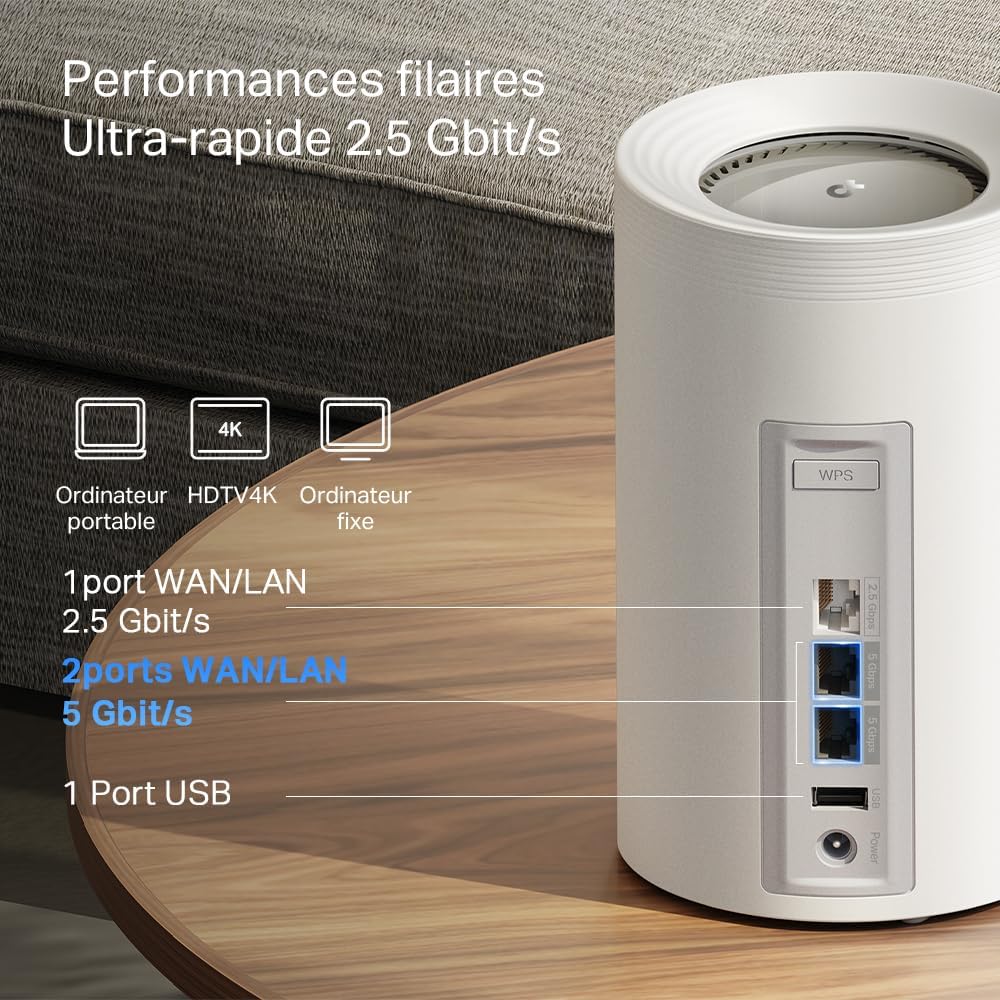
Rysunek 4: Szczegółowy view of the high-speed WAN/LAN and USB ports on a Deco BE65 Pro unit.
Backhaul Solution:
The Deco BE65 Pro system utilizes a robust backhaul solution, combining both wired Ethernet and multiple Wi-Fi bands (6 GHz, 5 GHz, 2.4 GHz) to ensure stable and high-speed communication between Deco units. This multi-gigabit mesh backhaul enhances overall network performance and reliability.

Figure 5: Illustration of the combined wired and wireless backhaul connections between Deco units.
4. Instrukcje konfiguracji
Setting up your TP-Link Deco BE65 Pro Mesh System is a straightforward process using the Deco app. Follow these general steps:
- Pobierz aplikację Deco: Szukaj "TP-Link Deco" in the App Store (iOS) or Google Play Store (Android) and install the app.
- Przygotuj modem: Wyłącz modem i wyjmij baterię (jeśli dotyczy).
- Podłącz główną jednostkę dekoracyjną:
- Connect one Deco unit to your modem using the provided Ethernet cable. Use any of the WAN/LAN ports on the Deco.
- Włącz modem.
- Plug in the main Deco unit and wait for its LED to pulse blue.
- Set Up via App: Open the Deco app, log in or sign up for a TP-Link ID, and follow the on-screen instructions to set up your main Deco unit.
- Dodaj dodatkowe jednostki dekoracyjne: Once the main Deco is set up, the app will guide you to add the remaining Deco units. Place them strategically to ensure optimal coverage. Plug in each additional Deco unit and wait for its LED to pulse blue, then follow the app's instructions to add it to your mesh network.
For detailed, step-by-step instructions, refer to the Quick Installation Guide included in your package or the in-app setup wizard.
5. Instrukcja obsługi
The TP-Link Deco app is your central hub for managing your mesh Wi-Fi network. After successful setup, you can use the app to control various aspects of your network.
Network Management via Deco App:
- Panel: View connected devices, network status, and real-time speed.
- Kontrola rodzicielska: Skonfiguruj profesjonalnąfiles for family members, filter content, set time limits, and pause internet access.
- Jakość usług (QoS): Prioritize devices or activities (e.g., gaming, streaming) to ensure optimal performance.
- Sieć gości: Utwórz oddzielną sieć Wi-Fi dla gości, zachowując bezpieczeństwo swojej głównej sieci.
- Antivirus & IoT Security: Utilize TP-Link HomeShield features for network protection against malicious threats and to secure your smart home devices.
- Ustawienia wifi: Change your Wi-Fi name (SSID) and password, enable/disable specific bands, and configure advanced settings.
- Bezproblemowy roaming: The Deco system automatically connects your devices to the strongest Wi-Fi signal as you move around your home, ensuring a smooth and uninterrupted experience.
6. Konserwacja
Regular maintenance helps ensure the optimal performance and longevity of your Deco BE65 Pro system.
- Aktualizacje oprogramowania układowego: The Deco app will notify you of available firmware updates. It is highly recommended to keep your Deco units updated to benefit from the latest features, security enhancements, and performance improvements. Updates can typically be performed directly through the app.
- Czyszczenie: Gently wipe the exterior of the Deco units with a soft, dry cloth. Do not use liquid cleaners or abrasive materials. Ensure the units are unplugged before cleaning.
- Optymalne rozmieszczenie: For best performance, ensure your Deco units are placed in open areas, away from obstructions like large metal objects, thick walls, and other electronic devices that may cause interference. Maintain a clear line of sight between units where possible.
- Ponowne uruchomienie: Occasionally, rebooting your Deco units and modem can resolve minor network issues and improve performance. This can be done via the Deco app or by unplugging and replugging the power adapters.
7. Rozwiązywanie Problemów
If you encounter issues with your Deco BE65 Pro system, try the following troubleshooting steps:
- Brak połączenia z internetem:
- Sprawdź czy modem działa prawidłowo.
- Sprawdź, czy kabel Ethernet między głównym urządzeniem Deco a modemem jest prawidłowo podłączony.
- Uruchom ponownie modem i główną jednostkę Deco.
- Check the Deco app for diagnostic tools or error messages.
- Niska prędkość Wi-Fi:
- Ensure your Deco units are optimally placed and not too far apart.
- Sprawdź, czy nie występują zakłócenia pochodzące od innych urządzeń elektronicznych.
- Sprawdź prędkość swojego abonamentu internetowego u swojego dostawcy usług internetowych.
- Użyj aplikacji Deco, aby przeprowadzić optymalizację sieci lub test szybkości.
- Jednostka Deco nie łączy się:
- Ensure the unit is powered on and its LED is pulsing blue for setup.
- Try moving the unit closer to an existing Deco unit.
- Perform a factory reset on the problematic Deco unit (refer to the Reset Button section in Product Overview) and try adding it again via the app.
- Problemy z aplikacją:
- Upewnij się, że Twoja aplikacja Deco jest zaktualizowana do najnowszej wersji.
- Spróbuj ponownie uruchomić aplikację lub urządzenie mobilne.
If these steps do not resolve your issue, please contact TP-Link support for further assistance.
8. Specyfikacje
Below are the technical specifications for the TP-Link Deco BE65 Pro Mesh System:

Figure 6: Illustration of the ultra-fast tri-band Wi-Fi speeds.
| Funkcja | Specyfikacja |
|---|---|
| Marka | TP-Link |
| Nazwa modelu | Deco BE65 Pro |
| Generacja Wi-Fi | Wi-Fi 7 |
| Standard komunikacji bezprzewodowej | 802.11be |
| Klasa pasma częstotliwości | Trójpasmowy (6 GHz, 5 GHz, 2.4 GHz) |
| Szybkość przesyłu danych | Up to 9300 Mbps (BE9300) |
| Przepustowość portu LAN | 2 x 5000 Mbps, 1 x 2500 Mbps |
| Liczba portów | 3 (WAN/LAN auto-sensing) |
| Protokół bezpieczeństwa | WPA3, WPA2-PSK, WPA-PSK |
| Metoda kontroli | Application (TP-Link Deco App) |
| Kompatybilne urządzenia | Surveillance Camera, Personal Computer, Smartphone, Tablet |
| Zalecane zastosowania | Dom |
| Typ anteny | Fixed (4 antennas per unit) |
| System operacyjny | TP-Link Archer OS |
| Zgodność z inteligentnym domem | Kompatybilny z urządzeniami inteligentnego domu |
| Router Firewall Security Level | Wysoki |
| Modem Compatible | Tak |
| Zasięg | Large (with 3 units) |
| Waga przedmiotu | 3.51 Kilograms (total for 3 units) |
| Wymiary przedmiotu Dł. x Szer. x Wys. | 24.1Dł. x 36Sz. x 11.9Wys. centymetrów |
| Security Updates Received | Tak |
9. Gwarancja i wsparcie
Informacje o gwarancji:
The TP-Link Deco BE65 Pro Mesh System comes with a 2-letnia gwarancja. Zachowaj dowód zakupu na wypadek roszczeń gwarancyjnych.
Wsparcie techniczne:
For technical support, product registration, and further information, please visit the official TP-Link website or contact their customer support. You can usually find support resources, FAQs, and contact details on the TP-Link support page for your region.
The TP-Link Deco app also provides in-app support options and access to helpful resources.


