
Wstęp
This manual provides detailed instructions for the operation and maintenance of the WOYO PL007 CAN LIN PWM Tester. This device is designed for automotive diagnostic applications, enabling the analysis of CAN Bus, LIN Bus, and PWM signals. Understanding the functions and proper usage of this tool will ensure accurate diagnostics and extend its lifespan.
Produkt ponadview
Główne cechy
The WOYO PL007 is a portable diagnostic tool with the following key features:
- Automatic recognition of CAN-H and CAN-L lines.
- Supports a wide range of CAN Bus baud rates: 50, 83, 100, 125, 150, 200, 250, 300, 400, 500, 666, 800, 1000kbps.
- Reads LIN Bus baud rates: 2400, 4800, 9600, 14400, 19200bps.
- Detects PWM signals up to 20V.
- Pozwala viewing of standard frame ID data.

Figure 1: WOYO PL007 Tester with key features highlighted, including CAN, LIN, and PWM testing capabilities.
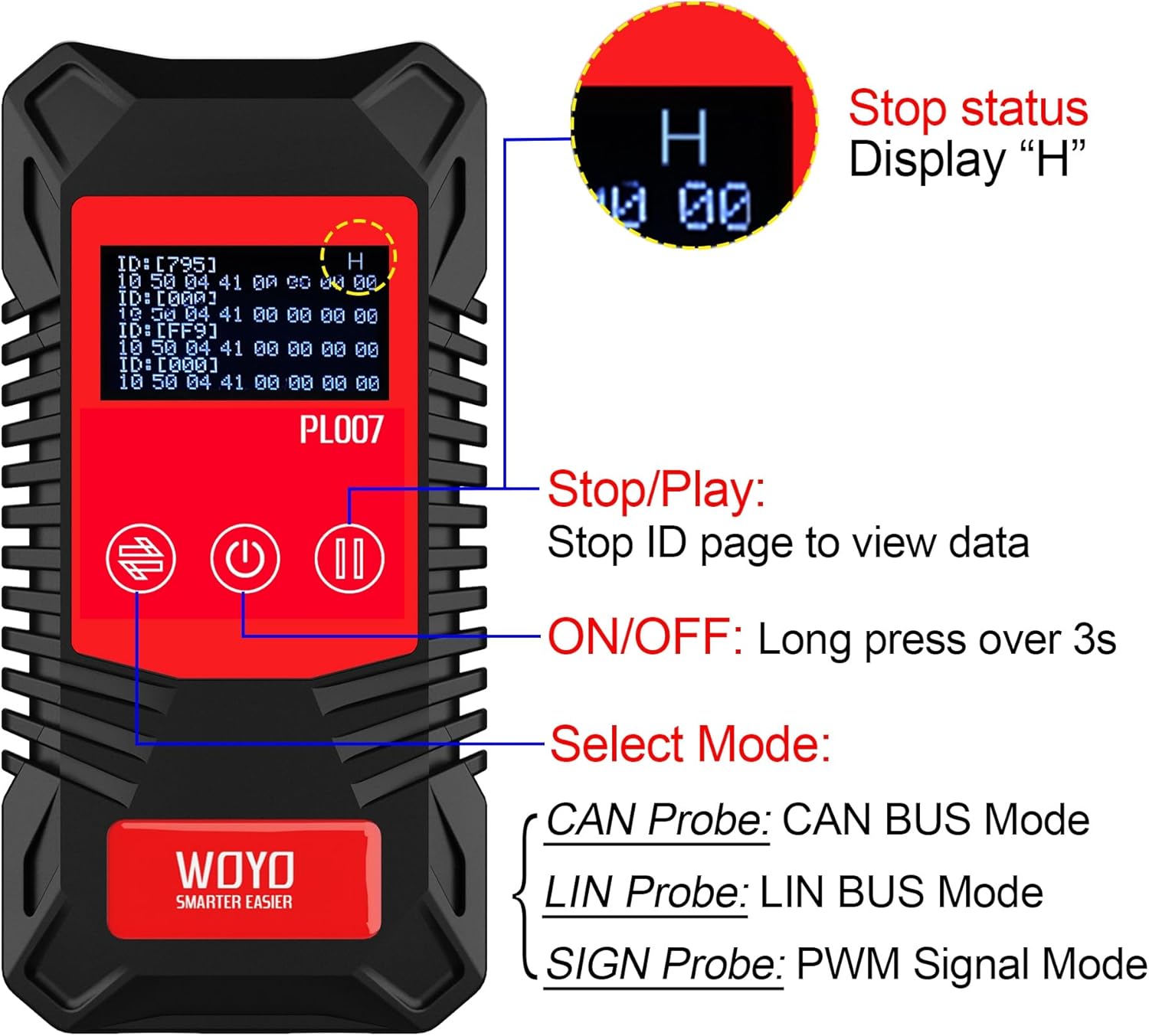
Rycina 2: Przód view of the WOYO PL007, illustrating the Stop/Play, ON/OFF, and Mode Select buttons. The display shows data frames.
Organizować coś
Zasilacz
The WOYO PL007 tester requires a 9V battery for operation. The battery is not included in the package.
- Znajdź komorę baterii z tyłu urządzenia.
- Otwórz pokrywę komory baterii.
- Insert a 9V battery, ensuring correct polarity.
- Dokładnie zamknij pokrywę komory baterii.

Rysunek 3: Tył view of the WOYO PL007, illustrating the 9V battery compartment. A 9V battery is required for operation.
Łączenie sond
The device uses standard 4.0mm banana plugs for connecting probes.

Rysunek 4: Góra view of the WOYO PL007, indicating the input ports for 4mm banana plugs.
Instrukcja obsługi
Ogólne działanie
- Włączanie/wyłączanie zasilania: Long press the power button (labeled with a circle and vertical line) for over 3 seconds to turn the device on or off.
- Wybór trybu: Use the mode select button (labeled with two arrows) to cycle through CAN, LIN, and PWM modes.
- Zatrzymaj/Odtwórz: In data display modes, press the Stop/Play button (labeled with two vertical lines) to pause the data stream and view specific ID pages. A 'H' will be displayed when paused.
Tryb magistrali CAN
In CAN Bus mode, the device automatically recognizes the direction of CAN-H and CAN-L lines and detects the baud rate.
- Connect the CAN probes to the respective CAN-H and CAN-L lines of the vehicle's CAN bus. The device will automatically identify which probe is connected to CAN-H and CAN-L.
- The display will show the detected baud rate (e.g., 500kbps) and the identified CAN-H and CAN-L connections.
- If communication is normal, the baud rate will be displayed. If the connection is broken or no data is present, no baud rate will be shown.
- Do view specific standard frame ID data, press the Stop/Play button to pause the display.

Figure 5: The WOYO PL007 in CAN Mode, demonstrating connection to a vehicle's CAN bus. The display shows the detected baud rate and CAN-L/CAN-H identification.
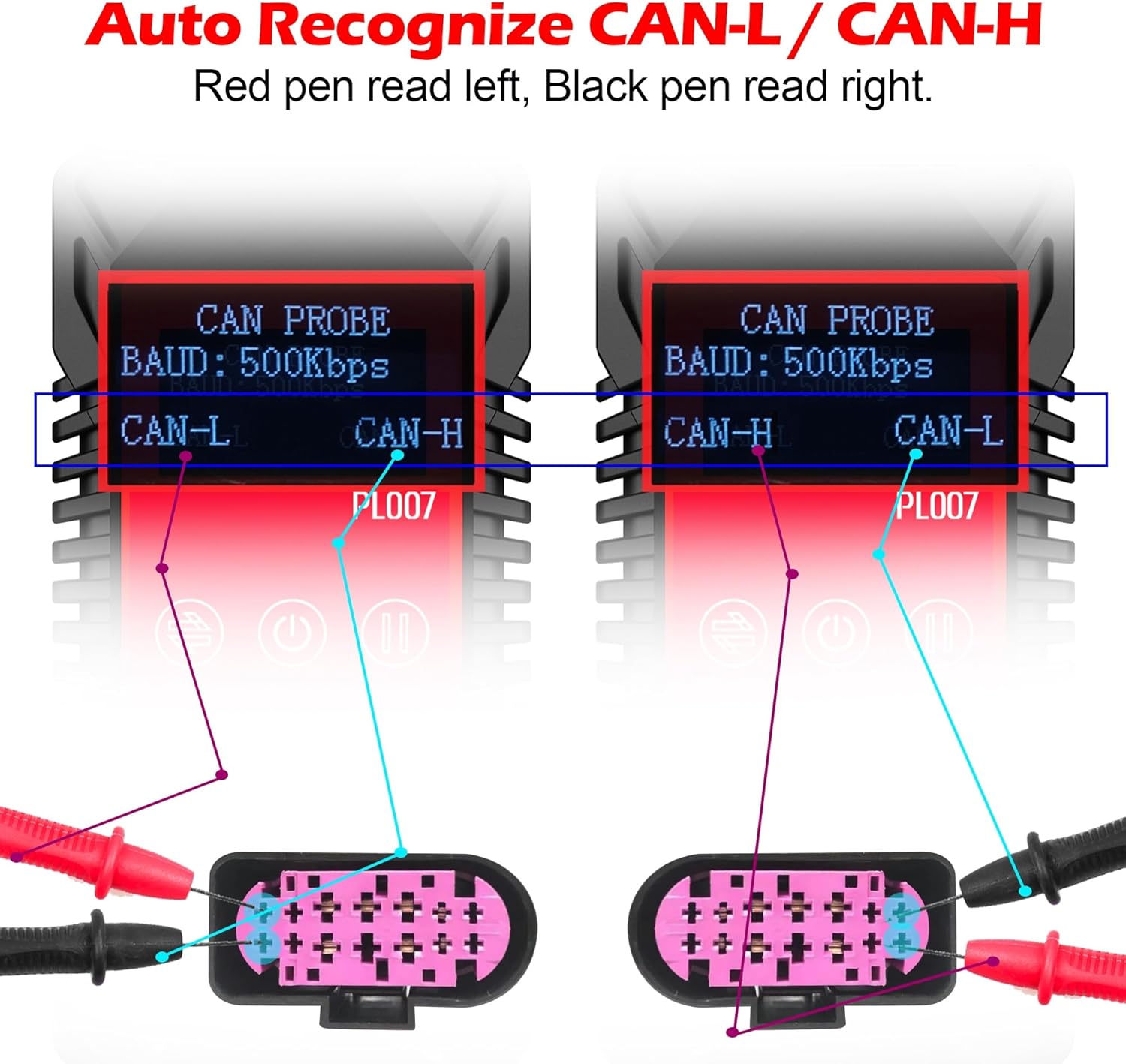
Figure 6: Illustration of the WOYO PL007's automatic CAN-L/CAN-H recognition feature, showing how the device adapts to probe connections.
Video 1: Demonstrates the WOYO PL007 CAN Bus testing functionality, including automatic recognition of CAN-H and CAN-L.
LIN Bus Mode
For LIN Bus testing, ensure correct probe connection to LIN and Ground (GND).
- Connect the red probe to the LIN line and the black probe to the GND line.
- The device will display the detected LIN Bus baud rate.
- Similar to CAN mode, if communication is normal, the baud rate will be shown. If no data is present, the baud rate will not be displayed.
- Use the Stop/Play button to pause the data stream and examine specific ID data.

Figure 7: The WOYO PL007 in LIN Mode, demonstrating correct probe connection to LIN and GND lines. The display shows the detected LIN baud rate.
PWM Signal Mode
The PWM Signal mode is used to detect Pulse Width Modulation signals.
- Connect the red probe to the signal line and the black probe to the GND line.
- The device will display the detected PWM signal, including its voltage.
- The maximum detectable voltage for PWM signals is 20V.

Figure 8: The WOYO PL007 in PWM Signal Mode, showing probe connection to a signal line and GND. The display indicates the detected PWM signal and voltage.
Video 2: A comprehensive guide on how to use the WOYO PL007 CAN LIN PWM Tester for various diagnostic tasks.
Konserwacja
To ensure the longevity and accurate performance of your WOYO PL007 tester, follow these maintenance guidelines:
- Czyszczenie: Przetrzyj urządzenie miękką, suchą ściereczką. Nie używaj środków czyszczących o właściwościach ściernych ani rozpuszczalników.
- Składowanie: Przechowywać urządzenie w chłodnym i suchym miejscu, z dala od bezpośredniego światła słonecznego i ekstremalnych temperatur.
- Bateria: Remove the 9V battery if the device will not be used for an extended period to prevent battery leakage.
- Sondy: Inspect probes and cables regularly for any signs of wear or damage. Replace damaged components immediately.
Rozwiązywanie problemów
If you encounter issues with your WOYO PL007 tester, refer to the following common troubleshooting steps:
- Urządzenie się nie włącza:
- Ensure the 9V battery is correctly installed and has sufficient charge.
- Verify that the power button is pressed and held for over 3 seconds.
- No baud rate displayed in CAN/LIN mode:
- Check all probe connections to ensure they are secure and correctly connected to the respective communication lines and ground.
- Verify that the vehicle's communication bus is active and transmitting data.
- Ensure the correct mode (CAN or LIN) is selected on the device.
- Incorrect PWM signal reading:
- Confirm that the red probe is connected to the signal line and the black probe to ground.
- Ensure the signal voltage nie przekracza 20V.
- Display shows 'H' and data is static:
- This indicates the data stream is paused. Press the Stop/Play button to resume real-time data display.
Specyfikacje
| Funkcja | Szczegół |
|---|---|
| Marka | WOYO |
| Model | PL007 (also referred to as PL017) |
| Źródło zasilania | Bateria 9V (brak w zestawie) |
| CAN Bus Baud Rate Range | 50, 83, 100, 125, 150, 200, 250, 300, 400, 500, 666, 800, 1000kbps |
| LIN Bus Baud Rate Range | 2400, 4800, 9600, 14400, 19200, XNUMX bps |
| PWM Signal Detection | < 20V |
| Waga przedmiotu | 0.16 kilograma |
| Pozycja Wymiary (dł. x szer. x wys.) | 4.33 x 1.97 x 1.18 cala (11.00 x 5.00 x 3.00 cm) |
| Kompatybilne urządzenia | Vehicles and devices with CAN, LIN, or PWM communication capabilities |
| Zawarte komponenty | Główny tester |
Note: The model number PL017 is an equivalent to PL007, with identical functionality.
Gwarancja i wsparcie
Informacje o gwarancji
The WOYO PL007 CAN LIN PWM Tester comes with a 1-miesięczna gwarancja od daty zakupu. Niniejsza gwarancja obejmuje wady produkcyjne i usterki powstałe w wyniku normalnego użytkowania. Prosimy zachować dowód zakupu na wypadek roszczeń gwarancyjnych.
Obsługa klienta
For technical assistance, troubleshooting, or warranty inquiries, please contact WOYO customer support. Refer to the official WOYO webAby uzyskać dane kontaktowe, odwiedź witrynę lub dokumentację zakupu.
Manufacturer: WOYO SMART