
1. Wprowadzenie
Thank you for choosing the MOUNTUP EconoMe Full Motion TV Wall Mount. This manual provides essential information for the safe and proper installation, operation, and maintenance of your new TV wall mount. Designed for most 32-65 inch flat screen, LED, and 4K TVs, this mount offers swivel, tilt, and extension capabilities to optimize your viewing experience. It supports VESA patterns from 100x100mm to 400x400mm and can hold TVs up to 99 lbs.
Please read this manual thoroughly before installation and keep it for future reference. If you have any questions or require assistance, please contact our customer service.
2. Informacje dotyczące bezpieczeństwa
OSTRZEŻENIE: Improper installation may result in serious personal injury or damage to your TV and property. If you do not understand these instructions or have doubts about the safety of the installation, please consult a qualified professional.
- Nośność: Nie przekraczać maksymalnego udźwigu wynoszącego 45 kg (99 funtów).
- Rozmiar telewizora: Uchwyt przeznaczony jest do telewizorów o przekątnej od 32 do 65 cali.
- Zgodność z VESA: Ensure your TV's VESA pattern (mounting hole spacing) is within the supported range of 100x100mm to 400x400mm.
- Typ ściany: This mount is intended for installation on wood studs (max 16" spacing), concrete walls, or brick walls. NIE montuj samodzielnie w płycie gipsowo-kartonowej. Always use a stud finder to confirm wood stud locations.
- Kotwice: Concrete and brick wall installations require appropriate anchors. Concrete anchors (Φ10×61mm) can be provided upon request.
- Narzędzia: Podczas montażu należy używać odpowiednich narzędzi i nosić sprzęt ochronny.
- Nadzór: Podczas instalacji należy trzymać dzieci i zwierzęta z daleka.
3. Zawartość opakowania
Before beginning installation, verify that all parts are present and undamaged. If any parts are missing or defective, contact customer service immediately.
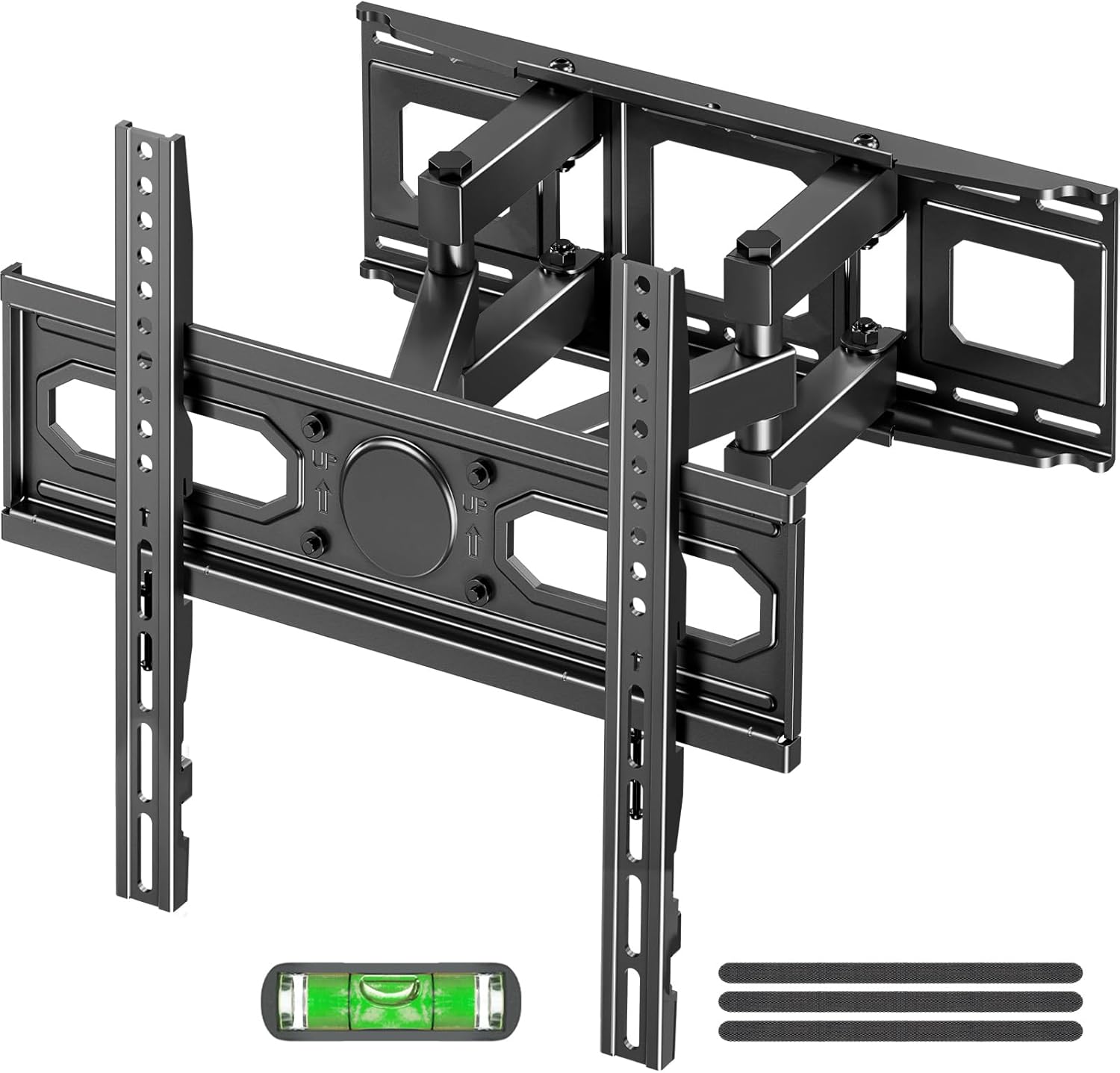
Obraz: Ponadview of the MOUNTUP EconoMe Full Motion TV Wall Mount and included accessories.
- Montaż płyty ściennej
- Uchwyty TV (2)
- Zestaw montażowy (różne śruby, podkładki, dystanse, kotwy)
- Narzędzie do poziomowania bąbelków
- Papierowy szablon montażowy
- Opaski kablowe
4. Konfiguracja i instalacja
The installation process involves three main steps. For detailed visual instructions, please refer to the official installation manual PDF available on the product page or contact customer support.

Image: Simplified three-step installation process for the TV wall mount.
- Krok 1: Przymocuj wsporniki do telewizora
Carefully place your TV face down on a soft, clean surface. Identify the VESA mounting holes on the back of your TV. Select the appropriate screws, washers, and spacers from the hardware kit that fit your TV's VESA pattern. Attach the two vertical TV brackets to the back of your TV, ensuring they are securely fastened and evenly aligned.

Image: Guide to available VESA patterns and suitable sizes for TV compatibility.
- Krok 2: Przymocuj płytę ścienną do ściany
Determine the desired height for your TV. Use a stud finder to locate wood studs if installing on a stud wall. Mark the drilling locations using the provided paper mounting template and the integrated level tool. For concrete or brick walls, use a hammer drill to create pilot holes and insert the appropriate anchors. Secure the wall plate assembly to the wall using the provided lag bolts. Ensure the wall plate is level and firmly attached.
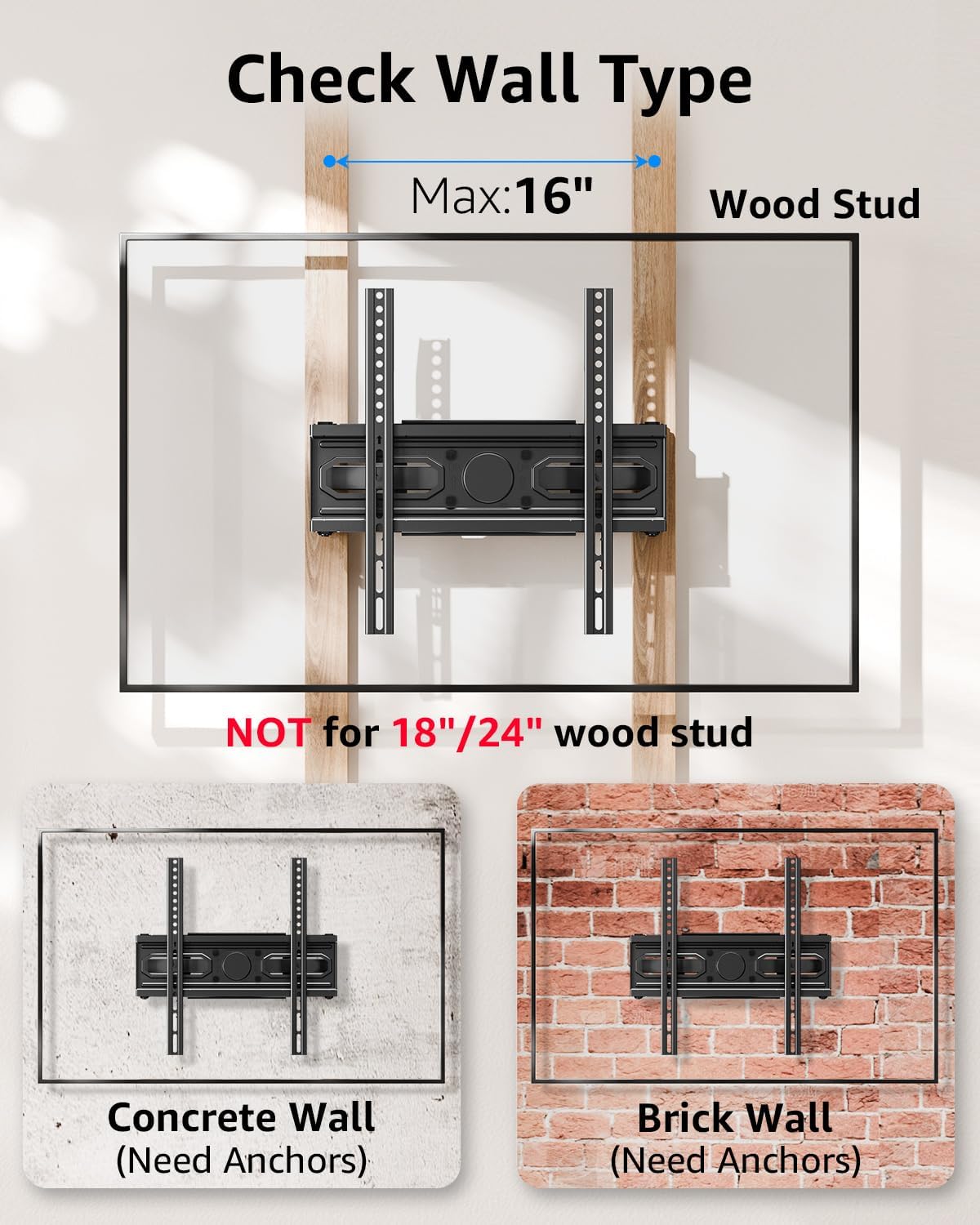
Image: Important information on checking wall type and stud spacing before installation.
- Step 3: Hang and Secure TV to Wall Plate
With assistance, carefully lift the TV (with brackets attached) and hook the TV brackets onto the wall plate. Ensure the TV is securely seated on the wall plate. Tighten any safety screws or locking mechanisms on the TV brackets to prevent accidental dislodgement. Double-check all connections for security before releasinw telewizorze.
5. Obsługa i regulacje
Your MOUNTUP EconoMe TV wall mount offers a range of adjustments to achieve optimal viewing angles and flexibility.
5.1. Regulacja nachylenia
The mount allows for vertical tilt adjustment to reduce glare and improve viewing comfort. You can tilt the TV up by +5° and down by -10°.

Image: Illustration of the tilting capability for anti-glare viewing.
5.2. Regulacja obrotu
The articulating arms allow you to swivel your TV left or right by up to ±45°, providing flexible viewing options from different areas of the room. The maximum swivel angle may vary depending on your TV's size.
5.3. Regulacja poziomowania
After installation, you can fine-tune the horizontal level of your TV by ±3° to ensure it is perfectly straight.

Image: Demonstrates premium adaptability with leveling and swivel adjustments.
5.4. Wydłużanie i cofanie
The dual articulating arms allow the TV to extend up to 14.5 inches (36.8 cm) from the wall and retract back to a slim 2.7 inches (6.8 cm) profile, saving space when not in use.

Image: Illustrates the ultimate flexibility of extension and retraction.
5.5. Height Options
The design allows for two height options for mounting the TV brackets on the wall plate, providing flexibility to achieve eye-level comfort.

Image: Demonstrates two height options for optimal eye-level viewing.
6. Konserwacja
To ensure the longevity and safe operation of your TV wall mount, follow these simple maintenance guidelines:
- Czyszczenie: Regularnie odkurzaj uchwyt miękką, suchą ściereczką. W przypadku uporczywych zabrudzeń użyj lekko wilgotnej ściereczki.amp cloth and mild detergent, then wipe dry. Avoid abrasive cleaners or solvents.
- Kontrole okresowe: Every few months, inspect all screws and connections to ensure they remain tight and secure. Re-tighten any loose fasteners.
- Ruch: If the articulating arms become stiff, a small amount of silicone-based lubricant can be applied to the pivot points, avoiding contact with the TV or wall.
7. Rozwiązywanie Problemów
If you encounter any issues with your MOUNTUP EconoMe TV Wall Mount, please refer to the common problems and solutions below. If the issue persists, contact our customer service.
| Problem | Możliwa przyczyna | Rozwiązanie |
|---|---|---|
| Telewizor nie jest wypoziomowany po zainstalowaniu. | Wall plate not perfectly level; minor adjustments needed. | Use the leveling adjustment feature (±3°) to fine-tune the TV's horizontal position. |
| Trudności z przesuwaniem lub regulacją telewizora. | Screws at pivot points are too tight; lack of lubrication. | Slightly loosen the screws at the articulating joints. Apply a small amount of silicone-based lubricant if necessary. |
| Uchwyt wydaje się luźny na ścianie. | Lag bolts not fully tightened; incorrect wall anchors used. | Ensure all lag bolts securing the wall plate are fully tightened. Verify that the correct anchors were used for your wall type. If unsure, consult a professional. |
| Telewizor nie pasuje do uchwytu. | Nieprawidłowy wzór VESA lub rozmiar/waga telewizora. | Double-check your TV's VESA pattern and weight against the mount's specifications. This mount supports VESA from 100x100mm to 400x400mm and up to 99 lbs. |
8. Specyfikacje
| Funkcja | Specyfikacja |
|---|---|
| Numer modelu | EU0092A |
| Kompatybilność z rozmiarem telewizora | 32 - 65 cali |
| Nośność | Do 99 funtów (45 kg) |
| Zgodność ze standardem VESA | 100x100mm, 150x150mm, 200x200mm, 200x300mm, 300x300mm, 400x400mm, etc. (Min 100x100mm, Max 400x400mm) |
| Kąt nachylenia | +5° / -10° |
| Kąt obrotu | ±45° (Max angle depends on TV size) |
| Regulacja poziomu | ±3° |
| Przedłużenie od ściany | od 2.7 cali (6.8 cm) do 14.5 cali (36.8 cm) |
| Tworzywo | Stal stopowa |
| Kolor | Czarny |
| Waga przedmiotu | 8.14 funta |
| Wymiary opakowania | 17.56 x 6.65 x 2.83 cala |

Image: Demonstrates the durability and stability of the mount, supporting up to 99 lbs.
9. Gwarancja i wsparcie
MOUNTUP is committed to providing quality products and excellent customer service. For any inquiries, concerns, or assistance with installation or parts, please do not hesitate to contact our support team. We are available to help you with any issues you may encounter.
For the most up-to-date warranty information and detailed support resources, please refer to the official MOUNTUP website or the product's Amazon page. You can also find a downloadable PDF version of the installation manual Tutaj.


