
1. Koniec produktuview
The LiNKFOR 6-Channel Audio Mixer is an ultra-compact device designed to combine up to six line-level signal sources into a single output channel. It is suitable for connecting various electronic instruments and audio equipment such as microphones, guitars, basses, keyboards, and phones, making it ideal for small clubs, bars, or personal stage setups. This mixer features individual volume controls for each input and the main output, along with mono/stereo switching capabilities. Its robust all-metal shell ensures durability and reduces electromagnetic interference for a purer sound experience.

Figure 1: LiNKFOR 6-Channel Audio Mixer, showcasindzięki kompaktowej konstrukcji i układowi sterowania.
2. Informacje dotyczące bezpieczeństwa
- Upewnij się, że napięcie zasilaniatage matches the device's requirements (5V DC).
- Nie wystawiaj urządzenia na działanie wody, wilgoci ani ekstremalnych temperatur.
- Unikaj rozmontowywania lub modyfikowania urządzenia, gdyż może to spowodować unieważnienie gwarancji i uszkodzenia.
- Trzymaj urządzenie z dala od silnych pól magnetycznych.
- Należy używać wyłącznie dołączonego lub zalecanego zasilacza i kabli.
3. Zawartość opakowania

Rysunek 2: Zawartość opakowania produktu.
Sprawdź, czy w przesyłce znajdują się wszystkie elementy:
- LiNKFOR 6-Channel Audio Mixer (Model 6-IN-1-OUT)
- Zasilacz 5V
- USB Type-C Power Cable with Magnetic Ring
- Kabel audio 6.35 mm
- Instrukcja obsługi
4. Funkcje produktu
- Ultrakompaktowa konstrukcja: Mixes up to 6 line signal sources into 1 channel for headphones or speakers.
- Wszechstronna kompatybilność: Suitable for microphones, guitars, basses, keyboards, phones, and other stage-sprzęt.
- Niezależna kontrola: Each input and the main output feature independent volume control.
- Stereo/Mono Switching: Supports switching between stereo and mono modes with a single key.
- Ultra-Low Noise Performance: Designed for impressive audio experience without interference.
- Stabilne zasilanie: Certified 5V power supply and power cable with magnetic ring ensure stable performance.
- Specific Power Switch: Easy to operate on/off switch, eliminating frequent unplugging.
- Trwała konstrukcja: All-metal shell reduces electromagnetic interference and provides a purer sound. Non-slip pads prevent movement during use.
Wideo 1: Ponadview of a 6-channel stereo audio mixer, highlighting its inputs and controls. This video demonstrates the compact design, 6.35mm input interfaces, independent volume adjustments, and mono/stereo switching capabilities.
5. Konfiguracja
Follow these steps to set up your LiNKFOR 6-Channel Audio Mixer:
- Podłączenie zasilania: Connect the provided USB Type-C power cable to the mixer's 5V DC input port. Plug the other end into a compatible 5V USB power source (e.g., wall adapter, computer USB port, power bank).
- Włączyć coś: Press the power switch located on the mixer. The power indicator light will illuminate.
- Połączenia wejściowe: Connect your audio sources (microphones, instruments, phones, etc.) to the INPUT 1-6 jacks using 6.35mm TRS/TS cables.
- Połączenie wyjściowe: Connect your headphones or amplifier to the OUTPUT jack using a 6.35mm TRS/TS cable.
- Początkowa regulacja głośności: Set all LEVEL knobs (1-6) and the main OUTPUT knob to their minimum position before playing any audio to avoid sudden loud sounds.

Figure 3: Connecting the Type-C power supply.
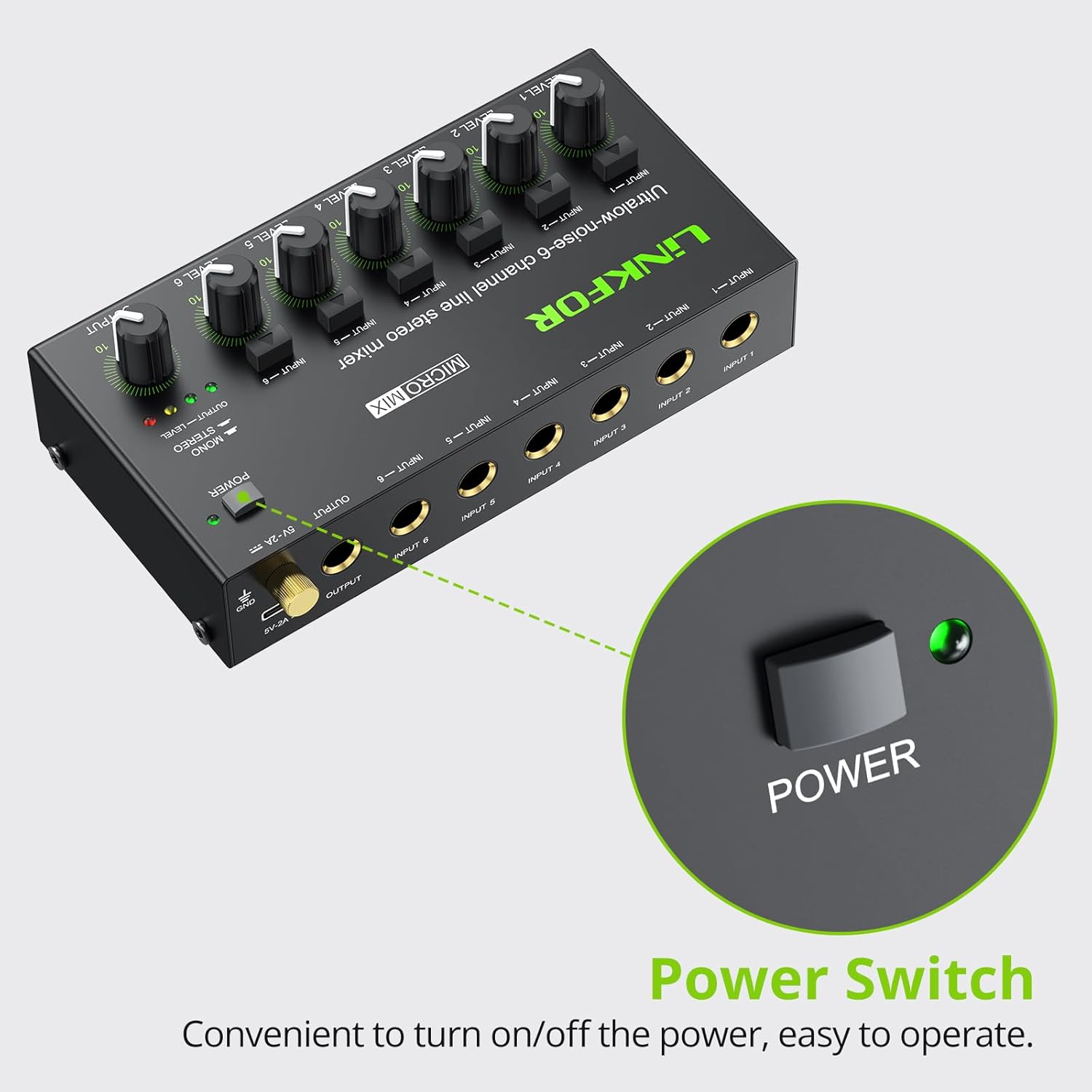
Rysunek 4: Lokalizacja wyłącznika zasilania.
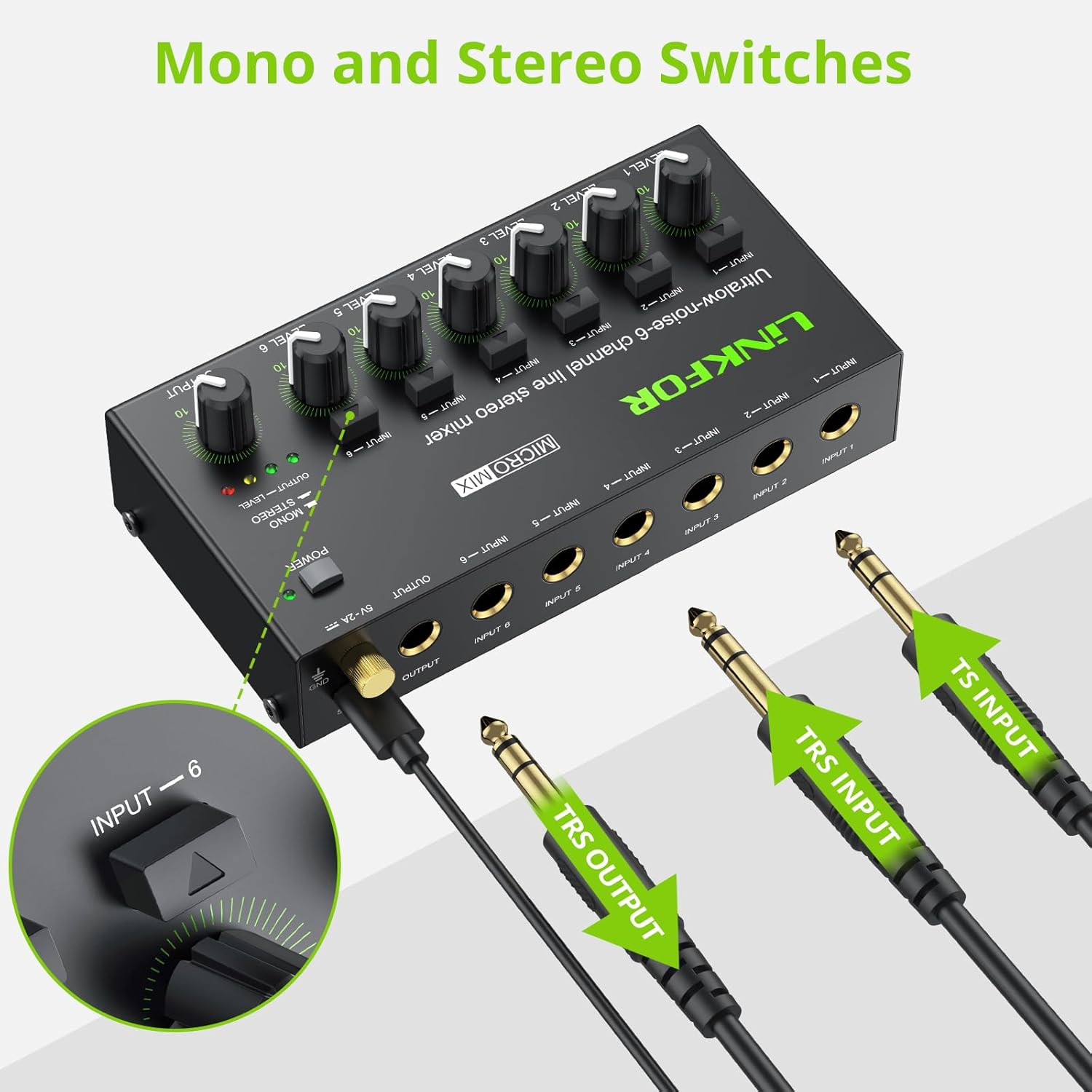
Figure 5: Input and output interfaces.

Figure 6: Connection diagram for inputs and outputs.
6. Instrukcja obsługi
Once your mixer is set up, follow these instructions for operation:
- Adjusting Input Levels: Gradually turn up the LEVEL knob for each active input channel (LEVEL 1-6) until the desired volume is achieved for that specific source.
- Regulacja poziomu wyjściowego: Slowly increase the main OUTPUT knob to control the overall volume of the mixed audio sent to your headphones or amplifier. Monitor the OUTPUT LEVEL indicator lights (green, yellow, red) to prevent clipping (red light indicates signal is too high).
- Mono/Stereo Switching: Each input channel has a dedicated button to switch between mono and stereo modes. Press the button above the respective input to toggle between modes as needed for your audio source.
- Mixing Multiple Sources: Adjust the individual LEVEL knobs for each input to create a balanced mix of all connected audio sources.
Video 2: Official LiNKFOR video demonstrating the 6-Channel Audio Mixer's features. This video highlights the specific power switch, separate volume controls for each channel, stereo/mono switching, and ultra-low noise performance during operation.

Rysunek 7: Example of mixer in use with guitar and laptop.
7. Konserwacja
- Czyszczenie: Do czyszczenia zewnętrznej części miksera należy używać miękkiej, suchej ściereczki. Nie należy używać płynnych środków czyszczących ani rozpuszczalników.
- Składowanie: Przechowuj urządzenie w chłodnym, suchym miejscu, z dala od bezpośredniego światła słonecznego i ekstremalnych temperatur, gdy nie jest używane.
- Pielęgnacja kabli: Ensure all cables are connected securely and are not bent or kinked excessively to prevent damage.
8. Rozwiązywanie Problemów
| Problem | Możliwa przyczyna | Rozwiązanie |
|---|---|---|
| Brak dźwięku | Power not connected or turned on; Volume knobs too low; Incorrect cable connections. | Check power supply and switch; Increase LEVEL and OUTPUT knobs; Verify all audio cables are correctly and securely connected. |
| Zniekształcony dźwięk | Volume levels too high (clipping); Faulty cables or audio sources. | Reduce LEVEL and/or OUTPUT knobs until red indicator light disappears; Test with different cables or audio sources. |
| Hissing/Buzzing noise | Ground loop interference; Poor quality cables; Nearby electronic interference. | Ensure proper grounding; Use high-quality shielded cables; Move the mixer away from other electronic devices. |
| Nie działa jeden kanał | Faulty input cable or source; Input level too low. | Test the input with a different cable and source; Increase the specific channel's LEVEL knob. |
9. Specyfikacje

Rysunek 8: Wymiary produktu.
| Funkcja | Szczegół |
|---|---|
| Marka | LinkFOR |
| Numer modelu | 6-IN-1-OUT |
| Liczba kanałów | 6 |
| Technologia łączności | 6.35mm |
| Źródło zasilania | Elektryczny przewodowy |
| Tomtage | 5 wolty |
| Wymiary produktu | 1.26" gł. x 2.95" szer. x 1.26" wys. (32 mm gł. x 75 mm szer. x 32 mm wys.) |
| Waga przedmiotu | 8.5 uncji (240 grama) |
10. Gwarancja i wsparcie
For warranty information and technical support, please refer to the documentation included with your purchase or visit the official LiNKFOR webSzczegółowe warunki gwarancji mogą się różnić w zależności od regionu i sprzedawcy.