
Powitanie
Thank you for choosing the BYTECH BICONIC True Wireless Earbuds. This manual provides essential information on how to set up, operate, maintain, and troubleshoot your new earbuds. Please read this manual thoroughly before use to ensure optimal performance and longevity of your device.
Ważne instrukcje bezpieczeństwa
- Nie wystawiaj słuchawek ani etui ładującego na działanie ekstremalnych temperatur, wilgoci ani płynów.
- Unikaj upuszczania, uderzania i demontażu urządzenia.
- Do not use abrasive cleaners or harsh chemicals to clean the earbuds or case.
- Słuchaj muzyki na umiarkowanym poziomie głośności, aby zapobiec uszkodzeniu słuchu. Długotrwała ekspozycja na głośne dźwięki może spowodować nieodwracalną utratę słuchu.
- Przechowywać w miejscu niedostępnym dla dzieci i zwierząt domowych.
- Dispose of the device responsibly according to local regulations. Do not dispose of with household waste.
Co jest zawarte
Sprawdź zawartość paczki, aby upewnić się, że znajdują się w niej wszystkie elementy:
- BYTECH BICONIC True Wireless Earbuds (Left and Right)
- Etui ładujące
- Kabel ładujący
- Instrukcja obsługi
Produkt ponadview
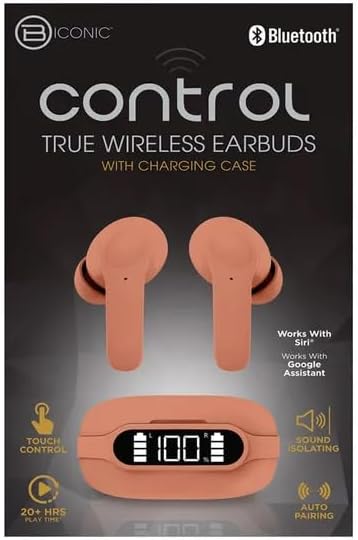
Familiarize yourself with the components of your BYTECH BICONIC True Wireless Earbuds.

Pierwsze kroki
Ładowanie słuchawek i etui
The BYTECH BICONIC earbuds come with a rechargeable battery in both the earbuds and the charging case. Ensure both are fully charged before first use.
- Umieść słuchawki w etui ładującym, upewniając się, że są prawidłowo osadzone w odpowiednich gniazdach (L - lewy, R - prawy).
- Connect the provided charging cable to the charging port on the case and the other end to a USB power source (e.g., computer USB port, wall adapter).
- The digital display on the charging case will show the battery level. Allow sufficient time for a full charge.
- Po całkowitym naładowaniu odłącz kabel ładujący.
Parowanie Bluetooth
Aby sparować słuchawki douszne z urządzeniem obsługującym technologię Bluetooth, wykonaj następujące czynności:
- Sprawdź, czy słuchawki są naładowane i znajdują się w etui ładującym.
- Open the charging case. The earbuds will automatically enter pairing mode, and an indicator light on the earbuds will flash.
- Na swoim urządzeniu (smartfonie, tablecie itp.) przejdź do ustawień Bluetooth i włącz Bluetooth.
- Szukaj available devices. You should see "BYTECH BICONIC" or a similar name appear in the list.
- Select "BYTECH BICONIC" to connect. Once connected, a voice prompt will confirm the successful pairing, and the indicator lights on the earbuds will stop flashing.
- Słuchawki douszne automatycznie połączą się z ostatnio sparowanym urządzeniem po wyjęciu z etui, pod warunkiem że w urządzeniu włączony jest Bluetooth.
Instrukcja obsługi
Sterowanie dotykowe
The BYTECH BICONIC earbuds feature intuitive touch controls for easy management of your audio and calls.
| Działanie | Funkcjonować |
|---|---|
| Pojedyncze dotknięcie (lewa/prawa słuchawka) | Odtwarzaj/wstrzymuj muzykę, odbieraj/kończ połączenia |
| Podwójne dotknięcie (prawa słuchawka) | Następny utwór |
| Podwójne dotknięcie (lewa słuchawka) | Poprzedni utwór |
| Potrójne dotknięcie (lewa/prawa słuchawka) | Aktywuj Asystenta głosowego (Siri/Asystent Google) |
| Długie naciśnięcie (lewa/prawa słuchawka) | Odrzuć połączenie |
Włączanie i wyłączanie
- Włączanie: Słuchawki douszne włączą się automatycznie po wyjęciu z etui ładującego.
- Wyłączone: Włóż słuchawki douszne z powrotem do etui ładującego i zamknij pokrywę. Słuchawki automatycznie się wyłączą i rozpoczną ładowanie.
Konserwacja i pielęgnacja
Proper care will extend the life of your BYTECH BICONIC True Wireless Earbuds.
- Czyszczenie: Use a soft, dry, lint-free cloth to clean the earbuds and charging case. Do not use liquids or aerosol cleaners.
- Składowanie: Gdy nie używasz słuchawek, zawsze przechowuj je w etui ładującym, aby je chronić i utrzymać naładowanie.
- Unikaj ekstremalnych warunków: Do not expose the device to extreme heat, cold, or direct sunlight.
- Wodoodporność: These earbuds are not waterproof. Avoid contact with water or excessive moisture.
Rozwiązywanie problemów
Jeśli napotkasz jakiekolwiek problemy ze słuchawkami dousznymi, zapoznaj się z poniższymi typowymi rozwiązaniami:
| Problem | Rozwiązanie |
|---|---|
| Słuchawki douszne nie parują się | Upewnij się, że słuchawki są naładowane. Wyłącz i włącz Bluetooth w urządzeniu. Usuń z urządzenia „zapomnienie” w ustawieniach Bluetooth i sparuj je ponownie. |
| Działa tylko jedna wkładka douszna | Włóż obie słuchawki douszne z powrotem do etui ładującego, zamknij pokrywę, odczekaj kilka sekund, a następnie wyjmij je. Upewnij się, że obie są naładowane. |
| Brak dźwięku | Check volume levels on both your device and the earbuds. Ensure earbuds are properly connected. Try playing different audio. |
| Etui ładujące nie ładuje się | Ensure the charging cable is securely connected to both the case and the power source. Try a different USB port or power adapter. |
Dane techniczne
Detailed specifications for your BYTECH BICONIC True Wireless Earbuds:
| Funkcja | Szczegół |
|---|---|
| Numer modelu | BC-AU-BE-144-TN |
| Technologia łączności | Bezprzewodowy (Bluetooth) |
| Współczynnik kształtu | Douszne (wewnątrzuszne) |
| Kolor | Kawiarnia |
| Cechy specjalne | Rechargeable Battery, Touch Control, Sound Isolating, Auto Pairing |
| Zawarte komponenty | Kabel |
| Estimated Play Time | Ponad 20 godzin (z etui ładującym) |
Informacje o gwarancji i obsłudze klienta
BYTECH products are designed and manufactured to the highest quality standards. For information regarding warranty coverage, please refer to the warranty card included with your purchase or visit the official BYTECH webstrona.
If you require further assistance or have questions not covered in this manual, please contact BYTECH customer support through their official channels. Please have your model number (BC-AU-BE-144-TN) and purchase details ready when contacting support.