
1. Wprowadzenie
The Keychron K17 Max is an ultra-slim wireless mechanical keyboard designed for enhanced productivity and gaming. It features a compact 96% layout, QMK firmware, and supports multiple connection modes including 2.4 GHz, Bluetooth, and wired USB Type-C. This manual provides detailed instructions for setting up, operating, maintaining, and troubleshooting your K17 Max keyboard.

Image 1.1: The Keychron K17 Max keyboard highlighting its key features such as Launcher Web Configurator, ultra-slim design, 2.4 GHz & Bluetooth connectivity, macOS & Windows compatibility, 1000 Hz Polling Rate, Numpad, Acoustic Foam, and Double-Shot PBT Keycaps.
2. Konfiguracja
2.1 Zawartość opakowania
Sprawdź, czy w przesyłce znajdują się wszystkie elementy:
- 1x Keychron K17 Max Fully Assembled Keyboard
- 1x kabel typu A do typu C
- 1x Adapter przedłużający do odbiornika 2.4 GHz
- 1x odbiornik typu A 2.4 GHz
- 1x ściągacz klawiszy

Image 2.1: Illustration of the included accessories: keyboard, USB-C cable, 2.4 GHz receiver, and keycap puller.
2.2 Ładowanie klawiatury
Connect the provided USB Type-A to Type-C cable to the keyboard's USB-C port and the other end to a power source (e.g., computer USB port or USB wall adapter). The charging indicator light will show the charging status.
2.3 Tryby połączenia
K17 Max obsługuje trzy typy połączeń:
- Łączność bezprzewodowa 2.4 GHz: For high-performance gaming with a 1000 Hz polling rate. Insert the 2.4 GHz receiver into your computer's USB-A port. Use the extension adapter if needed for better signal.
- Bluetooth 5.1: Connect up to three devices and switch between them seamlessly. Enable Bluetooth on your device and pair with the keyboard.
- Przewodowy (USB typu C): Connect the keyboard directly to your computer using the provided USB-C cable.

Image 2.2: The keyboard illustrating its three connection modes: 2.4 GHz, Bluetooth 5.1, and USB Wired.
2.4 Zmiana systemu operacyjnego
Locate the OS toggle switch on the side of the keyboard. Switch it to the appropriate position for your operating system (Windows/Android or Mac/iOS) to ensure correct key mapping.

Image 2.3: Close-up of the multi-OS toggle switch on the side of the keyboard, indicating settings for Windows and macOS.
3. Instrukcja obsługi
3.1 Podstawowe pisanie
The K17 Max features a standard QWERTY layout with a 96% form factor, including a numeric keypad. Keys are designed for a comfortable typing experience with low-profile Gateron mechanical brown switches.
3.2 Sterowanie podświetleniem RGB
The keyboard features customizable RGB backlighting. Use the dedicated function keys or the Keychron Launcher web app to cycle through various lighting effects, adjust brightness, and change colors.

Image 3.1: The Keychron K17 Max keyboard displaying its customizable RGB backlights in a desk setup.
3.3 QMK Firmware and Keychron Launcher
The K17 Max runs on QMK open-source firmware, allowing for advanced customization. Use the Keychron Launcher web app to remap keys, create macros, and configure lighting effects. This web-based tool requires no installation and provides regular updates.
- Access the Keychron Launcher via your web przeglądarka.
- Connect your keyboard via USB-C to your computer.
- Postępuj zgodnie z instrukcjami wyświetlanymi na ekranie, aby dostosować ustawienia klawiatury.
Ilustracja 3.2: Zrzut ekranu programu uruchamiającego Keychron Web App interface on a laptop, showing key remapping and customization options for the K17 Max.
4. Konserwacja
4.1 Czyszczenie klawiatury
Aby wyczyścić klawiaturę, odłącz ją od wszystkich źródeł zasilania. Użyj miękkiej, niepozostawiającej włókien ściereczki, lekko przetrzyj.ampened with water or a mild cleaning solution. For dust and debris between keycaps, use compressed air. Avoid spraying liquids directly onto the keyboard.
4.2 Pielęgnacja nakładek klawiszy
The K17 Max features durable double-shot PBT keycaps. If you need to remove keycaps for cleaning or replacement, use the provided keycap puller to avoid damage. Gently pull the keycap straight up.

Obraz 4.1: Zbliżenie view nisko-profesjonalnychfile double-shot PBT keycaps, highlighting their LSA profile and durable construction.
5. Rozwiązywanie Problemów
5.1 Problemy z łącznością
- 2.4 GHz: Ensure the receiver is securely plugged in and the keyboard is in 2.4 GHz mode. Try a different USB port or use the extension adapter to position the receiver closer to the keyboard.
- Bluetooth: Ensure Bluetooth is enabled on your device and the keyboard is in Bluetooth pairing mode. Forget the device on your computer and re-pair if connection fails.
- wired: Sprawdź połączenie kabla USB-C na obu końcach. Wypróbuj inny kabel lub port USB-C.
5.2 Klawisze nie reagują
- Sprawdź, czy klawiatura jest włączona i podłączona.
- Check the OS switch is set correctly for your system.
- If specific keys are not working, gently remove the keycap with the keycap puller and inspect for any obstructions.
- Perform a factory reset if issues persist (refer to Keychron support for specific instructions).
5.3 Problemy z podświetleniem
- Ensure the backlight is enabled and brightness is adjusted.
- Check settings in the Keychron Launcher web aplikacja.
5.4 aktualizacji oprogramowania sprzętowego
Regularly check the Keychron website or the Keychron Launcher web app for firmware updates to ensure optimal performance and access to new features. Follow the provided instructions carefully during the update process.
6. Specyfikacje
| Funkcja | Szczegół |
|---|---|
| Marka | Chronograf |
| Numer modelu | K17 Max |
| Układ | 96% (100 klucze) |
| Łączność | Łączność bezprzewodowa 2.4 GHz, Bluetooth 5.1, przewodowy port USB typu C |
| Przełączniki | Niskoprofile Gateron Mechanical Brown |
| Klawisze | Podwójny PBT |
| Podświetlenie | RGB |
| Częstotliwość odpytywania (2.4 GHz) | 1000 Hz |
| Kompatybilny system operacyjny | macOS, Windows, Linux, Android, iOS |
| Tworzywo | Aluminium, Plastik |
| Źródło zasilania | Rechargeable Battery, USB Powered |
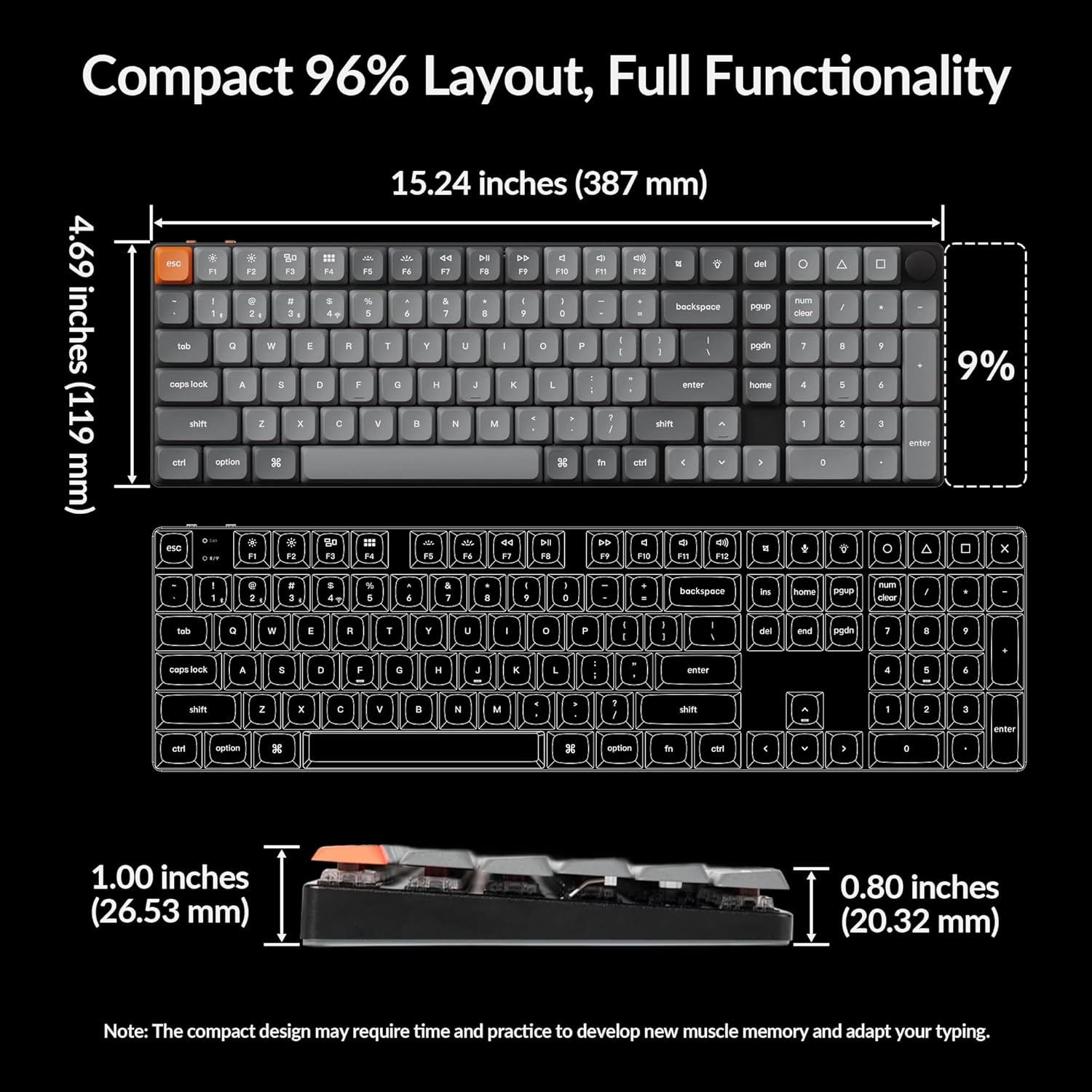
| Wymiary (w przybliżeniu) | 15.24 cala (387 mm) x 4.69 cala (119 mm) |

Image 6.1: Detailed dimensions of the Keychron K17 Max keyboard, illustrating its compact 96% layout.

Obraz 6.2: Zbliżenie view nisko-profesjonalnychfile Gateron mechanical brown switches beneath the keycaps.
7. Gwarancja i wsparcie
7.1 Informacje o gwarancji
The Keychron K17 Max keyboard comes with a 1-year limited warranty from the date of purchase. This warranty covers manufacturing defects under normal use. It does not cover damage caused by misuse, accidents, unauthorized modifications, or normal wear and tear.
7.2 Obsługa klienta
For technical assistance, warranty claims, or further inquiries, please visit the official Keychron website or contact their customer support team. You can find contact information and FAQs on the Keychron support page.
Oficjalny Keychron Webstrona: www.keychron.com