
1. Koniec produktuview
The ARPHA D180K-B is a keyless entry door lock designed for residential use, offering multiple unlocking methods and smart features for enhanced security and convenience. This manual provides detailed instructions for installation, operation, and maintenance.

Figure 1: ARPHA D180K-B Keyless Entry Door Lock (Matte Black)
2. Zawartość opakowania
Przed instalacją należy sprawdzić, czy wszystkie komponenty są obecne:
- Jednostka zamka przedniego
- Jednostka zamka tylnego
- Cylinder zamka
- Klucze mechaniczne (2)
- Klamki do drzwi (2)
- Szablon instalacji
- Pakiet akcesoriów śrubowych
- Instrukcja obsługi

Figure 2: Components included in the ARPHA D180K-B package.
3. Instalacja
The ARPHA D180K-B is designed for easy installation on most US standard left and right-hand doors without additional drilling. A video guide is available to walk you through the process.
3.1 Zgodność z drzwiami
Upewnij się, że Twoje drzwi spełniają następujące wymagania:
- Door Thickness: 1-3/8" to 2-1/8" (35mm to 55mm)
- Door Backset: 2-3/8" or 2-3/4" (60mm or 70mm)
- Cross Bore Diameter: 2-1/8" (54mm)

Figure 3: Door dimensions and compatibility requirements.
3.2 Kroki instalacji
Follow the instructions provided in the included manual and the video guide for a smooth installation.
Video 1: Detailed installation guide for the ARPHA D180K-B Keyless Entry Door Lock.
3.3 Instalacja baterii
The keypad door lock requires 4 AA batteries (not included). Ensure correct polarity when inserting the batteries.

Figure 4: Battery compartment and low battery alert indicator.
4. Instrukcja obsługi
The ARPHA D180K-B offers multiple ways to unlock and manage access.
4.1 Metody odblokowywania
The lock can be unlocked using the following methods:
- Kontrola aplikacji: Unlock remotely via the Tuya Smart App (requires optional gateway ASIN: B09YHFG933 for remote functionality).
- Hasło: Enter a 6-8 digit passcode on the keypad.
- EKey: Digital key access through the app.
- Klucz mechaniczny: Użyj klucza fizycznego jako kopii zapasowej.
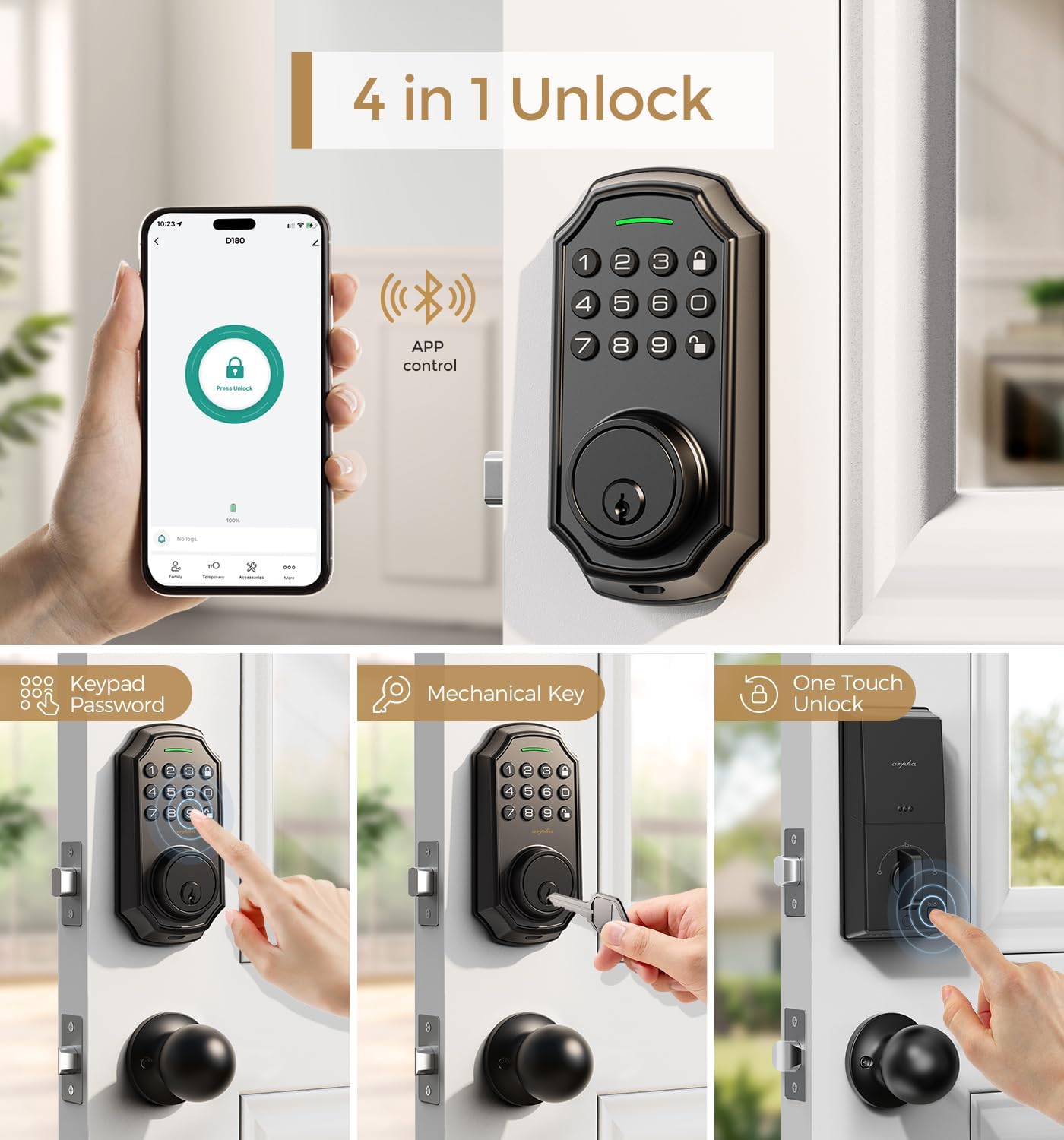
Rysunek 5: Koniecview of the four primary unlocking methods.
4.2 Hasło zabezpieczające przed podglądaniem
To protect your passcode from prying eyes, you can enter up to 16 virtual digits before or after your actual 6-8 digit passcode. The lock will still recognize the correct sequence within the longer entry.

Rysunek 6: Example of using the anti-peeping password feature.
4.3 Auto-Lock and One-Touch Locking
The lock features an auto-lock function that can be set to activate between 10 seconds and 30 minutes after unlocking. Additionally, a one-touch lock feature allows for immediate locking by pressing a dedicated button.

Figure 7: Auto-lock timer setting and one-touch locking functionality.
4.4 App Connection and Management
Connect your lock to the Tuya Smart App for advanced features. Ensure Bluetooth is enabled and your network is set to 2.4G for gateway connection. The app allows you to:
- Generate and share one-time, permanent, scheduled, and recurring codes.
- Manage up to 100 user access codes (3 admin, 97 user).
- View rekordy dostępu.
- Remotely unlock/lock (with optional gateway).
Video 2: Tutorial on connecting the smart door lock to a gateway for remote access.
Video 3: Guide on connecting the D180K-B to the mobile application.
Video 4: Demonstrates various app functions and operations for the D180K-B.

Figure 8: App control via Bluetooth, effective within a 10-meter range.

Figure 9: The lock supports up to 100 user codes, including 3 admin and 97 regular users.

Figure 10: Generating and sharing temporary access codes via the app.

Figure 11: Real-time unlocking records can be viewed w aplikacji.

Figure 12: Setting timed passcodes with automatic expiration dates.
5. Konserwacja
5.1 Wymiana baterii
The lock is powered by 4 AA batteries, which typically last around 180 days. A low battery alert will notify you when replacement is needed. Replace all four batteries simultaneously with new ones to ensure optimal performance.

Figure 13: The app displays a low battery reminder when the lock's power is low.
5.2 Czyszczenie
Wipe the keypad and lock body with a soft, dry cloth. Avoid using abrasive cleaners or solvents that could damage the finish or electronic components.
6. Rozwiązywanie Problemów
If you encounter issues with your ARPHA D180K-B lock, consider the following:
- Zamek nie odpowiada: Sprawdź poziom naładowania baterii i w razie potrzeby wymień.
- Klawiatura się nie podświetla: Sprawdź, czy baterie są prawidłowo zainstalowane i naładowane.
- Nie można połączyć się z aplikacją: Verify Bluetooth is on, the gateway is powered, and your Wi-Fi network is 2.4G. Refer to the app connection video for detailed steps.
- Incorrect passcode entry: Ensure you are entering the correct 6-8 digit passcode. Remember the anti-peeping feature allows extra digits before or after.
- Blokada nie włącza się/wyłącza: Check for any obstructions in the door frame or latch mechanism.
Aby uzyskać dalszą pomoc, skontaktuj się z obsługą klienta.
7. Specyfikacje
| Funkcja | Specyfikacja |
|---|---|
| Marka | ARPHA |
| Nazwa modelu | D180K-B |
| Typ zamka | Klawiatura Deadbolt |
| Funkcja specjalna | Passcode Unlock, App Control, Auto-Lock |
| Tworzywo | Cynk |
| Kolor | Matowa czerń |
| Pozycja Wymiary (dł. x szer. x wys.) | 5.8 x 2.3 x 1.57 cala |
| Waga przedmiotu | 3.5 funta |
| Źródło zasilania | 4 baterii AA (brak w zestawie) |
| Protokół łączności | Bluetooth |
| Pojemność użytkownika | 3 Administrator, 97 User Passcodes |
| Wilgotność robocza | 0% - 95% |
| Temperatura pracy | -4°F do +140°F (-20°C do +60°C) |
8. Gwarancja i wsparcie
ARPHA offers a 30-day money-back guarantee, an 18-month assurance, and lifetime technical support for the D180K-B Keyless Entry Door Lock.
Our dedicated support team is available 24/7 via email to assist you with any questions or issues.
- Wsparcie e-mailowe: wsparcie@arpha.com
- Wsparcie telefoniczne: (1) 844-820-5077
Figure 14: ARPHA provides 24/7 online service and a 2-hour fast response.