
Rraycom BW6
Rraycom BW6B Wireless Battery-Powered Security Camera
Instrukcja obsługi użytkownika
1. Wprowadzenie
Thank you for choosing the Rraycom BW6B Wireless Battery-Powered Security Camera. This manual provides detailed instructions for the installation, operation, and maintenance of your new security camera. Please read this manual thoroughly before use to ensure proper functionality and to maximize the benefits of your device. This camera is designed for outdoor use, offering 2K QHD resolution, color night vision, AI motion detection, and two-way audio communication, powered by a built-in battery and solar panel for continuous operation.
2. Koniec produktuview
2.1. Zawartość opakowania
Sprawdź, czy w przesyłce znajdują się wszystkie elementy:
- Rechargeable Battery Security Camera
- Panel słoneczny
- Metalowy uchwyt
- Screws Set & 1*User Manual
- Kabel USB
2.2. Główne cechy
- Solar Powered with 5200mAh Battery: Ensures 365 days of uninterrupted protection with a 3W solar panel and robust built-in battery.
- 2K QHD Resolution & 130° Wide View: Provides clear, detailed video and a broad field of view do kompleksowego monitorowania.
- Pełnokolorowa wizja nocna: Captures vivid images even in low-light conditions up to 33ft.
- Advanced AI Motion Detection: Intelligently analyzes and recognizes human motion, sending real-time alerts to your device.
- Dwukierunkowa rozmowa i alarm syreny: Allows for remote communication and includes a customizable siren and spotlight for deterrence.
- Elastyczne opcje przechowywania: Supports both cloud storage and local Micro SD card storage (up to 256GB) without subscription fees.
- Wodoodporność IP65: Zaprojektowane tak, aby wytrzymać różne warunki atmosferyczne.
2.3. Diagram produktu i jego komponenty

Rycina 2.3.1: Przód view of the Rraycom BW6B security camera with its accompanying solar panel.

Figure 2.3.2: Illustration of the camera and solar panel providing continuous power, highlighting 365 days of non-stop operation.
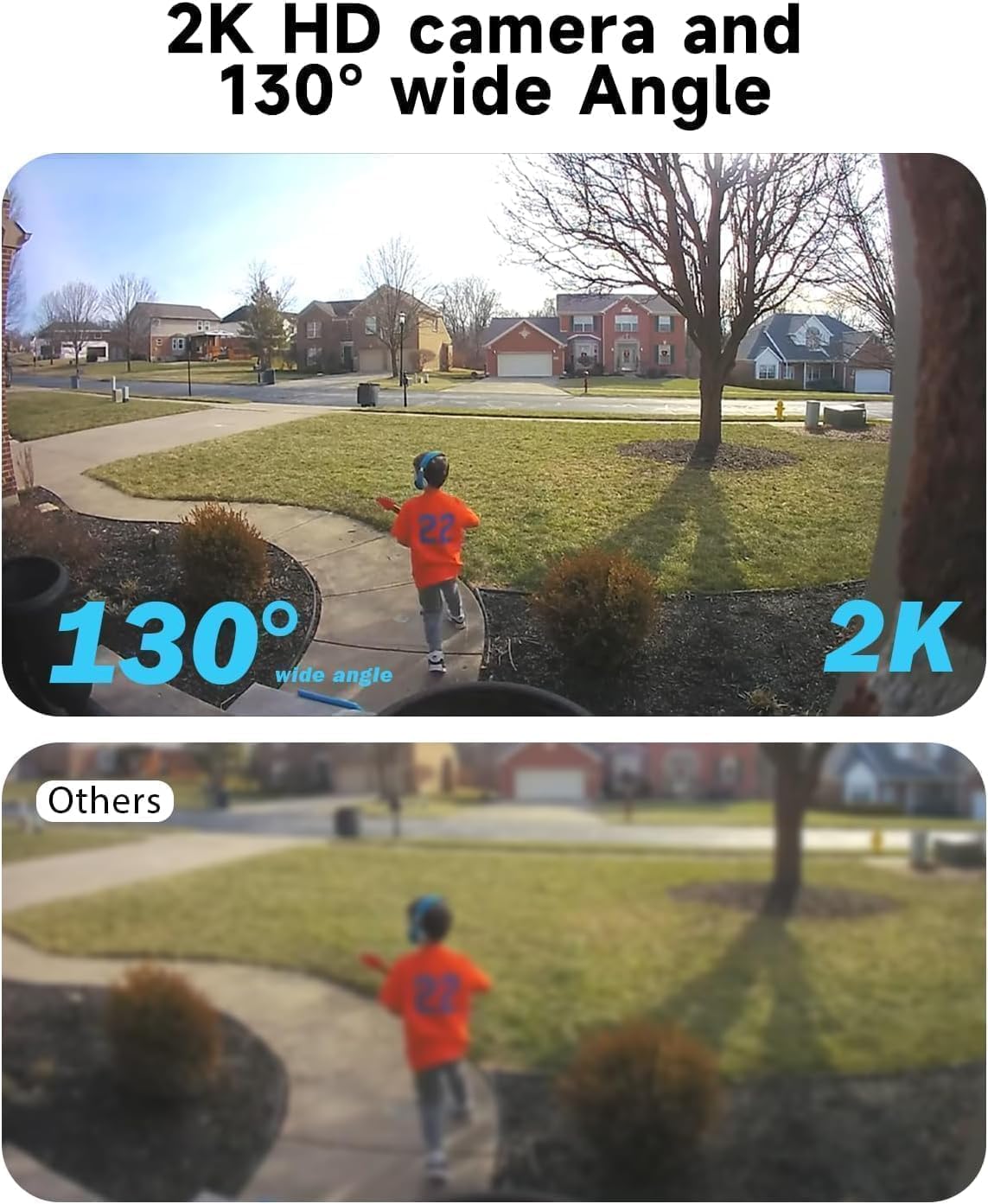
Figure 2.3.3: Comparison demonstrating the 2K HD resolution and 130-degree wide-angle view of the camera versus a standard view.

Figure 2.3.4: Depiction of the AI motion detection feature, showing a detected person and the camera's response with siren and spotlight.

Rysunek 2.3.5: Ilustracja funkcji dwukierunkowej transmisji dźwięku, umożliwiającej komunikację za pośrednictwem kamery.

Rysunek 2.3.6: Example of the 2K HD color night vision, showing clear imagery in low-light conditions up to 33 feet.

Figure 2.3.7: Diagram showing the camera's support for both cloud storage and local SD card storage (up to 256GB).

Figure 2.3.8: Demonstration of the camera's compatibility with Amazon Alexa for voice control and viewing.
3. Przewodnik konfiguracji
3.1. Ładowanie początkowe
Before initial use, fully charge the camera's built-in 5200mAh battery using the provided USB cable. Connect the USB cable to the camera's charging port and a standard 5V USB power adapter (not included). The charging indicator light will show the charging status.
3.2. Pobieranie aplikacji i rejestracja konta
- Scan the QR code in the included user manual or search for the "Rraycom" app in your mobile device's app store (iOS or Android).
- Pobierz i zainstaluj aplikację.
- Open the app and register a new account using your email address. Follow the on-screen prompts to complete registration and log in.
3.3. Parowanie aparatu
- Upewnij się, że Twoje urządzenie mobilne jest połączone z siecią Wi-Fi 2.4 GHz. Aparat nie obsługuje Wi-Fi 5 GHz.
- In the Rraycom app, tap the "+" icon to add a new device.
- Select "Wireless Camera" or the appropriate camera model.
- Power on the camera. If the camera is not in pairing mode (indicated by a flashing blue light), press and hold the reset button for 5 seconds until you hear a prompt.
- Follow the app's instructions to enter your Wi-Fi password. The app will generate a QR code.
- Hold your phone with the QR code approximately 6-8 inches (15-20 cm) in front of the camera lens until you hear a confirmation sound.
- Once connected, the camera's indicator light will turn solid blue. You can then name your camera and complete the setup.
3.4. Instalacja i umiejscowienie
The Rraycom BW6B camera is 100% wire-free, offering flexible installation. Choose a location with good Wi-Fi signal and where the solar panel can receive direct sunlight for several hours daily.
- Miejsce montażu: Identify a suitable outdoor location that provides the desired viewing angle (130° wide view) and is within Wi-Fi range. Consider areas prone to activity for optimal motion detection.
- Umiejscowienie panelu słonecznego: Mount the solar panel in an unshaded area that receives maximum direct sunlight throughout the day. Connect the solar panel cable to the camera's charging port.
- Bezpieczne mocowanie: Use the provided metal mount and screws to securely attach the camera and solar panel to a wall or other stable surface. Adjust the camera angle to cover your desired surveillance area.
4. Instrukcja obsługi
4.1. Na żywo View i odtwarzanie
- Open the Rraycom app and select your camera from the device list to access the live view.
- Z koncertu view interface, you can take screenshots, record video manually, and access two-way audio.
- Do view nagrano footage, tap on the "Playback" or "History" option within the camera interface. You can browse recordings by date and time.
4.2. Ustawienia wykrywania ruchu
- Przejdź do ustawień aparatu w aplikacji.
- Locate "Motion Detection" or "PIR Settings".
- Adjust sensitivity levels (Low, Medium, High) to optimize detection and minimize false alarms.
- Enable or disable push notifications for motion events.
- Configure detection zones if available to focus on specific areas.
4.3. Dwukierunkowy dźwięk i syrena
- Na żywo view, tap the microphone icon to activate two-way audio. Speak into your phone to communicate through the camera's speaker.
- To activate the siren alarm or spotlight, look for the respective icons in the live view or camera settings. You can also customize siren messages.
4.4. Tryby widzenia nocnego
The camera supports full-color night vision. This mode automatically activates in low-light conditions to provide clear, colored images up to 33 feet.
4.5. Zarządzanie magazynem
- Karta micro sd: Insert a Micro SD card (up to 256GB, not included) into the designated slot on the camera. The camera will automatically begin recording motion-triggered events to the card.
- Przechowywanie w chmurze: The Rraycom camera offers cloud storage options. Refer to the app for details on free trial periods and available plans.
- You can access and manage both local and cloud recordings through the app's playback section.
4.6 Integracja z Amazon Alexa
The Rraycom BW6B camera is compatible with Amazon Alexa. To integrate:
- Ensure your camera is properly set up in the Rraycom app.
- Otwórz aplikację Amazon Alexa.
- Go to "Skills & Games" and search for the "Rraycom" skill.
- Enable the skill and link your Rraycom account.
- Discover devices. You can now use voice commands like "Alexa, show me the [camera name]" on compatible Alexa devices with screens.
5. Konserwacja
5.1. Czyszczenie kamery i panelu słonecznego
Regular cleaning ensures optimal performance:
- Wipe the camera lens and solar panel surface with a soft, damp szmatką, aby usunąć kurz, brud lub zanieczyszczenia.
- Avoid using harsh chemicals or abrasive materials that could scratch the lens or panel.
- Ensure the solar panel is free from obstructions (e.g., leaves, snow) that could block sunlight.
5.2. Pielęgnacja baterii
While the solar panel provides continuous charging, occasional checks are recommended:
- Monitor the battery level via the Rraycom app.
- If the camera is installed in an area with limited sunlight, you may need to manually charge the camera using the USB cable periodically.
- Unikaj wystawiania aparatu na działanie ekstremalnych temperatur przez dłuższy czas, ponieważ może to mieć wpływ na żywotność baterii.
5.3. Aktualizacje oprogramowania sprzętowego
Rraycom may release firmware updates to improve performance or add new features. Check the app regularly for update notifications and follow the instructions to install them. Ensure the camera has sufficient battery life before starting an update.
6. Rozwiązywanie Problemów
| Problem | Możliwa przyczyna | Rozwiązanie |
|---|---|---|
| Kamera nie łączy się z siecią Wi-Fi. | Incorrect Wi-Fi password, 5GHz network, weak signal, camera too far from router. | Ensure 2.4GHz Wi-Fi. Verify password. Move camera closer to router or use a Wi-Fi extender. Reset camera and try pairing again. |
| Blurry image or poor video quality. | Protective film on lens, dirty lens, poor lighting, network bandwidth issues. | Remove any protective film. Clean the camera lens with a soft cloth. Ensure adequate lighting. Check your internet speed. |
| Detekcja ruchu nie działa lub jest zbyt czuła. | Incorrect sensitivity settings, obstructions, environmental factors (e.g., swaying branches). | Adjust motion detection sensitivity in the app. Ensure camera is positioned correctly to cover the desired area. Minimize environmental factors that could trigger false alarms. |
| Akumulator nie ładuje się lub rozładowuje się szybko. | Insufficient sunlight on solar panel, faulty solar panel connection, extreme temperatures. | Ensure solar panel is in direct sunlight and free from obstructions. Check solar panel cable connection. Manually charge the camera via USB if needed. |
| Two-way audio issues (e.g., distorted sound). | Microphone/speaker obstruction, network latency, software glitch. | Ensure nothing is blocking the camera's microphone or speaker. Check network stability. Restart the app or camera. |
7. Specyfikacje
| Funkcja | Szczegół |
|---|---|
| Nazwa modelu | BW6 |
| Zastosowanie wewnątrz/na zewnątrz | Plenerowy |
| Rozdzielczość przechwytywania wideo | 2K QHD |
| Viewing kąt | 130 stopni |
| Zakres noktowizora | 33 Feet (Full-Color) |
| Źródło zasilania | Solar Powered, Battery (5200 mAh) |
| Technologia łączności | Bezprzewodowa (Wi-Fi, 2.4 GHz) |
| Kompatybilne urządzenia | Android & iOS Smartphones, Amazon Alexa |
| Wykrywanie ruchu | Advanced AI Motion Detection (PIR Sensor) |
| Audio | Dźwięk dwukierunkowy |
| Opcje przechowywania | Przechowywanie w chmurze, karta Micro SD (do 256 GB) |
| Poziom wodoodporności | Wodoodporność IP65 |
| Tworzywo | Tworzywo ABS |
| Szybkość klatek | 15 klatek na sekundę |
| Tomtage | 5 V (prąd stały) |
| Cotage | 17 watogodzin |
8. Gwarancja i obsługa klienta
Rraycom provides a 1-year warranty for the BW6B Wireless Battery-Powered Security Camera, covering manufacturing defects and malfunctions under normal use. Please retain your proof of purchase for warranty claims.
For technical assistance, troubleshooting, or warranty inquiries, please contact Rraycom customer support:
- E-mail: posprzedażna@rraycom.com
- Wsparcie online: Visit the official Rraycom webStrona z odpowiedziami na często zadawane pytania i dodatkowymi zasobami.

Figure 8.1: Rraycom Customer Service contact details.
Ask a question about this manual
Ask about setup, troubleshooting, compatibility, parts, safety, or missing instructions. Manuals+ will review the question and use this page’s manual context to help answer it.