
1. Wprowadzenie
Thank you for choosing the BLOW S18D Senior Phone. This device is designed for ease of use, featuring large buttons, a clear display, and essential functions for daily communication. Please read this manual carefully to understand how to operate your phone safely and efficiently.
2. Zawartość opakowania
Ensure all items are present in your package. If anything is missing or damaged, please contact your retailer.
- BLOW S18D Senior Phone
- Stacja ładująca
- Zasilacz (ładowarka sieciowa)
- Bateria
- Instrukcja obsługi

Image: BLOW S18D phone with charging dock, power adapter, and product box.
3. Układ telefonu
Familiarize yourself with the key components of your BLOW S18D phone.
3.1 Przód View
The front of the phone features the display screen, navigation buttons, call/end buttons, and the numeric keypad with large, easy-to-read characters.
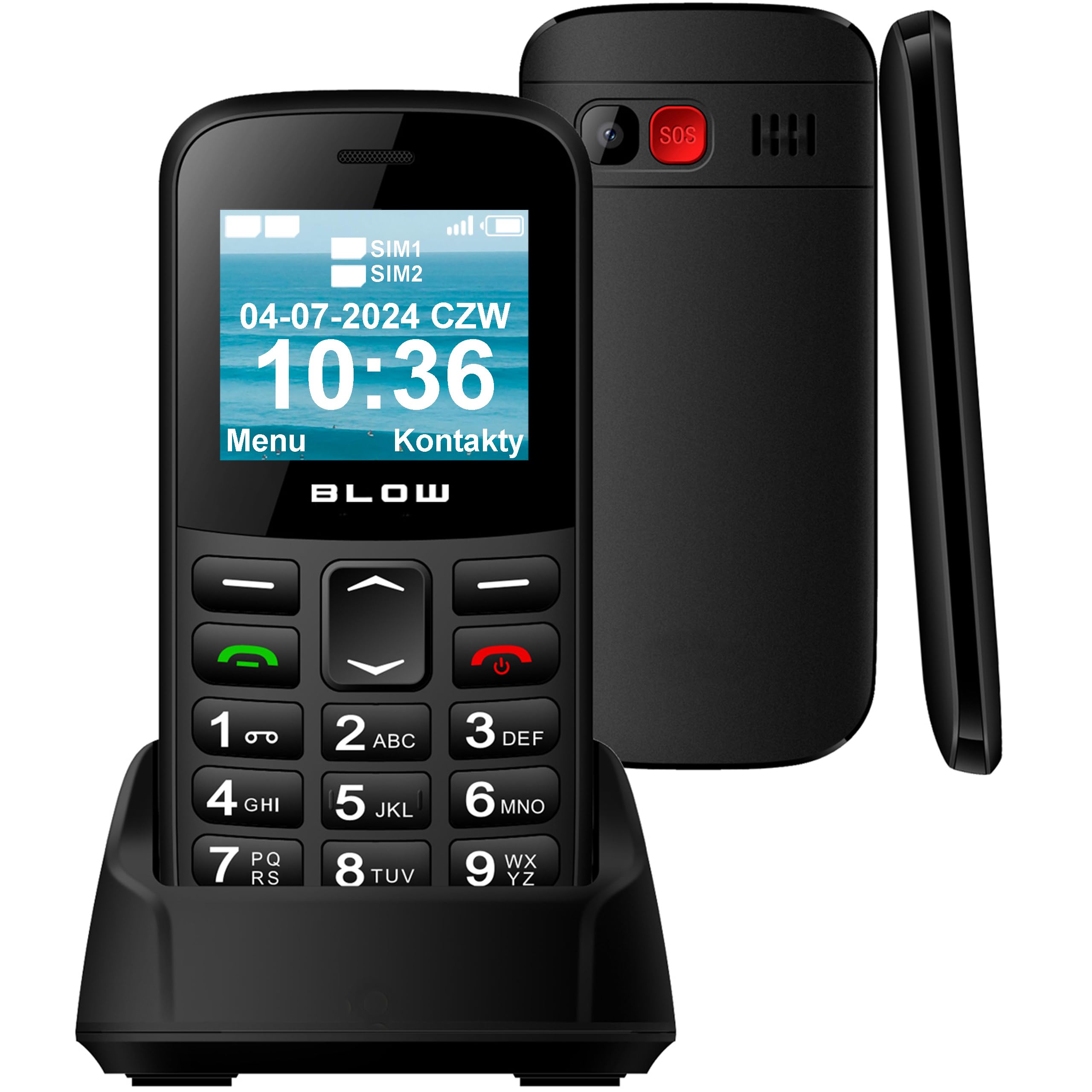
Obraz: Przód view of the BLOW S18D senior phone in its charging dock, highlighting the large keypad and display.
3.2 Back and Side Views
The back of the phone includes the SOS emergency button, camera, and speaker. The sides may contain volume controls and the USB-C charging port.

Obraz: Bok i tył view of the BLOW S18D senior phone, illustrating its slim profile and the prominent SOS button on the rear.
4. Konfiguracja
4.1 Wkładanie karty(kart) SIM i baterii
- Ostrożnie zdejmij tylną obudowę telefonu.
- Insert your SIM card(s) into the designated slot(s). The phone supports Dual SIM.
- If using an external memory card (up to 32 GB), insert it into the microSD card slot.
- Włóż baterię, upewniając się, że styki są prawidłowo ustawione.
- Załóż tylną pokrywę, aż zatrzaśnie się na swoim miejscu.
4.2 Ładowanie telefonu
Przed pierwszym użyciem należy całkowicie naładować baterię telefonu.
- Podłącz zasilacz do gniazdka ściennego.
- Place the phone into the charging dock, ensuring it sits securely and the charging indicator appears on the screen. Alternatively, connect the USB-C cable directly to the phone.
- Pełne naładowanie trwa zazwyczaj kilka godzin.
4.3 Włączanie/wyłączanie
- Aby włączyć: Naciśnij i przytrzymaj Zasilanie/zakończenie połączenia przycisk, aż ekran się zaświeci.
- Aby wyłączyć: Naciśnij i przytrzymaj Zasilanie/zakończenie połączenia button, then confirm power off on the screen.
5. Instrukcja obsługi
5.1 Wykonywanie i odbieranie połączeń
- Nawiązywanie połączenia: Wprowadź numer telefonu za pomocą klawiatury i naciśnij Dzwonić przycisk (zielony).
- Odbieranie połączenia: Gdy zadzwoni telefon, naciśnij Dzwonić button (green) to answer. Press the Zakończ połączenie button (red) to reject or end a call.
5.2 Wysyłanie i odbieranie wiadomości SMS
- Przejdź do Wiadomości menu.
- Wybierać Napisz wiadomość to compose a new SMS.
- Wprowadź numer odbiorcy lub wybierz go z kontaktów, a następnie wpisz wiadomość.
- Naciskać Wysłać.
5.3 Funkcja alarmowa SOS
The SOS button is located on the back of the phone. It allows you to quickly contact pre-set emergency numbers in critical situations.
- Ustawianie numerów SOS: Idź do Ustawienia > Ustawienia SOS to add up to 5 emergency contacts.
- Aktywacja SOS: Naciśnij i przytrzymaj SOS button for a few seconds. The phone will automatically call the emergency contacts one by one until one answers, and send an emergency SMS.

Image: The BLOW S18D phone with its SOS button highlighted, set against a background suggesting emergency services.
5.4 Radio FM
- Uzyskaj dostęp do Radio FM aplikację z menu głównego.
- Użyj przycisków nawigacyjnych, aby wyszukać stacje lub dostroić je ręcznie.
- Headphones may be required to act as an antenna for optimal reception.
5.5 Latarka
Dla wygody telefon posiada wbudowaną latarkę.
- To turn on/off the flashlight, typically press and hold the '0' key or a dedicated side button (refer to your phone's specific key mapping).

Image: The BLOW S18D phone with its flashlight activated, shown illuminating a dark path.
5.6 Dual SIM Management
The BLOW S18D supports two SIM cards, allowing you to manage two different phone numbers simultaneously.
- You can select which SIM card to use for calls or messages from the phone's settings or directly before making a call/sending a message.
- The display will show the status of both SIM cards.

Image: The BLOW S18D phone display showing the status of two SIM cards (SIM1, SIM2) and the current date and time.
5.7 Łączność Bluetooth
The phone supports Bluetooth for connecting to compatible devices such as headsets or car kits.
- Idź do Ustawienia > Bluetooth.
- Włącz Bluetooth On i wyszukaj dostępne urządzenia.
- Select your desired device and pair them.
6. Konserwacja
6.1 Czyszczenie
- Use a soft, dry cloth to clean the phone's surface and screen.
- Unikaj stosowania płynnych środków czyszczących i materiałów ściernych.
6.2 Pielęgnacja baterii
- Nie narażaj akumulatora na działanie ekstremalnych temperatur.
- Use only the original charger provided with the phone.
- If the phone will not be used for an extended period, charge it partially and store it in a cool, dry place.
6.3 Przechowywanie
- Store the phone in a dry environment, away from direct sunlight and moisture.
- Przechowywać w miejscu niedostępnym dla dzieci i zwierząt domowych.
7. Rozwiązywanie Problemów
If you encounter issues with your phone, try the following solutions before seeking professional assistance.
| Problem | Możliwe rozwiązanie |
|---|---|
| Telefon się nie włącza | Upewnij się, że bateria jest prawidłowo włożona i całkowicie naładowana. |
| Nie można wykonywać ani odbierać połączeń | Sprawdź, czy karta SIM jest prawidłowo włożona i aktywowana. Sprawdź siłę sygnału sieci. |
| Słaba jakość dźwięku | Ensure the speaker/earpiece is not blocked. Adjust volume settings. |
| Bateria szybko się rozładowuje | Zmniejsz jasność ekranu. Zamknij nieużywane aplikacje. Ogranicz użycie danych w tle. |
| Przycisk SOS nie działa | Verify that emergency contacts are correctly set in SOS settings. |
8. Specyfikacje
Below are the technical specifications for the BLOW S18D Senior Phone:
| Funkcja | Szczegół |
|---|---|
| Marka | CIOS |
| Nazwa modelu | Blow S18D |
| System operacyjny | KaiOS |
| Rozmiar zainstalowanej pamięci RAM | 32 MB |
| Max Supported Flash Memory Size | 32 GB (for external memory card) |
| Rozmiar ekranu | 1.77 cali |
| Operator sieci bezprzewodowej | Wszyscy przewoźnicy |
| Technologia komórkowa | 3G |
| Technologia łączności | Bluetooth |
| Kolor | Czarny |
| Typ złącza | USB typu C |
| Współczynnik kształtu | Łupek |
| Poziom wodoodporności | Nie wodoodporny |
| Cechy specjalne | Dual SIM, Built-in Flashlight, FM Radio, SOS Button |
| Opis aparatu | Tył |
| Moc baterii | 800 mAh |
| Typ wyświetlacza | LCD |
| Gęstość pikseli | 50 PPI |
| Rok modelowy | 2024 |
| Kraj pochodzenia | Chiny |
9. Informacje o gwarancji
The BLOW S18D Senior Phone comes with a 2-letnia gwarancja producentaNiniejsza gwarancja obejmuje wady materiałowe i wykonawcze powstałe w wyniku normalnego użytkowania. Nie obejmuje ona uszkodzeń spowodowanych niewłaściwym użytkowaniem, wypadkami, nieautoryzowanymi modyfikacjami ani normalnym zużyciem.
Please retain your proof of purchase for warranty claims. For detailed warranty terms and conditions, refer to the documentation provided with your product or contact the manufacturer directly.
10. Wsparcie
If you require further assistance or have questions not covered in this manual, please contact your retailer or the BLOW customer support. You can typically find contact information on the product packaging or the manufacturer's official webstrona.
When contacting support, please have your product model (S18D) and purchase details ready.