
Panasonic TB-40S45AEZ
Instrukcja obsługi telewizora Panasonic TB-40S45AEZ 40 cali Full HD LED Smart TV
Modele: TB-40S45AEZ
1. Wprowadzenie
Thank you for choosing the Panasonic TB-40S45AEZ Full HD LED Smart TV. This television is designed to provide an exceptional visual experience with its Full HD resolution and HD Colour Engine, delivering realistic and immersive images. Powered by TiVo, it offers a personalized Smart TV experience with access to various streaming applications and tailored recommendations. Enjoy hands-free control with integrated Google Assistant and Alexa voice commands, a dedicated Game Mode for smooth gaming, and a USB Media Player for flexible content viewing.
2. Co znajduje się w pudełku
Sprawdź, czy w przesyłce znajdują się wszystkie poniższe elementy:
- Panasonic TB-40S45AEZ 40-calowy telewizor LED Full HD Smart TV
- Zdalne sterowanie
- Baterie do pilota
- Przewód zasilający
- Stojak pod telewizor (ze śrubami)
- Szybki przewodnik
3. Przewodnik konfiguracji
3.1 Rozpakowywanie i umieszczanie
Ostrożnie wyjmij telewizor z opakowania. Postaw telewizor na stabilnej, płaskiej powierzchni lub zamontuj go na ścianie za pomocą kompatybilnego uchwytu VESA (sprzedawanego oddzielnie). Zapewnij odpowiednią wentylację wokół telewizora.

Przód view of the Panasonic TB-40S45AEZ 40-inch Smart TV.

Detailed dimensions of the 40-inch Panasonic TV for placement planning.
3.2 Kable połączeniowe
- Moc: Podłącz przewód zasilający do gniazda zasilania telewizora, a następnie do gniazdka ściennego.
- Antena/kabel: Connect your antenna or cable TV coaxial cable to the 'ANT/CABLE IN' port.
- Urządzenia HDMI: Connect external devices like Blu-ray players, game consoles, or set-top boxes to the HDMI ports. This TV has 2 HDMI ports.
- Urządzenia USB: For media playback, connect USB drives to the USB port. This TV has 1 USB port.
- Sieć: For internet connectivity, connect an Ethernet cable to the LAN port or use the built-in Wi-Fi.

Tył view of the Panasonic TV, illustrating the location of various connectivity ports.
3.3 Konfiguracja początkowa
After connecting all necessary cables, plug in the TV and press the power button on the remote control. The TV will guide you through the initial setup process, which includes:
- Wybór języka
- Połączenie sieciowe (Wi-Fi lub Ethernet)
- Skanowanie kanałów (dla anteny/kabla)
- Ustawienia strefy czasowej i daty
- Konfiguracja konta TiVo (jeśli dotyczy)
4. Instrukcja obsługi
4.1 Podstawowe funkcje telewizora
- Włączanie/wyłączanie: Użyj przycisku zasilania na pilocie.
- Wybór kanału: Użyj przycisków CH +/- lub klawiatury numerycznej.
- Regulacja głośności: Użyj przycisków VOL +/-.
- Źródło sygnału wejściowego: Naciśnij przycisk „Źródło” lub „Wejście”, aby przełączać się między źródłami HDMI, TV, USB itp.
4.2 TiVo Smart TV Features
The Panasonic TB-40S45AEZ is powered by TiVo, offering a personalized and intuitive smart TV experience. Access your favorite streaming apps and receive content recommendations based on your viewnawyków.
- Ekran główny: Navigate the home screen to find installed apps like Netflix, YouTube, Disney+, and more.
- Odkrywanie treści: TiVo's intelligent system learns your preferences and suggests movies, shows, and live TV content.
- Sklep z aplikacjami: Pobierz i zainstaluj dodatkowe aplikacje ze zintegrowanego sklepu z aplikacjami.
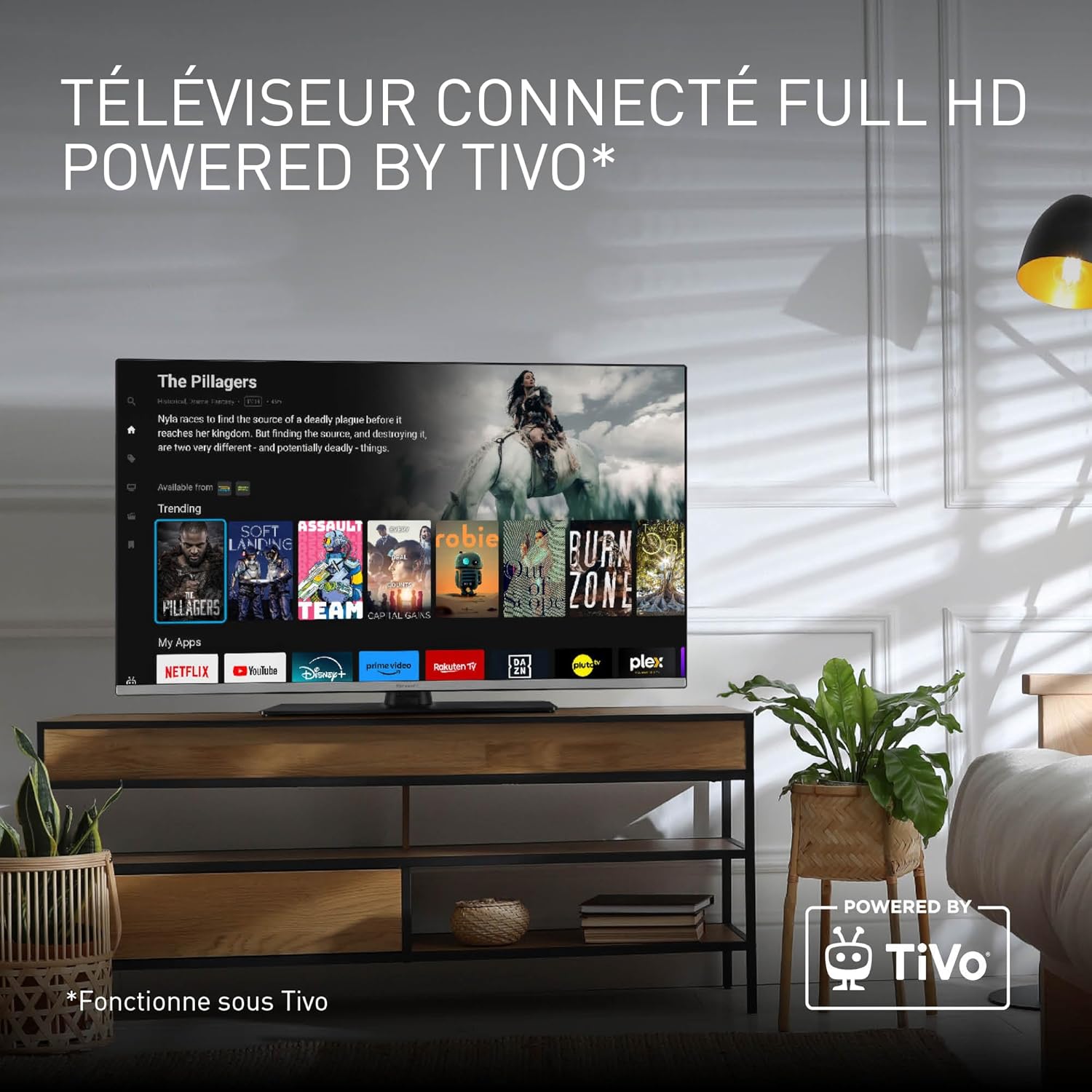
The TiVo Smart TV interface, showcasing various streaming applications available for access.
4.3 Sterowanie głosowe (Google i Alexa)
Control your TV hands-free using Google Assistant or Alexa. Simply speak commands into the remote control's microphone (if equipped) or through a connected smart speaker.
- Aktywuj sterowanie głosowe: Press the dedicated voice assistant button on your remote.
- Examples of Commands:
- „Otwórz Netflix”
- "Change to Channel 5"
- „Zwiększ głośność”
- "Szukaj filmy akcji"

A user interacting with the TV using voice commands, highlighting compatibility with Google Home and Alexa.
4.4 Media Player
The integrated USB Media Player allows you to view photos, play music, and watch videos directly from a USB storage device.
- Podłącz USB: Podłącz dysk USB do portu USB telewizora.
- Dostęp do odtwarzacza multimedialnego: Select the Media Player input source or launch the Media Player app from the home screen.
- Przeglądać Files: Poruszaj się po swoim filei wybierz treść, którą chcesz odtworzyć.

The TV screen showing content being played through the built-in Media Player, accessible via USB.
4.5 Tryb gry
Activate Game Mode for optimized performance during gaming sessions. This mode reduces input lag and enhances responsiveness, providing a smoother and more immersive gaming experience.
- Włącz tryb gry: Access the picture settings menu and select 'Game Mode'.
- Podłącz konsolę: Ensure your game console is connected via HDMI for the best experience.

A person engaged in gaming on the TV, demonstrating the benefits of the dedicated Game Mode.
5. Ustawienia obrazu i dźwięku
5.1 Ustawienia obrazu
Adjust picture settings to suit your viewing preferences. The TV features Full HD resolution and HD Colour Engine for vibrant and realistic images, along with HDR support for enhanced contrast.
- Tryby obrazu: Choose from standard, vivid, movie, game, or custom modes.
- Jasność/Kontrast/Kolor: Dostosuj te ustawienia, aby uzyskać optymalną jakość obrazu.
- HDR-y: High Dynamic Range provides deeper blacks, brighter whites, and a wider color palette.

A visual demonstration of the TV's high contrast and Full HD image performance.
5.2 Ustawienia dźwięku
Customize audio settings for an immersive sound experience, including surround sound capabilities.
- Tryby dźwięku: Select from standard, music, movie, or custom modes.
- Korektor: Adjust specific frequency bands for personalized audio.
- Dźwięk przestrzenny: Enable surround sound for a more cinematic audio experience.
6. Konserwacja
6.1 Czyszczenie telewizora
- Zawsze odłączaj telewizor od zasilania przed czyszczeniem.
- Do przecierania ekranu i obudowy używaj miękkiej, suchej i niepozostawiającej włókien ściereczki.
- W przypadku uporczywych plam delikatnieampen the cloth with water or a mild, non-abrasive screen cleaner. Never spray liquid directly onto the screen.
- Avoid using harsh chemicals or abrasive cleaning materials.
6.2 Aktualizacje oprogramowania
Periodically check for software updates to ensure your TV has the latest features and performance improvements. Updates can usually be found in the TV's settings menu under 'System' or 'About'.
7. Rozwiązywanie Problemów
If you encounter any issues with your TV, please refer to the following common problems and solutions:
| Problem | Możliwe rozwiązanie |
|---|---|
| Brak zasilania | Upewnij się, że przewód zasilający jest prawidłowo podłączony do telewizora i gniazdka ściennego. Sprawdź, czy gniazdko działa. |
| Brak obrazu, ale dźwięk jest | Sprawdź źródło sygnału wejściowego. Upewnij się, że urządzenia zewnętrzne są włączone i prawidłowo podłączone. |
| Brak dźwięku, ale obraz jest | Check volume level and mute status. Ensure external audio systems are connected and configured correctly. |
| Pilot nie działa | Wymień baterie. Upewnij się, że między pilotem a telewizorem nie ma żadnych przeszkód. Wyczyść czujnik pilota w telewizorze. |
| Nie można połączyć się z siecią Wi-Fi | Check Wi-Fi password. Restart your router. Ensure TV is within range of the Wi-Fi signal. |
| Aplikacje Smart TV nie ładują się | Check internet connection. Restart the TV. Clear app cache or reinstall the app if possible. |
Jeśli po wypróbowaniu tych rozwiązań problem nadal występuje, skontaktuj się z obsługą klienta.
8. Specyfikacje
| Funkcja | Szczegół |
|---|---|
| Marka | Panasonic |
| Numer modelu | TB-40S45AEZ |
| Rozmiar ekranu | 40 cala (102 cm) |
| Technologia wyświetlania | LCD |
| Rezolucja | Full HD (1920 x 1080p) |
| Częstotliwość odświeżania | 60 Hz |
| Platforma Smart TV | Telewizor TiVo Smart TV |
| Sterowanie głosowe | Asystent Google, Alexa |
| Cechy specjalne | Game Mode, Media Player, HDR |
| Łączność | Wi-Fi, 2x HDMI Ports, 1x USB Port |
| Tuner | DVB-T2 (Triple Tuner HD) |
| Klasa efektywności energetycznej | E |
| Wymiary (dł. x szer. x wys.) | Wymiary 90.2 x 23.5 x 57.4 cm |
| Waga | 7.5 kilogramów |
9. Gwarancja i wsparcie
9.1 Gwarancja producenta
This Panasonic TV comes with a manufacturer's warranty of 2 years. Please retain your proof of purchase for warranty claims. The warranty covers defects in materials and workmanship under normal use.
9.2 Obsługa klienta
For technical assistance, troubleshooting beyond this manual, or warranty inquiries, please contact Panasonic customer support. Refer to the contact information provided in your product packaging or visit the official Panasonic webwitryna dla Twojego regionu.
Wsparcie online: Www.panasonic.com
Ask a question about this manual
Ask about setup, troubleshooting, compatibility, parts, safety, or missing instructions. Manuals+ will review the question and use this page’s manual context to help answer it.