
1. Wprowadzenie
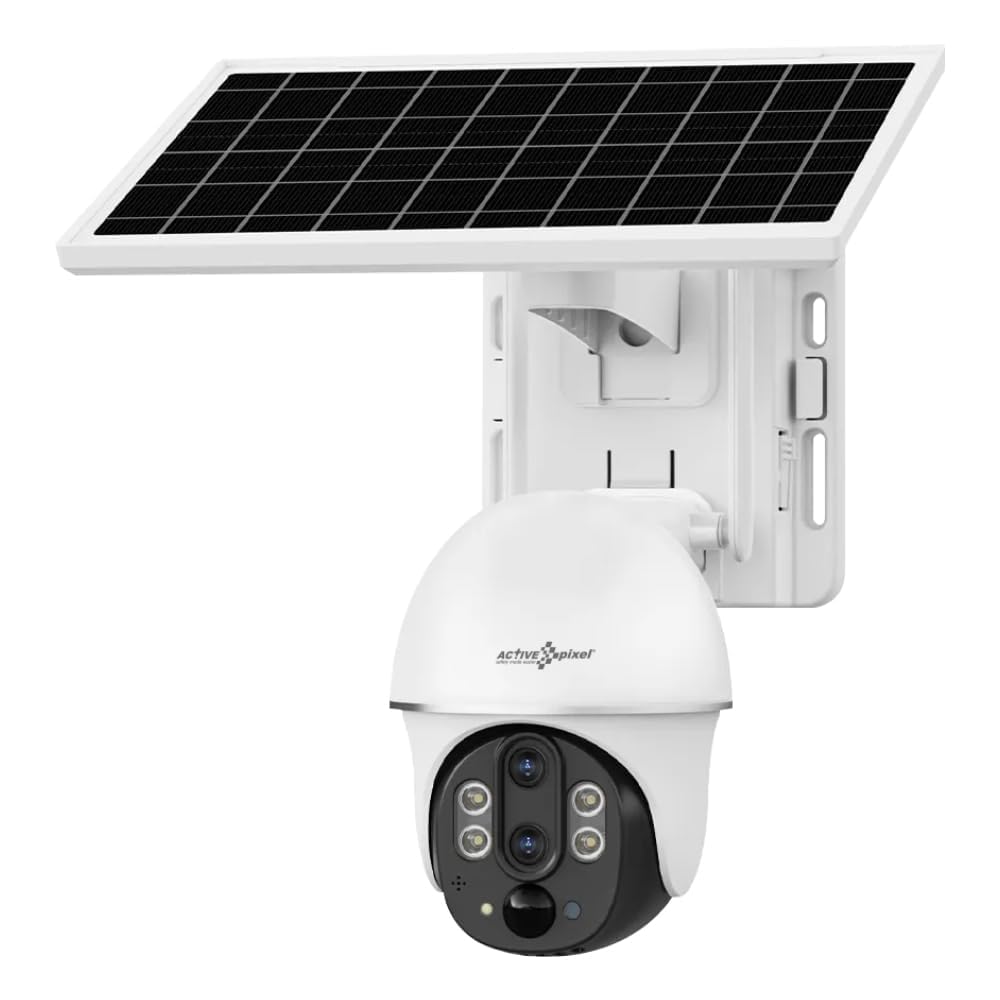
This manual provides detailed instructions for the installation, operation, and maintenance of your Active Pixel 4G Solar Powered Dual Lens Security Camera. Please read this manual thoroughly before using the product to ensure proper function and safety. This camera is designed for outdoor surveillance, featuring 4G connectivity, solar power, dual lenses for 10x zoom, 2-way audio, and motion detection capabilities.
1.1 Zawartość opakowania
- 1x 4G Solar Camera (with included battery)
- 1x Instrukcja obsługi
- 1x Screw Kit for installation
- Panel słoneczny 1x
2. Informacje dotyczące bezpieczeństwa
Observe the following safety precautions to prevent damage to the product or injury to yourself or others.
- Instalacja: Ensure the camera is securely mounted to prevent falling. Avoid installing near flammable or explosive materials.
- Źródło zasilania: Use only the provided solar panel and integrated battery. Do not attempt to replace the battery with unapproved alternatives.
- Wodoodporność: The camera is IP65/IP66 rated for water and dust resistance. However, avoid submerging the camera in water or exposing it to high-pressure water jets.
- Temperatura: Operate the camera within the specified temperature range of -15°C to 60°C.
- Demontaż: Nie próbuj demontować ani modyfikować aparatu. Spowoduje to unieważnienie gwarancji i może spowodować uszkodzenia lub obrażenia.
- Dzieci: Przechowuj aparat i jego akcesoria poza zasięgiem dzieci.
3. Koniec produktuview
The Active Pixel 4G Solar Powered Dual Lens Security Camera is a robust surveillance solution. Key features include:
- System podwójnego obiektywu: Provides 10x zoom capability (3x optical + 3.2x digital).
- Łączność 4G: Operates on 4G LTE networks, ideal for locations without Wi-Fi. (Note: 4G Jio Sim Card Not Supported. VI and Airtel SIM recommended.)
- Zasilane energią słoneczną: Equipped with a 7W solar panel and 8000mAh battery for continuous operation.
- Wysoka rozdzielczość: 2MP+2MP sensors delivering 1080P Full HD video.
- Pan-Tilt-Zoom (PTZ): Zakres obrotu w poziomie 355° i pochylenie w pionie 90° zapewniają pokrycie dużego obszaru.
- Inteligentne wykrywanie: PIR + Radar dual induction detection for human/animal detection.
- Dwukierunkowy dźwięk: Wbudowany mikrofon i głośnik umożliwiające komunikację.
- Kolorowe widzenie nocne: Clear color night vision up to 50ft.
- Składowanie: Supports local TF card (up to 128GB, not included) and cloud storage.
- Odporność na warunki atmosferyczne: IP65/IP66 rated for outdoor use.
4. Konfiguracja
4.1 Instalacja karty SIM
- Znajdź gniazdo karty SIM na obudowie aparatu.
- Insert a compatible 4G SIM card (VI or Airtel recommended) into the slot. Ensure the SIM card is correctly oriented.
- Close the SIM card slot cover securely to maintain waterproofing.
4.2 Instalacja aplikacji i konfiguracja konta
- Download the "V380 Pro" app from your smartphone's app store (Android or iOS).
- Otwórz aplikację i zarejestruj nowe konto lub zaloguj się, jeśli już je posiadasz.
- Postępuj zgodnie z instrukcjami w aplikacji, aby dodać kamerę. Zazwyczaj polega to na zeskanowaniu kodu QR na kamerze lub ręcznym wpisaniu jej identyfikatora.
4.3 Montaż kamery i panelu słonecznego
- Wybierz lokalizację: Select a location with good 4G signal strength and ample direct sunlight for the solar panel. The camera should be mounted at a height that provides optimal viewkąt nachylenia i bezpieczeństwo.
- Zamontuj kamerę: Use the provided screw kit to securely mount the camera to a wall or pole. Ensure the mounting surface is stable.
- Zamontuj panel słoneczny: Mount the solar panel in a position where it receives maximum direct sunlight throughout the day. Adjust its angle for optimal charging efficiency.
- Podłącz panel słoneczny: Podłącz kabel panelu słonecznego do portu ładowania kamery. Upewnij się, że połączenie jest stabilne i wodoodporne.
5. Instrukcja obsługi
5.1 Na żywo View i sterowanie PTZ
- Open the V380 Pro app and select your camera from the device list.
- The app will display the live video feed.
- Użyj elementów sterujących na ekranie, aby przesuwać kamerę (355° w poziomie) i pochylać ją (90° w pionie).
- Pinch to zoom on the live feed to utilize the 10x dual lens zoom.
5.2 Dźwięk dwukierunkowy
- Na żywo view, dotknij ikony mikrofonu, aby mówić przez głośnik kamery.
- Kliknij ikonę głośnika, aby słuchać dźwięku z mikrofonu kamery.
5.3 Detekcja ruchu i alerty
- Access the camera settings in the V380 Pro app.
- Enable "Smart Detection" (PIR+Radar dual induction) for human/animal detection.
- Configure alert settings, including push notifications to your mobile phone.
- When motion is detected, the camera will automatically record the event and send an alert.
5.4 Nagrywanie i odtwarzanie
- Pamięć lokalna: Insert a TF card (up to 128GB, not included) into the camera's slot for local recording. Recordings can be accessed via the app.
- Przechowywanie w chmurze: Subscribe to the cloud storage service through the V380 Pro app for alarm video storage.
- Do view nagrano footage, navigate to the playback section in the app and select the desired date and time.
5.5 Widzenie nocne
The camera automatically switches to night vision mode in low light conditions using its IR-CUT switch and 4pcs Double Core LEDs. It provides clear color night vision up to 50 feet (15 meters).
6. Konserwacja
- Czyszczenie: Regularnie czyść obiektyw aparatu i panel słoneczny miękką, miękką szmatką.amp ściereczką, aby zapewnić dobrą widoczność i efektywne ładowanie. Nie używaj silnych środków chemicznych.
- Pielęgnacja baterii: The integrated battery is designed for long life. Ensure the solar panel is clean and receives adequate sunlight for optimal charging. Avoid prolonged storage in extreme temperatures.
- Aktualizacje oprogramowania układowego: Check the V380 Pro app periodically for firmware updates. Keeping the firmware updated ensures optimal performance and security.
- Zarządzanie kartami TF: If using a TF card, periodically check its storage capacity and format it if necessary to maintain recording efficiency.
7. Rozwiązywanie Problemów
| Problem | Możliwa przyczyna | Rozwiązanie |
|---|---|---|
| Kamera się nie włącza. | Low battery; Solar panel not charging; Faulty connection. | Ensure solar panel is clean and receiving direct sunlight. Check solar panel connection to the camera. Allow time for battery to charge. |
| No 4G signal or offline. | SIM card not inserted correctly; SIM card not activated; Poor network coverage; Incompatible SIM card. | Reinsert SIM card. Verify SIM card is active and has data plan. Move camera to an area with better 4G coverage. Ensure using a compatible SIM (VI/Airtel). |
| Wykrywanie ruchu nie działa. | Detection sensitivity too low; Feature disabled in app; Obstructions in detection area. | Check app settings to ensure motion detection is enabled and sensitivity is appropriate. Clear any obstructions. |
| Słaba jakość wideo. | Dirty lens; Poor network signal; Low light conditions. | Clean the camera lens. Ensure good 4G signal. Video quality may be reduced in very low light, but night vision should activate. |
| Nie można połączyć się z aplikacją. | Incorrect camera ID; App issues; Network problems. | Verify camera ID. Restart the app or your phone. Check your phone's internet connection. Reset the camera if necessary (refer to app for reset procedure). |
8. Specyfikacje
| Funkcja | Szczegół |
|---|---|
| Model | AP-4G-SY2.0MP-DUAL LENS-V-3.6MM |
| Transduktor | 1/2.8" Progressive Scan CMOS *2 |
| Soczewki | 4mm F1.6 (Horizontal View: 80±5°, Vertical: 90±5°), 12mm F1.6 (Horizontal View: 26±1°, Vertical: 30±1°) |
| Brzęczenie | 10X Conflate Zoom (3X Optical + 3.2X Digital) |
| Kompresja wideo | H.265/15 kl./s |
| Rezolucja | Main stream: 1920*1080P, Sub-stream: 640×360P |
| Sieć | 4G LTE (SIM Supported) |
| Metoda wykrywania | PIR + Radar dual induction detection |
| Odległość wykrywania | 0~12 mln |
| Kąt wykrywania | 120° |
| Pan-Tilt | Poziomo: 355°, Pionowo: 90° |
| Prędkość obrotowa | Poziomo 55°/s, pionowo 40°/s |
| Wizja nocna | IR-CUT automatic switch, 4pcs Double Core LEDs, effective distance 10M (IR/White LED) |
| Audio | Built-in speaker (3W), Built-in microphone (pickup area ~20M) |
| Składowanie | TF card (Max 128GB), Cloud Storage (Alarm video) |
| Moc | 7W Solar Panel, 8000mAh Battery (included) |
| Odporność na wodę | IP65, IP66 |
| Temperatura pracy | -15°C do 60°C |
| Wymiary (dł. x szer. x wys.) | Wymiary 20 x 18 x 16 cm |
| Waga | 1.2 kilogramów |
| Metoda kontroli | App (V380 Pro) |
| Kompatybilny system operacyjny | Android, iOS |
9. Gwarancja i wsparcie
For warranty information and technical support, please refer to the contact details provided at the point of purchase or on the official Active Pixel website. The manufacturer is Glorious Digital Solution Pvt Ltd. For customer care, you may contact 9321367328.
Proszę zachować dowód zakupu na potrzeby roszczeń gwarancyjnych.