
CITLLA L570
CITLLA L570 Wireless Bluetooth Mouse User Manual
Model: L570 | Brand: CITLLA
Wstęp
This manual provides detailed instructions for the setup, operation, and maintenance of your CITLLA L570 Wireless Bluetooth Mouse. Please read this manual thoroughly before using the product to ensure proper functionality and to maximize your user experience.

Obraz: Góra view of the CITLLA L570 Wireless Bluetooth Mouse.

Image: User operating the CITLLA L570 mouse.
Zawartość opakowania
Sprawdź, czy w opakowaniu znajdują się wszystkie elementy:
- CITLLA L570 Wireless Bluetooth Mouse
- USB-A Receiver (stored inside the mouse)
- Kabel ładujący typu C.
- Instrukcja obsługi (ten dokument)
Produkt ponadview
Familiarize yourself with the components and key features of your CITLLA L570 mouse.

Obraz: Ponadview of the CITLLA L570 mouse features.

Image: CITLLA L570 mouse alongside a keyboard.
Główne cechy:
- 4-Way Scroll Wheel: Provides both vertical high-speed scrolling and horizontal tilt scrolling.
- Regulowane DPI: Four levels (1000/1600/2400/3000) for precise control.
- Łączność wielourządzeniowa: Connects to up to three devices via one 2.4G USB-A receiver and two Bluetooth channels.
- Akumulator: Built-in high-capacity lithium battery with Type-C charging.
- Ciche kliknięcia: Designed for a quiet working environment.
- Przyciski Dalej/Wstecz: Located on the side for enhanced navigation.
Organizować coś
The CITLLA L570 mouse offers flexible connectivity options. Choose between 2.4G wireless or Bluetooth connections.
1. 2.4G USB-A Receiver Connection
- Locate the USB-A receiver. It is typically stored in a compartment on the underside of the mouse.
- Insert the USB-A receiver into an available USB port on your computer or device.
- Włącz mysz za pomocą wyłącznika zasilania znajdującego się na spodzie urządzenia.
- Press the device switch button (usually on the top or bottom of the mouse) to select the 2.4G mode (indicated by a specific LED color or number, refer to the mouse's physical markings). The mouse should connect automatically.
2. Połączenie Bluetooth (BT1 / BT2)
The mouse supports two independent Bluetooth connections (BT1 and BT2).
- Włącz mysz za pomocą wyłącznika zasilania.
- Press the device switch button to select either Bluetooth 1 (BT1) or Bluetooth 2 (BT2) mode. The corresponding indicator light will flash.
- For initial pairing, hold down the device switch button for three seconds until the indicator light flashes rapidly. This indicates the mouse is in pairing mode.
- Na swoim urządzeniu (komputerze, tablecie, smartfonie) przejdź do ustawień Bluetooth.
- Szukaj new devices. The mouse should appear as "CITLLA L570" or a similar name.
- Select the mouse to pair. Once connected, the indicator light will stop flashing and remain solid for a few seconds before turning off.
To connect to a second Bluetooth device, repeat steps 2-6, selecting the other Bluetooth channel (BT2).

Image: Multi-device connectivity of the CITLLA L570 mouse.
Instrukcja obsługi
1. Regulacja DPI
The mouse features 4 adjustable DPI settings to suit various tasks and preferences.
- 1000 DPI: Suitable for design work requiring high precision.
- 1600 DPI: Ideal for general study and browsing.
- 2400 DPI: Recommended for work and productivity tasks.
- 3000 DPI: Optimal for gaming or fast-paced activities.
Aby zmienić ustawienie DPI, naciśnij Przycisk DPI located below the scroll wheel. Each press cycles through the available DPI levels.

Image: DPI adjustment settings and their recommended uses.
2. 4-Way Scroll Wheel
The innovative scroll wheel provides enhanced navigation capabilities:
- Przewijanie pionowe: Scroll the wheel up or down for standard vertical navigation. The smart fly scroll feature allows for super-fast scrolling on long web stron.
- Przewijanie poziome: Tilt the scroll wheel to the left or right to enable horizontal scrolling, useful for wide documents or spreadsheets.
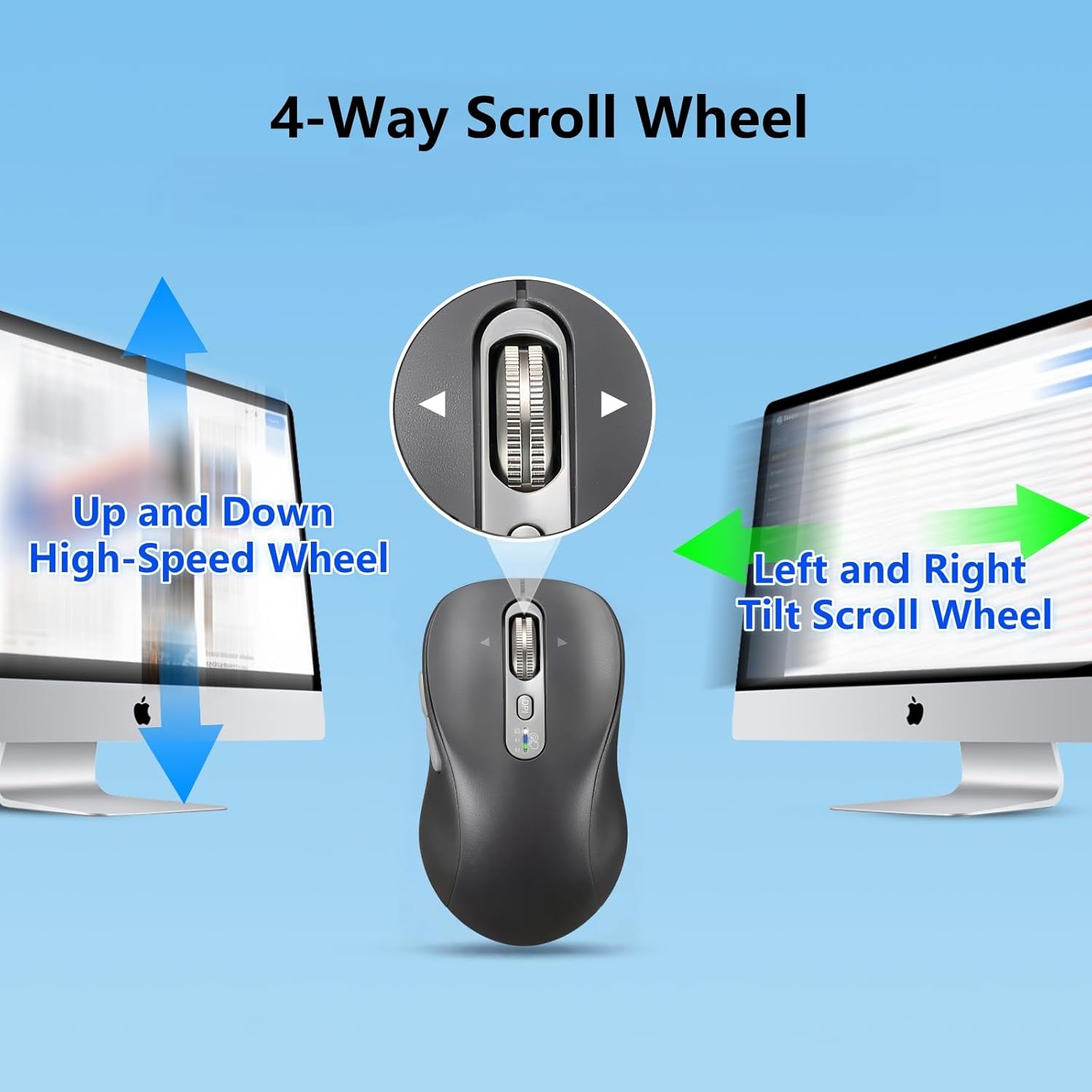
Image: Explanation of the 4-way scroll wheel functionality.
3. Przełączanie między wieloma urządzeniami
To switch between connected devices (2.4G, BT1, BT2), simply press the device switch button. The indicator light will show which channel is currently active.

Image: Mouse used with multiple devices.
4. Ładowanie
The CITLLA L570 mouse is equipped with a rechargeable battery.
- Connect the provided Type-C charging cable to the charging port on the front of the mouse and to a USB power source.
- A full charge typically takes 1.5-2 hours and can provide approximately 60 days of normal use.
- The low power indicator light will illuminate when the remaining power is sufficient for less than 7 days of use, providing ampczas na doładowanie.

Image: Mouse charging via Type-C cable.

Image: Mouse connected for charging.
Zgodność
The CITLLA L570 mouse is designed for broad compatibility across various operating systems and devices.
- Systemy operacyjne: Windows (8/10/11 and later), Mac OS (10.15 and later; USB connection supports 10.10 and later), Chrome OS (11 and later; USB connection supports 9 and later), iOS (13.4 and later), Android (5.0 and later), Linux (10 and later; USB connection supports 8 and later).
- Urządzenia: Desktops, Laptops, Tablets, Smartphones, All-in-one PCs.

Image: Operating system compatibility icons.

Image: Specific system version compatibility details.
Konserwacja
To ensure the longevity and optimal performance of your CITLLA L570 mouse, follow these maintenance guidelines:
- Czyszczenie: Do przecierania powierzchni myszy użyj miękkiej, suchej ściereczki. W przypadku uporczywych zabrudzeń, delikatnie przetrzyj powierzchnię.amp Można użyć ściereczki, ale należy uważać, aby wilgoć nie dostała się do wnętrza podzespołów. Unikać agresywnych środków chemicznych i ściernych środków czyszczących.
- Składowanie: Jeśli mysz nie będzie używana przez dłuższy czas, należy ją przechowywać w chłodnym i suchym miejscu.
- Pielęgnacja baterii: Avoid fully discharging the battery frequently. Charge the mouse when the low power indicator appears. Do not expose the battery to extreme temperatures.
- Odbiornik: Keep the USB-A receiver in its designated storage slot within the mouse when not in use to prevent loss.
Rozwiązywanie problemów
| Problem | Rozwiązanie |
|---|---|
| Mysz nie odpowiada (2.4G) |
|
| Mysz nie reaguje (Bluetooth) |
|
| Ruch kursora jest nieregularny lub powolny |
|
| Kółko przewijania nie działa |
|
| Wskaźnik niskiego poziomu baterii zawsze włączony |
|
Specyfikacje
| Funkcja | Szczegół |
|---|---|
| Numer modelu | L570 |
| Technologia łączności | 2.4G USB-A Receiver, Bluetooth 1, Bluetooth 2 |
| Ustawienia DPI | 1000 / 1600 / 2400 / 3000 |
| Wykrywanie ruchu | Optyczny |
| Cechy specjalne | 4-Way Scrolling, Forward/Back buttons, Multi-Device (3 devices), Quiet Clicks (10 million click lifespan), Rechargeable (Type-C charging) |
| Typ baterii | High-capacity Lithium Battery (500mAh) |
| Port ładowania | Typ C |
| Żywotność baterii (w przybliżeniu) | 60 days after 1-hour charge |
| Waga przedmiotu | 5.6 uncji |
| Wymiary | 5.59 x 3.11 x 2.13 cala |
Gwarancja i wsparcie
CITLLA products are manufactured with quality and reliability in mind. For warranty information or technical support, please refer to the contact details provided with your purchase or visit the official CITLLA webstrona.
Aby uzyskać dalszą pomoc, możesz również skontaktować się ze sprzedawcą bezpośrednio za pośrednictwem platformy, na której dokonano zakupu produktu.
Producent: CYTLA
Sklep firmowy: Visit the CITLLA Store on Amazon