
1. Wprowadzenie
This manual provides instructions for the ECONTROLLY BN59-01268D replacement remote control. This remote is designed to function as a direct replacement for your original Samsung TV remote, offering immediate usability without complex programming.
1.1 Zawartość opakowania
- 1 x BN59-01268D Replacement Remote Control
1.2 Kompatybilne modele telewizorów
This remote control is compatible with a wide range of Samsung TV models, including but not limited to:
- UE55LS003A, UE65LS003A, QE49Q70R, QE55Q70R, QE65Q70R, QE75Q70R, QE82Q70R
- QE49Q6FN, QE55Q6FN, QE65Q6FN, QE75Q6FN, QE82Q6FN
- QE55Q8CAM, QE65Q8CAM, QE75Q8CAM, QE55Q85R, QE65Q85R, QE75Q85R
- QE49Q7CAM, QE55Q7CAM, QE65Q7CAM, QE43LS01R, QE49LS01R, QE55LS01R
- QE43Q67R, QE49Q67R, QE55Q67R, QE65Q67R, QE75Q67R, QE82Q67R
- QE55Q80R, QE65Q80R, QE49Q7FAM, QE55Q7FAM, QE65Q7FAM, QE75Q7FAM
- UE32M5500, UE32M5600, UE43M5500, UE43M5510, UE43M5600
- UE49M5500, UE49M5510, UE49M5600, UE55M5500, UE55M5510, UE55M5600, UE43LS003A
2. Instrukcje konfiguracji
2.1 Instalacja baterii
The BN59-01268D remote control requires two AAA batteries (not included).
- Znajdź pokrywę komory baterii z tyłu pilota.
- Aby otworzyć, przesuń pokrywę w dół lub naciśnij zatrzask i unieś.
- Włóż dwie baterie AAA, upewniając się, że bieguny dodatni (+) i ujemny (-) są prawidłowo ustawione względem oznaczeń wewnątrz komory.
- Załóż pokrywę komory baterii, wsuwając ją z powrotem na miejsce, aż do zatrzaśnięcia.
No programming is required. Once batteries are installed, the remote is ready for immediate use with compatible Samsung TVs.
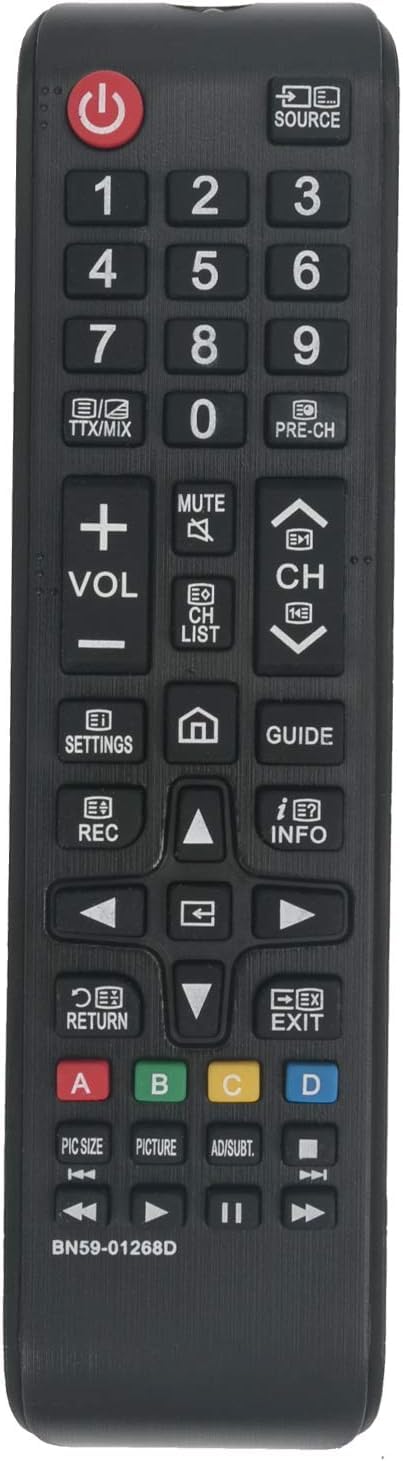
Image: The ECONTROLLY BN59-01268D replacement remote control, showing its button layout and sleek black design.
3. Obsługa pilota
This remote control utilizes infrared (IR) technology to communicate with your television. Ensure there is a clear line of sight between the remote's IR emitter and your TV's IR receiver for optimal performance.
3.1 Podstawowe funkcje
- Przycisk zasilania: Włącza lub wyłącza telewizor.
- Przyciski numeryczne (0-9): Bezpośredni wybór kanałów.
- Zwiększanie/zmniejszanie głośności: Adjusts the TV's volume.
- Kanał w górę/w dół: Zmienia kanały sekwencyjnie.
- Przycisk wyciszenia: Wycisza lub włącza dźwięk telewizora.
- Przycisk źródła/wejścia: Przełącza między dostępnymi źródłami sygnału wejściowego (HDMI, AV itp.).
- Przyciski nawigacyjne (góra, dół, lewo, prawo, Enter): Służy do nawigacji po menu i dokonywania wyborów.
- Smart Hub/Home Button: Accesses the TV's Smart Hub or main menu.
- Przycisk Wstecz/Powrót: Powrót do poprzedniego ekranu lub menu.
3.2 Zakres roboczy
The remote control offers stable performance and a responsive connection within approximately 8 to 10 meters (26 to 33 feet) from the television.
4. Pielęgnacja i konserwacja
- Czyszczenie: Przetrzyj pilota miękką, suchą ściereczką. Nie używaj płynnych środków czyszczących ani materiałów ściernych.
- Wymiana baterii: Replace batteries when the remote's response becomes sluggish or it stops functioning. Always replace both batteries at the same time with new ones of the same type.
- Składowanie: Jeżeli pilot nie będzie używany przez dłuższy czas, należy wyjąć baterie, aby zapobiec ich wyciekowi.
- Unikaj uszkodzeń: Nie upuszczaj pilota ani nie wystawiaj go na działanie ekstremalnych temperatur, wilgoci lub bezpośredniego światła słonecznego.
5. Rozwiązywanie Problemów
- Pilot nie działa:
- Sprawdź, czy baterie zostały włożone prawidłowo, z zachowaniem właściwej polaryzacji.
- Wymień stare baterie na nowe.
- Upewnij się, że nie ma żadnych przeszkód między pilotem a odbiornikiem podczerwieni telewizora.
- Skieruj pilota bezpośrednio na telewizor.
- Ograniczony zasięg lub reakcja przerywana:
- Wymień baterie.
- Upewnij się, że żadne silne źródła światła (np. bezpośrednie światło słoneczne) nie zakłócają sygnału IR.
- Reduce the distance between the remote and the TV.
6. Specyfikacje produktu
| Funkcja | Szczegół |
|---|---|
| Marka | KONTROLNIE |
| Nazwa / numer modelu | BN59-01268D |
| Funkcja specjalna | Nie wymaga programowania |
| Kolor | Czarny |
| Kompatybilne urządzenia | Telewizja |
| Technologia łączności | Podczerwony |
| Typ kontrolera | Sterowanie przyciskami |
| Maksymalny zasięg | Approximately 10 meters / 33 feet |
| Waga przedmiotu | 1 uncji |
| Pozycja Wymiary (dł. x szer. x wys.) | 5" dł. x 2" szer. x 0.6" wys. |
| Źródło zasilania | Baterie 2 x AAA (brak w zestawie) |
7. Gwarancja i obsługa klienta
ECONTROLLY provides friendly after-sales service for every customer. If you have any questions or concerns regarding your BN59-01268D replacement remote control, please do not hesitate to contact us. We are committed to assisting you with any issues.
For support, please refer to the contact information provided with your purchase or visit the ECONTROLLY official webstrona.