
1. Wprowadzenie
Thank you for choosing the Rraycom BW6 Wireless Security Camera. This 2K outdoor security camera is designed to provide reliable surveillance with features such as full-color night vision, AI motion detection, two-way audio, and weatherproof construction. This manual will guide you through the setup, operation, and maintenance of your camera to ensure optimal performance and security.
2. Co znajduje się w pudełku
Prosimy o dokładne sprawdzenie zawartości opakowania. Jeśli brakuje któregokolwiek z elementów lub jest on uszkodzony, prosimy o kontakt z obsługą klienta.
- BW6 Rechargeable Battery Security Camera
- Metalowy uchwyt
- Zestaw śrub
- Kabel USB
- Instrukcja obsługi (ten dokument)
3. Funkcje produktu
The Rraycom BW6 camera offers a range of advanced features for comprehensive home security.

Rysunek 3.1: Nadview of Rraycom BW6 Camera Features.
3.1 High-Resolution Video
Uchwyć wyraźne i szczegółowe zdjęciatage with 2K QHD resolution and a wide 130-degree viewkąt widzenia, minimalizując martwe pola.

Rysunek 3.2: 2K Resolution and 130-degree Wide Angle View.
3.2 Advanced Night Vision
The camera supports both full-color night vision and infrared mode, ensuring clear visibility even in low-light conditions.

Rysunek 3.3: Full Color Night Vision vs. Infrared Mode.
3.3 Inteligentne wykrywanie ruchu
Equipped with AI motion detection, the camera can distinguish between humans and other moving objects, reducing false alarms. You can also customize specific motion detection zones to focus on critical areas.

Rysunek 3.4: AI Motion Detection Capabilities.

Rysunek 3.5: Customizable Motion Detection Zones.
3.4 Dźwięk dwukierunkowy
Komunikuj się bezpośrednio z gośćmi lub odstraszaj intruzów za pomocą wbudowanego mikrofonu i głośnika.

Rysunek 3.6: Dwukierunkowa komunikacja audio.
3.5 Konstrukcja odporna na warunki atmosferyczne
With an IP65 weatherproof rating, the camera is designed to withstand various outdoor conditions, including rain, sun, and snow.

Rysunek 3.7: IP65 Weatherproof Rating.
3.6 Elastyczne opcje przechowywania
Rekord footage to a Micro SD card (up to 256GB, not included) or utilize cloud storage services for secure data backup and access.

Rysunek 3.8: Cloud and Micro SD Storage Options.
3.7 Integracja inteligentnego domu
The camera is compatible with Amazon Alexa, allowing for convenient voice control and integration into your smart home ecosystem.
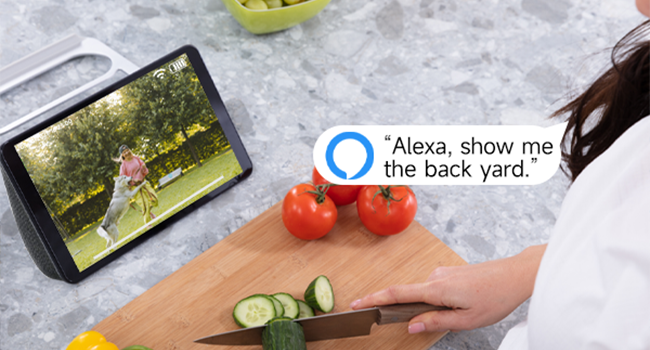
Rysunek 3.9: Amazon Alexa Integration.
4. Przewodnik konfiguracji
4.1 Ładowanie kamery
Przed pierwszym użyciem należy w pełni naładować kamerę za pomocą dołączonego kabla USB. Podłącz kabel USB do portu ładowania kamery i standardowego zasilacza USB (brak w zestawie). Kontrolka ładowania pokaże stan naładowania.
4.2 Instalacja aplikacji i tworzenie konta
- Download the official Rraycom app from your smartphone's app store (available for Android and iOS).
- Otwórz aplikację i postępuj zgodnie z instrukcjami wyświetlanymi na ekranie, aby utworzyć nowe konto lub zaloguj się, jeśli już je posiadasz.
4.3 Parowanie kamery
- Ensure your camera is powered on and your smartphone is connected to a 2.4GHz Wi-Fi network.
- In the Rraycom app, tap the "Add Device" or "+" icon.
- Wybierz model aparatu z listy.
- The app will prompt you to scan a QR code displayed on your camera or generate a QR code on your phone for the camera to scan. Follow the specific instructions in the app.
- Once the camera successfully connects, you will hear a confirmation sound, and the camera will appear in your app's device list.
4.4 Montaż kamery
Wybierz odpowiednie miejsce dla swojego aparatu, upewniając się, że ma ono zapewniony czysty obraz. view of the area you wish to monitor and good Wi-Fi signal strength. Use the provided metal mount and screws to securely attach the camera to a wall or other stable surface. Adjust the camera's angle for optimal coverage.
5. Instrukcja obsługi
5.1 Na żywo View Dostęp
Open the Rraycom app and select your camera from the device list to access the live video feed. You can view the 2K resolution footage w czasie rzeczywistym.
5.2 Ustawienia wykrywania ruchu
Navigate to the camera settings in the app to configure motion detection. You can:
- Enable/disable AI Human Detection.
- Set up custom motion detection zones to monitor specific areas.
- Adjust motion sensitivity levels.
- Configure alert notifications (push notifications, siren alarm).
5.3 Komunikacja dwukierunkowa
Na żywo view, tap the microphone icon in the app to speak through the camera's speaker. Tap the speaker icon to listen to audio from the camera's microphone.
5.4 Nagrywanie i odtwarzanie
The camera automatically records when motion is detected. You can access recorded footage through the app:
- Przechowywanie w chmurze: View recordings stored in the cloud (subscription may be required).
- Pamięć karty SD: Access recordings saved on the Micro SD card inserted into the camera.
5.5 Tryby widzenia nocnego
The camera automatically switches between day and night vision modes. In night vision settings, you can typically choose between:
- Pełnokolorowa wizja nocna: Utilizes built-in spotlights to provide color images in low light.
- Nocna Nocna Wizja: Zapewnia czarno-biały obraz przy użyciu diod LED podczerwonych.
5.6 Alexa Voice Commands
To integrate with Amazon Alexa, enable the Rraycom skill in the Alexa app. Once linked, you can use voice commands such as "Alexa, show me the [camera name]" to view transmisja na żywo na kompatybilnych urządzeniach Alexa.
6. Konserwacja
6.1 Zarządzanie baterią
The BW6 camera is battery-powered. Monitor the battery level in the app and recharge the camera using the USB cable when the battery is low. Battery life varies based on usage, motion detection frequency, and environmental factors.
6.2 Czyszczenie
Okresowo czyść obiektyw i obudowę aparatu miękką,amp cloth to remove dust and dirt. Avoid using harsh chemicals that could damage the camera's finish or lens.
6.3 aktualizacji oprogramowania sprzętowego
Ensure your camera's firmware is up to date. The Rraycom app will typically notify you of available updates. Follow the in-app instructions to perform firmware updates, which can improve performance and add new features.
7. Rozwiązywanie Problemów
If you encounter issues with your Rraycom BW6 camera, refer to the following common problems and solutions:
| Problem | Możliwe rozwiązanie |
|---|---|
| Kamera nie łączy się z siecią Wi-Fi |
|
| Motion detection is delayed or misses events |
|
| Częste fałszywe alarmy |
|
| Static noise in recordings |
|
| Słaba żywotność baterii |
|
8. Specyfikacje
Technical details of the Rraycom BW6 Wireless Security Camera:
| Funkcja | Szczegół |
|---|---|
| Marka | Rraycom |
| Nazwa modelu | BW6 |
| Technologia łączności | Bezprzewodowy (Wi-Fi) |
| Funkcja specjalna | Motion Sensor, Full Color Night Vision, Two-Way Talk |
| Zastosowanie wewnątrz/na zewnątrz | Wewnątrz, Na zewnątrz |
| Kompatybilne urządzenia | Android & iOS, Amazon Alexa |
| Typ mocowania | Montaż ścienny |
| Stopień wodoodporności | IP65 |
| Źródło zasilania | Zasilany bateryjnie |
| Pojemność baterii | 5200 mAh |
| Pole View | 130 stopni |
| Rozdzielczość przechwytywania wideo | 2K |
| Format przechwytywania wideo | MP4 |
| Wsparcie magazynowania | Karta Micro SD (do 256 GB), przechowywanie w chmurze |
| Wymiary przedmiotu | 1 x 1 x 1 cale (w przybliżeniu) |
9. Gwarancja i wsparcie
For warranty information, please refer to the product packaging or contact Rraycom customer service directly. If you have any questions, technical issues, or require assistance with your Rraycom BW6 camera, please contact our support team:
E-mail: posprzedażna@rraycom.com
Please provide your product model (BW6) and a detailed description of your issue when contacting support for faster assistance.