
ALLIMITY RC45162
ALLIMITY RC45162 Voice Remote Control User Manual
Model: MME-RC45162-NP
Compatible with Panasonic TV models: TX-65MX700E, TX-65MX710E, TX-43MX700E, TX-55MX710E, TX-50MX710E, TX-55MX700E
1. Wprowadzenie
This manual provides instructions for the ALLIMITY RC45162 Voice Remote Control. This remote is designed to be fully compatible with various Panasonic TV models, offering a direct replacement experience without complex setup procedures. Its ergonomic design ensures comfortable handling and reliable performance for controlling your television.
2. Konfiguracja
2.1 Instalacja baterii
The ALLIMITY RC45162 remote control requires batteries for operation. Please follow these steps to install them:
- Znajdź pokrywę komory baterii z tyłu pilota.
- Slide or press the latch to open the battery compartment.
- Insert the required Lithium batteries, ensuring the positive (+) and negative (-) terminals align correctly with the markings inside the compartment.
- Dokładnie zamknij pokrywę komory baterii.
Note: This remote control requires no programming or complex installation. Once batteries are correctly inserted, it is ready for use with compatible Panasonic TV models.

Obraz: Tył view of the remote control, highlighting the battery compartment for easy access and installation.
3. Instrukcja obsługi
The ALLIMITY RC45162 remote control is designed for intuitive use. Below are the primary functions:
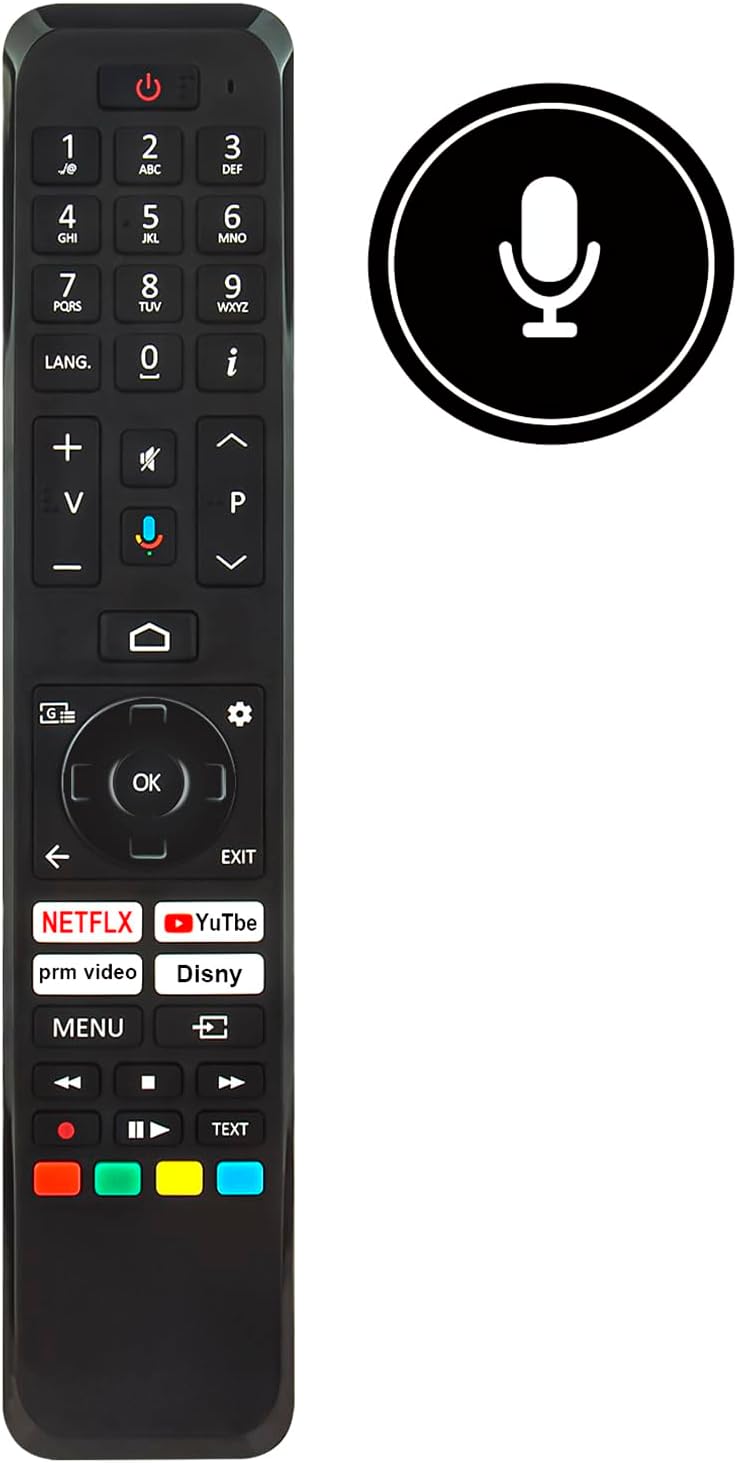
Obraz: Przód view of the ALLIMITY RC45162 remote control, displaying the full button layout.
3.1 Podstawowe funkcje
- Przycisk zasilania (U): Włącza lub wyłącza telewizor.
- Przyciski numeryczne (0-9): Bezpośredni wybór kanałów.
- Zwiększanie/zmniejszanie głośności (+/-): Regulacja głośności telewizora.
- Channel Up/Down (P^/P<): Zmienia kanały telewizyjne.
- Przycisk wyciszenia: Wycisza lub włącza dźwięk telewizora.
- Panel nawigacyjny (góra, dół, lewo, prawo, OK): Służy do poruszania się po menu i potwierdzania wyborów.
- Back Button (<): Powrót do poprzedniego menu lub ekranu.
- Przycisk wyjścia: Wychodzi z bieżącego menu lub aplikacji.
- Przycisk Home: Accesses the TV's main home screen or smart TV interface.
3.2 Funkcje specjalne
- Voice Control Button (Microphone icon): Activates the voice control feature. Press and hold this button, then speak your command clearly into the remote. Release the button when finished.
- Przyciski szybkiego dostępu: Dedicated buttons for popular streaming services such as Netflix, YouTube, Prime Video, and Disney+ for direct access.
- Przycisk LANG.: For language selection or audio track changes.
- Przycisk Info (i): Wyświetla informacje o bieżącym programie lub wejściu.
- Przycisk menu: Dostęp do głównego menu ustawień telewizora.
- Kolorowe przyciski (czerwony, zielony, żółty, niebieski): These buttons often correspond to specific functions within TV menus or applications, as indicated on the screen.
4. Konserwacja
4.1 Czyszczenie
Aby zachować wygląd i funkcjonalność pilota:
- Wytrzyj pilota miękką, suchą ściereczką.
- W przypadku uporczywych zabrudzeń, delikatnieamppl szmatkę wodą lub łagodnym, nieściernym środkiem czyszczącym.
- Avoid using harsh chemicals, solvents, or abrasive materials, as these can damage the remote's surface or internal components.
4.2 Wymiana baterii
Replace batteries when the remote control's response becomes sluggish or stops working. Always replace all batteries at the same time with new ones of the same type. Do not mix old and new batteries or different types of batteries.
4.3 Przechowywanie
Jeśli pilot nie będzie używany przez dłuższy czas, należy wyjąć baterie, aby zapobiec wyciekowi elektrolitu i potencjalnemu uszkodzeniu urządzenia.
5. Rozwiązywanie Problemów
If you encounter issues with your ALLIMITY RC45162 remote control, please refer to the following common solutions:
- Pilot nie odpowiada:
- Sprawdź, czy baterie są prawidłowo włożone i wystarczająco naładowane. W razie potrzeby wymień je.
- Upewnij się, że między pilotem zdalnego sterowania a czujnikiem podczerwieni telewizora nie ma żadnych przeszkód.
- Skieruj pilota bezpośrednio na telewizor.
- Sterowanie głosowe nie działa:
- Ensure you are pressing and holding the voice control button while speaking.
- Mów wyraźnie i normalnym głosem.
- Check your TV's settings to ensure voice control is enabled and configured correctly.
- Ograniczony zasięg lub reakcja przerywana:
- Replace the batteries. Low battery power can affect signal strength.
- Ensure the remote is within the maximum operating range (up to 10 meters).
- Minimize sources of infrared interference, such as direct sunlight or strong artificial light.
6. Specyfikacje

Obraz: przód i bok view of the remote control, illustrating its dimensions for reference.
| Marka | WSZECHSTRONNOŚĆ |
| Nazwa / numer modelu | MME-RC45162-NP |
| Cechy specjalne | Ergonomic |
| Kolor | Czarno-biały |
| Maksymalna liczba obsługiwanych urządzeń | 10 |
| Kompatybilne urządzenia | TX-65MX700E, TX-65MX710E, TX-43MX700E, TX-55MX710E, TX-50MX710E, TX-55MX700E |
| Technologia łączności | Podczerwony |
| Typ kontrolera | Kontrola na podczerwień |
| Maksymalny zasięg | 10 metrów |
| Typ baterii | Lit |
| Waga przedmiotu | 59 gram |
7. Informacje o gwarancji
This product is typically covered by a standard manufacturer's warranty. For specific details regarding warranty duration, coverage, and claims, please refer to the documentation provided at the time of purchase or contact your retailer. Extended warranty options may be available from third-party providers.
8. Wsparcie
For further assistance or if you have questions not covered in this manual, please contact the seller or the manufacturer directly. You may find contact information on the product packaging or the retailer's webstrona.
Ask a question about this manual
Ask about setup, troubleshooting, compatibility, parts, safety, or missing instructions. Manuals+ will review the question and use this page’s manual context to help answer it.