
SONICAKE QME-200
Instrukcja obsługi SONICAKE Matribox II Pro
Multi Effects Guitar Pedal with Expression
Wstęp
The SONICAKE Matribox II Pro is an advanced multi-effects guitar pedal designed for guitarists, bassists, and acoustic players seeking a comprehensive and versatile tone solution. Featuring new hardware and digital modeling technology, it accurately reproduces a wide range of sounds with high fidelity. This unit includes over 240 built-in guitar/bass/acoustic amp and effect models, an expression pedal, FX loop, MIDI capabilities, and a stereo OTG USB audio interface. This manual provides detailed instructions for setting up, operating, and maintaining your Matribox II Pro.

The SONICAKE Matribox II Pro, a versatile multi-effects guitar pedal.
Organizować coś
Zawartość opakowania
- SONICAKE Matribox II Pro Unit
- Zasilacz
- Kabel USB
- Instrukcja obsługi (ten dokument)
Podłączanie pedału
Before powering on, ensure all connections are secure. The Matribox II Pro offers a variety of input and output options for different setups.

Szczegółowy view of the rear panel connections, including inputs for expression pedals, FX loop, XLR outputs, and USB.
- Wejście gitarowe: Connect your guitar to the 1/4" INPUT jack.
- Wyjście do Amplifier/PA: Use the 1/4" OUTPUT (L/MONO, R) jacks to connect to your amplifier or PA system. For balanced connections, use the XLR OUT (L/MONO, R) jacks.
- Pętla efektów: Connect external effects pedals using the SEND and RETURN jacks for an integrated signal chain.
- Expression Pedal/Footswitch: The EXP/FS INPUT allows for an external expression pedal or footswitch for additional control.
- MIDI: Connect MIDI devices via the MIDI IN and OUT ports for advanced control and synchronization.
- USB: The USB port allows connection to a computer for audio interface functions and software editing.
- Moc: Connect the included DC 9V power adapter to the POWER jack.
Włączanie
Once all connections are made, plug the power adapter into a wall outlet. The unit will power on automatically. The 4.3" color touchscreen will illuminate, displaying the main interface.
Operating the Matribox II Pro
Interfejs z ekranem dotykowym
The Matribox II Pro features a high-resolution 4.3" color touchscreen for intuitive navigation and parameter adjustment. Tap, swipe, and drag to control effects, change presets, and access various functions.

The 4.3-inch color touchscreen provides clear visual feedback and easy control over settings.
Effect Matrix and Signal Chain
The unit allows for up to 12 movable effect modules, offering over 200 high-quality effects. You can customize your signal chain by dragging and dropping effect blocks on the touchscreen to create unique tones.

Visual representation of the effect matrix, showing various effect modules that can be arranged in the signal chain.
Presets and Performance Features
The Matribox II Pro comes with 240 presets and includes built-in features like a tuner, drum machine with 100 rhythms, and a 90-second looper. These features are designed to enhance your practice and live performance experience.
Official product video demonstrating the SONICAKE Matribox II Pro's features, including its user interface, effects, and performance capabilities.
Footswitches and Expression Pedal
The unit features multiple footswitches for hands-free control during live performances. The integrated expression pedal can be assigned to control various effect parameters or overall volume, providing dynamic real-time adjustments.

A user's foot on the expression pedal, demonstrating its use for dynamic control.
Interfejs audio USB i oprogramowanie
The Matribox II Pro functions as a USB audio interface, allowing direct connection to computers (Mac/Windows) and iOS/Android mobile devices (via OTG function) for recording and re-amping. Free PC/Mac software is available for sound editing, firmware upgrades, and managing presets and third-party IRs.
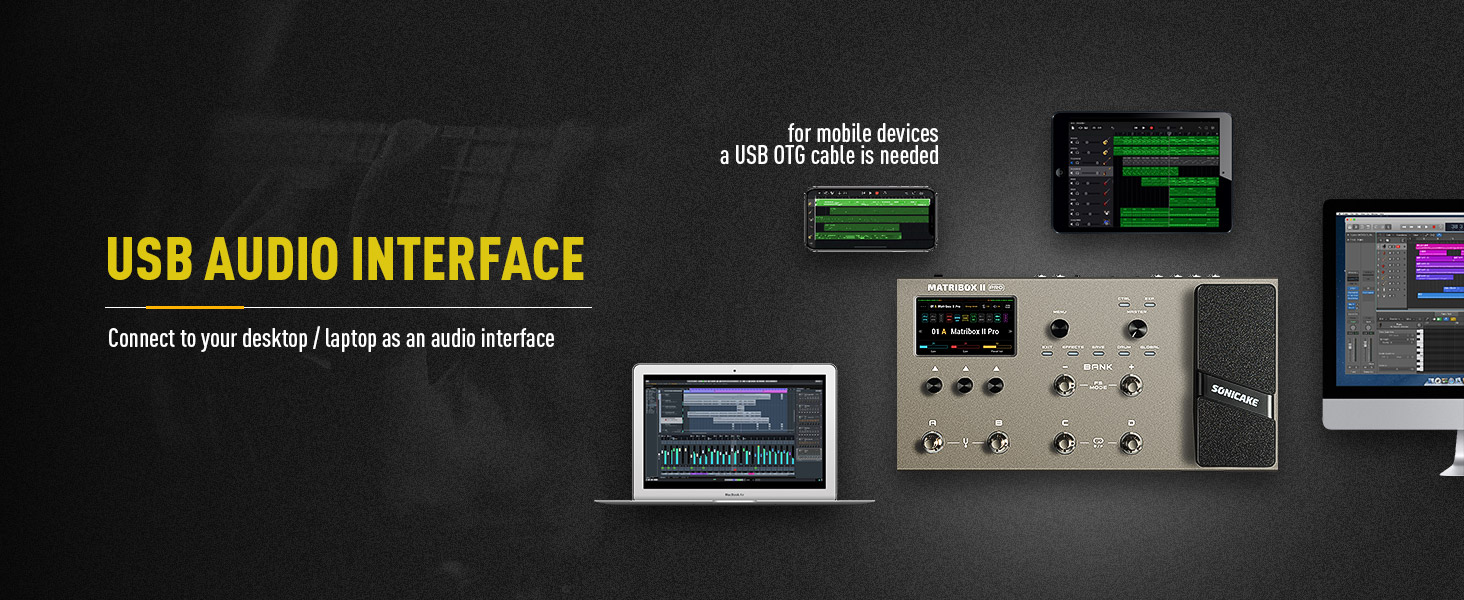
The Matribox II Pro connected to a computer, showcasing the compatible software for detailed sound editing and management.
Specyfikacje i funkcje
Główne cechy:
- New hardware and digital modeling technology for high fidelity and clarity.
- 240+ Built-in Guitar/Bass/Acoustic legacy amp and effect models, including 63 amplifier and over 93 effect pedal simulations.
- Stereo effects loop and expression pedal, footswitch input and XLR out.
- USB Audio Interface with Stereo Audio Streaming, supporting OTG function for direct connection to iOS/Android Mobile Devices.
- Free Mac/Windows Software for Sound Editing and Presets Managing.
Dane techniczne:
| Specyfikacja | Wartość |
|---|---|
| Waga przedmiotu | 5.5 funta (2.5 kilograma) |
| Wymiary produktu | 10.94 x 16.93 x 4.17 cala |
| Numer modelu przedmiotu | QME-200 |
| Nazwa koloru | Matribox II Pro |
| Interfejs sprzętowy | USB |
| Format sygnału | Cyfrowy |
| Źródło zasilania | Zasilacz |
| Tomtage | 9 wolty |
| Styl | Multi Effects, Acoustic, Bass, Looper, Expression |

Diagram showing the physical dimensions of the Matribox II Pro unit.
Konserwacja
To ensure the longevity and optimal performance of your Matribox II Pro, follow these maintenance guidelines:
- Czyszczenie: Do czyszczenia urządzenia należy używać miękkiej, suchej ściereczki. Unikać środków czyszczących o właściwościach ściernych, wosków i rozpuszczalników.
- Składowanie: Przechowywać urządzenie w chłodnym, suchym miejscu, z dala od bezpośredniego światła słonecznego i ekstremalnych temperatur.
- Obsługiwanie: Handle the pedal with care. Avoid dropping or subjecting it to strong impacts.
- Zasilanie: Always use the original or a compatible power adapter to prevent damage.
Rozwiązywanie problemów
If you encounter any issues with your Matribox II Pro, refer to the following common troubleshooting tips:
- Brak zasilania: Ensure the power adapter is securely connected to both the unit and a working power outlet. Verify the power outlet is active.
- Brak dźwięku: Check all audio cables (input, output, FX loop) for secure connections. Ensure your guitar, amplifier, and other connected devices are working correctly. Verify the volume levels on the Matribox II Pro and your ampliyfikator.
- Zniekształcony dźwięk: Check input gain levels on the Matribox II Pro and your amplifier to avoid clipping. Ensure no damaged cables are being used.
- Problemy z połączeniem oprogramowania: Ensure the USB cable is properly connected. Try restarting both the Matribox II Pro and your computer. Install the latest drivers if necessary.
- Nieoczekiwane zachowanie: Perform a factory reset if the unit behaves unexpectedly (refer to the full digital manual for specific steps). Ensure firmware is up to date.
Gwarancja i wsparcie
Aby uzyskać informacje dotyczące gwarancji i pomocy technicznej, zapoznaj się z oficjalną stroną SONICAKE webOdwiedź stronę internetową lub skontaktuj się bezpośrednio z działem obsługi klienta. Zachowaj dowód zakupu na wypadek reklamacji.
Zasoby internetowe:
- Odwiedź SONICAKE Store on Amazon Aby uzyskać informacje o produkcie i jego aktualizacjach.
Ask a question about this manual
Ask about setup, troubleshooting, compatibility, parts, safety, or missing instructions. Manuals+ will review the question and use this page’s manual context to help answer it.