
1. Wprowadzenie
The YIMU KB41 HD720P Rear Seat Baby Car Camera system provides a clear and reliable way to monitor your baby in the back seat while driving. This system features a 4.3-inch monitor, a 360° rotatable camera with night vision, and a wide 150-degree viewing angle. Designed for easy installation without drilling, it offers peace of mind by allowing you to keep an eye on your child without distractions.
2. Co znajduje się w pudełku
Przed przystąpieniem do instalacji sprawdź, czy wszystkie komponenty są obecne:
- Baby Car Monitor (4.3-inch)
- Car Headrest Camera
- Suction Cup Mount for Monitor
- Headrest Straps for Camera
- Kabel wideo
- Cigarette Lighter Power Adapter (12V)
- Instrukcja obsługi
3. Konfiguracja i instalacja
3.1 Instalacja monitora
The monitor can be securely mounted on your car's dashboard or windshield using the provided suction cup mount. Ensure the surface is clean and dry before attaching the mount for optimal adhesion.

3.2 Instalacja kamery
The camera is designed for quick installation on the car seat headrest using the adjustable straps. This allows for flexible positioning to achieve the best view Twojego dziecka.
- Pull the headrest restraint up slightly.
- Fasten the horizontal strap around the headrest.
- Fasten the vertical strap around the headrest, securing the camera.
- Rotate the adjustable camera to the desired viewkąt.


3.3 Połączenie zasilania
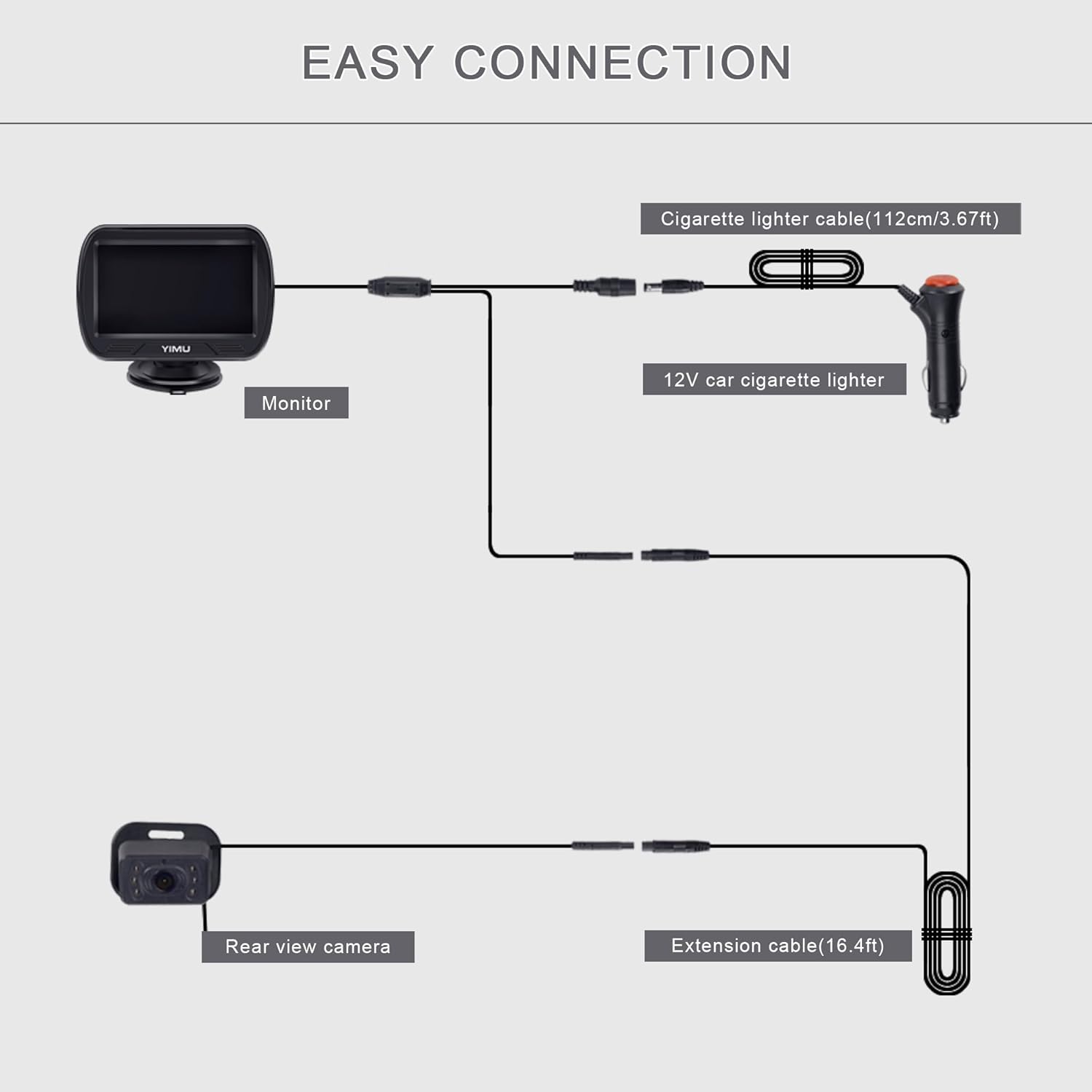
Connect the camera to the monitor using the video cable, then power the system via the cigarette lighter socket. It is recommended to use the included 12V lighter adapter.
- Connect the camera cable to the extension cable.
- Connect the extension cable to the monitor.
- Plug the cigarette lighter adapter into your car's 12V cigarette lighter socket.
- Turn on the power switch on the cigarette lighter adapter.

3.4 Filmy instalacyjne
For a visual guide, please refer to the official installation videos below:
4. Instrukcja obsługi
4.1 Podstawowa obsługa
Once powered on, the monitor will automatically display the camera feed. Use the buttons on the monitor to access settings and adjustments.
- Przycisk zasilania: Włącza lub wyłącza monitor.
- Przycisk menu: Accesses settings such as brightness, contrast, hue, saturation, language, and reset options.
- Przyciski w górę/w dół: Poruszaj się po opcjach menu lub dostosuj wartości.
4.2 Widzenie nocne
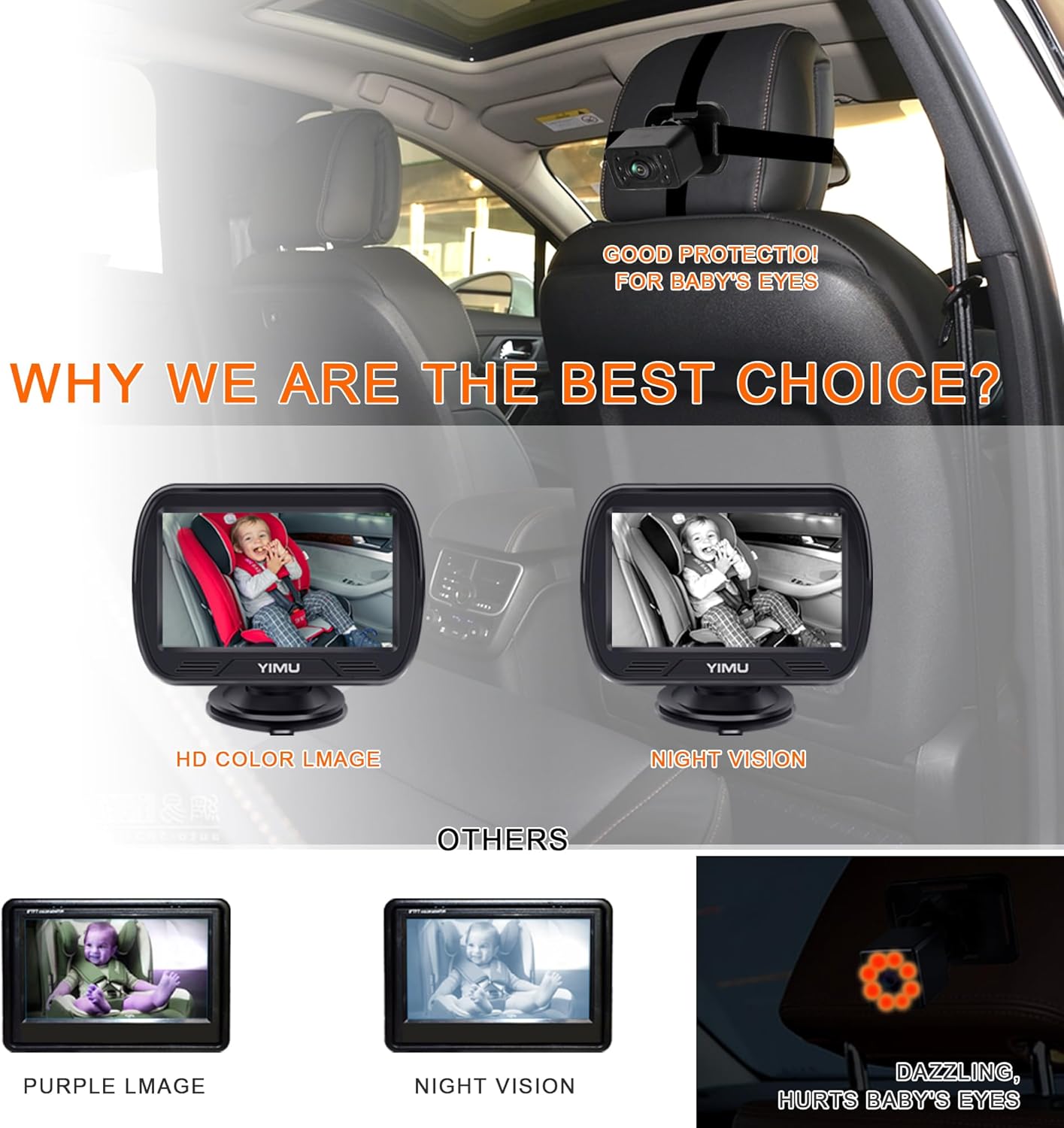
The camera features 940nm infrared (IR) lights, which are invisible to the human eye, ensuring your baby is not disturbed. The system automatically switches to night vision mode in low-light conditions, providing a clear black and white image.
4.3 360° Rotatable Camera and Wide View Kąt
The camera can be rotated 360 degrees to accommodate various car seat positions and types. Its 150-degree wide-angle lens eliminates blind spots, allowing you to view one, two, or even three children clearly in the back seat.


5. Konserwacja
To ensure the longevity and optimal performance of your YIMU KB41 Baby Car Camera system, follow these maintenance guidelines:
- Czyszczenie: Use a soft, dry cloth to clean the monitor screen and camera lens. Avoid abrasive cleaners or solvents that could damage the surfaces.
- Zarządzanie kablami: Ensure all cables are neatly tucked away and not pinched or exposed to excessive wear. This prevents damage and maintains a tidy car interior.
- Składowanie: Jeśli przechowujesz system przez dłuższy okres czasu, odłącz go od zasilania i przechowuj w chłodnym, suchym miejscu, z dala od bezpośredniego światła słonecznego i ekstremalnych temperatur.
- Regularne kontrole: Periodically check the camera and monitor mounts to ensure they are secure and stable.
6. Rozwiązywanie Problemów
If you encounter issues with your YIMU KB41 Baby Car Camera system, refer to the following common problems and solutions:
- Brak obrazu na monitorze:
- Ensure the cigarette lighter adapter is securely plugged in and the power switch is ON.
- Check that all cables (camera to extension, extension to monitor) are firmly connected.
- Verify that your car's 12V power outlet is functioning.
- Flickering or Unclear Image:
- Sprawdź połączenia kabli pod kątem luzu.
- Upewnij się, że obiektyw aparatu jest czysty i nie ma w nim żadnych przeszkód.
- Adjust the monitor's brightness, contrast, and other settings via the menu.
- Camera Not Staying in Position:
- Re-tighten the headrest straps.
- Ensure the camera's rotational joint is tightened after adjustment.
- Wizja nocna nie jest aktywowana:
- The system automatically switches to night vision in low light. Ensure the environment is sufficiently dark for it to activate.
- Check for any obstructions blocking the camera's IR sensors.
If these steps do not resolve the issue, please contact YIMU customer support for further assistance.
7. Specyfikacje
| Funkcja | Szczegół |
|---|---|
| Wymiary produktu | 7.48 x 4.33 x 2.56 cala |
| Waga przedmiotu | 1.19 funta |
| Numer modelu przedmiotu | KB41 4.3inch |
| Cechy specjalne | 360 Degree, Adjustable, Dimmable, HD Resolution, Night Vision |
| Technologia wyświetlania | LCD |
| Inne funkcje wyświetlacza | Bezprzewodowy |
| Kolor | Czarny |
| Producent | Yimu |
| Rozmiar ekranu | 4.3 cali |
| Kompatybilne urządzenia | Wired Monitor |
| Typ instalacji | Montaż powierzchniowy |
| Tomtage | 12 Volts (Do not use more than 24V) |
| Technologia czujnika optycznego | CCD lub CMOS |
| Typ soczewki | Szeroki kąt |
| Kąt rzeczywisty View | 150 stopni |
| Typ złącza | 4PIN |
8. Gwarancja i wsparcie
The YIMU KB41 HD720P Rear Seat Baby Car Camera comes with a 2-letnia gwarancja. This warranty covers manufacturing defects and ensures the quality and performance of your product.
If you have any questions, require technical assistance, or encounter any issues with your device, please do not hesitate to contact YIMU customer support. Our team is dedicated to providing prompt and helpful solutions.
Aby uzyskać pomoc, odwiedź naszą oficjalną stronę webodwiedź witrynę lub zapoznaj się z informacjami kontaktowymi znajdującymi się na opakowaniu produktu.