
1. Wprowadzenie
Thank you for choosing the YESIDO YSP13 Bluetooth Ear Hook Earphones. This manual provides essential information for the proper setup, operation, and maintenance of your device. Please read it carefully before use to ensure optimal performance and longevity.
The YSP13 features an air conduction design, eliminating the need to insert earbuds directly into the ear canal, which can enhance comfort and ear health. It utilizes Bluetooth 5.3 for stable connectivity and delivers HiFi sound quality, making it suitable for music and sports activities.
2. Zawartość opakowania
Proszę sprawdzić, czy w paczce znajdują się następujące elementy:
- YESIDO YSP13 Bluetooth Ear Hook Earphones (Left and Right)
- Etui ładujące
- Kabel ładujący
- Instrukcja obsługi
- Torebka do przechowywania

Image: Contents of the YESIDO YSP13 package, including the earphones, charging case, charging cable, and a small storage pouch.
3. Koniec produktuview
The YESIDO YSP13 earphones feature a rotatable ear hook design for a secure and comfortable fit during various activities. The charging case includes a digital display to indicate battery levels.
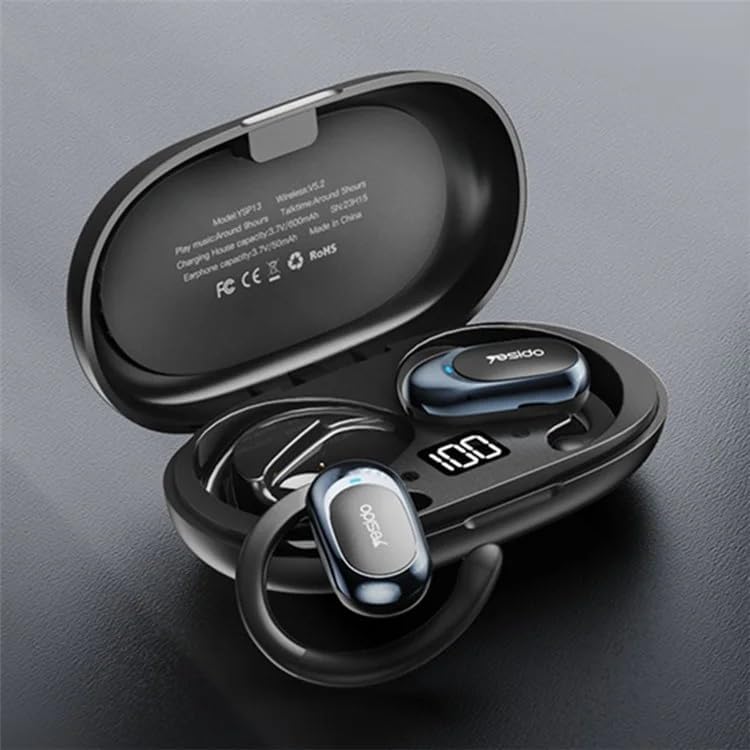
Image: The YESIDO YSP13 earphones resting in their charging case, which features a digital battery level indicator.

Image: A user wearing the YESIDO YSP13 earphone, illustrating how the ear hook design fits securely around the ear.

Image: An exploded diagram of the YESIDO YSP13 earphone, showcasing its internal structure and components responsible for HiFi sound reproduction.
4. Konfiguracja
4.1 Ładowanie słuchawek i etui
- Umieść słuchawki w etui ładującym. Upewnij się, że są prawidłowo osadzone.
- Podłącz kabel ładujący do portu ładowania w obudowie i do źródła zasilania USB.
- Cyfrowy wyświetlacz na etui ładującym pokazuje stan ładowania.
- Charging time for earphones is approximately 1 hour. Charging time for the case is approximately 2.5 hours.
- Po całkowitym naładowaniu odłącz kabel ładujący.
4.2 parowanie Bluetooth
- Sprawdź, czy słuchawki są naładowane.
- Otwórz etui ładujące. Słuchawki automatycznie przejdą w tryb parowania.
- Włącz Bluetooth na swoim urządzeniu (smartfonie, tablecie itp.).
- Szukaj available Bluetooth devices and select "YESIDO YSP13" from the list.
- Po nawiązaniu połączenia usłyszysz dźwięk potwierdzający i słuchawki będą gotowe do użycia.
- Słuchawki automatycznie połączą się z ostatnio sparowanym urządzeniem po wyjęciu z etui, jeśli w urządzeniu włączony jest Bluetooth.
5. Instrukcja obsługi
5.1 Noszenie słuchawek
Gently place the ear hook over your ear, positioning the earphone speaker near your ear canal. Adjust the rotatable ear hook for a comfortable and secure fit.
5.2 Podstawowe funkcje
- Włączanie: Otwórz etui ładujące, słuchawki włączą się automatycznie.
- Wyłączone: Place earphones back into the charging case and close the lid, earphones power off automatically.
- Odtwórz/Pauza: Single tap on either earphone's touch control area.
- Następny utwór: Double tap on the right earphone's touch control area.
- Poprzedni utwór: Double tap on the left earphone's touch control area.
- Odbieranie/kończenie połączeń: Single tap on either earphone's touch control area during an incoming call.
- Odrzuć połączenie: Press and hold either earphone's touch control area for 2 seconds during an incoming call.
- Aktywuj asystenta głosowego: Triple tap on either earphone's touch control area.
Note: Specific touch control functions may vary slightly. Refer to the quick start guide included in your package for detailed diagrams if available.
6. Konserwacja
- Czyszczenie: Do czyszczenia słuchawek i etui ładującego używaj miękkiej, suchej i niepozostawiającej włókien ściereczki. Nie używaj silnych środków chemicznych ani materiałów ściernych.
- Wodoodporność: The earphones are designed to be resistant to splashes. However, they are not waterproof. Do not submerge them in water.
- Składowanie: Gdy nie używasz słuchawek, przechowuj je w etui ładującym, aby je chronić i utrzymać naładowanie.
- Temperatura: Unikaj wystawiania urządzenia na działanie ekstremalnych temperatur (wysokiej lub niskiej) i wysokiej wilgotności.

Image: The YESIDO YSP13 earphones shown with water splashes, illustrating their resistance to sweat and light rain.
7. Rozwiązywanie Problemów
| Problem | Możliwe rozwiązanie |
|---|---|
| Słuchawki nie łączą się |
|
| Brak dźwięku |
|
| Etui ładujące nie ładuje się |
|
| Przerywane połączenie |
|
8. Specyfikacje
| Funkcja | Szczegół |
|---|---|
| Numer modelu | YSP13 |
| Wersja Bluetooth | BT8926B2 V5.3 |
| Pojemność baterii słuchawek | 50mAh x 2 |
| Pojemność akumulatora etui ładującego | 600mAh |
| Muzyka/Czas połączenia | Około 6 godzin |
| Czas ładowania słuchawek | Około 1 godziny |
| Etui ładujące Czas ładowania | Około 2.5 godzin |
| Tworzywo | PC+ABS+Electroplating UV |
| Łączność | Bezprzewodowy (Bluetooth) |
| Dodatkowe funkcje | Microphone Included, Air Conduction Design, Rotatable Ear Hook |
9. Gwarancja i wsparcie
9.1 Informacje o gwarancji
Ten produkt jest dostarczany z 6-miesięczna gwarancja od daty zakupu. Gwarancja obejmuje wady produkcyjne i usterki powstałe w wyniku normalnego użytkowania. Nie obejmuje uszkodzeń spowodowanych niewłaściwym użytkowaniem, wypadkami, nieautoryzowanymi modyfikacjami ani normalnym zużyciem.
Proszę zachować dowód zakupu na potrzeby roszczeń gwarancyjnych.
9.2 Obsługa klienta
For technical assistance, warranty claims, or any questions regarding your YESIDO YSP13 earphones, please contact your retailer or the manufacturer's customer support. Refer to the packaging or the retailer's webstrona dla danych kontaktowych.