
ErGear B0D9MFMBBQ
Instrukcja obsługi biurka ErGear z elektryczną regulacją wysokości
Model: B0D9MFMBBQ
1. Ważne informacje dotyczące bezpieczeństwa
Przed montażem i użytkowaniem należy uważnie przeczytać wszystkie instrukcje bezpieczeństwa. Nieprzestrzeganie tych instrukcji może spowodować obrażenia ciała lub uszkodzenie produktu.
- Zawsze należy ściśle przestrzegać instrukcji montażu.
- Nie przekraczać maksymalnego udźwigu 100 kilogramów.
- Trzymaj biurko z dala od źródeł ciepła i płynów.
- Ensure the desk is properly anchored or placed on a stable surface to prevent tipping.
- Exercise caution when adjusting the desk height to avoid pinching or trapping objects.
This section provides critical guidelines for safe operation and handling of your ErGear Electric Height Adjustable Desk.
2. Koniec produktuview
The ErGear Electric Height Adjustable Desk is designed for ergonomic comfort and versatility in your workspace. It features a robust metal frame, a powerful brushless motor, and programmable memory presets for height adjustment.

Figure 2.1: The ErGear Electric Height Adjustable Desk in a typical office setup, showcasing its spacious white desktop and sturdy frame supporting multiple devices.
Główne cechy:
- 100 kg Load Capacity: Obsługuje wiele monitorów, laptopów i ciężkiego sprzętu.
- Zaawansowany silnik bezszczotkowy: Certified for reliable performance and smooth height transitions, tested for 100,000 lift cycles.
- Wzmocniona rama: Features thicker 2.36" legs, wider feet, and larger top plates for 30% more stability.
- Regulacja wysokości: Range from 72 cm to 118 cm with four programmable memory presets.
- Cicha praca: Maximum noise level of 50 dB during height adjustment.
- Zarządzanie kablami: Two cable grommets and an under-desk power strip holder for an organized workspace.
- Haczyki na akcesoria: Two hooks for headphones or bags.
3. Instrukcja montażu
Assembly of the ErGear Electric Height Adjustable Desk is straightforward. It is recommended to have a second person assist with certain steps due to the weight of the components.
3.1. Rozpakowanie i sprawdzenie komponentów
Carefully unpack all components and lay them out on a clean, soft surface to prevent scratches. Verify that all parts listed in the packing list are present. If any parts are missing or damaged, contact customer support.
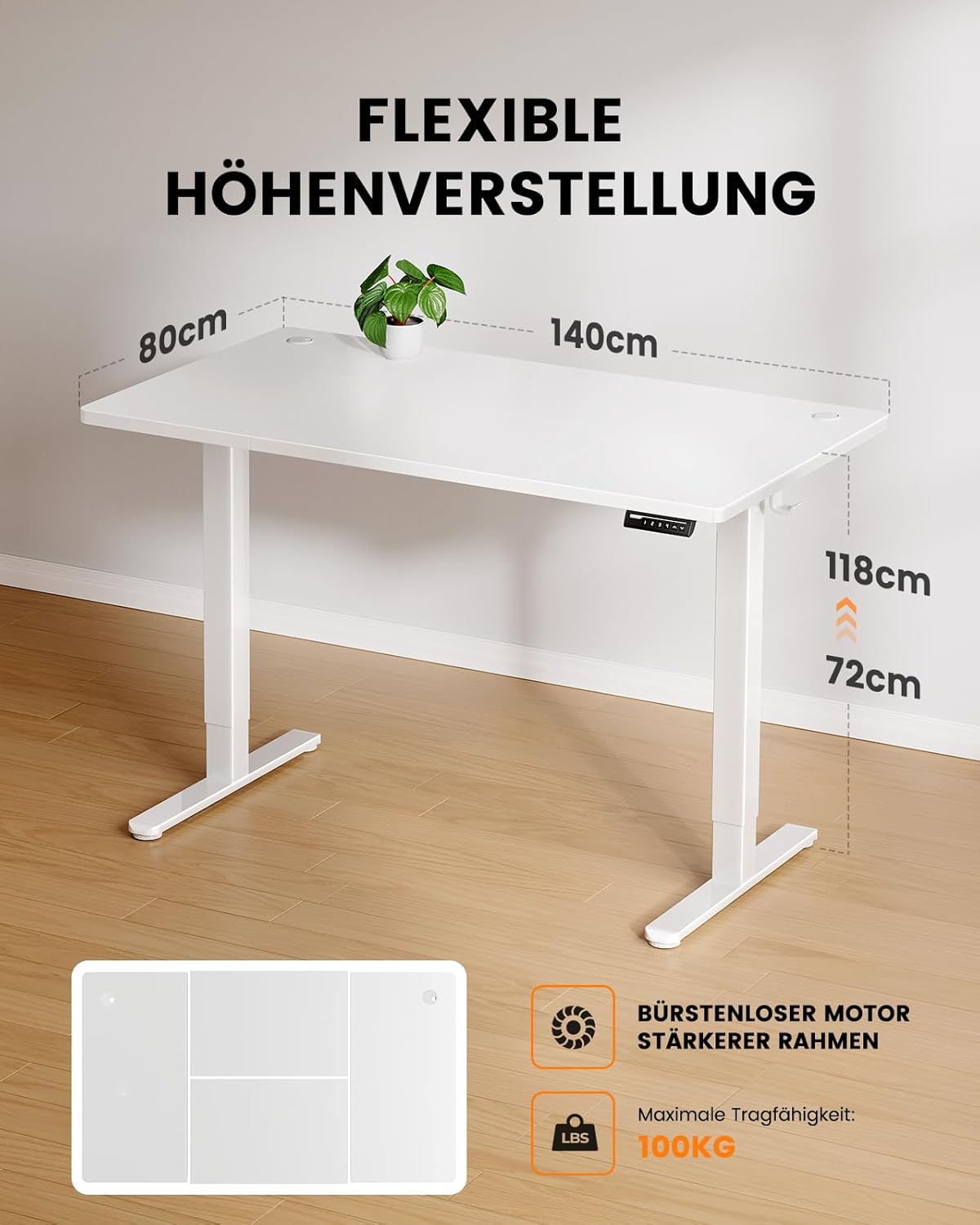
Figure 3.1: Illustration of the desk's flexible height adjustment range (72cm to 118cm) and its maximum load capacity of 100kg, highlighting the brushless motor and strong frame.
3.2. Montaż ramy
- Attach the lifting columns to the foot supports using the provided screws. Ensure they are securely fastened.
- Connect the crossbar to the lifting columns. This provides structural integrity.
- Install the control box onto the designated area of the frame.

Figure 3.2: A visual comparison demonstrating the thicker leg design of the ErGear desk (6cm) versus standard thinner legs (4.5cm), illustrating the enhanced stability provided by the robust frame.
3.3. Instalacja na pulpicie
- Carefully place the desktop onto the assembled frame, aligning the pre-drilled holes.
- Secure the desktop to the frame using the appropriate screws. Use a screwdriver or electric drill (low torque setting) for best results.
3.4. Cable Management and Accessories
- Install the power strip holder under the desk.
- Attach the accessory hooks to the sides of the desk as desired.
- Route all cables through the cable grommets and into the power strip holder for a tidy setup.

Rysunek 3.3: Szczegółowy view of the desk's integrated cable management features, including dual cable grommets, an under-desk power strip holder, and convenient accessory hooks for headphones or bags.
4. Instrukcja obsługi
Your ErGear Electric Height Adjustable Desk is designed for easy and intuitive operation.
4.1. Początkowa konfiguracja i pierwsze użycie
- Plug the desk into a standard power outlet.
- The control panel display will light up.
- Naciśnij Up or W dół arrows to move the desk to your desired height.

Figure 4.1: The desk's control panel, featuring four programmable memory buttons (1-4) for quick height recall, along with standard up and down adjustment arrows.
4.2. Programming Memory Presets
Biurko umożliwia zapisanie czterech preferowanych ustawień wysokości.
- Dostosuj wysokość biurka do swoich potrzeb za pomocą Up or W dół strzałki.
- Naciśnij "M" button (or similar memory button, if present, otherwise assume direct number press). The display might flash.
- Natychmiast naciśnij jeden z przycisków numerycznych (1, 2, 3 lub 4) to save the current height to that preset. The display will confirm the save.
- Aby przywołać zapisaną wysokość, wystarczy nacisnąć odpowiedni przycisk numeryczny.

Figure 4.2: A user demonstrating the ergonomic benefits of the ErGear desk, easily transitioning between sitting and standing positions within the 72cm to 118cm height range.
5. Konserwacja i pielęgnacja
Proper maintenance ensures the longevity and optimal performance of your ErGear desk.
- Czyszczenie: Przetrzyj blat i ramę miękką szmatką.amp ściereczką. Unikaj środków czyszczących o działaniu ściernym i silnych środków chemicznych.
- Kontrola: Okresowo sprawdzaj wszystkie śruby i połączenia, aby upewnić się, że są dobrze dokręcone. W razie potrzeby dokręć.
- Pielęgnacja silnika: The brushless motor is designed for durability and requires no special maintenance. Avoid obstructing the motor's movement.
- Zarządzanie kablami: Regularly check cables for wear or damage and ensure they are neatly routed to prevent tripping hazards or damage.
6. Rozwiązywanie Problemów
If you encounter any issues with your ErGear Electric Height Adjustable Desk, refer to the following common troubleshooting steps:
| Problem | Możliwa przyczyna | Rozwiązanie |
|---|---|---|
| Biurko się nie porusza. | Niepodłączony; zasilanie wyłączonetage; przeciążenie silnika. | Check power connection; verify power supply; reduce load on desk. |
| Biurko porusza się nierównomiernie lub wydaje nietypowe dźwięki. | Loose connections; obstruction; uneven weight distribution. | Check and tighten all screws; remove any obstructions; redistribute weight evenly. |
| Ustawienia pamięci nie działają. | Incorrect programming; power cycle needed. | Re-program the memory presets (refer to Section 4.2); unplug the desk for 30 seconds and plug back in. |
| Kod błędu na wyświetlaczu. | Konkretny błąd systemowy. | Zapoznaj się z konkretnym kodem błędu w pełnej wersji instrukcji (jeśli jest dostępna) lub skontaktuj się z działem obsługi klienta. |
Jeśli po wypróbowaniu tych rozwiązań problem nadal występuje, skontaktuj się z obsługą klienta ErGear, aby uzyskać dalszą pomoc.
7. Specyfikacje
- Model: B0D9MFMBBQ
- Marka: Przekładnia
- Wymiary pulpitu: 140 cm (długość) x 80 cm (szerokość)
- Zakres regulacji wysokości: 72 cm - 118 cm
- Nośność: 100 kilogramów
- Typ silnika: Zaawansowany silnik bezszczotkowy
- Poziom hałasu: ≤ 50 dB
- Tworzywo: Metal (Frame), Wood (Desktop)
- Waga produktu: Około 29.6 kg
- Kolor: Biały
8. Gwarancja i wsparcie
ErGear products are built with quality and durability in mind. For specific warranty details, please refer to the warranty card included with your product or visit the official ErGear webstrona.
Obsługa klienta:
If you have any questions, require technical assistance, or need to report an issue, please contact ErGear customer support through the following channels:
- Wsparcie online: Visit the ErGear official webStrona (Sklep ErGear na Amazon) for FAQs and contact information.
- E-mail: Adres e-mail działu obsługi klienta znajdziesz na opakowaniu produktu lub na karcie gwarancyjnej.
Please have your product model number (B0D9MFMBBQ) and purchase date ready when contacting support.
Powiązane dokumentyB0D9MFMBBQ


Ask a question about this manual
Ask about setup, troubleshooting, compatibility, parts, safety, or missing instructions. Manuals+ will review the question and use this page’s manual context to help answer it.