
1. Wprowadzenie
Welcome to the instruction manual for your OTL Technologies Pokémon Pikachu Kids Wireless Headphones, Model PK1315. This guide provides essential information on how to set up, operate, maintain, and troubleshoot your new headphones. Please read this manual carefully to ensure safe and optimal use of the product.
2. Koniec produktuview
Główne cechy:
- Połączenie bezprzewodowe: Bluetooth 5.3 for a stable and reliable connection up to 10 meters.
- Child-Safe Volume Control: Integrated volume limiter with a sensitivity of 85.95 dB to protect young ears.
- Inteligentne sterowanie dotykowe: Easily manage music playback (play/pause), answer/end calls, and activate voice assistant with simple touches.
- Wygodny projekt: Soft earcups and an adjustable headband ensure a comfortable fit for extended wear.
- Udostępnianie dźwięku: Includes a sharing cable to allow two headphones to listen to the same audio source simultaneously.
- Składany i lekki: Compact design for easy portability and storage, weighing only 160 grams (5.6 ounces).
- Wbudowany mikrofon: For hands-free calls and online interactions.
Design & Components:
The headphones feature a vibrant yellow design with iconic Pikachu graphics, making them appealing for children. The earcups are cushioned for comfort, and the headband is adjustable to fit various head sizes. The foldable structure allows for convenient storage and transport.

Figure 1: OTL Technologies Pokémon Pikachu Kids Wireless Headphones. A pair of bright yellow over-ear headphones featuring a Pikachu design on the earcups and black accents.
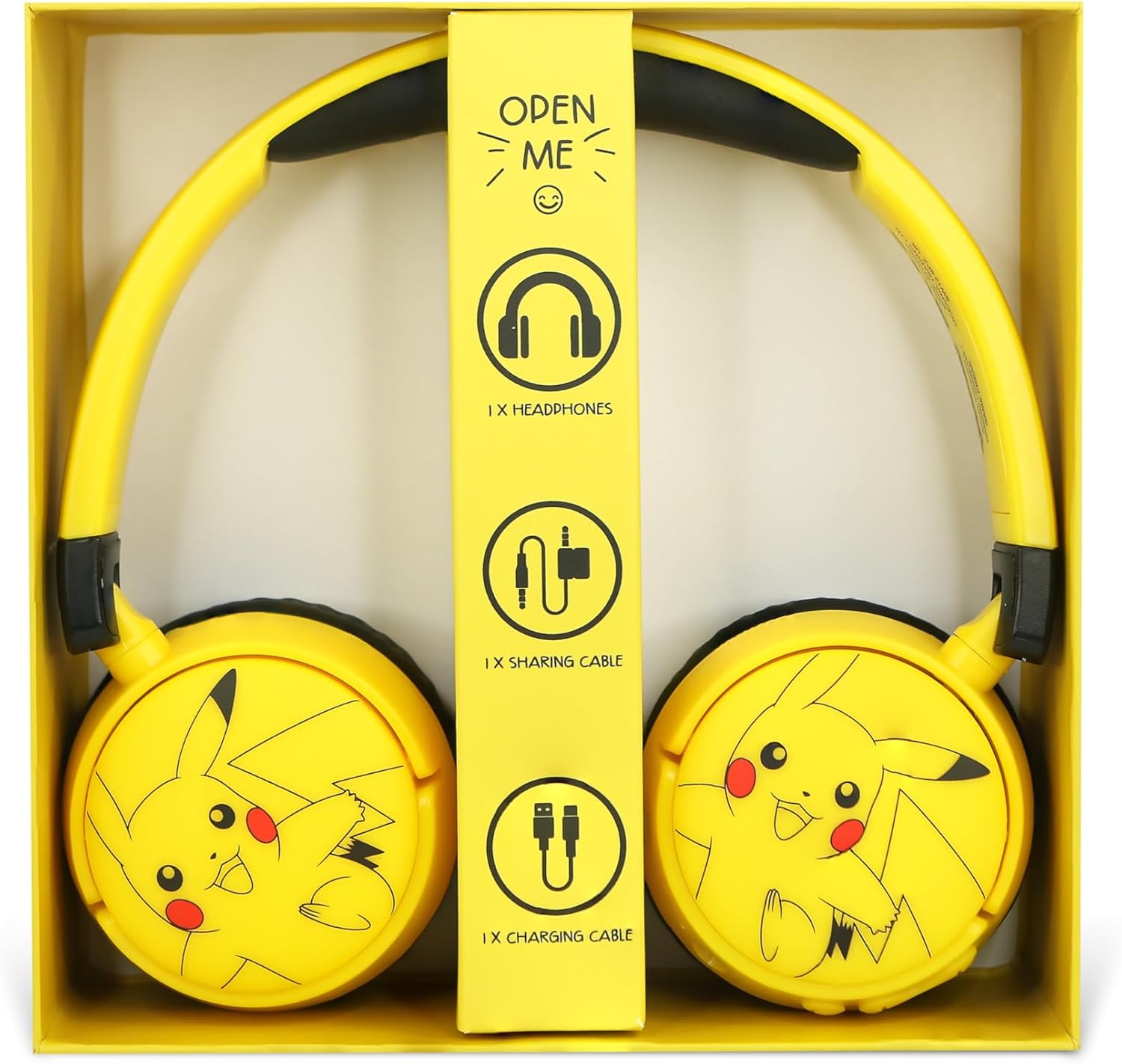
Figure 2: Box Contents. An open box revealing the headphones, a sharing cable, and a charging cable, along with an 'Open Me' tab.
3. Konfiguracja
3.1 Pierwsze ładowanie
- Before first use, fully charge the headphones. Connect the included charging cable to the charging port on the headphone earcup.
- Connect the other end of the charging cable to a compatible USB power source (e.g., computer USB port, USB wall adapter).
- The charging indicator light will illuminate. Charging takes approximately 1.5 hours.
- Po pełnym naładowaniu kontrolka zmieni kolor lub zgaśnie. Odłącz kabel ładujący.

Figure 3: Charging Port and Volume Limit Switch. A detailed view of the headphone earcup showing the micro-USB charging port and a switch for adjusting volume limits (85dB and 95dB).
3.2 parowanie Bluetooth
- Upewnij się, że słuchawki są wyłączone.
- Naciśnij i przytrzymaj przycisk zasilania, aż dioda LED zacznie migać na niebiesko i czerwono, wskazując tryb parowania.
- Na swoim urządzeniu audio (smartfonie, tablecie, komputerze) włącz Bluetooth i wyszukaj dostępne urządzenia.
- Select "PK1315" or a similar name from the list of devices.
- Once paired, the LED indicator light will turn solid blue or flash blue slowly.
- The headphones will auto-pair with the last connected device upon power-on for future use.
4. Instrukcja obsługi
4.1 Włączanie/wyłączanie zasilania
- Włączanie: Press and hold the Power button until the LED indicator light illuminates.
- Wyłączone: Press and hold the Power button until the LED indicator light turns off.
4.2 Inteligentne sterowanie dotykowe
The headphones feature intuitive touch controls on the earcups:
- Odtwórz/Pauza: Single tap on the designated touch area.
- Następny utwór: Double tap on the designated touch area.
- Poprzedni utwór: Triple tap on the designated touch area.
- Odbieranie/kończenie połączeń: Single tap during an incoming call to answer, single tap during a call to end.
- Aktywuj asystenta głosowego: Naciśnij i przytrzymaj obszar dotykowy przez 2 sekundy.

Figure 4: Headphone Controls. The side of the headphone earcup with clearly visible control buttons for power, play/pause, and volume adjustment.
4.3 Regulacja głośności
The headphones are designed with a child-safe volume limiter. Use the physical switch on the earcup to select between 85dB and 95dB maximum volume levels to protect your child's hearing.
4.4 Udostępnianie dźwięku
To share audio with another pair of headphones:
- Connect the included audio sharing cable to the designated sharing port on your OTL Technologies Pikachu headphones.
- Connect the other end of the sharing cable to the audio input jack of a second pair of headphones.
- Both headphones will now receive audio from the primary connected device.

Figure 5: Audio Sharing Cable. A yellow audio sharing splitter cable with two 3.5mm jacks, designed to connect two headphones to a single audio source.
5. Ładowanie
The headphones are equipped with a rechargeable Lithium Polymer battery. A full charge provides up to 6 hours of playtime. Standby time is up to 180 hours. Refer to section 3.1 for charging instructions.
6. Konserwacja
- Czyszczenie: Do czyszczenia słuchawek używaj miękkiej, suchej ściereczki. Unikaj stosowania silnych środków chemicznych i materiałów ściernych.
- Składowanie: When not in use, store the headphones in a cool, dry place. Utilize the foldable design for compact storage to prevent damage.
- Pielęgnacja baterii: Aby przedłużyć żywotność baterii, unikaj częstego całkowitego rozładowywania słuchawek. Ładuj je regularnie, nawet jeśli nie są używane regularnie.

Figure 6: Foldable Design. The headphones folded inwards, demonstrating their compact design for easy portability and storage.
7. Rozwiązywanie Problemów
- Brak zasilania: Ensure the headphones are charged. Connect to a power source and allow sufficient charging time.
- Brak dźwięku: Check if the headphones are properly paired with your device. Ensure the volume on both the headphones and the connected device is turned up. Verify the audio source is playing.
- Problemy z parowaniem: Turn off Bluetooth on your device and then turn it back on. Restart the headphones and attempt pairing again. Ensure no other devices are actively trying to connect.
- Słaba jakość dźwięku: Ensure the headphones are within the 10-meter Bluetooth range of the connected device. Check for interference from other wireless devices.
8. Specyfikacje
| Funkcja | Specyfikacja |
|---|---|
| Nazwa modelu | PK1315 |
| Marka | Technologie OTL |
| Technologia łączności | Bezprzewodowy (Bluetooth) |
| Wersja Bluetooth | 5.3 |
| Zasięg Bluetooth | Do 10 metrów |
| Odpowiedź częstotliwościowa | 20-20 kHz |
| Wrażliwość | 85.95 dB (with volume limiter) |
| Czas na zabawę | Do 6 godzin |
| Czas czuwania | Do 180 godzin |
| Czas ładowania | Około 1.5 godzin |
| Pojemność baterii | 30 mAh / side x 2 (Lithium Polymer) |
| Metoda kontroli | Dotykać |
| Zawarte komponenty | Headphones, Charging Cable, Audio Sharing Cable |
| Waga przedmiotu | 160 gramów (5.6 uncji) |
| Wymiary produktu | 6.3 x 2.76 x 6.69 cala |
9. Informacje dotyczące bezpieczeństwa
- Ochrona słuchu: Always use the built-in volume limiter to protect children's hearing. Prolonged exposure to loud sounds can cause permanent hearing damage.
- Ryzyko zadławienia: Keep small parts, such as cables, away from young children to prevent choking hazards.
- Nadzór: Adult supervision is recommended when children are using headphones, especially in environments where situational awareness is crucial.
- Czyszczenie: Do not immerse the headphones in water or other liquids. Clean only with a dry cloth.
- Bezpieczeństwo baterii: Do not attempt to replace the battery yourself. Do not expose the headphones to extreme temperatures or direct sunlight.
10. Gwarancja i wsparcie
For warranty information, technical support, or service inquiries, please refer to the contact details provided on the product packaging or visit the official OTL Technologies webZachowaj dowód zakupu na wypadek roszczeń gwarancyjnych.