
Wstęp
This manual provides comprehensive instructions for the ECONTROLLY EUR7729KE0 Replacement Remote Control. This remote is designed to function as a direct replacement for various Panasonic DVD HDD TV Recorders, offering full functionality without the need for complex programming.
Kompatybilne modele:
- UR7729KE0
- EUR7721X10
- DMR-EH50
- DMR-E55K
- DMR-EH50S
- DMR-E55P9
- DMR-E55S
- DMR-ES10
- DMR-EH50P
- DMR-EH60
This replacement remote control covers all functions of the original remote, ensuring a seamless user experience.
Organizować coś
Instalacja baterii
The EUR7729KE0 remote control requires two AAA batteries (not included) for operation. Please follow these steps to install the batteries:
- Znajdź komorę baterii z tyłu pilota.
- Przesuń pokrywę komory baterii w dół i podnieś ją.
- Włóż dwie baterie AAA, upewniając się, że bieguny dodatni (+) i ujemny (-) są prawidłowo ustawione względem oznaczeń wewnątrz komory.
- Załóż pokrywę komory baterii, wsuwając ją z powrotem na miejsce, aż do zatrzaśnięcia.

Tył view of the ECONTROLLY EUR7729KE0 remote control with the battery cover removed, showing the compartment for two AAA batteries.
Notatka: Zawsze wymieniaj obie baterie jednocześnie na nowe. Nie mieszaj starych i nowych baterii ani baterii różnych typów.
Instrukcja obsługi
To operate the remote control, point it directly at the infrared sensor on your Panasonic DVD HDD TV Recorder. Ensure there are no obstructions between the remote and the device.
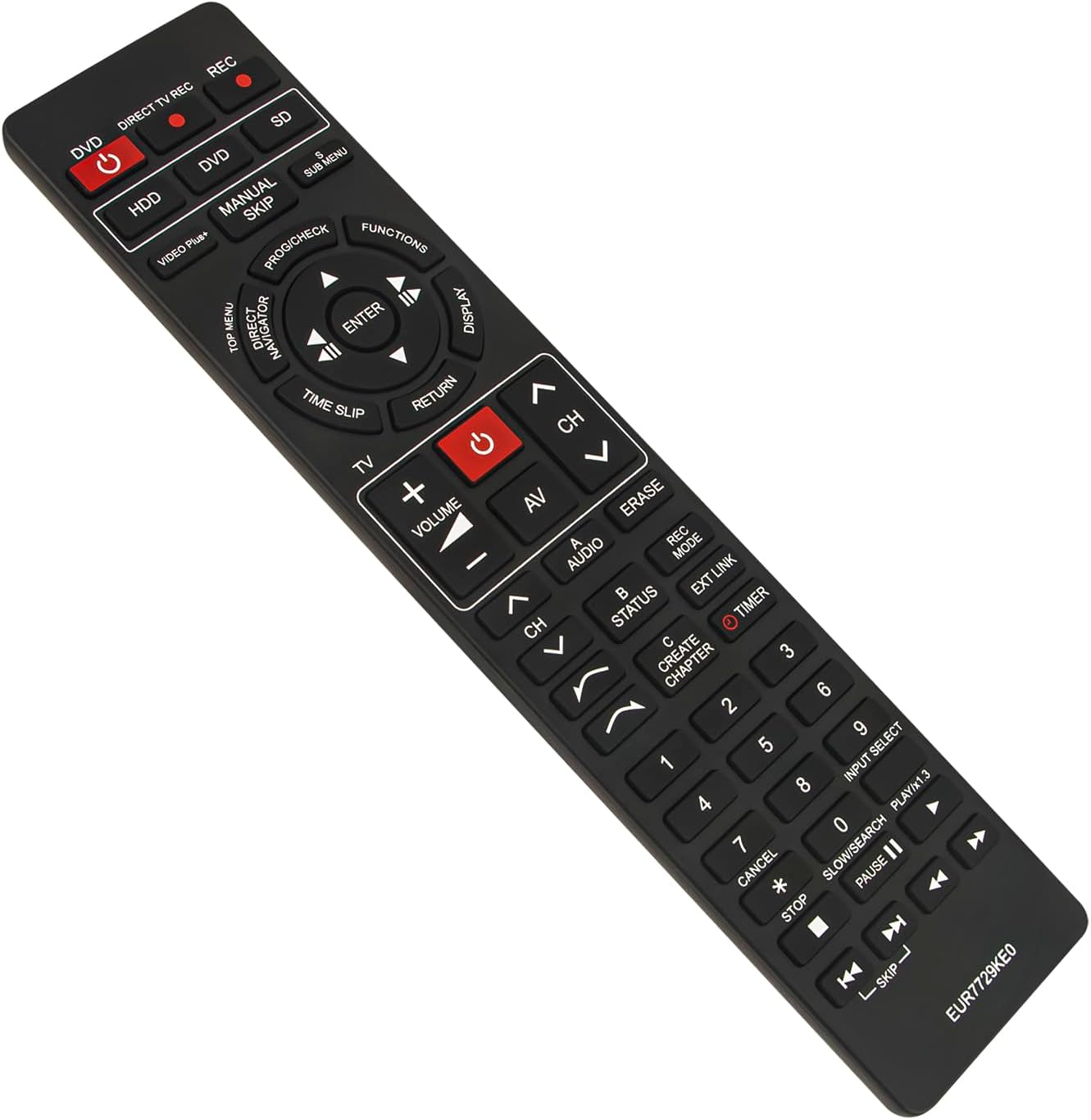
Przód view of the ECONTROLLY EUR7729KE0 replacement remote control, showing all buttons and their labels.
Funkcje kluczoweview:
- Power Buttons (DVD, HDD, DIRECT TV REC, REC, SD): Used to power on/off or select specific modes for the respective components.
- Przyciski numeryczne (0-9): For direct channel selection, inputting numbers, or menu navigation.
- Głośność (+/-): Dostosowuje głośność dźwięku.
- Channel (CH ^/v): Zmienia kanały w górę lub w dół.
- Panel nawigacyjny (góra, dół, lewo, prawo, ENTER): Służy do poruszania się po menu i potwierdzania wyborów.
- Playback Controls (PLAY/x1.3, PAUSE, STOP, SKIP, SLOW/SEARCH): Standardowe sterowanie odtwarzaniem multimediów.
- MENU Buttons (TOP MENU, SUB MENU, DIRECT NAVIGATOR): Access various menu options for DVD, HDD, or TV functions.
- Special Function Buttons (PROG/CHECK, FUNCTIONS, DISPLAY, TIME SLIP, RETURN, AV, AUDIO, ERASE, STATUS, REC MODE, EXT LINK, CREATE CHAPTER, TIMER): These buttons provide access to advanced features specific to your Panasonic recorder, such as recording options, chapter creation, and display settings. Refer to your recorder's manual for detailed use of these functions.

Comparison image showing the ECONTROLLY EUR7729KE0 replacement remote control on the left and an original Panasonic remote control on the right, highlighting their similar button layouts.
Konserwacja
Czyszczenie
Do czyszczenia pilota należy używać miękkiej, suchej ściereczki. W przypadku uporczywych zabrudzeń należy delikatnie przetrzećampPrzetrzyj ściereczkę wodą lub delikatnym środkiem czyszczącym. Unikaj stosowania środków ściernych, alkoholu i rozpuszczalników, ponieważ mogą one uszkodzić powierzchnię pilota lub jego wewnętrzne elementy.
Składowanie
Store the remote control in a cool, dry place away from direct sunlight and extreme temperatures. If the remote will not be used for an extended period, it is recommended to remove the batteries to prevent leakage and potential damage.
Rozwiązywanie problemów
- Pilot nie odpowiada:
- Sprawdź, czy baterie zostały włożone prawidłowo, z zachowaniem właściwej polaryzacji (+/-).
- Wymień baterie na nowe.
- Upewnij się, że między pilotem zdalnego sterowania a czujnikiem podczerwieni urządzenia nie ma żadnych przeszkód.
- Make sure you are pointing the remote directly at the device.
- Niektóre przyciski nie działają:
- This remote is designed to replicate all functions of the original. If specific buttons are not working, ensure your device is in the correct mode (e.g., DVD mode for DVD functions).
- Clean the remote's surface, as dirt or debris might be interfering with button presses.
If the issue persists after following these steps, please refer to the support section for further assistance.
Specyfikacje
| Marka | KONTROLNIE |
| Nazwa modelu | EUR7729KE0 |
| Kolor | Czarny |
| Funkcja specjalna | Nie wymaga programowania |
| Kompatybilne urządzenia | DVD HDD TV Recorder (Panasonic DMR-EH50, etc.) |
| Technologia łączności | Podczerwony |
| Typ kontrolera | Sterowanie przyciskami |
| Maksymalny zasięg | 33 stóp |
| Waga przedmiotu | 1 uncji |
| Pozycja Wymiary (dł. x szer. x wys.) | 5" dł. x 2" szer. x 0.6" wys. (ok. 22.4 cm x 5 cm x 1.5 cm) |

Image displaying the dimensions of the ECONTROLLY EUR7729KE0 remote control: approximately 22.4 cm (8.82 inches) in length and 5 cm (1.97 inches) in width.
Gwarancja i wsparcie
This ECONTROLLY product has been tested to ensure proper functionality before shipping. As a replacement remote control, it is designed for immediate use without additional setup.
For further assistance, compatibility inquiries, or troubleshooting that is not covered in this manual, please contact ECONTROLLY customer support through the retailer's platform where the product was purchased. Provide your product model number (EUR7729KE0) and a detailed description of your issue for efficient support.