
1. Wprowadzenie
Thank you for choosing the FLEXISPOT QB2W-2080-IE Height Adjustable Standing Desk. This electric standing desk is designed to provide a versatile and ergonomic workspace, allowing you to easily switch between sitting and standing positions. Featuring a robust dual-motor lift system, intelligent control panel with memory functions, and an anti-collision system, this desk offers stability, efficiency, and safety for your daily work.
2. Informacje dotyczące bezpieczeństwa
Przed montażem i użytkowaniem należy uważnie przeczytać wszystkie instrukcje bezpieczeństwa, aby zapobiec obrażeniom ciała lub uszkodzeniu produktu. Zachowaj tę instrukcję do wykorzystania w przyszłości.
- Maksymalny udźwig: Nie przekraczać maksymalnego obciążenia statycznego 120 kg (264 funta) or dynamic load capacity of 100 kg (220 funta)Przeciążenie może powodować niestabilność i uszkodzenia.
- Zakres regulacji wysokości: Ensure the desk operates within its specified height range of 70 cm do 119 cm (27.6 cala do 46.9 cali) for optimal stability and safety.
- Dzieci i zwierzęta: Aby zapobiec wypadkom, trzymaj dzieci i zwierzęta domowe z dala od biurka podczas pracy.
- Zasilanie: Connect the desk only to a properly grounded power outlet. Do not use damaged power cords or adapters.
- Luz: Ensure there are no obstructions above or below the desk during height adjustments to allow the anti-collision system to function effectively.
- Montaż: Assembly requires two people. Ensure all components are securely fastened before use.
- Wycieki cieczy: Avoid spilling liquids on the control panel or electrical components. In case of a spill, immediately disconnect power and allow to dry completely before reconnecting.
3. Zawartość opakowania
Przed rozpoczęciem montażu należy sprawdzić, czy wszystkie części są na miejscu i nieuszkodzone. Jeśli brakuje którejkolwiek części lub jest ona uszkodzona, prosimy o kontakt z obsługą klienta.
- Desktop (4 parts)
- Nogi biurka (2)
- Komponenty ramy
- Dual Motor Lift System
- Panel sterowania
- Zasilacz i kabel
- All necessary assembly tools and connection elements
- Instrukcja obsługi
4. Instalacja i montaż
Assembly of the FLEXISPOT QB2W-2080-IE desk requires approximately 2 people and includes all necessary tools. Follow these general steps:
- Rozpakuj komponenty: Ostrożnie wyjmij wszystkie części z opakowania i połóż je na czystej, miękkiej powierzchni, aby zapobiec zarysowaniom.
- Złóż ramę: Attach the crossbars to the lifting columns (desk legs) using the provided hardware. Ensure all screws are tightened securely.
- Zamontuj nogi biurka: Przymocuj stopy do dolnej części kolumn podnoszących.
- Zamontuj pulpit: Place the desktop sections onto the assembled frame. The desktop is made of 4 parts and includes connection elements for stability. Align the pre-drilled holes and secure the desktop to the frame using the provided screws.
- Podłącz panel sterowania i zasilanie: Connect the control panel cable to the motor control box. Then, connect the power adapter to the control box and plug it into a grounded power outlet.
- Zarządzanie kablami: Use the included cable ties or management accessories to organize cables neatly under the desk.
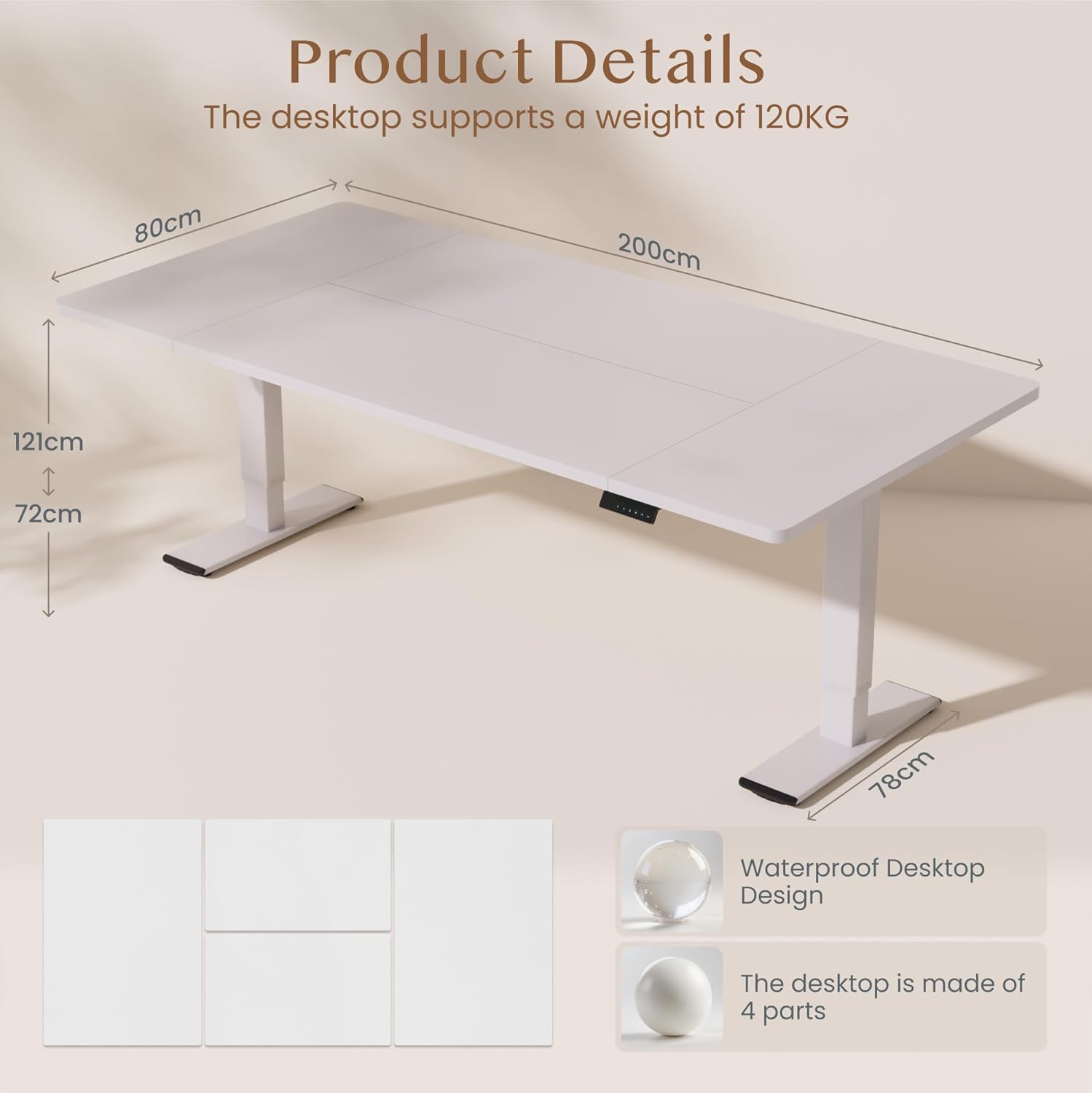
Obraz: Product details of the FLEXISPOT standing desk, illustrating its dimensions (200cm length, 80cm width, 72-121cm height range) and the four-part, waterproof desktop design. The desktop supports a weight of 120KG.

Obraz: The FLEXISPOT standing desk shown at its minimum (72cm) and maximum (121cm) height, demonstrating its height adjustability for both sitting and standing positions.
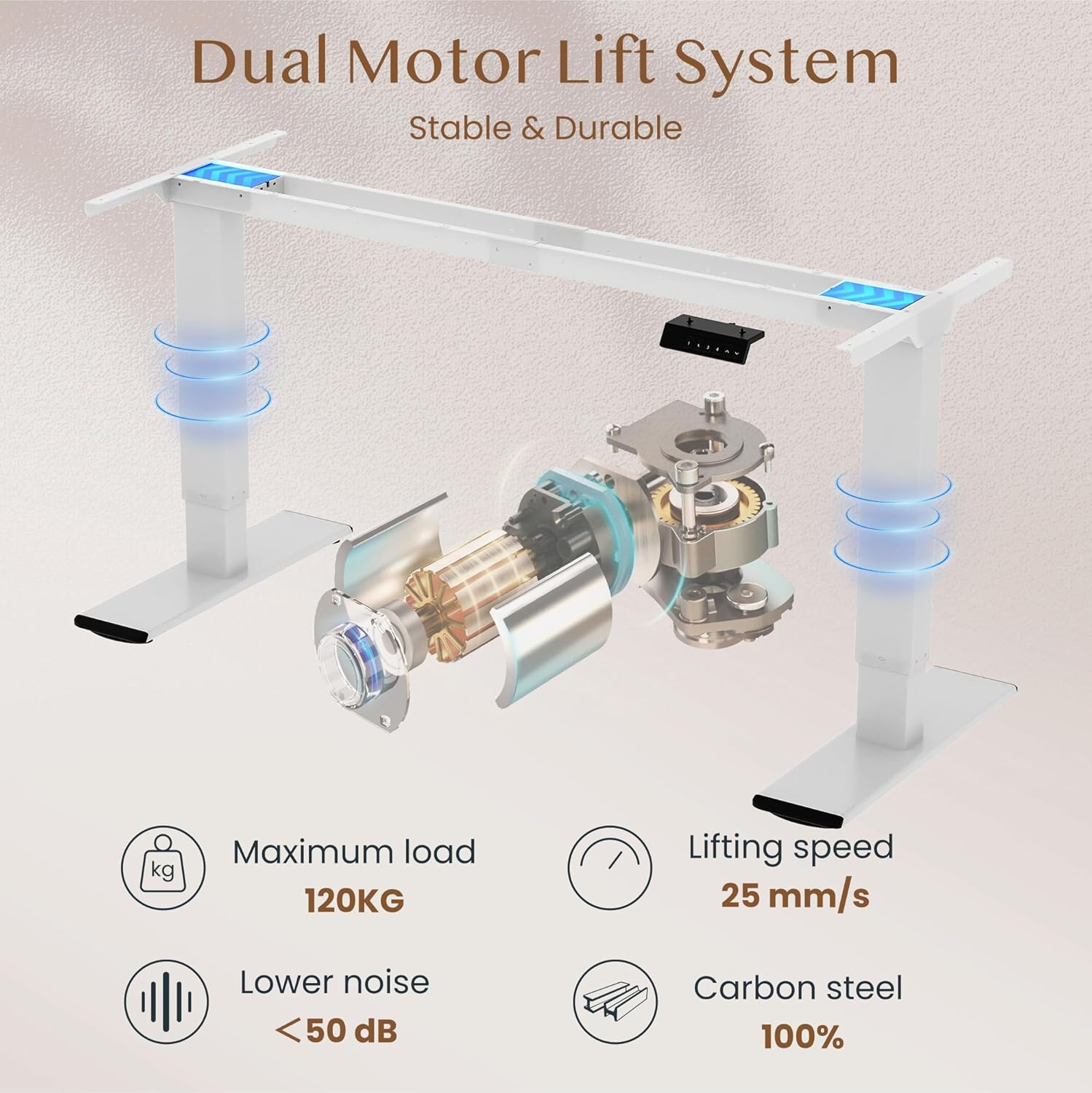
Obraz: Diagram illustrating the FLEXISPOT dual motor lift system, highlighting its stable and durable design. Key specifications like maximum load (120KG), lifting speed (25 mm/s), lower noise (<50 dB), and 100% carbon steel construction are visible.
5. Instrukcja obsługi
The FLEXISPOT QB2W-2080-IE desk features an intuitive control panel for easy height adjustment and memory functions.
5.1. Podstawowa regulacja wysokości
- Naciśnij "^" (Up) przycisk do podnoszenia biurka.
- Naciśnij "v" (Down) przycisk do obniżania biurka.
- Release the button to stop the desk at the desired height.
5.2. Ustawienia pamięci
Panel sterowania umożliwia zapisanie do czterech preferowanych ustawień wysokości.
- Dostosuj wysokość biurka do swoich potrzeb za pomocą przycisków Góra/Dół.
- Naciśnij "M" (Memory) button (often represented by a 'f' symbol). The LED display will show "S-".
- Natychmiast naciśnij jeden z przycisków numerycznych ("1", "2", "3", or "4") to save the current height to that preset. The display will show "S-1", "S-2", etc., to confirm.
- Aby przywołać zapisaną wysokość, wystarczy nacisnąć odpowiedni przycisk numeryczny. Biurko automatycznie ustawi się w zapisanej pozycji.
5.3. Anti-Collision Function
The desk is equipped with an anti-collision system that automatically stops and slightly reverses the desk's movement if it encounters an obstruction during height adjustment. This feature enhances safety and prevents damage to the desk or other objects.

Obraz: Close-up of the FLEXISPOT intelligent control panel, showing buttons for Up & Down adjustment, 4 Memory Heights, an LED Screen, and the Anti-Collision Function indicator.

Obraz: The FLEXISPOT standing desk in an office setting, illustrating its smooth and quiet operation with a lifting speed of 25mm/s and noise levels below 50 dB. The control panel is visible under the desk.

Obraz: A visual comparison demonstrating the FLEXISPOT safety collision avoidance system. One side shows an object being avoided by the desk's upward movement (WITH Anti-Collision Function), while the other side implies a collision without the function.
6. Konserwacja
Regular maintenance ensures the longevity and optimal performance of your FLEXISPOT standing desk.
- Czyszczenie: Przetrzyj powierzchnię biurka i nogi wodą.amp szmatką. Unikaj stosowania silnych środków chemicznych lub ściernych środków czyszczących, które mogłyby uszkodzić wykończenie.
- Sprawdź połączenia: Okresowo sprawdzaj dokręcenie wszystkich śrub i nakrętek. W razie potrzeby dokręć je ponownie.
- Zarządzanie kablami: Ensure all cables are neatly organized and not pinched or tangled, which could affect desk operation or cause damage.
- Unikaj przeciążania: Do not place items exceeding the maximum weight capacity on the desk.
7. Rozwiązywanie Problemów
If you encounter issues with your desk, refer to the following common troubleshooting steps:
- Biurko się nie rusza:
- Sprawdź, czy kabel zasilający jest prawidłowo podłączony do biurka i gniazdka ściennego.
- Upewnij się, że nie ma żadnych przeszkód uniemożliwiających ruch.
- Try resetting the desk by unplugging it for 10 seconds and then plugging it back in.
- Kody błędów na wyświetlaczu:
- If an error code appears, consult the specific error code section in the full manual (if available) or contact customer support. Often, a reset (unplugging and replugging) can clear minor errors.
- Uneven Movement/Instability:
- Upewnij się, że biurko stoi na równej powierzchni.
- Sprawdź, czy wszystkie śruby montażowe są dokręcone.
- Verify that the weight on the desk is evenly distributed and does not exceed the maximum capacity.
- Anti-Collision System Triggering Unnecessarily:
- Ensure there are no loose cables or objects near the desk's path that could be mistaken for an obstruction.
If these steps do not resolve the issue, please contact FLEXISPOT customer support for further assistance.
8. Specyfikacje
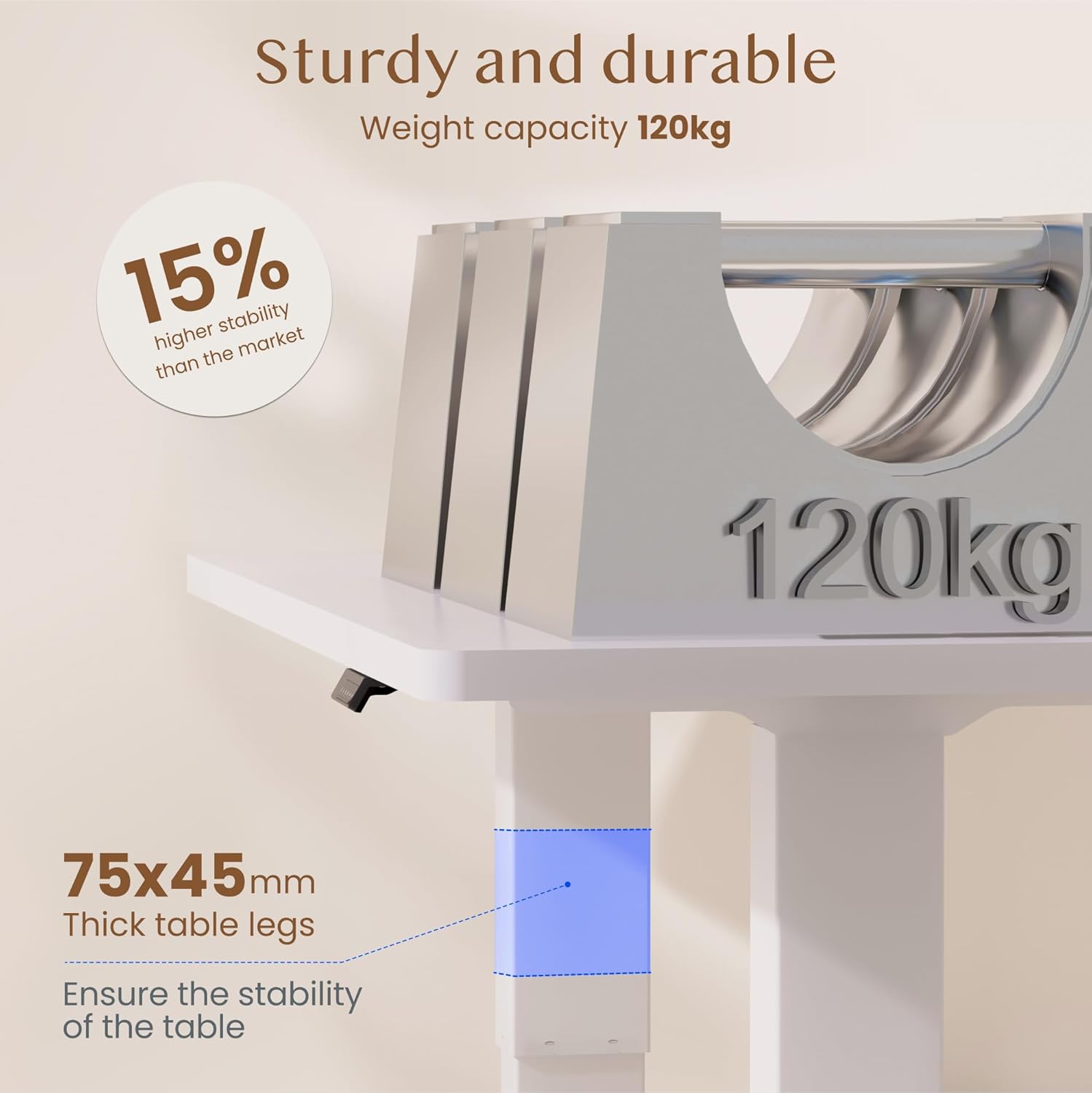
Obraz: The FLEXISPOT standing desk highlighting its sturdy and durable construction, specifically the 75x45mm thick table legs designed to ensure stability and support a weight capacity of 120kg.

Obraz: Zbliżenie view of the FLEXISPOT desk's thickened table legs, illustrating the adjustable height range from 70cm to 119cm, providing unmatched stability.
| Funkcja | Specyfikacja |
|---|---|
| Numer modelu | QB2W-2080-IE |
| Marka | ELASTYCZNI |
| Wymiary (dł. x szer. x wys.) | 200 x 80 x 72 cm (min height) |
| Zakres regulacji wysokości | 70 cm - 119 cm (27.6 cala - 46.9 cala) |
| Grubość blatu | 25 mm |
| Maximum Load Capacity (Static) | 120 kg (264 funta) |
| Maximum Load Capacity (Dynamic) | 100 kg (220 funta) |
| System podnoszenia | Podwójny silnik |
| Prędkość podnoszenia | 25 mm/s |
| Poziom hałasu | < 50 dB |
| Tworzywo | Alloy Steel (Base and Top Material) |
| Kolor | Biały |
| Wymagany montaż | Yes (2 people recommended, tools included) |
| Cechy specjalne | Electric, 4 Memory Presets, Anti-Collision System |
| Waga produktu | 40.9 kilogramów |
| UPC | 810072889508 |
9. Gwarancja i wsparcie
For warranty information, product support, or to report any issues, please contact FLEXISPOT customer service. Keep your purchase receipt and model number (QB2W-2080-IE) handy when contacting support.
The seller for this product is FLEXISPOT GmbH. Please refer to their official webSzczegółowe warunki gwarancji i dane kontaktowe znajdziesz na stronie internetowej lub w dokumentacji zakupu.