
Wstęp
Thank you for choosing the Oakcastle HIFI150 Stereo System. This manual provides essential information for setting up, operating, and maintaining your device. Please read it thoroughly before use and retain it for future reference.
Informacje dotyczące bezpieczeństwa
Aby zapewnić bezpieczną obsługę i zapobiec uszkodzeniom, należy przestrzegać następujących środków ostrożności:
- Nie wystawiaj urządzenia na działanie deszczu, wilgoci ani ekstremalnych temperatur.
- Nie otwierać casing. Wszelkie prace serwisowe powierzaj wykwalifikowanemu personelowi.
- Zapewnij odpowiednią wentylację wokół urządzenia. Nie blokuj żadnych otworów wentylacyjnych.
- Używaj wyłącznie zasilacza dostarczonego wraz z urządzeniem.
- Keep the unit away from heat sources such as radiators, stoves, or other heat-producing appliances.
- Urządzenie należy czyścić wyłącznie suchą szmatką.
Zawartość opakowania
Sprawdź, czy w przesyłce znajdują się wszystkie elementy:
- Oakcastle HIFI150 Stereo System
- Zdalne sterowanie
- Baterie do pilota
- Kabel zasilający
- Instrukcja obsługi
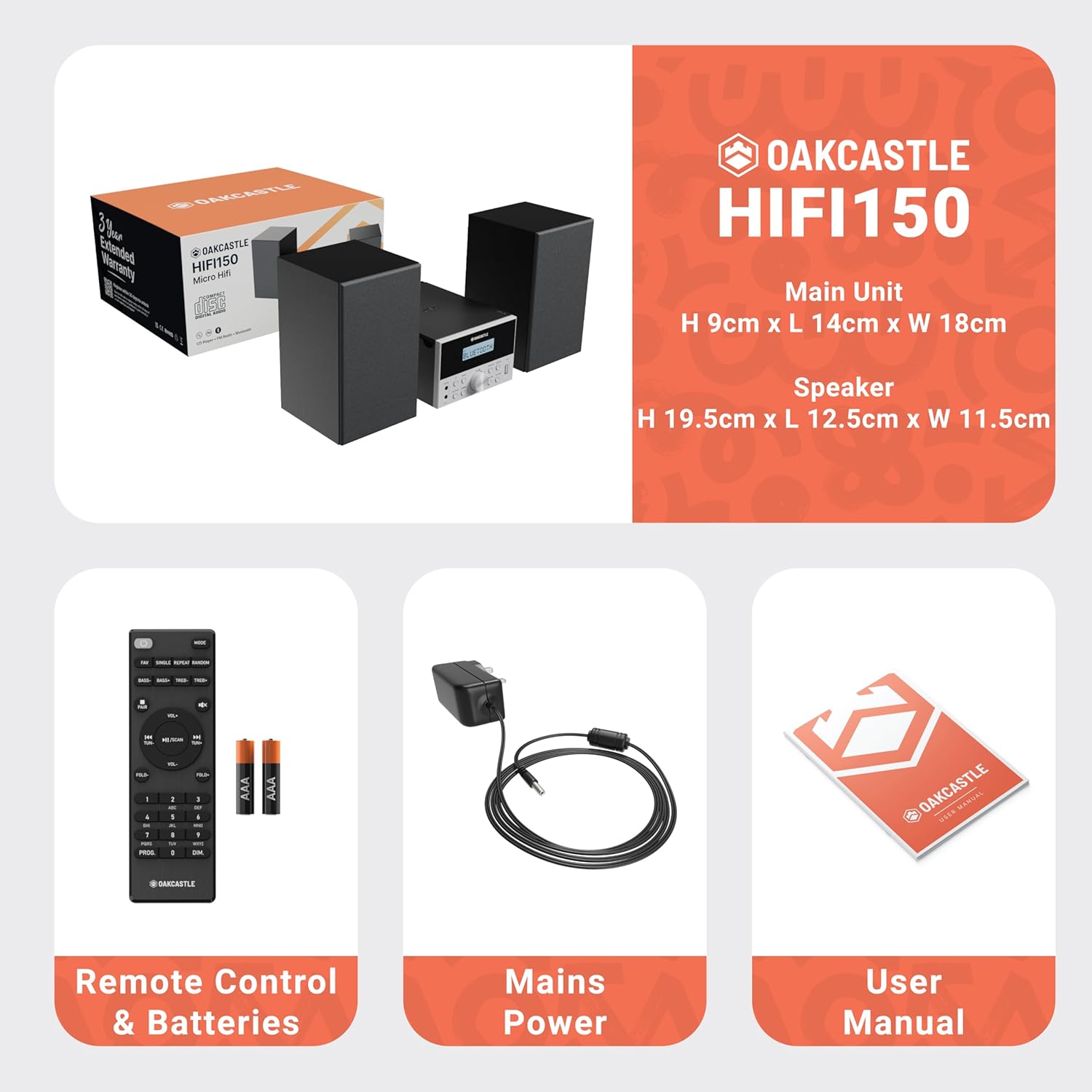
Image: The Oakcastle HIFI150 package contents, showing the main unit, two speakers, remote control with batteries, power adapter, and user manual.
Produkt ponadview
The Oakcastle HIFI150 features a compact design with intuitive controls and multiple connectivity options.
Elementy sterujące i wyświetlacz na panelu przednim

Image: A close-up of the Oakcastle HIFI150 main unit's front panel, highlighting the digital display, central volume knob, mode selection buttons, and front-facing AUX In and USB ports. The display shows 'BLUETOOTH'.
- Wyświetlacz: Pokazuje aktualny tryb, informacje o trasie i częstotliwość radiową.
- Przycisk zasilania: Włącza lub wyłącza urządzenie.
- Przycisk trybu: Cycles through input sources (CD, FM, Bluetooth, AUX, USB).
- Pokrętło głośności: Reguluje główną głośność.
- Przycisk Odtwórz/Pauza: Steruje odtwarzaniem z płyt CD, urządzeń USB i urządzeń Bluetooth.
- Przyciski pomijania/strojenia: Navigates tracks or tunes radio frequencies.
- Port wejściowy AUX: Do podłączania zewnętrznych urządzeń audio za pomocą kabla 3.5 mm.
- Port USB: Do odtwarzania dźwięku files z dysku USB.
Połączenia na tylnym panelu
The rear panel includes connections for speakers and power.
Organizować coś
1. Podłączanie głośników
Connect the included speakers to the speaker terminals on the rear of the main unit. Ensure correct polarity (red to red, black to black) for optimal sound quality.
2. Podłączenie zasilania
Plug the power cable into the AC inlet on the rear of the main unit, then plug the other end into a standard wall outlet.
Instrukcja obsługi
Włączanie/wyłączanie zasilania
Naciśnij Moc przycisk na panelu przednim lub pilocie, aby włączyć lub wyłączyć urządzenie.
Wybór trybu
Naciśnij Tryb button on the front panel or remote control repeatedly to cycle through the available input sources: CD, Radio FM, Bluetooth, AUX, I USB.
Działanie Bluetooth
- Wybierać Bluetooth mode using the Mode button. The display will show 'BLUETOOTH' and the unit will enter pairing mode.
- Włącz Bluetooth na swoim smartfonie lub innym urządzeniu Bluetooth i wyszukaj dostępne urządzenia.
- Select 'OAKCASTLE HIFI150' from the list. Once connected, the unit will confirm the connection.
- You can now stream audio wirelessly from your device to the HIFI150.
Odtwarzanie CD

Image: The Oakcastle HIFI150 with its top-loading CD player mechanism open, revealing a compact disc placed inside. The display shows 'CD'.
- Otwórz pokrywę komory na płytę CD.
- Place a CD (MP3, CD, WMA, or CD-R format) onto the spindle with the label side facing up.
- Zamknij pokrywę kieszeni na płytę CD.
- Wybierać CD mode. The unit will read the disc and begin playback automatically.
- Do sterowania odtwarzaniem służą przyciski Odtwórz/Pauza i Pomiń.
Obsługa radia FM

Image: The Oakcastle HIFI150 main unit with its telescopic antenna extended, displaying an FM radio frequency on its screen. The unit is placed between two speakers.
- Wybierać Radio FM tryb.
- Aby uzyskać lepszy odbiór, wysuń antenę teleskopową.
- Automatyczne skanowanie: Press and hold the Play/Pause button to automatically scan and save available FM stations (up to 30 presets).
- Strojenie ręczne: Use the Skip/Tune buttons to manually adjust the frequency.
- Przywołaj ustawienia wstępne: Use the 'FAV/PROG' button on the remote to cycle through saved stations.
Odtwarzanie USB
- Włóż dysk USB do portu USB na panelu przednim.
- Wybierać USB mode. The unit will automatically detect and begin playing compatible audio files (MP3, WMA).
- Do sterowania odtwarzaniem służą przyciski Odtwórz/Pauza i Pomiń.
Wejście AUX
- Podłącz zewnętrzne urządzenie audio (np. odtwarzacz MP3, smartfon) do AUX In port on the front panel using a 3.5mm audio cable (not included).
- Wybierać AUX tryb.
- Steruj odtwarzaniem z podłączonego urządzenia zewnętrznego.
Kontrola głośności
Obróć Pokrętło głośności na panelu przednim lub użyj OBJĘTOŚĆ +/- Przyciski na pilocie do regulacji poziomu dźwięku.
Użycie pilota zdalnego sterowania
The included remote control provides full functionality for the HIFI150. Ensure batteries are correctly inserted. Point the remote control towards the front panel of the main unit for optimal response.
Konserwacja
Czyszczenie
- Wytrzyj urządzenie miękką, suchą ściereczką.
- Nie należy używać środków czyszczących o działaniu ściernym, wosków ani rozpuszczalników, gdyż mogą one uszkodzić powłokę.
Składowanie
If the unit is not used for an extended period, unplug it from the power outlet and store it in a cool, dry place.
Rozwiązywanie problemów
If you encounter issues with your HIFI150, please refer to the following common problems and solutions:
| Problem | Możliwa przyczyna | Rozwiązanie |
|---|---|---|
| Brak zasilania | Kabel zasilający nie jest podłączony; gniazdko elektryczne jest uszkodzone | Sprawdź, czy kabel zasilający jest dobrze podłączony. Spróbuj użyć innego gniazdka elektrycznego. |
| Brak dźwięku | Volume too low; Incorrect input mode; Speakers not connected | Increase volume; Select correct input mode; Check speaker connections. |
| Płyta CD nie odtwarza się | CD inserted incorrectly; Disc scratched/dirty; Incorrect format | Reinsert CD correctly; Clean or replace disc; Ensure disc is compatible (MP3, CD, WMA, CD-R). |
| Bluetooth nie łączy się | Bluetooth mode not selected; Device too far; Device already connected to another unit | Select Bluetooth mode; Move device closer; Disconnect from other devices and try again. |
| Słaby odbiór FM | Antena nie jest wysunięta; słaby sygnał | Fully extend the telescopic antenna; Try repositioning the unit. |
Specyfikacje
| Numer modelu | 1000002971 |
| Marka | Dąbowy zamek |
| Łączność | Bluetooth 5.2, USB, AUX |
| Wyjście audio | 20 W |
| Obsługiwane media | CD, MP3, WMA, CD-R, USB |
| Radio | Radio FM z 30 ustawieniami wstępnymi |
| Kompatybilne urządzenia | Odtwarzacz MP3, smartfon, tablet |
| Materiał szafki | Drewno |
| Kolor | Czarny |
| Pozycja Wymiary (dł. x szer. x wys.) | Wymiary 13.7 x 17.8 x 9 cm |
| Waga przedmiotu | 2 kilograma |
Gwarancja i wsparcie
The Oakcastle HIFI150 comes with an extended 3-year warranty. Registration is required to activate the full warranty period. Please refer to the warranty card included in your package or visit the official Oakcastle website for registration details and support information.
For technical assistance or further inquiries, please contact Oakcastle customer support through their official channels.