
1. Wprowadzenie
Welcome to the instruction manual for your new SUNLUX 12-Digit Electronic Calculator. This manual provides essential information on how to set up, operate, maintain, and troubleshoot your device. Please read it thoroughly to ensure optimal performance and longevity of your calculator.
2. Zawartość opakowania
Proszę sprawdzić, czy w paczce znajdują się następujące elementy:
- SUNLUX 12-Digit Electronic Calculator
- Instrukcja obsługi (ten dokument)
3. Koniec produktuview
The SUNLUX 12-Digit Electronic Calculator is designed for ease of use and reliability, featuring a clear display and responsive keys. It operates on a dual power system, utilizing both solar energy and a backup battery.
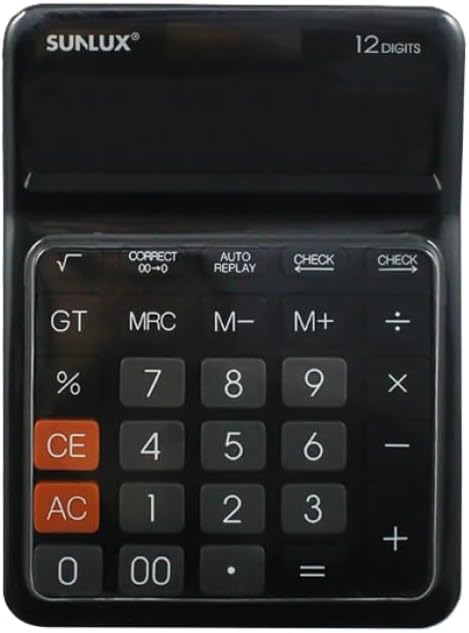
This image shows the front of the SUNLUX 12-digit electronic calculator, highlighting its display, numeric keypad, and function buttons. The calculator features a black casing with clearly labeled keys for various operations.
Funkcje kluczowe
- 0-9, 00: Numeryczne klawisze wprowadzania.
- +: Dodatek.
- -: Subtraction.
- *: Multiplication.
- /: Division.
- =: Equals key, displays the result of a calculation.
- %: Procenttagobliczenia.
- √: Square root function.
- GT (suma całkowita): Recalls the grand total of all calculations.
- MRC (przywołanie/kasowanie pamięci): Recalls memory content (first press), clears memory (second press).
- M+ (Pamięć Plus): Dodaje wyświetloną wartość do pamięci.
- M- (Pamięć Minus): Odejmuje wyświetloną wartość od pamięci.
- CE (Wyczyść wpis): Wyczyść ostatnią wprowadzoną liczbę lub obliczenie.
- AC (wszystko jasne): Clears all entries and memory, resetting the calculator.
- CZEK: Umożliwia ponowneviewing previous calculation steps.
- AUTO REPLAY: Automatically replays the calculation steps.
- CORRECT (00->0): Corrects the last digit entered.
4. Konfiguracja
Zasilacz
Your SUNLUX calculator features a dual power system: solar power and battery power. Under sufficient light, the calculator will operate using solar power. In low light conditions, it will automatically switch to battery power.
Instalacja baterii
While the calculator primarily uses solar power, a battery ensures operation in all lighting conditions. If the display is dim or unresponsive in low light, the battery may need replacement.
- Znajdź pokrywę komory baterii z tyłu kalkulatora.
- Ostrożnie zdejmij pokrywę.
- Insert a new battery (type typically AG10 or LR1130, check compartment for specific type if indicated) with the correct polarity (+/-).
- Dokładnie załóż pokrywę komory baterii.
5. Instrukcja obsługi
Podstawowe obliczenia
- Dodatek: Wprowadź pierwszą liczbę, naciśnij +, wprowadź drugą liczbę, naciśnij =.
- Odejmowanie: Wprowadź pierwszą liczbę, naciśnij -, wprowadź drugą liczbę, naciśnij =.
- Mnożenie: Wprowadź pierwszą liczbę, naciśnij *, wprowadź drugą liczbę, naciśnij =.
- Dział: Wprowadź pierwszą liczbę, naciśnij /, wprowadź drugą liczbę, naciśnij =.
Funkcje pamięci
- M+: Dodaje do pamięci aktualnie wyświetlaną liczbę.
- M-: Odejmuje aktualnie wyświetlaną liczbę z pamięci.
- MRC: Press once to recall the value stored in memory. Press twice to clear the memory.
- GT: Displays the grand total of all results obtained since the last AC press.
Funkcje specjalne
- Procenttagmi (%): Na przykładample, to calculate 10% of 200: Enter 200, press *, enter 10, press %.
- Pierwiastek kwadratowy (√): Enter a number, then press √.
- CZEK: After a series of calculations, press CHECK to review the entered operations step-by-step.
- AUTO REPLAY: Press AUTO REPLAY to automatically cycle through the calculation steps.
- CORRECT (00->0): If you enter a wrong digit, press CORRECT to delete the last digit without clearing the entire entry.
6. Konserwacja
Czyszczenie
To clean your calculator, use a soft, dry cloth. Do not use liquid cleaners, abrasive pads, or chemical solvents, as these can damage the display or casing.
Składowanie
Przechowuj kalkulator w chłodnym, suchym miejscu, z dala od bezpośredniego światła słonecznego i ekstremalnych temperatur. Unikaj umieszczania ciężkich przedmiotów na kalkulatorze, aby zapobiec uszkodzeniu wyświetlacza lub klawiszy.
7. Rozwiązywanie Problemów
- Wyświetlacz jest pusty lub przyciemniony:
Ensure the calculator is in a well-lit area for solar power. If the issue persists, the battery may need replacement. Refer to the "Battery Installation" section. - Nieprawidłowe wyniki obliczeń:
Naciskać AC to clear all previous entries and memory. Re-enter your calculation carefully. Check if any memory functions (M+, M-, MRC) are active. - Klawisze nie reagują:
Ensure the calculator is clean and free from debris around the keys. If the problem persists, try replacing the battery.
8. Specyfikacje
Szczegóły techniczne
- Marka: SUNLUKS
- Model: 7886116
- Ilość cyfr: 12
- Wymiary: 17.5 cm x 12.5 cm (approximately)
- Źródło zasilania: Podwójne zasilanie (słoneczne i akumulatorowe)
- Tworzywo: Plastik i metal
- Waga przedmiotu: 300 gramów
- Kraj pochodzenia: Chiny
9. Gwarancja i wsparcie
Informacje o gwarancji
This product is covered by the standard manufacturer's warranty. Please refer to your purchase documentation or contact your retailer for specific warranty terms and conditions.
Obsługa klienta
For any questions, technical assistance, or support regarding your SUNLUX calculator, please contact the retailer from whom you purchased the product. They will be able to provide the most accurate and timely assistance.