
Wstęp
Thank you for choosing the ESX Vision VMX700DAB Universal 2 DIN Multimedia Receiver. This device is designed to provide a comprehensive in-car entertainment and communication experience, featuring a 7-inch touchscreen, digital radio, smartphone integration, and versatile media playback options. This manual provides essential information for the proper installation, operation, and maintenance of your new multimedia receiver.
Główne cechy
- 7-inch (17.8 cm) Touchscreen Display
- Wireless Apple CarPlay and Android Auto compatibility
- DAB+ Digital Radio with included DAB antenna
- FM/AM Radio with RDS function
- Bluetooth Hands-free Function with audio streaming
- Front USB-C port for media and charging (1.5A)
- Rear USB-A port for Apple CarPlay/Android Auto and charging (1.5A)
- 4 x 80 W max. music power output
- 4V RCA pre-amplified outputs (FL/FR/RL/RR/SUB1/SUB2)
- Wejścia AUX RCA (L/P/WIDEO)
- RCA Camera inputs (Front/Rear)
- Internal and external microphone support
- Compatible with analog steering wheel remote control (learnable)
- Zintegrowany odbiornik GPS
- Multimedia player for audio, video, and photos (AVI, FLV, MOV, MKV, WMV, WMA, MP3, FLAC, JPEG, PNG, BMP)
Organizować coś
1. Zawartość opakowania
Before beginning installation, ensure all components are present. The package typically includes:
- ESX VMX700DAB Multimedia Receiver
- Wiązki przewodów zasilających i głośnikowych
- Mikrofon zewnętrzny
- Antena DAB+
- Odbiornik GPS
- Mounting Hardware and Trim Frame
- RCA Cables for AUX and Camera Inputs
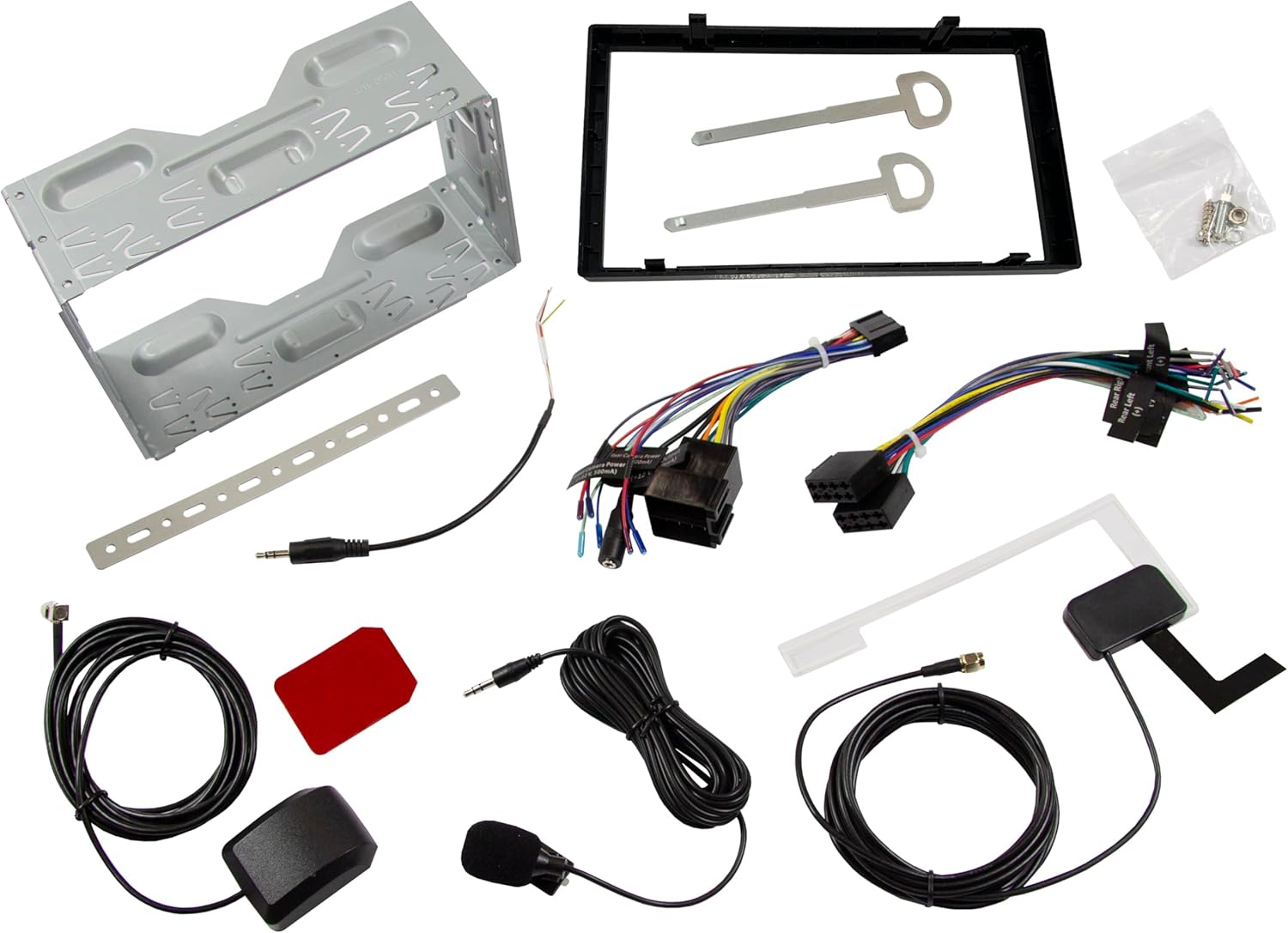
Obraz: Ponadview of all included accessories and cables for the ESX VMX700DAB multimedia receiver, including wiring harnesses, antennas, and mounting brackets.
2. Instalacja
Installation of the ESX VMX700DAB should ideally be performed by a qualified professional to ensure proper wiring and functionality. Incorrect installation can lead to damage to the unit or vehicle electrical system.
- Montowanie: Secure the 2 DIN unit into your vehicle's dashboard opening using the provided mounting brackets and screws. Ensure it is firmly seated.
- Okablowanie: Connect the main power harness, speaker wires, and other auxiliary connections (RCA pre-outs, AUX-in, camera inputs) as per your vehicle's wiring diagram and the receiver's connection ports.
- Anteny: Connect the DAB+ antenna and GPS receiver to their respective ports on the rear of the unit. Position the antennas for optimal signal reception.
- Mikrofon zewnętrzny: Connect the external microphone to the designated input for improved hands-free call quality.
- Sterowanie z kierownicy: If your vehicle supports analog steering wheel controls, connect the appropriate wires and configure the learning function in the unit's settings.
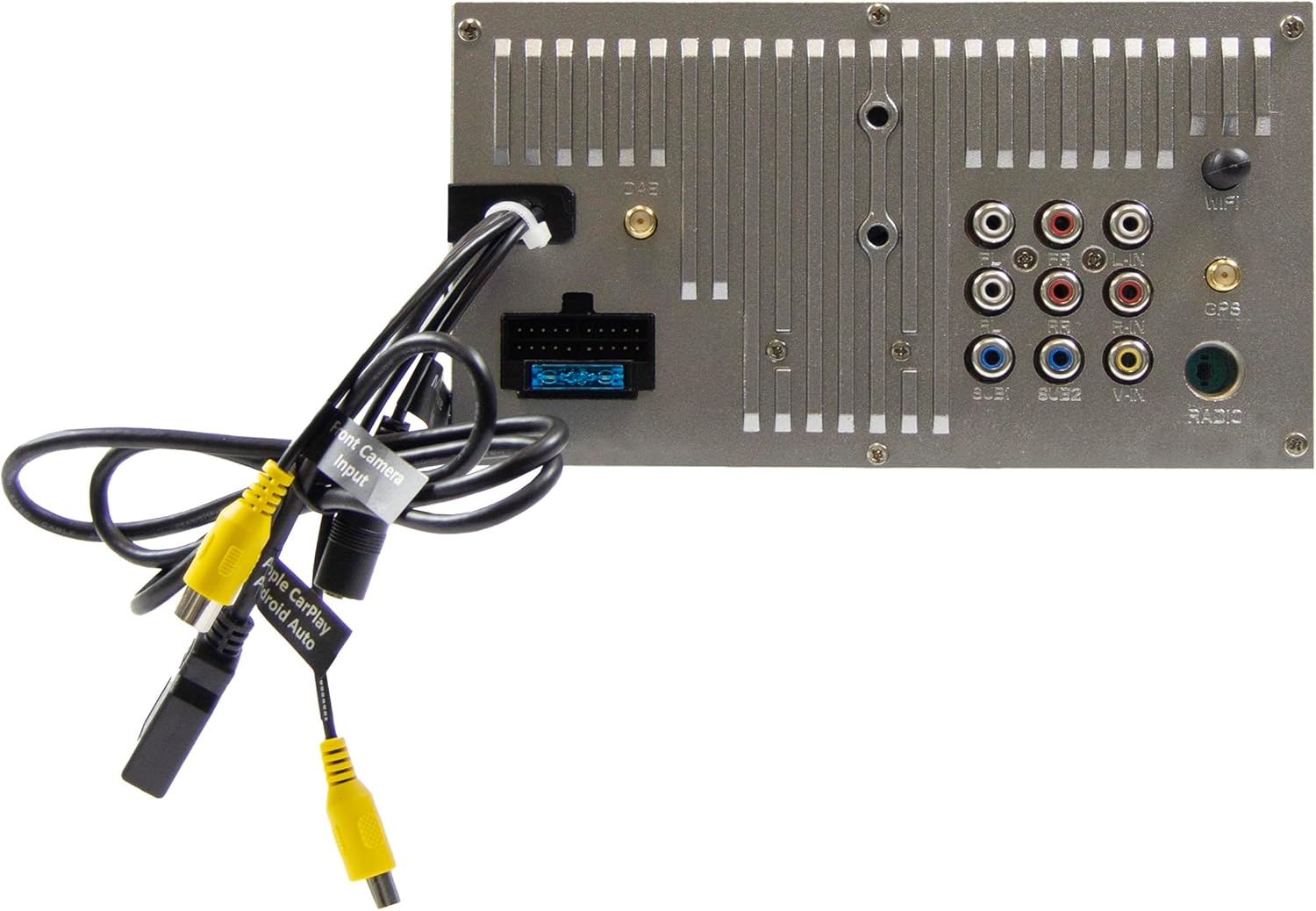
Image: Rear panel of the ESX VMX700DAB multimedia receiver, displaying the array of input and output ports including RCA, USB, and antenna connections for comprehensive system integration.

Obraz: Bok view of the ESX VMX700DAB unit, highlighting its compact 2 DIN chassis design and the front panel layout with physical controls and USB-C port.

Obraz: Przód view of the ESX VMX700DAB multimedia receiver, showcasing its 7-inch touchscreen display and the physical rotary knob and buttons on the left side for easy access to essential functions.
3. Pierwsze włączenie zasilania
Po instalacji włącz zapłon pojazdu. Urządzenie powinno uruchomić się automatycznie. Postępuj zgodnie z instrukcjami wyświetlanymi na ekranie, aby przeprowadzić wstępną konfigurację, taką jak wybór języka lub ustawienie strefy czasowej.
Instrukcja obsługi
1. Podstawowe sterowanie i interfejs
The VMX700DAB features a large rotary knob for volume control and three function keys on the left side of the control panel for quick access. The primary interface is the 7-inch touchscreen.

Image: The main home screen of the ESX VMX700DAB multimedia receiver, displaying various application icons for functions such as Apple CarPlay, Android Auto, Radio, Phone, Camera, Bluetooth Audio, USB, DAB, Equalizer, AUX, and Settings.
- Pokrętło: Turn to adjust volume. Press to mute/unmute or access specific menus depending on context.
- Klawisze funkcyjne: These keys provide shortcuts to common functions. Refer to the on-screen labels for their specific actions.
- Ekran dotykowy: Navigate through menus, select options, and control playback by touching the corresponding icons or areas on the display.
2. Radio Functions (FM/AM & DAB+)
Select the "Radio" or "DAB" icon from the home screen to access radio functions.
- Radio FM/AM: Use the on-screen controls to scan for stations, save presets, and utilize RDS features for station information.
- Radio DAB+: The integrated DAB+ tuner provides access to digital radio broadcasts. Ensure the DAB antenna is properly connected for optimal reception. Scan for available DAB stations and save your favorites.
3. Łączność Bluetooth
The built-in Bluetooth module supports hands-free calling and high-quality wireless music streaming.
- Łączenie w pary: Go to the Bluetooth settings on the receiver and enable pairing mode. On your smartphone, search for available Bluetooth devices and select "ESX VMX700DAB" to connect.
- Rozmowy w trybie głośnomówiącym: Once paired, you can make and receive calls directly through the receiver. The 7-inch display shows your phonebook, allowing direct contact selection. The external microphone ensures clear voice quality.
- Strumieniowe przesyłanie dźwięku: Stream music wirelessly from your smartphone to the receiver. Control playback (play/pause, skip tracks) from the receiver's touchscreen.
4. Apple CarPlay & Android Auto (Wireless & USB)
The ESX VMX700DAB supports both wireless and wired connections for Apple CarPlay and Android Auto, mirroring your smartphone's compatible apps directly onto the receiver's screen.

Image: The Apple CarPlay interface displayed on the ESX VMX700DAB screen, showing common iOS applications like Phone, Music, Maps, Messages, and Now Playing, providing seamless smartphone integration.

Image: The ESX VMX700DAB multimedia receiver installed in a car dashboard, displaying music playback information on its screen while a smartphone is held nearby, illustrating the integrated media experience.
- Połączenie bezprzewodowe: Ensure your smartphone's Wi-Fi and Bluetooth are enabled. Select the Apple CarPlay or Android Auto icon on the receiver's home screen and follow the on-screen instructions to establish a wireless connection.
- Połączenie USB: Connect your smartphone to the dedicated USB-A port (usually at the rear, or via the front USB-C if supported for data) using a certified USB cable. The system will automatically launch CarPlay or Android Auto.
- Funkcjonalność: Access navigation (e.g., Google Maps with live traffic), music streaming services (e.g., Spotify), messaging, and other compatible apps directly from the receiver's touchscreen.
5. Odtwarzanie multimediów
The VMX700DAB supports various audio, video, and photo formats via its USB ports.
- Nośniki USB: Insert a USB drive into the front USB-C port or rear USB-A port. Select the "USB" icon to browse and play media files.
- Obsługiwane formaty: Obsługiwane formaty: AVI, FLV, MOV, MKV, WMV, WMA, MP3, FLAC, JPEG, PNG, BMP.
- Wejście AUX: Connect external audio/video devices to the RCA AUX inputs (L/R/VIDEO) at the rear of the unit. Select "AUX" from the source menu to play content.
6. Wejścia kamery
The unit features two RCA camera inputs (Front/Rear) for connecting external cameras.
- Kamera tylna: When connected, the display will automatically switch to the rear camera view po włączeniu biegu wstecznego.
- Przednia kamera: Przednia kamera view can typically be activated manually from the "Camera" icon on the home screen or through specific settings.
Konserwacja
- Czyszczenie ekranu: Delikatnie przetrzyj ekran dotykowy miękką, niepozostawiającą włókien ściereczką. W przypadku uporczywych plam delikatnie przetrzyj.ampPrzetrzyj ściereczkę wodą lub środkiem do czyszczenia ekranów. Unikaj materiałów ściernych i silnych środków chemicznych.
- Ogólne sprzątanie: Utrzymuj urządzenie w czystości, usuwając kurz i zanieczyszczenia. Do czyszczenia okolic przycisków i portów używaj miękkiej szczotki lub sprężonego powietrza.
- Aktualizacje oprogramowania: Periodically check the ESX website for any available firmware updates for your VMX700DAB model. Updates can improve performance, add features, or fix bugs. Follow the instructions provided with the update file ostrożnie.
Rozwiązywanie problemów
If you encounter issues with your ESX VMX700DAB, refer to the following common problems and solutions:
| Problem | Możliwa przyczyna | Rozwiązanie |
|---|---|---|
| Brak zasilania | Blown fuse, incorrect wiring, vehicle ignition off. | Check vehicle fuses and the unit's fuse. Verify power wiring connections. Ensure vehicle ignition is on. |
| Brak dźwięku | Zbyt niska głośność, wyciszenie włączone, nieprawidłowe okablowanie głośników, ampproblem z lifierem. | Increase volume. Check if mute is active. Verify speaker connections. If using external amplifier, sprawdź jego zasilanie i połączenia. |
| Słaby odbiór radia (DAB/FM) | Antena nie jest podłączona, antena jest źle umiejscowiona, sygnał jest słaby w danym obszarze. | Ensure antenna is securely connected. Reposition antenna for better signal. Try in an area with stronger signal. |
| Bluetooth nie łączy się | Urządzenie nie jest w trybie parowania, proces parowania jest nieprawidłowy, występują zakłócenia. | Upewnij się, że oba urządzenia są w trybie parowania. Usuń poprzednie parowania i spróbuj ponownie. Zbliż się do urządzenia. |
| Apple CarPlay/Android Auto nie uruchamia się | Incorrect USB cable, phone settings, app issues, wireless connection problems. | Use a certified USB cable. Check phone settings for CarPlay/Android Auto. Restart phone and unit. For wireless, ensure Wi-Fi and Bluetooth are on and paired. |
| Ekran dotykowy nie reaguje | Zawieszenie systemu, brud na ekranie. | Perform a soft reset (refer to manual for specific reset button/procedure, often a small pinhole). Clean the screen. |
If the problem persists after trying these solutions, please contact ESX customer support or a qualified service technician.
Specyfikacje
| Funkcja | Szczegół |
|---|---|
| Numer modelu | VMX700DAB |
| Wyświetlacz | 7-inch (17.8 cm) Touchscreen |
| Technologia łączności | Bluetooth, USB (Type A, Type C), Auxiliary (RCA) |
| Cechy specjalne | Wireless Apple CarPlay, Wireless Android Auto, DAB+ Digital Radio, Hands-free Calling |
| Kompatybilne urządzenia | Smartfon |
| Max Music Power Output | 4 x 80 W |
| Przed-ampulepszone wyjścia | 4V RCA (FL/FR/RL/RR/SUB1/SUB2) |
| Tryb wejścia audio | Stereofoniczny |
| Konfiguracja kanału dźwięku przestrzennego | 4.2 |
| Video Encoding Formats | AVI, FLV, MOV, MKV, WMV |
| Audio Encoding Formats | WMA, MP3, FLAC |
| Formaty obrazów | Pliki JPEG |
| Waga przedmiotu | 1.61 kilograma |
Gwarancja i wsparcie
For warranty information, please refer to the warranty card included with your product or visit the official ESX webZachowaj dowód zakupu na wypadek roszczeń gwarancyjnych.
For technical support, troubleshooting beyond this manual, or service inquiries, please contact ESX customer support through their official channels. Contact information can typically be found on the ESX webmiejscu lub w opakowaniu produktu.