
1. Wprowadzenie
Thank you for choosing the MZZYG Car Satellite Navigation Multimedia Player, Model 1005005311060377. This advanced car radio system is designed to provide a comprehensive in-car entertainment and navigation experience. It features a high-resolution 9-inch touchscreen, integrated GPS, Bluetooth, Wi-Fi, and 4G connectivity, ensuring you stay connected and entertained on the road.
This manual provides detailed instructions for the installation, operation, and maintenance of your new multimedia player. Please read it thoroughly before use to ensure proper functionality and to maximize your enjoyment of the product.
Główne cechy:
- High-fidelity sound reproduction for an enhanced audio experience.
- 9-inch touchscreen display with 1280*720 or 2000*1200 resolution.
- Support for steering wheel controls (volume, Bluetooth, voice commands).
- 4G connectivity for live streaming, online music, games, and movies.
- 360° 3D/2D panoramic mode for safer parking and reversing.
- Integrated speaker/microphone, Wi-Fi, and 3G/4G network support.
- Plug-and-play interface for simplified installation.
- Supports MP3, MP4, WMA, and JPEG digital media formats.
- Available with 32G, 64G, 128G, or 256G ROM and 8G RAM.
- TF/Micro SD slot for external memory up to 256G.
- Built-in cooling fan to prevent overheating and ensure stable operation.
- Customizable button lighting with various color options.
- Fully laminated screen for excellent visibility in bright conditions, reducing glare by 40%.
2. Konfiguracja i instalacja
This multimedia player features a plug-and-play interface for straightforward installation. However, professional installation is recommended to ensure correct wiring and optimal performance, especially for advanced features like camera integration and steering wheel controls.
2.1 Zawartość opakowania
Sprawdź, czy w opakowaniu znajdują się wszystkie komponenty:
- MZZYG Car Satellite Navigation Multimedia Player unit
- Power harness and necessary cables
- Antena GPS
- Kable USB
- Instrukcja obsługi
- Optional accessories (e.g., 4K AHD Camera, 1080P ADAS DVR, Microphone, Tools, Clean Cloth)

Figure 1: Main unit and included accessories (some items may be optional gifts).
2.2 Podstawowe kroki instalacji
- Przygotowanie: Przed rozpoczęciem jakichkolwiek prac elektrycznych należy odłączyć akumulator pojazdu.
- Usuń starą jednostkę: Ostrożnie zdejmij istniejące radio samochodowe lub panel deski rozdzielczej, aby uzyskać dostęp do wiązki przewodów.
- Podłącz okablowanie: Connect the provided power harness, speaker wires, and other necessary cables to the corresponding ports on the new multimedia player and your vehicle's wiring. Ensure all connections are secure.
- Antena GPS: Zamontuj antenę GPS w miejscu z wolnym dostępem view nieba, zazwyczaj na desce rozdzielczej lub pod przednią szybą, z dala od metalowych przeszkód.
- Opcjonalne połączenia: Connect any optional accessories such as the rear view camera, DVR, or external microphone as per their specific instructions.
- Funkcjonalność testu: Before fully reassembling the dashboard, reconnect the vehicle's battery and power on the unit to test basic functions like power, sound, and touchscreen response.
- Bezpieczna jednostka: Once tested, securely mount the multimedia player into the dashboard and reassemble any removed panels.
2.3 Network and Connectivity Setup
- Wi-Fi: Access the system settings to connect to an available Wi-Fi network. This enables online features, app downloads, and software updates.
- Sieć 4G/3G: If your unit supports a SIM card slot (check specifications), insert a compatible SIM card to enable 4G/3G cellular data connectivity.
- Parowanie Bluetooth: Go to Bluetooth settings on the unit and enable Bluetooth. Szukaj your mobile device and pair them to enable hands-free calling and audio streaming.
3. Instrukcja obsługi
This section details the primary functions and operations of your MZZYG multimedia player.
3.1 Podstawowe sterowanie
- Włączanie/wyłączanie: The unit typically powers on automatically with the vehicle's ignition. Press and hold the power button (if available) to manually turn it off or on.
- Regulacja głośności: Reguluj głośność za pomocą przycisków na urządzeniu, przycisków na kierownicy lub interfejsu ekranowego.
- Interfejs ekranu dotykowego: Navigate through menus and applications by tapping, swiping, and pinching on the 9-inch touchscreen.
3.2 System nawigacyjny
The integrated GPS system provides reliable navigation. Ensure the GPS antenna is properly installed for optimal signal reception.
- Uruchamianie nawigacji: Tap the 'Navigation' or 'Maps' icon on the home screen to open the navigation application.
- Setting Destination: Wprowadź miejsce docelowe za pomocą klawiatury ekranowej lub za pomocą poleceń głosowych.
- Wskazówki dotyczące trasy: Follow the voice prompts and on-screen directions for turn-by-turn guidance.
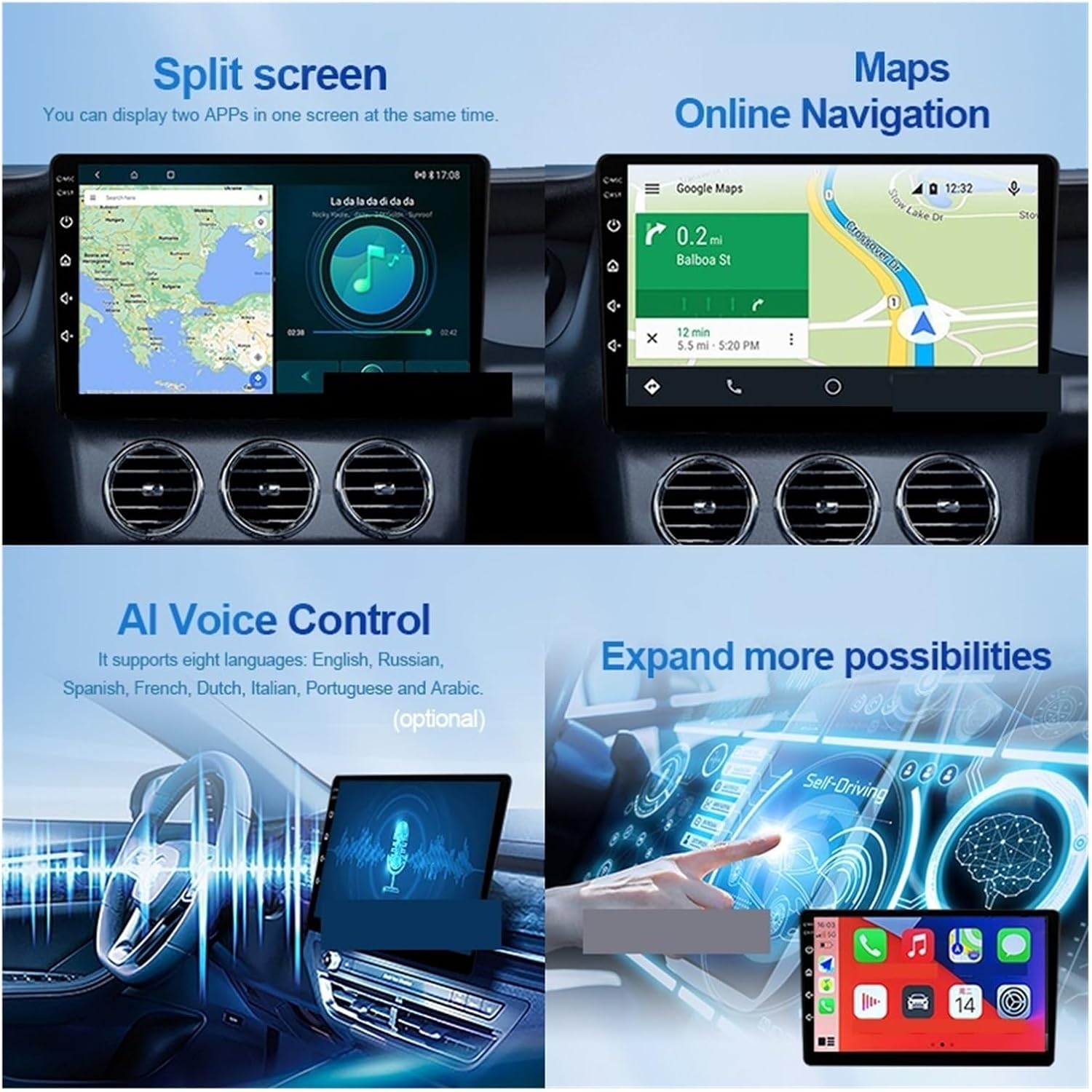
Figure 2: Split screen mode and online navigation capabilities.
3.3 Odtwarzanie multimediów
Urządzenie obsługuje różne formaty multimediów cyfrowych, w tym MP3, MP4, WMA i JPEG.
- Odtwarzanie dźwięku/wideo: Dostęp do muzyki i wideo files from internal storage, a connected USB device, or a Micro SD card.
- Radio: Tune into FM/AM radio stations using the built-in tuner.
- Bluetooth Audio: Stream audio wirelessly from your paired smartphone or other Bluetooth devices.
3.4 Funkcje zaawansowane
- Podzielony ekran: Utilize the split screen function to run two applications simultaneously, such as navigation and music playback.
- Sterowanie głosowe AI: Use voice commands for hands-free operation. The system supports multiple languages.
- Sterowanie z kierownicy: Program the unit to respond to your vehicle's steering wheel buttons for convenient control of volume, tracks, and calls.
- Możliwość dostosowania podświetlenia przycisku: Change the color of the physical buttons to match your vehicle's interior lighting or personal preference.
- DTS Tuning System: For models equipped with the DTS Tuning System (H6 version), adjust sound settings with the TDA7850 DSP chip and 48-band EQ for optimized audio quality and sound field control.

Figure 3: DTS Tuning System for advanced audio customization.
3.5 Camera and DVR Functions
The unit supports external cameras and DVR systems for enhanced safety and recording.
- Tył View Camera (AHD): Po podłączeniu wyświetlacz automatycznie przełącza się na tył view when the vehicle is in reverse. Supports dynamic track and night vision.
- Rejestrator samochodowy (ADAS): The 1080P ADAS Driving Assistance System records footage and provides safety warnings.
- Kamera panoramiczna 360°: For units with 360° camera support, this mode provides a comprehensive view around the vehicle, assisting with parking and maneuvering in tight spaces.

Figure 4: Sony AHD Camera and Car DVR features.

Figure 5: Customizable interface and 360° camera system overview.
4. Konserwacja
Właściwa konserwacja gwarantuje długowieczność i optymalną wydajność odtwarzacza multimedialnego.
- Czyszczenie ekranu: Delikatnie przetrzyj ekran dotykowy miękką, niepozostawiającą włókien ściereczką. W przypadku uporczywych plam delikatnie przetrzyj.ampPrzetrzyj ściereczkę wodą lub środkiem do czyszczenia ekranów. Unikaj silnych środków chemicznych i materiałów ściernych.
- Aktualizacje oprogramowania: Periodically check for software updates via the system settings (requires Wi-Fi or 4G connection). Keeping the software updated can improve performance and add new features.
- Wentylator chłodzący: The built-in cooling fan helps manage internal temperatures. Ensure the ventilation areas around the unit are not obstructed to allow for proper airflow.
- Opieka ogólna: Unikaj wystawiania urządzenia na działanie ekstremalnych temperatur, długotrwałego bezpośredniego światła słonecznego i nadmiernej wilgoci.
5. Rozwiązywanie Problemów
If you encounter issues with your multimedia player, refer to the following troubleshooting guide. For problems not listed here, please contact customer support.
- Brak zasilania:
- Check all power connections and ensure they are securely plugged in.
- Verify the vehicle's battery is charged and the ignition is on.
- Check the fuse in the vehicle's fuse box and the unit's power harness.
- Brak dźwięku:
- Sprawdź, czy głośność nie jest wyciszona lub ustawiona na minimum.
- Sprawdź połączenia przewodów głośnikowych.
- Sprawdź, czy źródło dźwięku zostało wybrane prawidłowo.
- GPS Signal Loss/Inaccurate:
- Upewnij się, że antena GPS jest prawidłowo podłączona i zamontowana w miejscu z wolnym dostępem. view nieba.
- Avoid parking in areas with tall buildings or dense foliage that may obstruct the signal.
- Touchscreen Unresponsive/Abnormal Operation:
- Restart the unit by turning off the vehicle's ignition and then restarting it.
- High temperatures can cause abnormal operation. The built-in cooling fan helps, but ensure the unit is not exposed to excessive heat.
- Perform a factory reset (refer to system settings, note this will erase all user data).
- Problemy z łącznością Bluetooth:
- Upewnij się, że Bluetooth jest włączony zarówno w urządzeniu, jak i w urządzeniu mobilnym.
- Usuń poprzednie sparowania i spróbuj ponownie sparować urządzenia.
- Move the mobile device closer to the unit.
6. Specyfikacje
| Funkcja | Specyfikacja |
|---|---|
| Marka | MZZYG |
| Nazwa modelu | 1005005311060377 |
| Rozmiar ekranu | 9 cali |
| Rezolucja | 1280*720 / 2000*1200 |
| Typ procesora | 4/8 rdzenia |
| BARAN | 8G |
| Opcje ROM-u | 32G/64G/128G/256G |
| Obsługa pamięci zewnętrznej | Up to 256G (TF/Micro SD slot) |
| Objętość operacyjnatage | 24 V |
| Waga przedmiotu | 50 gram |
| Cechy specjalne | Built-in Speaker/Microphone, Wi-Fi Function, Steering Wheel Control Support, 3G/4G Network Support |
| Obsługa formatów multimediów cyfrowych | MP3, MP4, WMA, JPEG |
| Kraj pochodzenia | Chiny |
7. Gwarancja i wsparcie
For warranty information, please refer to the terms and conditions provided by your retailer or the MZZYG official website. Warranty periods and coverage may vary depending on your region and point of purchase.
If you require technical assistance or have questions regarding your MZZYG Car Satellite Navigation Multimedia Player, please contact the seller or MZZYG customer support through their official channels. Have your model number (1005005311060377) and purchase details ready when contacting support.