
Active Pixel AP-4G-SY4.0MP-DUAL CAM-V-4MM-BW1
Active Pixel 4G SIM PTZ Security Camera User Manual
Model: AP-4G-SY4.0MP-DUAL CAM-V-4MM-BW1
1. Koniec produktuview
The Active Pixel 4G SIM PTZ Security Camera is an outdoor surveillance device designed for locations without traditional Wi-Fi or wired internet access. It operates using a 4G SIM card, providing remote monitoring capabilities. The camera features a dual-lens system for comprehensive coverage and detailed imaging, pan-tilt-zoom functionality, motion tracking, color night vision, and two-way audio communication.
1.1 Główne cechy
- 4G SIM Connectivity: Operates independently using a 4G SIM card (Vi & Airtel Sim Supported), suitable for remote areas without Wi-Fi.
- Dual Lens (4MP + 4MP = 8MP Total): Provides both a wide-angle view and a detailed close-up view simultaneously for enhanced monitoring.
- 360° Pan-Tilt-Zoom (PTZ): Allows remote control of camera direction and zoom, with automatic human motion tracking.
- Kolorowe widzenie nocne: Equipped with bright spotlight LEDs and IR lights for clear, full-color footage w warunkach słabego oświetlenia.
- Dwukierunkowy dźwięk: Enables real-time communication through the camera via a mobile application.
- Outdoor Ready (IP65): Weatherproof design ensures durability against rain and dust for outdoor installation.
- Inteligentne śledzenie ruchu: Automatycznie śledzi wykryty ruch człowieka.
1.2 Zawartość opakowania
Sprawdź, czy w opakowaniu znajdują się wszystkie elementy:
- 1x Active Pixel 4G SIM PTZ Security Camera
- 1x stojak montażowy
- 1x Zasilacz
- 1x Instrukcja obsługi (ten dokument)
- 1x Screw Kit for installation
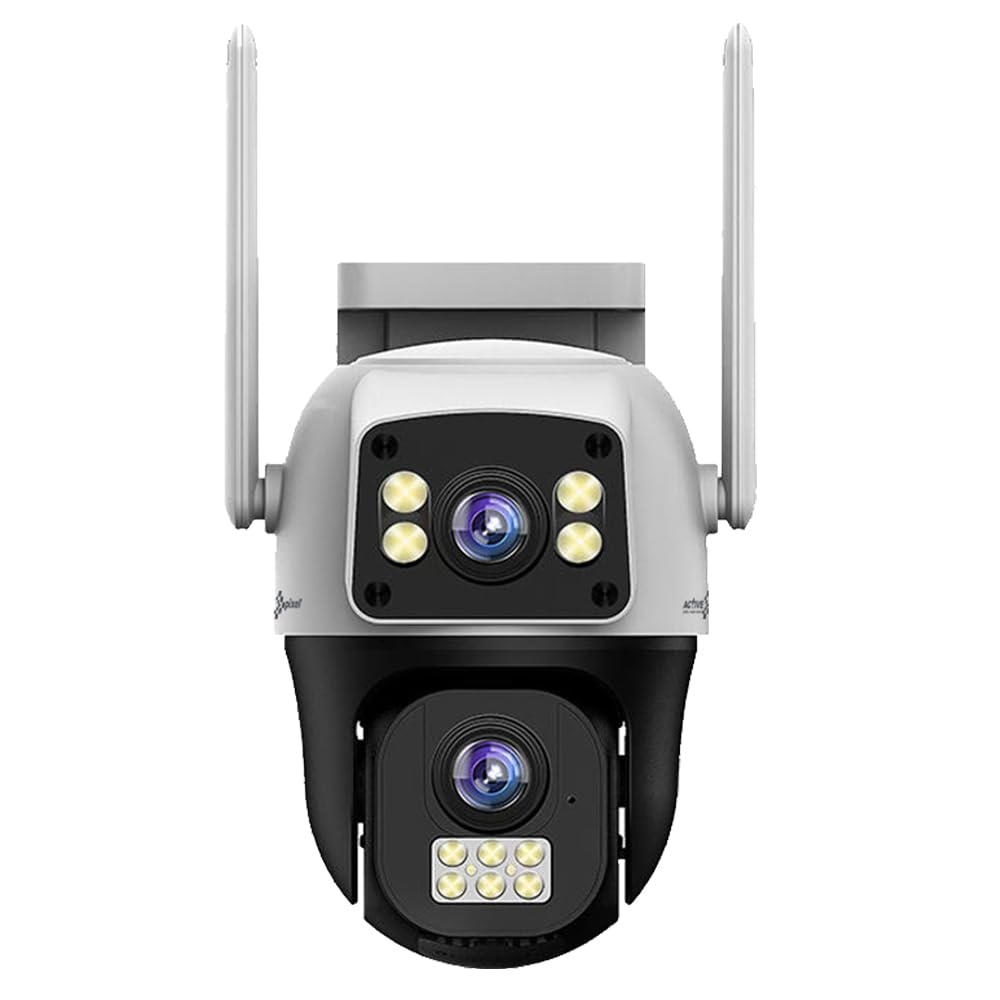
Figure 1: Active Pixel 4G SIM PTZ Security Camera (Front View)
2. Informacje dotyczące bezpieczeństwa
- Aby zapobiec upadkowi, należy zadbać o stabilne zamontowanie kamery.
- Aby uniknąć uszkodzeń lub zagrożenia pożarem, należy używać wyłącznie dołączonego zasilacza.
- Nie wystawiaj aparatu na działanie ekstremalnych temperatur wykraczających poza zakres jego działania.
- Trzymaj aparat z dala od silnych pól magnetycznych.
- Unikaj bezpośredniego i długotrwałego wystawiania soczewki na działanie silnych źródeł światła.
- Do not attempt to disassemble or repair the camera yourself. Contact support for assistance.
- Ensure proper sealing of all connections to maintain the IP65 water resistance rating.
3. Konfiguracja
3.1 Wkładanie karty SIM
- Locate the SIM card slot on the camera. This is typically protected by a waterproof cover.
- Carefully open the cover using a small screwdriver if necessary.
- Insert a activated 4G SIM card (Vi or Airtel recommended) into the slot with the metal contacts facing down and the notched corner aligned correctly.
- Ensure the SIM card clicks into place.
- Securely close the waterproof cover to prevent water ingress.
Note: The camera does not require Wi-Fi. Ensure the 4G SIM card has an active data plan.
3.2 Połączenie zasilania
- Podłącz dołączony zasilacz do portu zasilania aparatu.
- Podłącz zasilacz do odpowiedniego gniazdka elektrycznego.
- Kamera włączy się i rozpocznie sekwencję autotestu.
3.3 Instalacja i parowanie aplikacji
- Download the official Active Pixel security camera application from your mobile device's app store (e.g., Google Play Store for Android).
- Zarejestruj nowe konto lub zaloguj się, jeśli już je posiadasz.
- Follow the in-app instructions to add a new device. This typically involves scanning a QR code on the camera or manually entering its device ID.
- Once paired, you will be able to view podgląd na żywo i sterowanie kamerą.
3.4 Montaż kamery
The camera is designed for wall-mounted installation.
- Wybierz odpowiednie miejsce na zewnątrz, które zapewni pożądane viewing angle and is within reach of a power source.
- Use the included mounting stand as a template to mark drilling points on the wall.
- W razie potrzeby wywierć otwory montażowe i włóż kołki rozporowe.
- Przymocuj stojak montażowy do ściany za pomocą dołączonych śrub.
- Attach the camera to the mounting stand, ensuring it is firmly secured.
- Adjust the camera's initial angle as needed before final tightening.
Rysunek 2: Example of camera mounting (Image not available, refer to physical manual for illustration).
4. Instrukcja obsługi
4.1 Na żywo View i sterowanie PTZ
- Open the Active Pixel app on your smartphone.
- Aby uzyskać dostęp do transmisji wideo na żywo, wybierz kamerę z listy urządzeń.
- Use the on-screen controls to pan (move horizontally), tilt (move vertically), and zoom the camera.
4.2 Detekcja ruchu i śledzenie
- Przejdź do ustawień aparatu w aplikacji.
- Enable "Motion Detection" and configure sensitivity levels as desired.
- Activate "Smart Motion Tracking" to allow the camera to automatically follow detected human movement.
- You will receive instant alerts on your mobile device when motion is detected.
4.3 Dźwięk dwukierunkowy
- Na żywo view, dotknij ikony mikrofonu w aplikacji, aby mówić przez głośnik kamery.
- Kliknij ikonę głośnika, aby słuchać dźwięku z mikrofonu kamery.
4.4 Widzenie nocne
The camera automatically switches to night vision mode in low-light conditions. The powerful LEDs provide full-color night vision, while IR lights assist in darker environments.
4.5 Rejestrowanie i przechowywanie
The camera supports local storage via a MicroSD card (not included) and may offer cloud storage options (check app for details). Recordings are triggered by motion detection or can be initiated manually.
- Insert a MicroSD card (up to 128GB, Class 10 recommended) into the designated slot (usually near the SIM card slot).
- Format the MicroSD card via the app settings before first use.
- Uzyskaj dostęp do nagranego pliku footage through the playback feature in the app.
5. Konserwacja
- Czyszczenie: Delikatnie przetrzyj obiektyw i korpus aparatu miękką szmatką.amp płótno. Nie używaj ostrych środków chemicznych ani ściernych środków czyszczących.
- Aktualizacje oprogramowania układowego: Regularly check the app for available firmware updates to ensure optimal performance and security. Follow in-app instructions for updating.
- Odporność na warunki atmosferyczne: Periodically inspect the waterproof covers and seals for any signs of wear or damage, especially after extreme weather conditions. Ensure they are securely closed.
- Zasilanie: Sprawdź, czy zasilacz i kabel nie są uszkodzone.
6. Rozwiązywanie Problemów
| Problem | Możliwa przyczyna | Rozwiązanie |
|---|---|---|
| Kamera nie włącza się | Brak zasilania, uszkodzony adapter, luźne połączenie. | Sprawdź gniazdko elektryczne, upewnij się, że adapter jest prawidłowo podłączony, spróbuj użyć innego gniazdka. |
| Brak transmisji wideo na żywo | No 4G signal, inactive SIM card, incorrect app pairing. | Check 4G signal strength, ensure SIM card is active and has data, re-pair camera with app. |
| Wykrywanie ruchu nie działa | Detekcja ruchu wyłączona, czułość za niska, nieprawidłowa strefa detekcji. | Enable motion detection in app, increase sensitivity, adjust detection zones. |
| Problemy z dwukierunkową transmisją dźwięku | Microphone/speaker disabled in app, poor network connection. | Ensure audio features are enabled in app, check 4G signal strength. |
| Słaba jakość obrazu w nocy | Obstruction of IR/spotlight LEDs, dirty lens. | Clear any obstructions, clean the camera lens. |
7. Specyfikacje
| Funkcja | Szczegół |
|---|---|
| Numer modelu | AP-4G-SY4.0MP-DUAL CAM-V-4MM-BW1 |
| Marka | Aktywny piksel |
| Technologia łączności | Bezprzewodowy (4G komórkowy) |
| Rozdzielczość przechwytywania wideo | 1536P (Dual 4MP lenses for 8MP total clarity) |
| Funkcja specjalna | Dual Lens, 360° PTZ, Smart Motion Tracking, Color Night Vision, Two-Way Audio |
| Zastosowanie wewnątrz/na zewnątrz | Plenerowy |
| Źródło zasilania | DC |
| Metoda kontroli | App (Android compatible) |
| Tworzywo | Akrylonitryl-butadien-styren (ABS) |
| Wymiary produktu (DxSxW) | 15 x 10 x 8 centymetrów |
| Poziom wodoodporności | IP65 (Wodoodporność) |
| Technologia słabego oświetlenia | Kolor nocy |
| Tryb pracy | Tylko ruch |
| Technologia czujnika fotograficznego | CMOS |
| Typ instalacji | Naścienny |
| Zawarte komponenty | Camera, Stand, Adapter, Manual, Screw Kit |
8. Gwarancja i wsparcie
8.1 Informacje o gwarancji
This Active Pixel product comes with a 1 rok gwarancji od daty zakupu. Zachowaj paragon jako dowód gwarancji.
The warranty covers manufacturing defects. It does not cover damage caused by misuse, accidents, unauthorized modifications, or improper installation.
8.2 Obsługa klienta
For technical assistance, troubleshooting, or warranty claims, please contact Active Pixel customer care:
- Numer Obsługi Klienta: 9321367328
- Producent: Glorious Digital Solution Pvt Ltd, Mumbai, India.
Please have your product model number (AP-4G-SY4.0MP-DUAL CAM-V-4MM-BW1) and purchase details ready when contacting support.
Ask a question about this manual
Ask about setup, troubleshooting, compatibility, parts, safety, or missing instructions. Manuals+ will review the question and use this page’s manual context to help answer it.