
PYY Electronic Cash Register
PYY Electronic Cash Register User Manual
Model: Electronic Cash Register
Marka: PYY
1. Wprowadzenie
Thank you for choosing the PYY Electronic Cash Register. This manual provides detailed instructions for setting up, operating, and maintaining your new cash register. Please read this manual thoroughly before use to ensure proper functionality and to maximize the lifespan of your device. This system is designed to streamline transactions, manage inventory, and provide valuable sales insights for various commercial environments.
2. Informacje dotyczące bezpieczeństwa
Aby zapewnić bezpieczną obsługę i zapobiec uszkodzeniom, należy przestrzegać następujących wskazówek bezpieczeństwa:
- Always connect the cash register to a grounded power outlet with the correct voltage (AC 100-240V/50-60Hz).
- Do not expose the device to excessive moisture or liquids. While the ABS casing is waterproof and oil-resistant, direct exposure to large amounts of liquid should be avoided.
- Aby zapobiec przegrzaniu, należy zapewnić odpowiednią wentylację wokół urządzenia.
- Nie próbuj samodzielnie demontować ani naprawiać urządzenia. Wszelkie prace serwisowe zleć wykwalifikowanemu personelowi.
- Keep all keys and small parts out of reach of children.
- This product has passed RoHS and FCC certifications, ensuring compliance with environmental and safety standards.
3. Zawartość opakowania
Sprawdź, czy w przesyłce znajdują się wszystkie elementy wymienione poniżej:
- PYY Electronic Cash Register Unit
- Przewód zasilający
- Kabel USB
- 6 x Cash Drawer Keys
- 10 x 2 1/4" Thermal Paper Rolls
- Instrukcja obsługi (ten dokument)

Image: The PYY Cash Register unit displayed with its accessories, including cash drawer keys, thermal paper rolls, USB cable, and power cord.
4. Koniec produktuview i komponenty
The PYY Electronic Cash Register integrates several key components for efficient operation:
- Cashier Display: A 2.8-inch TFT LCD for the cashier, providing clear transaction details and system menus.
- Customer Display: An 8-digit LED display for customers to view prices and totals.
- Zintegrowana drukarka termiczna: Built-in printer with a speed of up to 90mm/s for fast receipt printing. Uses 58mm thermal paper.
- Szuflada kasowa: Secure drawer with 4 bill compartments and 5 coin compartments, designed to pop open automatically during transactions. Includes 6 keys for dual security.
- Klawiatura: Features 48 keys with dust-proof caps for durable and reliable input.
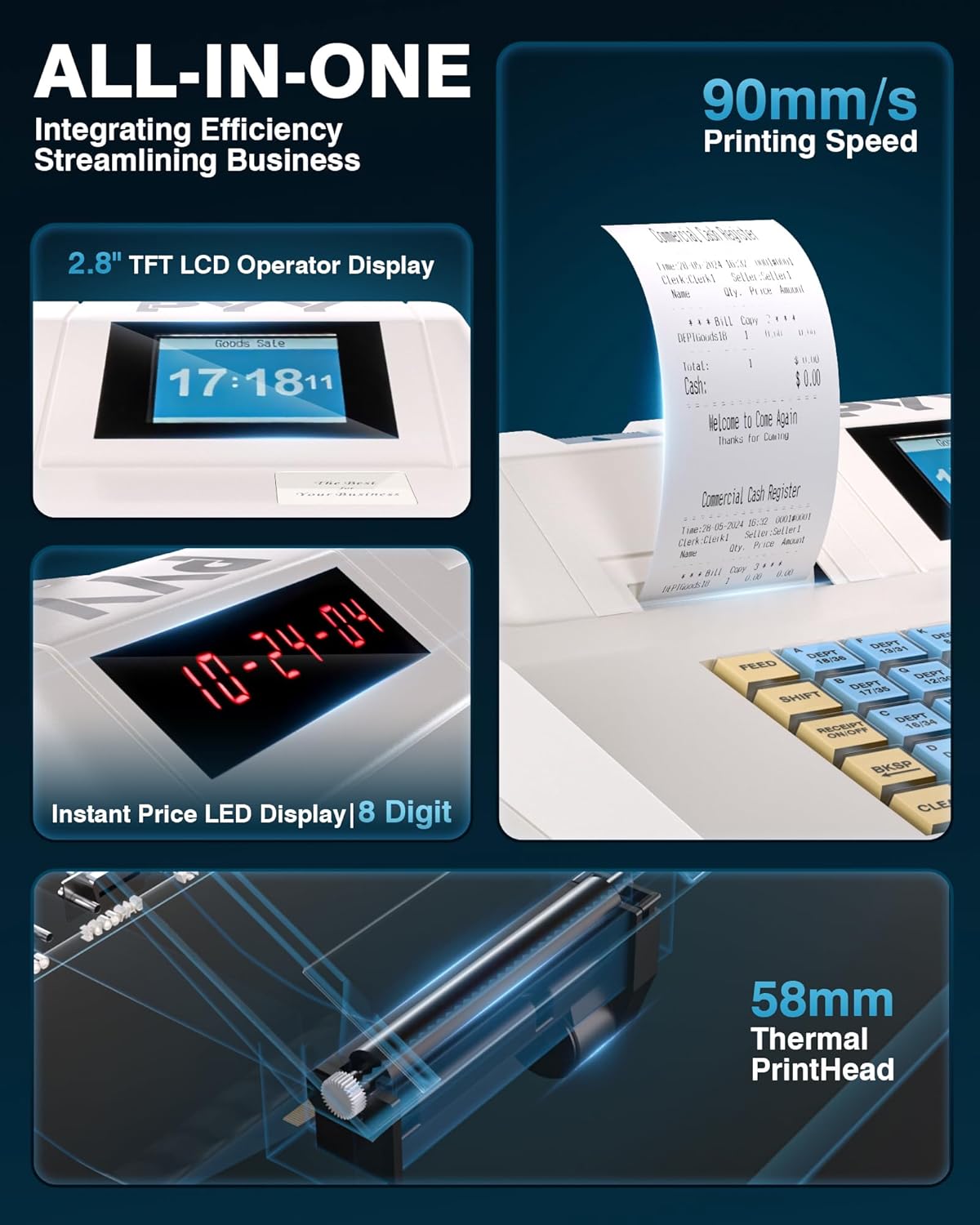
Obraz: Szczegółowy view of the cash register's 2.8-inch TFT LCD operator display, 8-digit LED customer display, and the integrated 58mm thermal printhead.

Obraz: zdjęcie rentgenowskie view illustrating the internal structure of the cash register, highlighting the 48-key keyboard with dust-proof caps and the cash drawer with its 4 bill and 5 coin compartments.
5. Konfiguracja
Wykonaj poniższe kroki w celu wstępnej konfiguracji:
- Rozpakowywanie: Carefully remove the cash register and all accessories from the packaging.
- Podłączenie zasilania: Connect the power cord to the cash register's power input port and then plug it into a suitable electrical outlet.
- Loading Thermal Paper: Open the printer cover, insert a roll of 2 1/4" (58mm) thermal paper, ensuring the paper feeds correctly from the bottom. Close the cover securely.
- Cash Drawer Keys: Insert one of the provided keys into the cash drawer lock. The drawer can be opened manually with the key or electronically during transactions.
- Pierwsze włączenie: Press the power button to turn on the cash register. The displays should illuminate.
6. Instrukcja obsługi
The PYY cash register offers various modes and functions for daily operations:
6.1 Sales Mode and Transactions
Once in sales mode, the system allows for quick and efficient transactions. After item recognition (either by manual input or scanner), a one-click checkout process is available. The integrated thermal printer will automatically print receipts.
6.2 Programming Departments and Items
The system supports configuration for:
- Up to 200 departments
- Up to 10,000 items (PLUs)
- Up to 1,000 members
- Do 200 sesji
- 9 tax rate settings
Refer to the detailed programming guide (usually a separate section or manual) for specific steps on how to set up departments, items, and tax rates.
6.3 Reporting Functions
The cash register provides comprehensive sales data reports, including:
- Hourly sales reports
- Cashier-specific sales reports
- Item-specific sales reports
- Departmental sales reports
- Refunds tracking
- Cash drawer opening logs
These reports are crucial for business analysis and inventory management.
6.4 Cashier Management
The system supports up to 50 cashiers, each with individual passwords for secure access and accountability.

Image: The cash register displaying its main menu, highlighting features such as cashier capacity (50), keyboard keys (48), product capacity (10,000), and department capacity (200).
7. Łączność
The PYY cash register is equipped with multiple ports for connecting external devices, enhancing its versatility:
- 2 x RS232 Ports: For connecting peripherals such as barcode scanners, external scales, or additional printers.
- 1 x port USB: For connecting the cash register to a computer for data transfer or programming.
- 1 x PS2 Port: For connecting an external keyboard, which can be useful for faster data entry or programming.

Zdjęcie: Tył view of the cash register, clearly labeling the two RS232 ports for scanners/printers, the USB port for computer connection, and the PS2 port for keyboard connection.
8. Konserwacja
Regular maintenance ensures the longevity and optimal performance of your cash register:
- Czyszczenie: Użyj miękkiego, damp cloth to clean the exterior of the unit. The ABS material casing is designed to be waterproof and oil-resistant, making it easy to wipe down. Avoid abrasive cleaners or solvents.
- Thermal Paper Replacement: When the paper roll is low or empty, replace it promptly to avoid interruptions in service. Always use 2 1/4" (58mm) thermal paper.
- Zapobieganie pyleniu: The 48 keys are equipped with dust-proof caps. Periodically wipe down the keyboard surface to prevent dust accumulation.
9. Rozwiązywanie Problemów
If you encounter issues with your cash register, refer to the following common problems and solutions:
- Urządzenie nie włącza się: Ensure the power cord is securely connected to both the cash register and a working power outlet. Check the power switch.
- Drukarka nie drukuje: Verify that thermal paper is loaded correctly and that the printer cover is closed. Check for any paper jams. Ensure the printer head is clean.
- Szuflada kasowa się nie otwiera: Ensure the unit is powered on and a transaction is being completed. Check if the key is fully inserted and turned if attempting manual opening.
- Problemy z wyświetlaniem: If the display is blank or showing errors, try restarting the unit. Ensure cables are securely connected if using external displays.
- Tax Settings Not Working: This often requires specific programming steps. Refer to the detailed programming section of your manual or contact technical support for assistance with tax rate configuration.
- Connectivity Problems (Scanner/PC/Keyboard): Ensure the correct port is being used and the external device is properly connected and powered on. Check device drivers if connecting to a computer.
For issues not covered here, or if problems persist, please contact PYY customer support.
10. Specyfikacje
| Model | Elektroniczna kasa fiskalna |
| Wymiary (dł. x szer. x wys.) | 41.5 x 38 x 26 cm (16.3" x 15" x 10.2") |
| Waga | 6.4 kilogramów |
| Moc | 36 W |
| Tomtage | AC 100-240V / 50-60Hz; DC 12V/3A |
| Cashier Display | 2.8-calowy wyświetlacz TFT LCD |
| Wyświetlanie klienta | 8-cyfrowa dioda LED |
| Typ drukarki | Wbudowana drukarka termiczna |
| Szybkość drukarki | Do 90 mm/s |
| Rozmiar papieru | 2 1/4" (58mm) Thermal Paper |
| Szuflada kasowa | 4 Bill Compartments, 5 Coin Compartments |
| Klawiatura | 48 Keys with Dust-Proof Cap |
| Porty łączności | 2 x RS232, 1 x USB, 1 x PS2 |
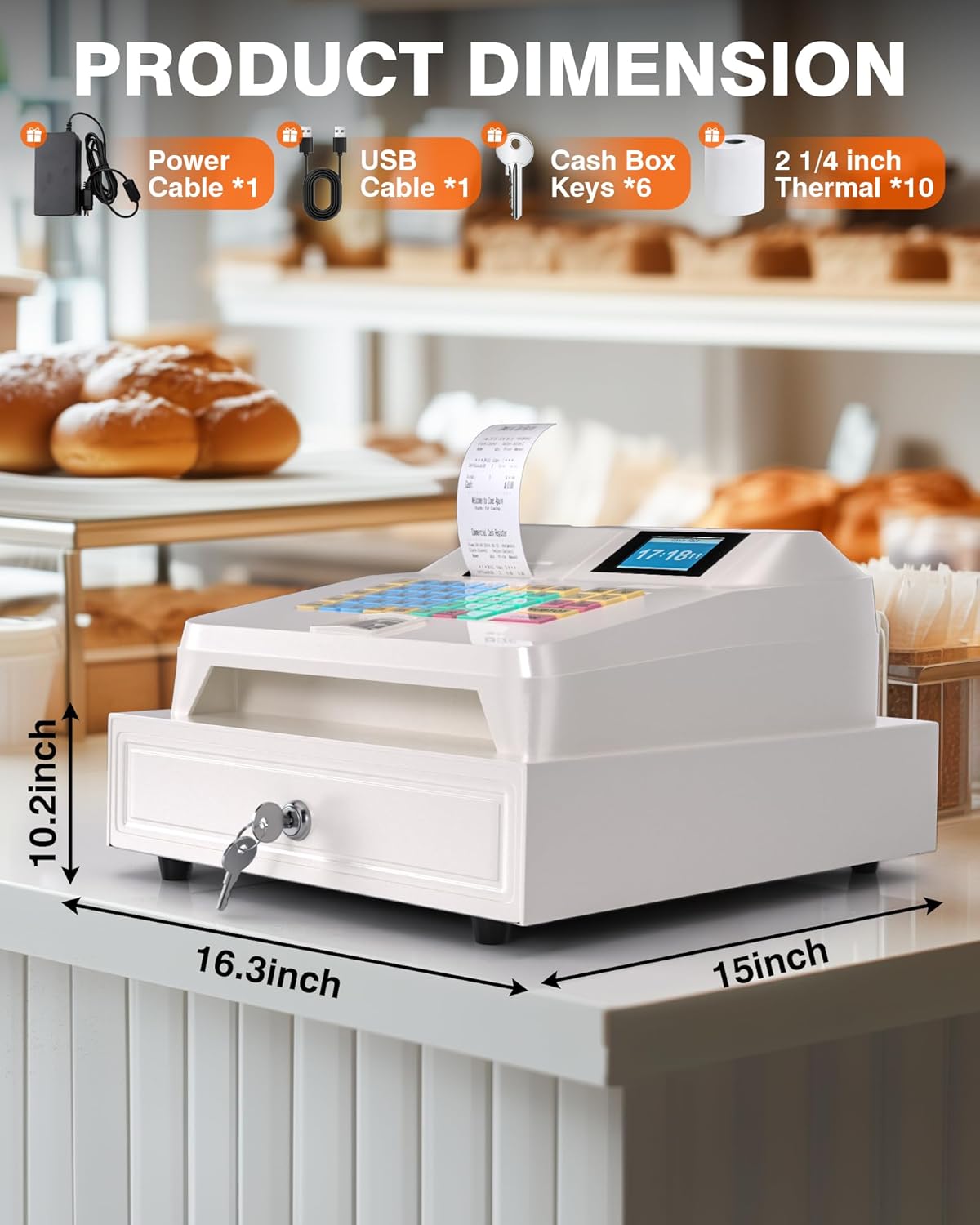
Image: The cash register shown with its key dimensions: 16.3 inches (length), 15 inches (width), and 10.2 inches (height).
11. Gwarancja i wsparcie
PYY stands behind the quality of its products. Your PYY Electronic Cash Register comes with a one-year coverage from the date of purchase.
For any technical issues, questions, or professional one-on-one technical support, please reach out to PYY customer service. Contact information can typically be found on the product packaging or the official PYY webstrona.
Ask a question about this manual
Ask about setup, troubleshooting, compatibility, parts, safety, or missing instructions. Manuals+ will review the question and use this page’s manual context to help answer it.