
1. Wprowadzenie
The Lemnoi Digital Calendar Day Clock is designed to assist individuals, particularly seniors with memory loss or Alzheimer's, by clearly displaying the time, day, date, and period of the day. It features a 7-inch HD display, multiple alarm and reminder functions, automatic dimming, and support for various languages. This manual provides detailed instructions for setting up and operating your clock.

Rycina 1: Przód view of the Lemnoi Digital Calendar Day Clock displaying the time, day, and date.
2. Konfiguracja
2.1 Zawartość opakowania
- Lemnoi Digital Calendar Day Clock
- Zasilacz (typ C)
- Instrukcja obsługi
2.2 Włączanie urządzenia
- Connect the provided Type-C power cable to the 'Type-C Power' port on the back of the clock.
- Podłącz zasilacz do standardowego gniazdka elektrycznego.
- The clock will automatically power on and display the initial setup screen.
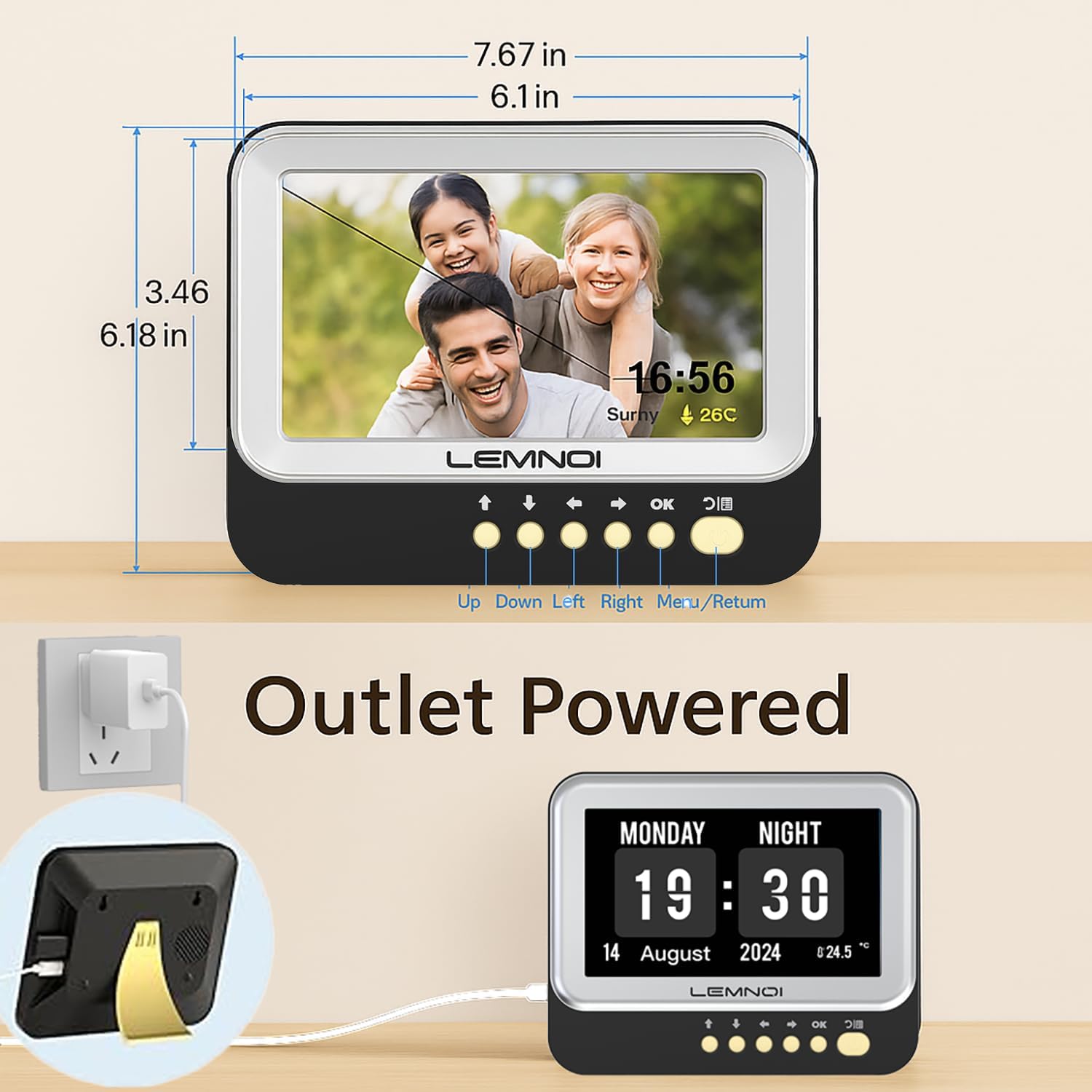
Rysunek 2: Tył view of the clock highlighting the USB port and Type-C power input.
2.3 Initial Settings (Date, Time, Language)
Upon first power-on, or after a factory reset, you will be guided through initial settings:
- Użyj UP I W DÓŁ przyciski służące do poruszania się po opcjach.
- Użyj LEWY I PRAWIDŁOWY przyciski służące do zmiany wartości.
- Naciskać OK to confirm a selection or move to the next setting.
- Naciskać MENU/POWRÓT aby powrócić do poprzedniego ekranu lub wyjść z menu.
- Set the current Data (Month, Day, Year).
- Set the current Czas (Hour, Minute, AM/PM or 24-hour format).
- Wybierz preferowany Język (English, German, French, Italian, Spanish are available).
3. Instrukcja obsługi
3.1 Tryby wyświetlania
The clock offers 6 distinct display modes. To switch between modes, press the LEWY or PRAWIDŁOWY navigation buttons on the front panel.

Rysunek 3: Examples of the 6 available display modes, showing variations in layout and background.
3.2 Brightness Adjustment and Auto Dimming
The clock features 5 levels of brightness. You can manually adjust the brightness or enable the auto-dimming function.
- Ręczna jasność: Navigate to the 'Brightness' setting in the menu and use the LEWY I PRAWIDŁOWY buttons to select a brightness level from 1 to 5.
- Automatyczne przyciemnianie: Enable this feature in the 'Brightness' menu. The clock will automatically dim at night and brighten in the morning. You can customize the start and end times for auto-dimming and set a specific sleep brightness level (e.g., 0% for completely off).

Figure 4: Visual representation of the 5-level adjustable brightness and auto-dimming function.
3.3 Czas letni (DST)
The clock includes an automatic Daylight Saving Time function. When enabled, it will automatically adjust for summer/winter time changes in March and October.
4. Alarmy i przypomnienia
The Lemnoi clock offers extensive alarm and reminder capabilities to support daily routines.
4.1 Setting Daily Alarms
You can set up to 15 normal daily alarms. Each alarm can be configured for specific times and recurrence patterns (every day, weekdays, weekends, or specific dates).
- Navigate to the 'Alarm' section in the main menu.
- Select 'Create an alarm' or choose an existing alarm slot.
- Ustaw Godzina I Chwila na alarm.
- Wybierz Powtarzać wzór.
- Wybierz odpowiedni Etykieta for the alarm (see 4.3).
- Choose an alarm Dźwięk (dostępne 6 opcje).
- Potwierdź swoje ustawienia.
4.2 Setting Medication Reminders
The clock supports up to 15 medication reminders, allowing you to set specific alerts for morning, afternoon, and evening medication times.
- Navigate to the 'Take Medicine' section in the main menu.
- Select a medication reminder slot.
- Set the desired time for morning, afternoon, or evening reminders.
- Potwierdź swoje ustawienia.
4.3 Alarm Labels and Visual Cues
The clock features 12 distinct alarm labels with vivid color images to make reminders easier to understand. These include reminders for activities such as waking up, drinking water, eating, bathing, walking, and doctor appointments.
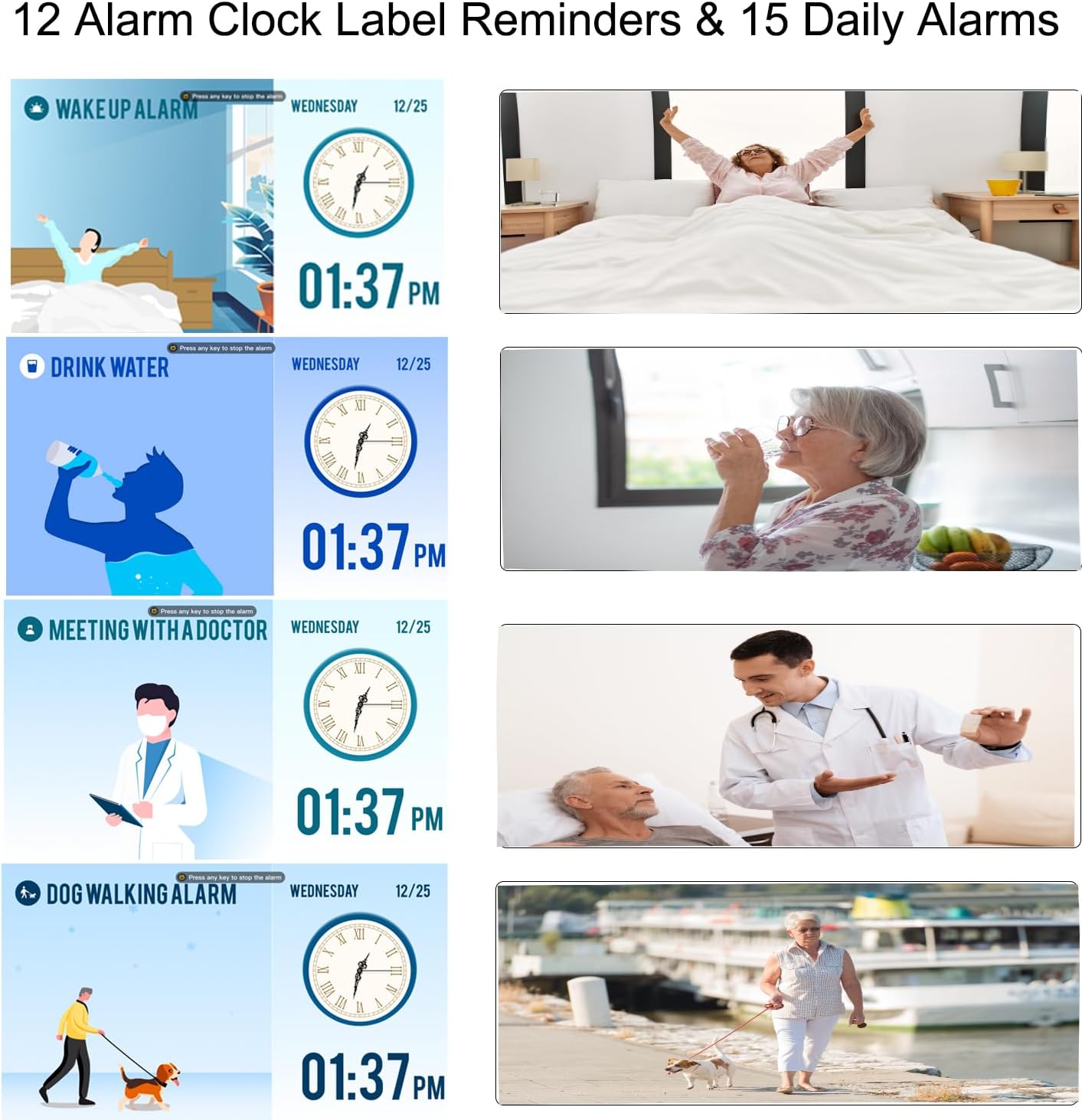
Figure 5: Visual alarm labels for various daily activities, enhancing clarity for users.
5. Funkcja cyfrowej ramki do zdjęć
The Lemnoi clock can also function as a digital photo frame, allowing you to display photos and videos.
- Insert a USB flash drive containing your photos and videos into the USB port on the back of the clock.
- Navigate to the 'Photo Frame' or 'Media Playback' option in the menu (exact menu name may vary).
- Select the desired photos or videos to play.

Figure 6: The clock displaying personal photos, showcasing its digital photo frame feature.
6. Konserwacja
To ensure the longevity and optimal performance of your Lemnoi Digital Calendar Day Clock, follow these maintenance guidelines:
- Czyszczenie: Wipe the screen and exterior with a soft, dry, lint-free cloth. Do not use abrasive cleaners, solvents, or aerosol sprays, as these can damage the finish or screen.
- Umieszczenie: Place the clock on a stable, flat surface or mount it securely on a wall. Avoid direct sunlight, extreme temperatures, and high humidity.
- Moc: Use only the provided power adapter. Disconnect power during electrical storms or when not in use for extended periods.
7. Rozwiązywanie Problemów
If you encounter any issues with your clock, refer to the following common problems and solutions:
| Problem | Możliwa przyczyna | Rozwiązanie |
|---|---|---|
| Zegar się nie włącza. | Zasilacz nie jest podłączony lub jest uszkodzony. | Ensure the Type-C cable is securely connected to the clock and the adapter is plugged into a working outlet. Try a different outlet. |
| Display is blank or too dim. | Brightness setting is too low or auto-dimming is active. | Adjust the brightness manually in the settings. Check auto-dimming settings and ensure the sleep brightness is not set to 0% during active hours. |
| Alarmy nie wyją. | Alarm jest wyłączony, głośność jest zbyt niska lub ustawiono nieprawidłową godzinę. | Verify alarm settings (enabled, time, repeat). Check the volume level in the clock's settings. |
| Date or Time is incorrect. | Incorrect manual setting or DST issue. | Go to 'Date & Time' settings to correct. Ensure DST is set correctly if applicable. |
8. Specyfikacje
- Marka: Lemnoi
- Numer modelu: SG9
- Kolor: 7 cali czarny
- Wymiary produktu: Wymiary 19.56 x 3.81 x 15.75 cm
- Waga przedmiotu: 290 gramów
- Tomtage: 100 V
- Tworzywo: Akrylonitryl-butadien-styren (ABS)
- Typ wyświetlacza: Cyfrowy
- Cechy szczególne: Adjustable Brightness, Auto Dimmable, Daylight Saving, Temperature Display
- Tryby wyświetlania: 6
- Języki: Angielski, niemiecki, francuski, włoski, hiszpański
- Alarmy: 15 Normal Alarms, 15 Medication Reminders
- Alarm Labels: 12 Visual Labels
- Photo Frame Function: Supports photos and videos via USB
9. Gwarancja i wsparcie
For warranty information, technical support, or any questions not covered in this manual, please contact Lemnoi customer service. Refer to the product packaging or the retailer's webodwiedź naszą stronę, aby uzyskać szczegółowe dane kontaktowe.
Notatka: Brak oficjalnego filmu produktu URL was provided in the product data. If available, a video demonstrating key features would be embedded here.