
eppfun 710421187463
Instrukcja obsługi adaptera USB Bluetooth eppfun
Model: 710421187463
1. Wprowadzenie
The eppfun USB Bluetooth Adapter is a compact and versatile audio transmitter designed to provide high-quality wireless audio for various devices. Featuring Bluetooth 5.2 technology and support for advanced audio codecs like aptX Low Latency and aptX-Adaptive, it ensures synchronized audio and video experiences with minimal delay. This adapter allows you to connect your favorite Bluetooth headphones or speakers to gaming consoles, PCs, and other compatible systems.
Główne cechy:
- Mini USB Dongle: Niskoprofile design allows it to remain plugged into your device without obstructing other ports.
- Szeroka kompatybilność: Driver-free plug-and-play operation with Windows XP/7/8/10, Linux, PS4, PS5, Nintendo Switch, and Android.
- Obsługa dwóch słuchawek: Connect two Bluetooth headsets or speakers simultaneously.
- APTX-Adaptive Technology: Minimizes audio delay to approximately 60ms for perfectly synchronized audio and video.
- Obsługa wielu kodeków audio: Supports APTX, APTX LL, SBC, APTX HD, and APTX-Adaptive, with corresponding LED indicators for active codec status. Note: Your headphones must also support the same codec for optimal performance.
2. Zawartość opakowania
Sprawdź, czy w przesyłce znajdują się wszystkie elementy:
- 1 x eppfun USB Bluetooth Adapter
- 1 x Instrukcja obsługi

Image: The eppfun USB Bluetooth Adapter, a compact black dongle with a blue LED indicator, shown alongside a 3.5mm audio jack, highlighting its small size and primary function.
3. Konfiguracja i instalacja
The eppfun USB Bluetooth Adapter is designed for plug-and-play functionality, requiring no driver installation for most compatible operating systems and devices.
Instalacja krok po kroku:
- Podłącz adapter: Plug the eppfun USB Bluetooth Adapter into an available USB 2.0 or USB 3.0 port on your device (e.g., PS5, PC, Nintendo Switch).
- Początkowy tryb parowania: Upon first connection, the LED indicator on the adapter will flash white quickly, indicating it has automatically entered pairing mode.
- Przygotuj urządzenie audio: Put your Bluetooth headphones or speaker into pairing mode. Refer to your audio device's manual for specific instructions on how to enter pairing mode.
- Łączenie w pary: The adapter will automatically search for and connect to your Bluetooth audio device. Once successfully paired, the LED indicator on the adapter will remain steadily lit.

Image: The eppfun USB Bluetooth Adapter plugged into a desktop PC, with a pair of wireless headphones nearby, illustrating a typical setup for computer audio.

Image: Two individuals wearing headphones while playing a video game on a PlayStation 5, with the eppfun USB Bluetooth Adapter visibly connected to the console, demonstrating dual headphone connectivity for gaming.
4. Instrukcja obsługi
Podłączanie wielu urządzeń:
The eppfun adapter supports connecting two Bluetooth audio devices simultaneously. After pairing the first device, put the second device into pairing mode. The adapter will attempt to connect to the second device. Once both are connected, audio will be transmitted to both.
Switching Audio Codecs:
The adapter supports various audio codecs to optimize sound quality and latency. You can cycle through the supported codecs by pressing the button on the adapter. The order of switching is typically aptX Adaptive → aptX LL → aptX HD → aptX → SBC.

Image: A diagram illustrating a finger pressing the button on the eppfun adapter to switch audio playback codecs. It also shows a legend for the LED indicator colors and their corresponding codecs: Blue for aptX Adaptive, Green for aptX HD, Yellow for aptX LL, Purple for aptX, and Red for SBC.
Stan wskaźnika LED:
- Miga na biało: Pairing mode (first time use or searching for device).
- Jednolity biały: Successfully paired and connected.
- Niebieskie światło: aptX Adaptive codec active.
- Zielone światło: aptX HD codec active.
- Żółte światło: aptX LL (Low Latency) codec active.
- Fioletowe światło: aptX codec active.
- Czerwone światło: Kodek SBC aktywny.
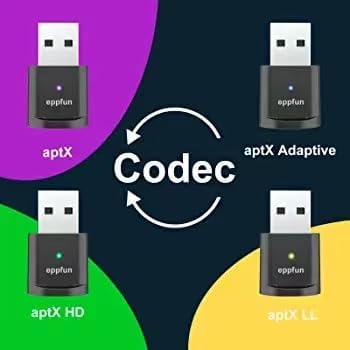
Image: A visual representation showing four eppfun adapters, each with a different colored LED (blue, green, yellow, purple), indicating the active audio codec: aptX Adaptive, aptX HD, aptX LL, and aptX, with a central "Codec" arrow suggesting the ability to switch between them.
5. Zgodność
The eppfun USB Bluetooth Adapter offers broad compatibility with various operating systems and audio devices:
- Systemy operacyjne: Windows XP, Windows 7, Windows 8, Windows 10, Linux, macOS.
- Konsole do gier: PlayStation 4 (PS4), PlayStation 5 (PS5), Nintendo Switch (NS).
- Inne urządzenia: Android devices, PCs, Laptops.
- Urządzenia audio: Bluetooth Headphones, Bluetooth Speakers, Earbuds.
Ważna uwaga: For optimal performance and to utilize specific audio codecs (e.g., aptX Low Latency, aptX HD, aptX-Adaptive), your connected Bluetooth headphones or speakers must also support the same codec standard.
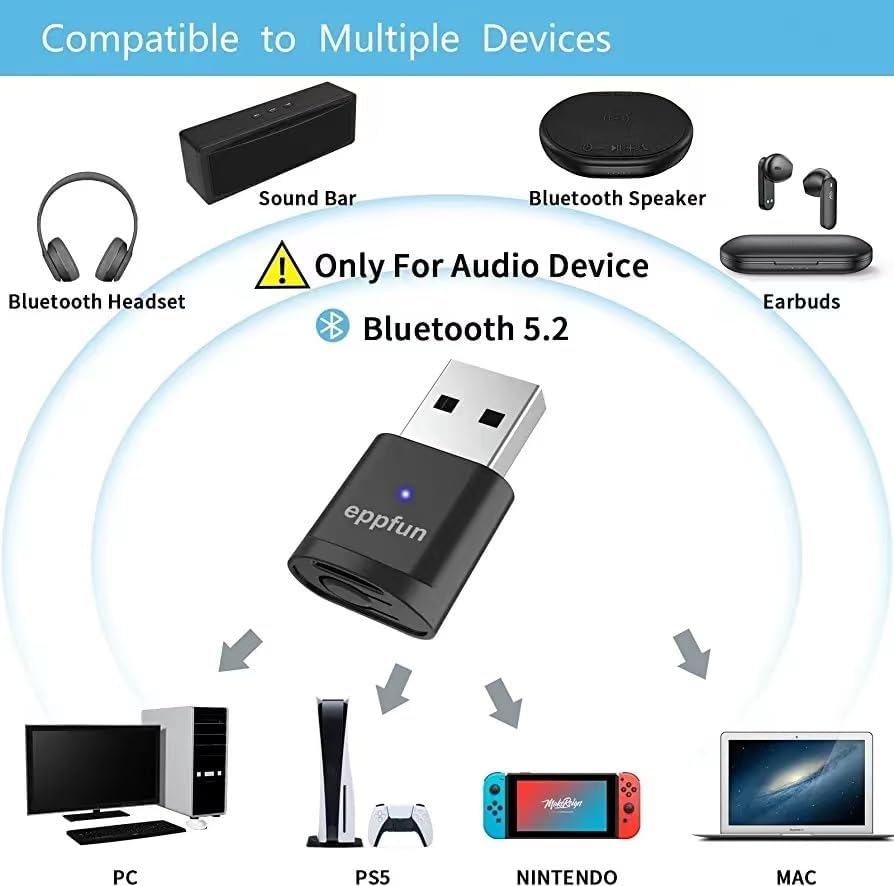
Image: A diagram illustrating the eppfun USB Bluetooth Adapter's compatibility with various devices, including Bluetooth headsets, soundbars, speakers, and earbuds, and source devices like PC, PS5, Nintendo Switch, and Mac, emphasizing it's for audio devices only and uses Bluetooth 5.2.

Image: The eppfun AK3040PLUS adapter shown with labels indicating compatibility with PS4, PS5, PC/Mac, and Nintendo Switch, along with icons for Bluetooth 5.2, Qualcomm aptX, and various audio codecs (aptX, aptX-LL, aptX-HD, aptX-Adaptive).

Image: A comparison table highlighting the features of the eppfun adapter (labeled 'FETURES') against 'OTHERS'. It shows the eppfun adapter supports Windows 11/10/8/7/XP/MAC, PS5/Nintendo Switch, Bluetooth 5.2, and all listed aptX codecs (Adaptive, HD, LL, aptX) and SBC, while 'OTHERS' have limited support.
6. Rozwiązywanie Problemów
If you encounter issues with your eppfun USB Bluetooth Adapter, please refer to the following common troubleshooting steps:
- Brak problemów z dźwiękiem/połączeniem:
- Sprawdź, czy adapter jest całkowicie włożony do portu USB.
- Confirm your Bluetooth audio device is in pairing mode and within range.
- Spróbuj odłączyć i ponownie podłączyć adapter.
- Uruchom ponownie urządzenie hosta (komputer, konsolę).
- If connecting to a PC, ensure the audio output is set to the Bluetooth device in your sound settings.
- Audio Lag/Poor Quality:
- Verify that both the adapter and your audio device support the same low-latency codecs (e.g., aptX LL, aptX-Adaptive).
- Try switching the audio codec on the adapter by pressing its button (refer to Section 4).
- Zmniejsz odległość między adapterem a urządzeniem audio.
- Zminimalizuj zakłócenia ze strony innych urządzeń bezprzewodowych (routerów Wi-Fi, innych urządzeń Bluetooth).
- Adapter nie został rozpoznany:
- Spróbuj użyć innego portu USB w swoim urządzeniu.
- Ensure your operating system is listed as compatible (Windows XP/7/8/10, Linux, macOS).
7. Specyfikacje
| Funkcja | Specyfikacja |
|---|---|
| Numer modelu | 710421187463 |
| Wymiary produktu | 1.26 x 0.7 x 0.2 cala |
| Waga przedmiotu | 1.44 uncji |
| Wersja Bluetooth | Bluetooth 5.2 |
| Obsługiwane kodeki audio | APTX, APTX LL, SBC, APTX HD, APTX-Adaptive |
| Typ złącza | Mini USB |
| Kolor | Czarny |
| Kompatybilne urządzenia | Gaming Consoles (PS4, PS5, Nintendo Switch), Headphones, Speakers |
| Kompatybilne systemy operacyjne | Windows XP/7/8/10, Linux, macOS, Android |
| Producent | śmiech |
8. Konserwacja
To ensure the longevity and optimal performance of your eppfun USB Bluetooth Adapter, please follow these maintenance guidelines:
- Czyszczenie: Do czyszczenia adaptera należy używać miękkiej, suchej ściereczki. Nie należy używać płynów czyszczących ani aerozoli.
- Składowanie: Przechowywać adapter w chłodnym i suchym miejscu, z dala od bezpośredniego światła słonecznego i ekstremalnych temperatur.
- Obsługiwanie: Unikaj upuszczania adaptera i narażania go na silne uderzenia. Nie próbuj demontować urządzenia.
- Wilgoć: Keep the adapter away from water and high humidity.
9. Gwarancja i wsparcie
eppfun products are designed for reliability and performance. For information regarding warranty coverage, technical support, or service inquiries, please refer to the warranty card included with your product or visit the official eppfun webstrona.
For further assistance, you may contact eppfun customer support through their official channels. Please have your product model number (710421187463) and purchase details ready when contacting support.
eppfun Official Store: Odwiedź sklep eppfun na Amazon
Ask a question about this manual
Ask about setup, troubleshooting, compatibility, parts, safety, or missing instructions. Manuals+ will review the question and use this page’s manual context to help answer it.