
AULA F3061
AULA F3061 Gaming Keyboard and Mouse Combo User Manual
Model: F3061
1. Wprowadzenie
This manual provides detailed instructions for the AULA F3061 Gaming Keyboard and Mouse Combo. This wired combo is designed for gaming, featuring anti-ghosting technology, a rainbow LED backlit keyboard, and a 1200 DPI gaming mouse. Please read this manual carefully before use to ensure proper operation and to maximize your gaming experience.
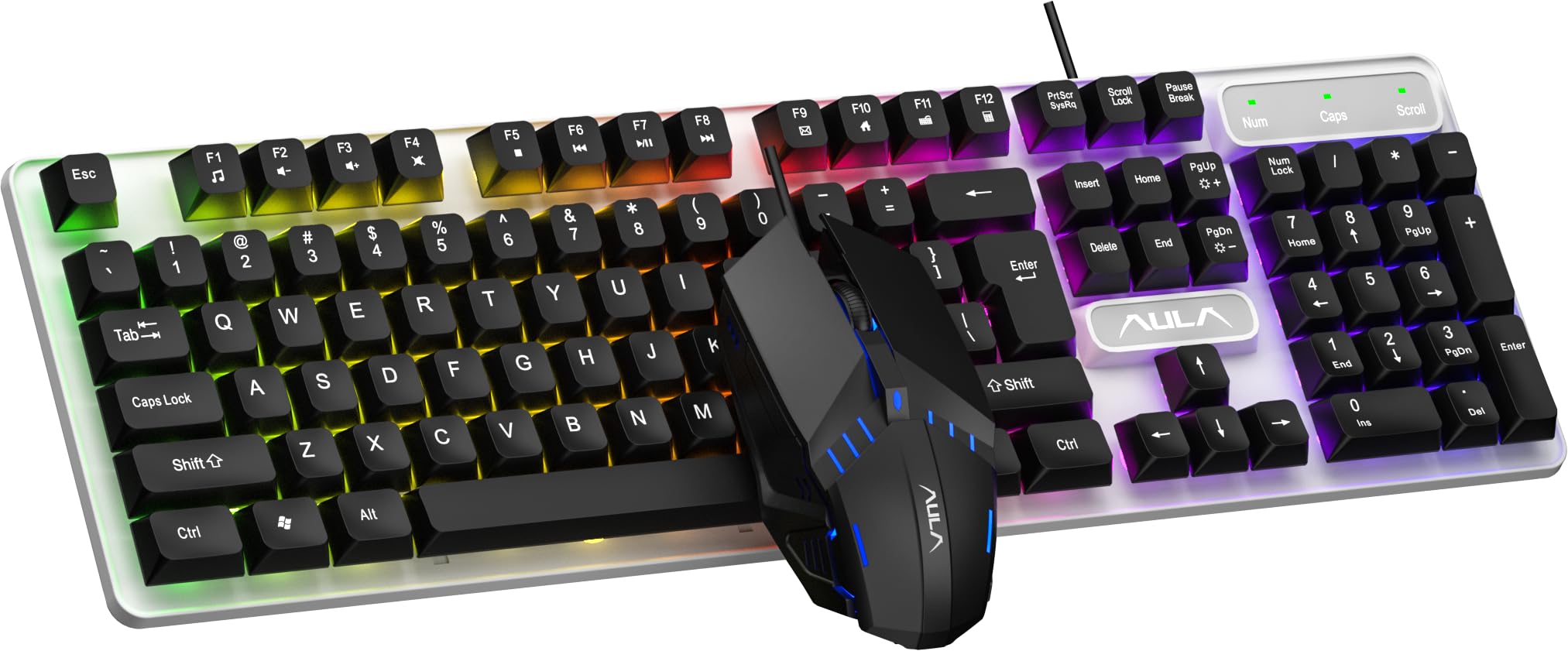
Image 1.1: The AULA F3061 Gaming Keyboard and Mouse Combo.
2. Zawartość opakowania
Sprawdź, czy w przesyłce znajdują się wszystkie elementy:
- AULA F3061 Wired Gaming Keyboard
- AULA F3061 Wired Gaming Mouse
- Instrukcja obsługi
3. Instrukcje konfiguracji
The AULA F3061 combo is a plug-and-play device, requiring no additional drivers for basic functionality.
- Connect the USB-A cable of the keyboard to an available USB port on your computer (PC or Laptop).
- Connect the USB-A cable of the mouse to another available USB port on your computer.
- Your operating system will automatically detect and install the necessary drivers.
- Klawiatura i mysz są teraz gotowe do użycia.

Image 3.1: Connecting the AULA F3061 keyboard and mouse combo via USB.
4. Instrukcja obsługi
4.1. Sterowanie podświetleniem klawiatury
The AULA F3061 keyboard features a vibrant rainbow LED backlight with adjustable settings.
- Przełącz efekty świetlne: Use the designated shortcut key (refer to keyboard layout for specific key, often Fn + blokada przewijania or similar) to cycle through 3 different lighting effects.
- Dostosuj jasność: Use the designated shortcut key combination (e.g., Fn + Strzałka w górę/w dół) to increase or decrease the backlight brightness.
- Dostosuj prędkość: Use the designated shortcut key combination (e.g., Fn + Strzałka w lewo/prawo) to adjust the speed of dynamic lighting effects.

Image 4.1: The AULA F3061 keyboard with its rainbow LED backlight activated.

Obraz 4.2: Zbliżenie view of the keyboard's breathable color backlight with adjustable brightness.
4.2. Anti-Ghosting i blokada systemu Windows
The keyboard features 26-key rollover anti-ghosting technology, allowing multiple keys to be pressed simultaneously without conflict, which is crucial for intense gaming. The Win lock function prevents accidental presses of the Windows key during gameplay or typing, which can interrupt your activity.
4.3. Obsługa myszy
The AULA F3061 gaming mouse operates at 1200 DPI, providing precise tracking for various applications, including gaming and general computer use.

Image 4.3: The AULA F3061 gaming mouse with its distinctive design and LED lighting.

Image 4.4: The mouse features an overall streamlined appearance designed to fit the curvature of the hand.
5. Główne cechy
- Multimedia & Backlight Control: The wired membrane keyboard allows for effortless control of media functions and backlight settings (3 lighting effects, brightness, and speed adjustments) via dedicated shortcut keys.
- Durable ABS Panel: The keyboard's panel is constructed from top-grade ABS material with a matte-finish texture, providing durability and resistance against scratches.
- Cool RGB Rainbow Backlight: Customize your keyboard's aesthetic with a vibrant rainbow backlight, offering personalized brightness and speed settings.
- 26-Keys Rollover & Ergonomic Design: Experience simultaneous key presses without conflict thanks to 26-key rollover anti-ghosting technology. The ergonomic design ensures comfortable use during extended gaming or typing sessions. The Win lock function prevents accidental interruptions.
- Szeroka kompatybilność: This gaming keyboard and mouse combo is compatible with Windows XP / Vista / Win7 / Win8 / Win10 / MacOS for gaming. It also supports PC, Laptop, Google TV, Smart TV, PS4, and Xbox One.

Image 5.1: The ergonomic design of the keyboard provides a comfortable typing experience.

Image 5.2: The keyboard features bass-suspended keycaps that snap back quickly for responsive input.

Image 5.3: The mouse is constructed with 3D anti-slip rubber material for enhanced grip and wear resistance.
6. Specyfikacje
| Funkcja | Szczegół |
|---|---|
| Marka | AULA |
| Numer modelu | F3061 |
| Kompatybilne urządzenia | Komputer stacjonarny, laptop |
| Technologia łączności | USB-A (przewodowy) |
| Opis klawiatury | Hazard |
| Zalecane zastosowania | Hazard |
| Cechy produktu | Backlit, Ergonomic, Integrated Stand |
| Liczba kluczy | 104 |
| Podświetlenie klawiatury | RGB Rainbow |
| Typ przełącznika | Membrana |
| Układ klawiatury | QWERTY |
| DPI myszy | 1200 DPI |
| Orientacja dłoni | Ambidextrous (Mouse) |
| Kolor | Czarny |
| Pozycja Wymiary (dł. x szer. x wys.) | 16L x 2.8W x 45.7H centymetrów |
| Materiał obudowy | Akrylonitryl-butadien-styren (ABS) |
| Waga przedmiotu | 740 gram |
7. Rozwiązywanie Problemów
7.1. Klawiatura lub mysz nie reagują
- Ensure both the keyboard and mouse USB cables are securely connected to your computer's USB ports.
- Spróbuj podłączyć urządzenia do różnych portów USB w komputerze.
- Uruchom ponownie komputer.
- If the devices were previously working, check for any recent software updates or driver conflicts.
7.2. Backlight Not Working or Incorrect
- Ensure the backlight is not turned off or set to the lowest brightness. Use the backlight control shortcut keys (as described in Section 4.1) to adjust brightness and effects.
- Verify that the keyboard is properly connected to the computer.
7.3. Mouse Tracking Issues
- Upewnij się, że czujnik myszy jest czysty i wolny od kurzu i zanieczyszczeń.
- Use the mouse on a suitable surface (e.g., a mouse pad) for optimal tracking.
7.4. Automatyczny tryb uśpienia
The keyboard will automatically enter sleep mode after 5 minutes of inactivity. To wake it up, simply press any key.
8. Gwarancja i wsparcie
8.1. Informacje o gwarancji
The AULA F3061 Gaming Keyboard and Mouse Combo comes with a 10-miesięczna gwarancja from the date of purchase, covering manufacturing defects only. Please retain your proof of purchase for warranty claims.
8.2. Obsługa klienta
For technical assistance or warranty inquiries, please contact the importer:
SOAI India Private Limited
Manufacturer: Dongguan Suoai Electronics Co Ltd
9. Koniec produktuview Wideo
Wideo 9.1: Krótki przeglądview of the AULA F3061 Gaming Keyboard and Mouse Combo, highlighting its key features and design.
Ask a question about this manual
Ask about setup, troubleshooting, compatibility, parts, safety, or missing instructions. Manuals+ will review the question and use this page’s manual context to help answer it.