
Wstęp
This manual provides essential instructions for the safe and efficient use of your Aiwa AW-KF4 Portable Bluetooth Speaker. Please read this manual thoroughly before using the product and retain it for future reference.
The Aiwa AW-KF4 is a portable Bluetooth speaker designed for robust audio performance with dynamic LED lighting, a rechargeable battery, and resistance to water and dust (IPX6). It offers versatile connectivity options including Bluetooth, USB, and AUX input.
Zawartość opakowania
Carefully unpack your speaker and ensure all items are present and in good condition. If any items are missing or damaged, please contact your retailer.
- Aiwa AW-KF4 Portable Bluetooth Speaker
- Kabel ładujący USB-C
- Instrukcja obsługi

Image: The Aiwa AW-KF4 speaker in its retail packaging, showing the speaker and branding.
Produkt ponadview
The Aiwa AW-KF4 speaker features a compact, cylindrical design with integrated controls and dynamic LED lighting. It is built for portability and durability.
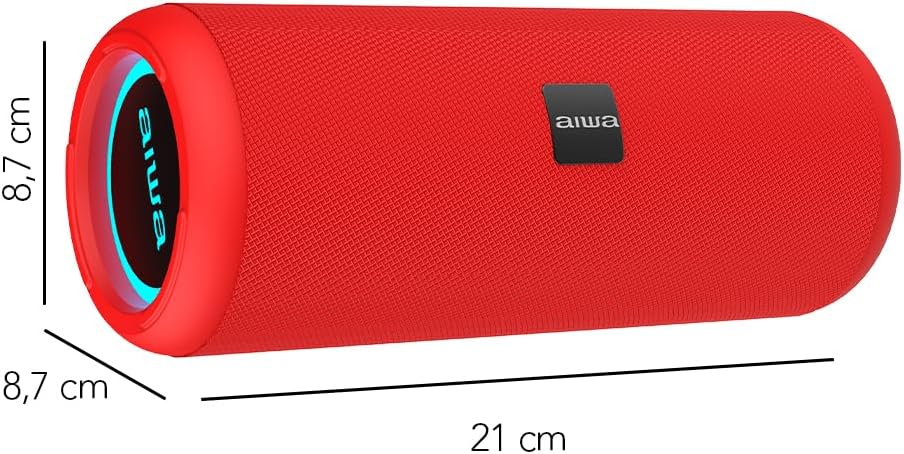
Image: A red Aiwa AW-KF4 speaker showing its approximate dimensions: 21 cm in length and 8.7 cm in diameter.

Image: Two Aiwa AW-KF4 speakers (red and black) illustrating key features: 20W output, LED lighting, TWS function, IPX6 water resistance, Bluetooth, USB, and SD card compatibility.

Image: A collage showing the Aiwa AW-KF4 speaker in various outdoor settings, emphasizing its IPX6 water resistance, up to 10 hours of battery life, and hands-free calling capability with an integrated microphone.
Organizować coś
1. Ładowanie głośnika
Before first use, fully charge the speaker. Use the provided USB-C cable to connect the speaker to a compatible USB power adapter (not included) or a computer's USB port.
- Podczas ładowania zaświeci się kontrolka ładowania.
- Pełne naładowanie trwa około 3 godzin.
- Po pełnym naładowaniu kontrolka może się zmienić lub zgasnąć.
A fully charged battery provides up to 10 hours of playback, depending on volume level and usage.
2. Włączanie/wyłączanie zasilania
- To power on: Press and hold the Power button for a few seconds until you hear an audible prompt and the LED lights activate.
- To power off: Press and hold the Power button for a few seconds until you hear an audible prompt and the LED lights turn off.
Instrukcja obsługi
1. Parowanie Bluetooth
The speaker will automatically enter Bluetooth pairing mode when powered on for the first time or if no device is connected. The LED indicator will flash, indicating it's ready to pair.
- Upewnij się, że głośnik jest włączony i znajduje się w trybie parowania.
- Włącz Bluetooth w swoim smartfonie, tablecie lub innym urządzeniu audio.
- Szukaj "AW-KF4" in the list of available Bluetooth devices.
- Select "AW-KF4" to connect. You will hear a confirmation sound once paired.
- The LED indicator will stop flashing and remain solid.
Głośnik ma zasięg Bluetooth do 10 metrów (33 stóp).
2. Funkcja True Wireless Stereo (TWS)
The TWS function allows you to pair two Aiwa AW-KF4 speakers together for a stereo sound experience.

Image: A visual representation of the TWS (True Wireless Stereo) function, showing two Aiwa AW-KF4 speakers being used together for synchronized sound.
- Ensure both AW-KF4 speakers are powered on and not connected to any Bluetooth device.
- On one speaker (this will be the primary speaker), press and hold the TWS button (if available, or a designated button as per specific model instructions) until you hear a pairing tone.
- Oba głośniki połączą się ze sobą automatycznie. Po połączeniu rozlegnie się dźwięk potwierdzający.
- Teraz połącz urządzenie Bluetooth z głównym głośnikiem, tak jak opisano w sekcji „Parowanie Bluetooth”.
Note: Refer to the specific button layout on your speaker for the exact TWS pairing button.
3. Odtwarzanie USB i AUX
- Odtwarzanie z USB: Włóż dysk flash USB zawierający dźwięk filePodłącz go do portu USB. Głośnik automatycznie wykryje napęd i rozpocznie odtwarzanie muzyki z niego.
- Odtwarzanie AUX: Connect an audio device using a 3.5mm AUX cable (not included) to the AUX input port. The speaker will switch to AUX mode.
4. Światła LED
The speaker features dynamic LED lights. These lights typically activate automatically when the speaker is powered on. Specific controls for changing light modes or turning them off may be available via a dedicated button on the speaker (refer to your speaker's button layout).
5. Sterowanie
The speaker features tactile controls for various functions:
- Przycisk zasilania: Naciśnij i przytrzymaj, aby włączyć/wyłączyć.
- Przycisk Odtwórz/Pauza: Naciśnij, aby odtworzyć lub wstrzymać muzykę.
- Zwiększanie głośności/następny utwór: Naciśnij, aby zwiększyć głośność. Naciśnij i przytrzymaj, aby przejść do następnego utworu.
- Zmniejszenie głośności/Poprzedni utwór: Naciśnij, aby zmniejszyć głośność. Naciśnij i przytrzymaj, aby przejść do poprzedniego utworu.
- Przycisk trybu: Naciśnij, aby przełączać się między trybami Bluetooth, USB i AUX.
- Call Button (if applicable): Naciśnij, aby odebrać/zakończyć połączenie. Naciśnij i przytrzymaj, aby odrzucić połączenie.
Note: Button functions may vary slightly. Consult the diagrams in your physical manual for precise button identification.
Konserwacja
To ensure the longevity and optimal performance of your Aiwa AW-KF4 speaker, follow these maintenance guidelines:
- Czyszczenie: Do czyszczenia obudowy głośnika należy używać miękkiej, suchej ściereczki. Nie należy używać środków czyszczących o działaniu ściernym, rozpuszczalników ani silnych środków chemicznych.
- Wodoodporność (IPX6): The speaker is resistant to strong water jets. It is not designed for submersion. Ensure all port covers are securely closed before exposing the speaker to water or dust. After exposure to water, wipe the speaker dry before charging.
- Składowanie: Przechowuj głośnik w chłodnym, suchym miejscu, z dala od bezpośredniego światła słonecznego i ekstremalnych temperatur.
- Pielęgnacja baterii: Aby wydłużyć żywotność baterii, ładuj głośnik regularnie, nawet jeśli nie jest często używany. Unikaj całkowitego rozładowywania baterii przez dłuższy czas.

Image: The Aiwa AW-KF4 speaker positioned near a pool, illustrating its IPX6 water resistance feature, suitable for outdoor and poolside use.
Rozwiązywanie problemów
Jeśli masz problemy z głośnikiem, zapoznaj się z poniższymi typowymi problemami i ich rozwiązaniami:
| Problem | Możliwa przyczyna / rozwiązanie |
|---|---|
| Głośnik nie włącza się. |
|
| Nie można sparować przez Bluetooth. |
|
| Brak dźwięku. |
|
| Zniekształcenie dźwięku. |
|
| Parowanie TWS nie powiodło się. |
|
Specyfikacje
| Nazwa modelu | AW-KF4 (AWKF4B) |
| Marka | Aiwa |
| Moc wyjściowa głośnika | 20 W RMS |
| Odpowiedź częstotliwościowa | 80 Hz (minimum specified) |
| Technologia łączności | Bluetooth 5.0, USB, AUX |
| Tryb wyjścia audio | Stereofoniczny |
| Materiał obudowy | Plastikowy |
| Typ głośnika | Głośnik niskotonowy |
| Poziom wodoodporności | IPX6 (Resistant to strong water jets) |
| Zasięg Bluetooth | Do 10 metrów (33 stóp) |
| Mikrofony | 1 (for hands-free calling) |
| Pojemność baterii | Bateria litowo-jonowa 2000 mAh |
| Żywotność baterii | Up to 10 hours (varies with volume and usage) |
| Czas ładowania | Około 3 godzin |
| Wejście Voltage | 5 wolty |
| Impedancja | 4 omy |
| Metoda kontroli | Przyciski dotykowe |
| Wymiary (dł. x gł.) | Ok. 21 cm x 8.7 cm |
| Kompatybilne urządzenia | Smartfony, tablety |
| Pochodzenie | Chiny |
Gwarancja i wsparcie
Your Aiwa AW-KF4 Portable Bluetooth Speaker comes with a 1-letnia gwarancja producenta od daty zakupu. Niniejsza gwarancja obejmuje wady produkcyjne powstałe w wyniku normalnego użytkowania.
Gwarancja nie obejmuje:
- Damage caused by misuse, abuse, negligence, or accident.
- Uszkodzenia powstałe w wyniku nieautoryzowanych napraw lub modyfikacji.
- Normalne zużycie.
For warranty claims or technical support, please contact your retailer or the official Aiwa customer service in your region. Please have your proof of purchase and product model number (AW-KF4) ready when contacting support.