
1. Wprowadzenie
Dziękujemy za zakupasing the Minetom BL-HW02 Outdoor RGB Christmas Laser Light Projector. This device is designed to create dynamic and decorative light displays for various occasions, both indoors and outdoors. Featuring multiple color combinations, motion effects, and remote control operation, it offers a versatile lighting solution. Please read this manual thoroughly before use to ensure proper operation and safety.
2. Informacje dotyczące bezpieczeństwa
- Bezpieczeństwo oczu: Do not look directly into the laser light beam. Direct exposure to laser light can cause eye damage.
- Źródło zasilania: Upewnij się, że źródło zasilania jest zgodne z objtage requirements specified on the product label. Use only the provided power adapter.
- Zastosowanie na zewnątrz: While the projector is IP65 waterproof, ensure the power adapter and connections are protected from water exposure.
- Instalacja: Install the projector securely to prevent it from falling or being dislodged by wind or other environmental factors.
- Dzieci i zwierzęta: Trzymaj urządzenie poza zasięgiem dzieci i zwierząt domowych, aby zapobiec przypadkowemu uszkodzeniu lub obrażeniom.
- Temperatura: Do not operate the device outside its specified temperature range (-30°F to 104°F).
- Konserwacja: Nie próbuj samodzielnie otwierać ani naprawiać urządzenia. Wszelkie prace serwisowe zleć wykwalifikowanemu personelowi.
3. Zawartość opakowania
Sprawdź, czy w opakowaniu znajdują się wszystkie elementy:
- Minetom RGB Christmas Laser Light Projector
- Zdalne sterowanie RF
- Stawka ziemi
- Okrągła podstawa
- Power Adapter (with 16.4ft extension cord)
- Instrukcja obsługi (ten dokument)
4. Konfiguracja
4.1 Choosing an Installation Method
The projector offers three installation options: ground-mounted, wall-mounted, or placed on a flat surface.
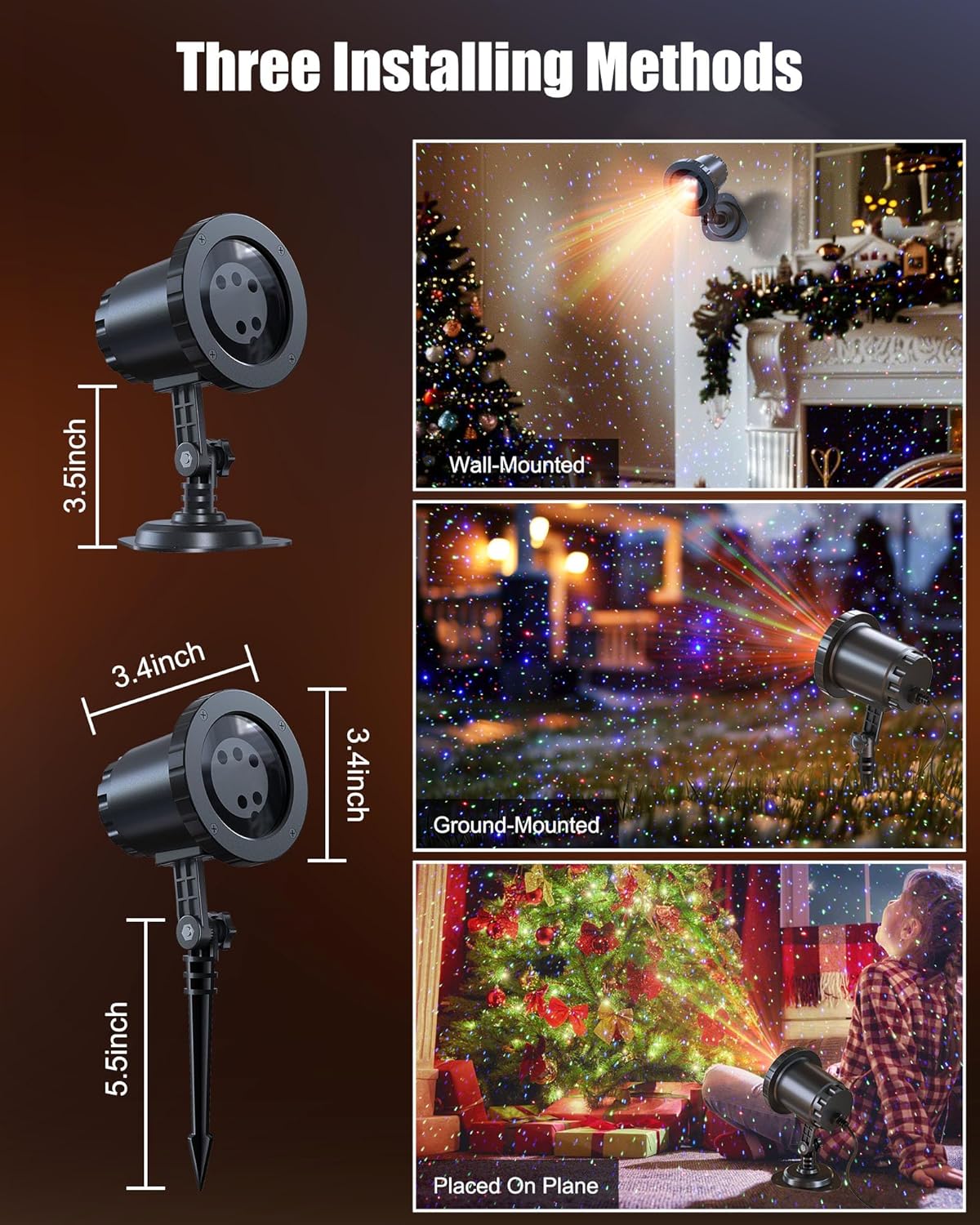
Image: The Minetom laser light projector can be installed in three ways: wall-mounted, ground-mounted, or placed on a flat surface using the included accessories.
- Ground-Mounted: Attach the ground stake to the projector. Insert the stake firmly into soft ground in your desired outdoor location.
- Naścienny: Attach the round base to the projector. Secure the base to a wall using appropriate screws (not included) for a stable installation.
- Placed on Plane: Attach the round base to the projector. Place the projector on any stable, flat surface indoors or outdoors.
4.2 Połączenie zasilania
- Connect the projector to the provided power adapter.
- Use the 16.4ft extension cord to reach a suitable outdoor power outlet.
- Upewnij się, że wszystkie połączenia są solidne i chronione przed wilgocią.
- Podłącz zasilacz do uziemionego gniazdka elektrycznego.
5. Instrukcja obsługi
Once powered on, the projector will begin its default light show. Use the RF remote control to customize the display.
5.1 Funkcje zdalnego sterowania
The RF remote control allows you to manage various settings from a distance. Ensure 2*AAA batteries (not included) are installed in the remote.

Image: RF Remote Control layout with functions for each button.
| Przycisk | Funkcjonować |
|---|---|
| WŁ./WYŁ. | Włącza lub wyłącza projektor. |
| 2H/4H/6H | Sets the timer for 2, 4, or 6 hours. |
| (H) Restore | Restores to default timing (6 hours on, 18 hours off). |
| Cykl kolorów | Cycles through Green, Blue, Red-Green, Blue-Green, Red-Blue, Red-Green-Blue, and Red-Green-Blue cycle. |
| Tryb oddychania | Activates a slow fade-in/fade-out effect. |
| Jumping Mode | Activates a rapid color change effect. |
| S0 (Static) | Sets the light display to static (no motion). |
| S- / S+ | Adjusts rotation speed (S- for slow, S+ for fast). |
| R/G/B | Selects Red, Green, or Blue light individually. |
| R/G/B Breathing | Activates breathing mode for individual Red, Green, or Blue colors. |
| R/G/B Strobe | Activates strobe mode for individual Red, Green, or Blue colors. Press sequentially to adjust speed (Slow, Medium, Fast, Stop). |
| R/G/B Steady | Sets individual Red, Green, or Blue colors to steady (non-flashing). |
5.2 XNUMX XNUMX kombinacji kolorów
The projector supports various color combinations to create diverse effects.

Obraz: Byłyamples of the 7 available color combinations.
- Czerwony
- Zielony
- Niebieski
- Czerwony Zielony
- Czerwony Niebieski
- Zielony Niebieski
- Czerwony Zielony Niebieski
6. Stopień wodoodporności IP65
The projector body is designed with an IP65 waterproof rating, ensuring reliable performance in various weather conditions such as snow, rain, dust, and intense sunlight. It is cold-proof, operating effectively from -30°F to 104°F.

Image: The projector operating in rainy and snowy conditions, highlighting its IP65 waterproof and cold-proof features.
7. Coverage Area
The projector can cover a significant area, illuminating indoor ceilings, walls, or outdoor walls, gardens, lawns, trees, and rooftops. From a distance of 32.8 feet, it can cover approximately 3229.17 square feet.

Image: Coverage area chart illustrating how the projected area expands with increased distance from the surface.
8. Konserwacja
- Czyszczenie: Gently wipe the projector lens and body with a soft, dry cloth. Do not use abrasive cleaners or solvents.
- Składowanie: Gdy projektor nie jest używany, należy go przechowywać w chłodnym i suchym miejscu, z dala od bezpośredniego światła słonecznego i ekstremalnych temperatur.
- Kontrola kabla: Periodically check the power cord and adapter for any signs of damage. Discontinue use if damage is found.
9. Rozwiązywanie Problemów
| Problem | Rozwiązanie |
|---|---|
| Projektor się nie włącza. |
|
| Pilot zdalnego sterowania nie odpowiada. |
|
| Strumień światła jest słaby lub nierównomierny. |
|
| Multiple projectors interfere with each other. |
|
10. Specyfikacje
| Funkcja | Szczegół |
|---|---|
| Numer modelu | BL-HW02 |
| Marka | Minetom |
| Kolor | Czerwony Zielony Niebieski |
| Tworzywo | Plastikowy |
| Rodzaj wykończenia | Projektor |
| Typ źródła światła | Dioda elektroluminescencyjna |
| Źródło zasilania | Elektryczny przewodowy |
| Typ montażu | Montaż na podłodze, montaż na ścianie |
| Wymiary produktu | 2.75" dł. x 2.75" szer. x 11.02" wys. |
| Waga przedmiotu | 14 uncji |
| Kąt wiązki | 120 stopni |
| Stopień wodoodporności | IP65 |
| Temperatura pracy | -30°F do 104°F |
| Coverage Area (approx.) | 3229.17 sq ft at 32.8 ft distance |
11. Gwarancja i wsparcie
For warranty information or technical support, please refer to the contact details provided at the point of purchase or visit the official Minetom webZachowaj paragon jako dowód zakupu.