
Olafus 3-LBG10N
Olafus 3-LBG10N Battery Operated LED Flood Light Outdoor Instruction Manual
Model: 3-LBG10N
1. Wprowadzenie
This manual provides detailed instructions for the installation, operation, and maintenance of your Olafus 3-LBG10N Battery Operated LED Flood Light Outdoor. This product is designed to provide bright, motion-activated illumination for outdoor areas without the need for electrical wiring.

Image 1.1: Olafus 3-LBG10N Battery Operated LED Flood Light Outdoor (2-Pack shown)
2. Wytyczne bezpieczeństwa
- Przed instalacją i użytkowaniem przeczytaj uważnie wszystkie instrukcje.
- Nie mieszaj starych i nowych baterii. Nie mieszaj baterii alkalicznych, standardowych (węglowo-cynkowych) ani akumulatorowych (niklowo-kadmowych).
- Upewnij się, że baterie zostały włożone z zachowaniem prawidłowej polaryzacji.
- Trzymać produkt z dala od otwartego ognia i źródeł ciepła.
- Do not stare directly into the LED light when it is illuminated.
- Ten produkt jest przeznaczony do użytku na zewnątrz i posiada klasę wodoodporności IP65. Należy jednak unikać zanurzania go w wodzie.
- Installation should be performed on a stable surface.
3. Zawartość opakowania
Przed rozpoczęciem instalacji sprawdź, czy wszystkie komponenty są obecne:
- Olafus 3-LBG10N LED Flood Light (quantity as purchased, e.g., 1 or 2)
- Sprzęt montażowy (śruby, kotwy ścienne)
- Instrukcja obsługi
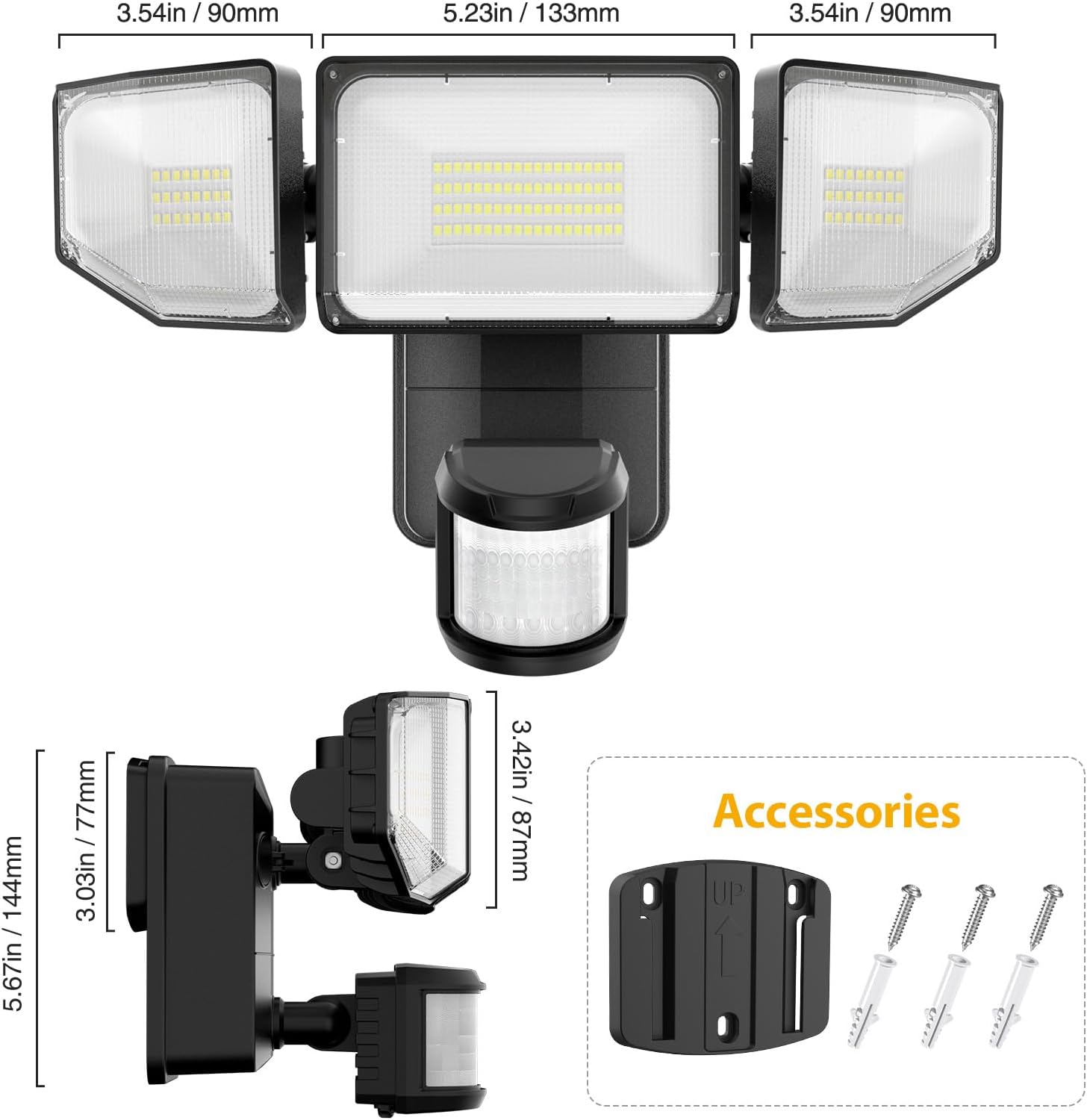
Rysunek 3.1: Wymiary produktu i dołączone akcesoria.
4. Koniec produktuview
The Olafus 3-LBG10N features three adjustable light heads and an integrated motion sensor. The main body houses the battery compartment and control knobs for settings.

Image 4.1: Motion sensor and control knobs.
5. Instalacja
The Olafus 3-LBG10N is battery-operated, allowing for flexible installation without the need for electrical wiring. Recommended installation height is 7.2ft - 10.5ft (2.2m - 3.2m) above the ground.
5.1 Instalacja baterii
- Otwórz pokrywę komory baterii z tyłu urządzenia.
- Insert 4 new 1.5V D-cell batteries (not included), ensuring correct polarity.
- Dokładnie zamknij pokrywę komory baterii.
5.2 Montaż światła
- Choose a suitable location for installation, such as a wall, fence, or garage, ensuring the desired coverage area.
- Fasten the mounting bracket onto the wall using the provided screws and wall anchors. Ensure the 'UP' arrow on the bracket points upwards.
- Buckle the light unit into the mounting plate securely.
- Adjust the three light heads and the motion sensor to cover the desired area.
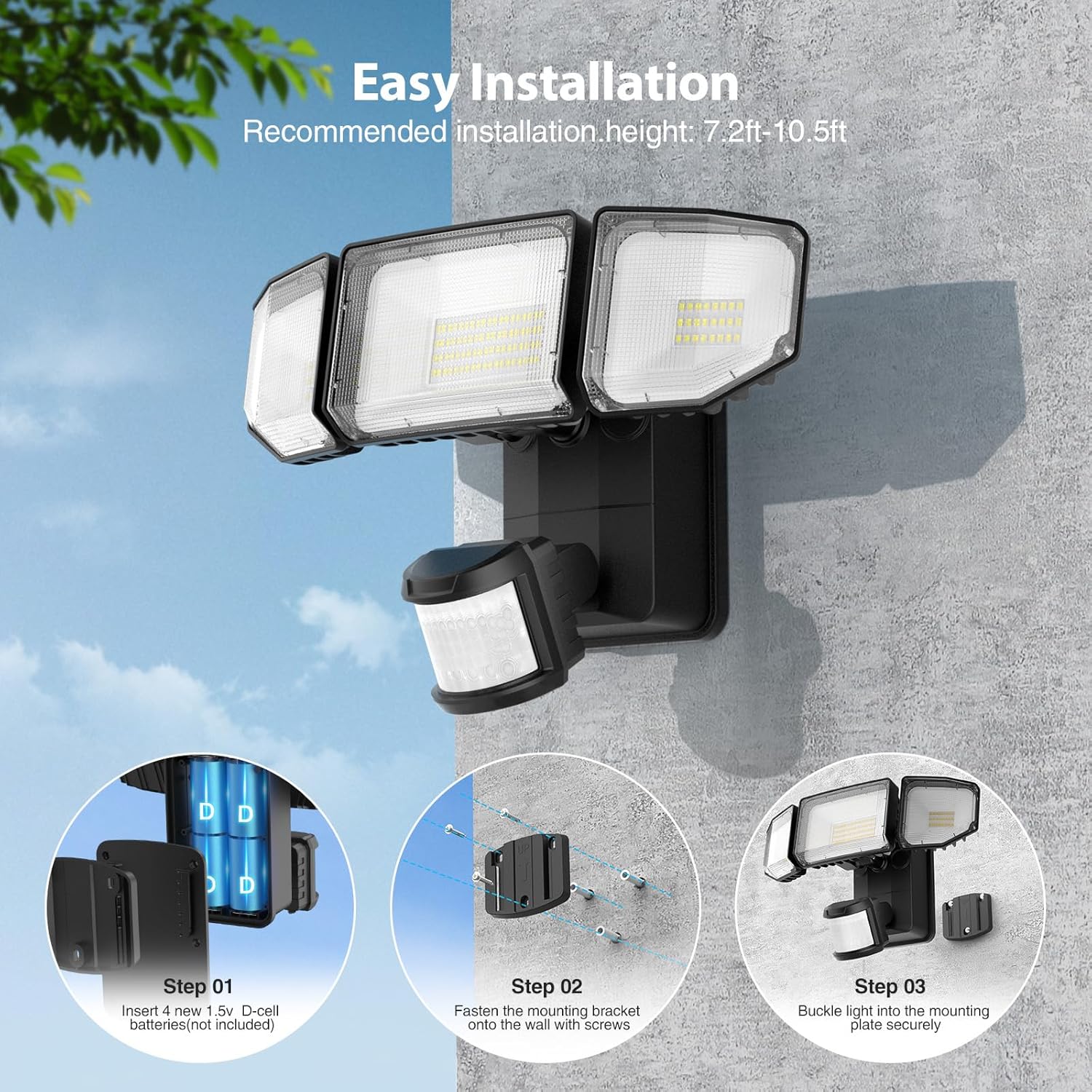
Image 5.1: Easy installation steps.

Image 5.2: Battery-powered installation offers flexibility over wired or solar options.
6. Instrukcja obsługi
The motion sensor flood light features adjustable settings for optimal performance.
6.1 pokręteł sterujących
Locate the three control knobs on the motion sensor unit:
- CZAS: Adjusts the duration the light stays on after motion is detected (5 seconds to 30 seconds).
- LUKS: Sets the ambient light level at which the motion sensor will activate the light.
- SENS (czułość): Adjusts the detection range of the motion sensor (19ft to 72ft).
6.2 Setting the Motion Sensor
- Ustawienie czasu: Rotate the 'TIME' knob to select the desired illumination duration. For testing, set it to the minimum (5s).
- Ustawienie LUKSUSU: Rotate the 'LUX' knob. Set it to the sun icon for daytime testing or to the moon icon for night-only operation. The light will only activate when the ambient light is below the set LUX level.
- SENS Setting: Rotate the 'SENS' knob to adjust the motion detection range. Start with a lower setting and increase as needed to avoid false triggers.
Image 6.1: Motion Sensor Mode controls (TIME, LUX, SENS).
Video 6.1: This video demonstrates the functionality of the battery-powered motion outdoor lights, showcasing their activation and illumination capabilities.
7. Funkcje
- Zasilanie bateryjne i łatwa instalacja: Powered by 4 D batteries (not included), this light is ideal for locations without access to electricity or direct sunlight. Installation can be completed in approximately 5 minutes, requiring no main power or complex wiring.
- Ulepszony czujnik ruchu: The sensor offers a wide 180-degree detection angle and can detect motion up to 72 feet away. The timer is adjustable from 5 to 30 seconds, and the ambient illuminance value (LUX) can be set to trigger the light only when needed, such as at night or dusk.
- Super Bright & Energy Efficient: Equipped with high-efficiency LED beads and professional optical lenses, the light produces 2000 lumens of brightness. This is comparable to a 150W halogen bulb while being significantly more energy-efficient. The innovative 3-folded surface design provides a wide 220° beam angle for extensive coverage.
- Efficient Cooling & Long Lifespan: Featuring a fin-type heat sink design and durable ABS housing material, the flood light ensures safe operation and extended product life. With typical usage (20 triggers per day, 20s per trigger), batteries can last approximately 180 days.
- Wodoodporność IP65: Designed to withstand various weather conditions, including rain and snow, making it suitable for year-round outdoor use in garages, shops, yards, basements, and other areas.

Image 7.1: Wide beam angle and 2000LM brightness.

Image 7.2: Motion sensor detection range.

Image 7.3: IP65 Waterproof rating for all-weather reliability.
8. Specyfikacje techniczne
| Specyfikacja | Szczegół |
|---|---|
| Nazwa modelu | 3-LBG10N |
| Marka | Olafusa |
| Typ źródła światła | PROWADZONY |
| Jasność | 2000 lumenów |
| Temperatura barwowa | 6500 Kelwinów (zimna biel) |
| Źródło zasilania | Battery Powered (4 x D-cell batteries, not included) |
| Cotage | 7 watów |
| Kąt wykrywania czujnika ruchu | 180 stopnia |
| Odległość wykrywania czujnika ruchu | Do 72 stóp |
| Regulacja timera | 5 do 30 |
| Poziom wodoodporności | Wodoodporność IP65 |
| Tworzywo | Akrylonitryl-butadien-styren (ABS) |
| Wymiary produktu | 10.7" dł. x 8.5" szer. x 5.11" wys. |
| Waga przedmiotu | 3.23 funta |
| Typ instalacji | Kołnierz płaski |
9. Konserwacja
- Czyszczenie: Okresowo przecieraj oprawę oświetleniową miękką,amp Ściereczką usuń kurz i zanieczyszczenia. Nie używaj środków czyszczących ani rozpuszczalników o działaniu ściernym.
- Wymiana baterii: Replace all four D-cell batteries simultaneously when the light output diminishes or the unit stops functioning. Ensure to use new, high-quality alkaline batteries for optimal performance and lifespan.
- Kontrola: Regularly check the mounting and housing for any signs of damage or wear. Ensure the battery compartment seal is intact to maintain IP65 waterproofing.
10. Rozwiązywanie Problemów
- Światło się nie włącza:
- Sprawdź, czy baterie zostały prawidłowo zainstalowane i czy bieguny są właściwe.
- Wymień stare lub wyczerpane baterie na nowe.
- Ensure the LUX setting is appropriate for the ambient light conditions (e.g., set to 'moon' for night operation).
- Sprawdź, czy czujnik ruchu nie jest zasłonięty.
- Światło świeci się cały czas:
- Check the TIME setting; it might be set to a longer duration.
- Reduce the SENS (Sensitivity) setting to prevent triggering by distant or minor movements.
- Ensure there are no constant heat sources or moving objects within the detection range.
- Light is too dim:
- Replace batteries with new, high-quality D-cell batteries.
- Clean the LED panels and motion sensor lens.
- Czujnik ruchu nie wykrywa:
- Increase the SENS (Sensitivity) setting.
- Ensure the motion sensor is aimed correctly towards the desired detection area.
- Verify that the LUX setting is not preventing activation in current ambient light conditions.
11. Gwarancja i wsparcie
For warranty information or technical support, please refer to the contact details provided on the product packaging or visit the official Olafus webstrona:
- Webstrona: www.olafuslife.com
- E-mail: support@olafuslife.com
Proszę zachować paragon zakupu na wypadek reklamacji.
Ask a question about this manual
Ask about setup, troubleshooting, compatibility, parts, safety, or missing instructions. Manuals+ will review the question and use this page’s manual context to help answer it.